HTMLCollection vs NodeList: What Every Developer Must Know

Me and my best friends went to Kashmir together. Seven of us, Falesh, Rishika, Aaditi, Bhanu, and a couple of others. I handled all the planning and bookings the whole trip the way I always do, so settling the final expenses also landed on me.
I went through every entry, hotels, food, transport, river rafting, everything we had split together. Added it all up, divided by seven, sent each person their share in the WhatsApp group. Everyone paid. Done.
Then I remembered.
Falesh had bought some things during the trip that he had not paid for yet. Personal stuff, extra shopping, things that were not part of the shared expenses. I had not added them to the sheet when I was calculating. My version of the expenses was missing those entries.
I told Falesh. He paid the difference.
I had the full picture. Or I thought I did. The real list had more in it than what I was looking at when I ran the numbers.
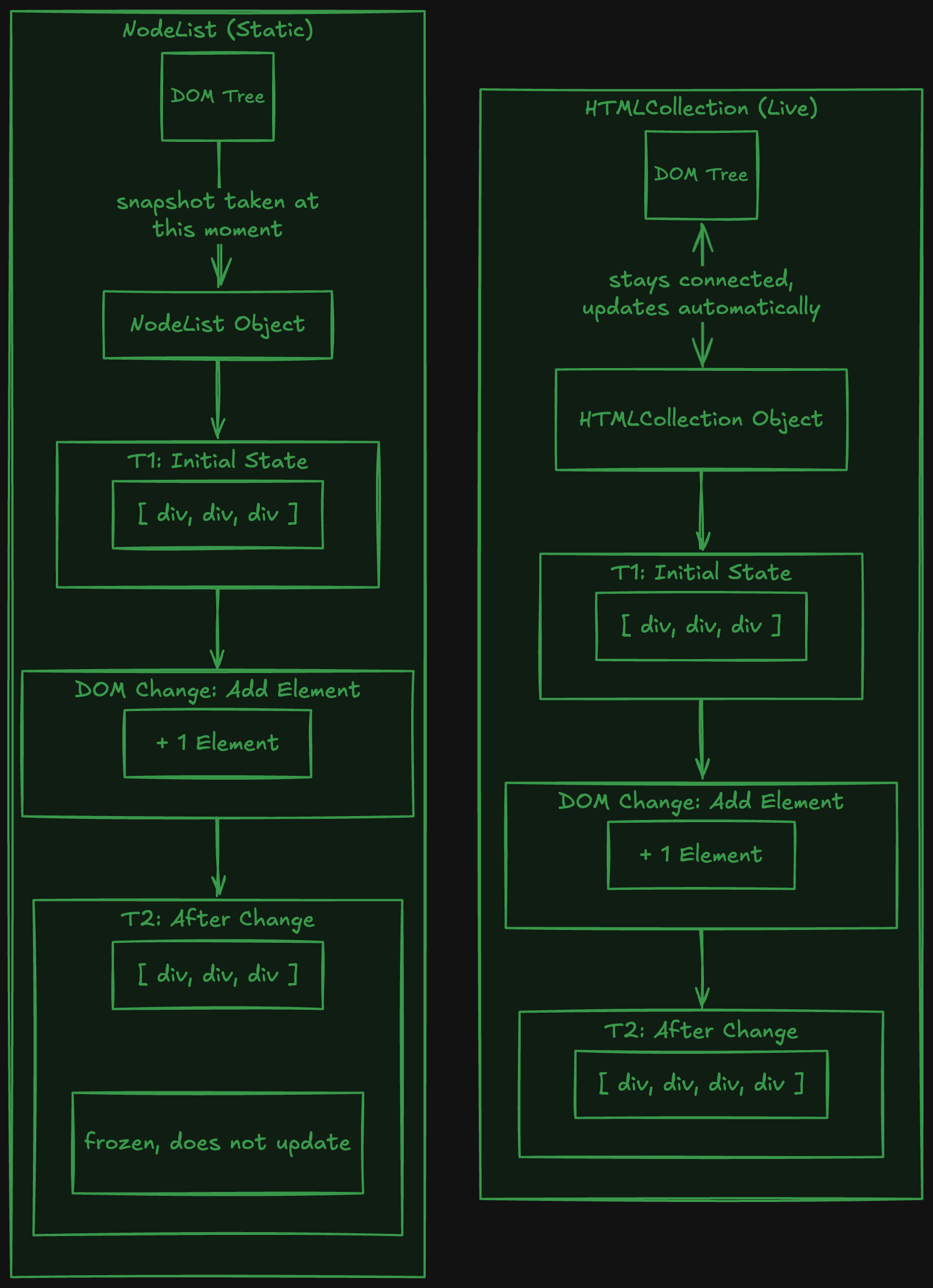
That is the difference between HTMLCollection and NodeList in JavaScript. One stays connected to the DOM and reflects whatever is there right now. The other freezes at the moment you call it and never updates.
What HTMLCollection Is
When I first started querying the DOM I did not think about what was actually coming back. I just grabbed elements and used them. HTMLCollection is what several of those methods silently return.
document.getElementsByClassName("item")
document.getElementsByTagName("div")
document.getElementsByName("username")
document.forms
document.images
document.links
It looks like an array. It has a length. You can access elements by index. But it is not an array. It is a live collection. It stays wired to the DOM and updates on its own whenever the page changes.
const items = document.getElementsByClassName("item")
console.log(items.length) // 3

// add a new element with class "item" to the DOM
const newItem = document.createElement("div")
newItem.className = "item"
document.body.appendChild(newItem)

console.log(items.length) // 4, automatically updated
You did not call anything again. You did not refresh the collection. It updated on its own because it stays wired to the DOM. Whatever is in the page at that moment is what the collection reflects.
If I had been looking at a live version of the Kashmir expense sheet, the moment those extra Falesh entries got added I would have seen them immediately without having to reload anything.
What NodeList Is
querySelectorAll is the method I reach for most when querying the DOM. What it returns is a NodeList, and it behaves completely differently from HTMLCollection.
document.querySelectorAll(".item")
element.childNodes
element.querySelectorAll("p")
When you use querySelectorAll, the NodeList you get back is static. It is a snapshot of the DOM at the exact moment you called it. If elements get added or removed after that point, the NodeList does not know and does not care.
const items = document.querySelectorAll(".item")
console.log(items.length) // 3

// add a new element with class "item" to the DOM
const newItem = document.createElement("div")
newItem.className = "item"
document.body.appendChild(newItem)

console.log(items.length) // still 3, frozen at the moment of the call
Same code structure, completely different behavior. The NodeList does not update. If you need the updated list you have to call querySelectorAll again.
That is exactly what happened with the expense sheet. I had looked at it once, made my calculations from what I saw, and worked with that. The sheet had more in it than what I captured.
childNodes is the exception. It returns a live NodeList not a static one. But querySelectorAll always returns static and that is the one you will use most.
The Key Difference
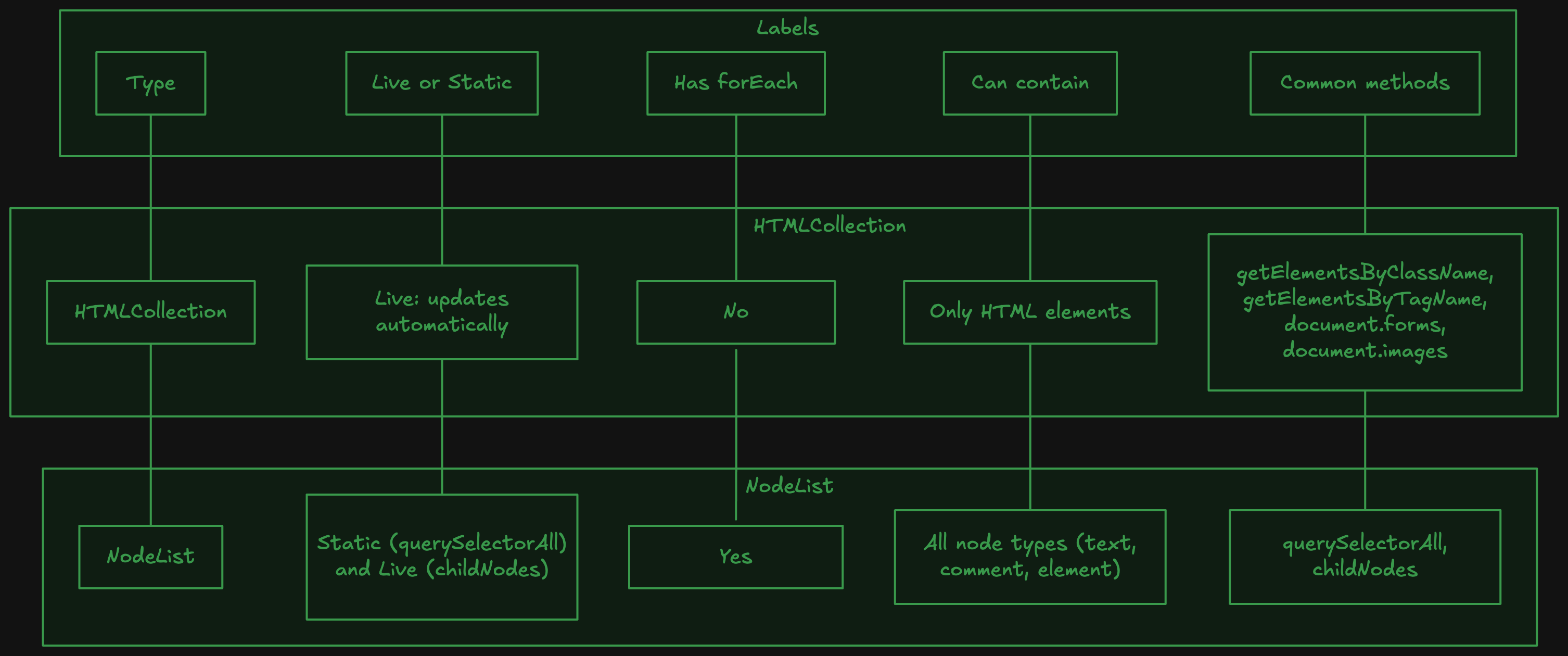
Two methods, both querying the DOM, completely different behavior. Live vs static is the biggest one but not the only one.
// HTMLCollection, live
const byClass = document.getElementsByClassName("item")

// NodeList, static (from querySelectorAll)
const byQuery = document.querySelectorAll(".item")
Live vs Static: HTMLCollection reflects the current state of the DOM at all times. NodeList from querySelectorAll is a frozen snapshot.
What methods you get: HTMLCollection does not have forEach. NodeList does. Nobody warns you about this. You find out when you call it and get a TypeError.
// this works
document.querySelectorAll(".item").forEach(function(item) {
  console.log(item)
})

// this throws an error
document.getElementsByClassName("item").forEach(function(item) {
  console.log(item)
})
// TypeError: document.getElementsByClassName(...).forEach is not a function
HTMLCollection only has length, numeric index access, item(), and namedItem(). No forEach, no map, no filter.
NodeList has length, numeric index access, item(), and forEach. Still not a full array but at least forEach works.
What they can contain: HTMLCollection only contains HTML elements. NodeList can contain any type of node including text nodes and comment nodes.
const div = document.querySelector("div")

// childNodes is a live NodeList that includes text nodes
console.log(div.childNodes)
// NodeList [text, p, text, span, text]

// children is an HTMLCollection that only includes elements
console.log(div.children)
// HTMLCollection [p, span]
childNodes gives you everything including whitespace text nodes between elements. children gives you only the actual HTML elements.
Converting to an Array
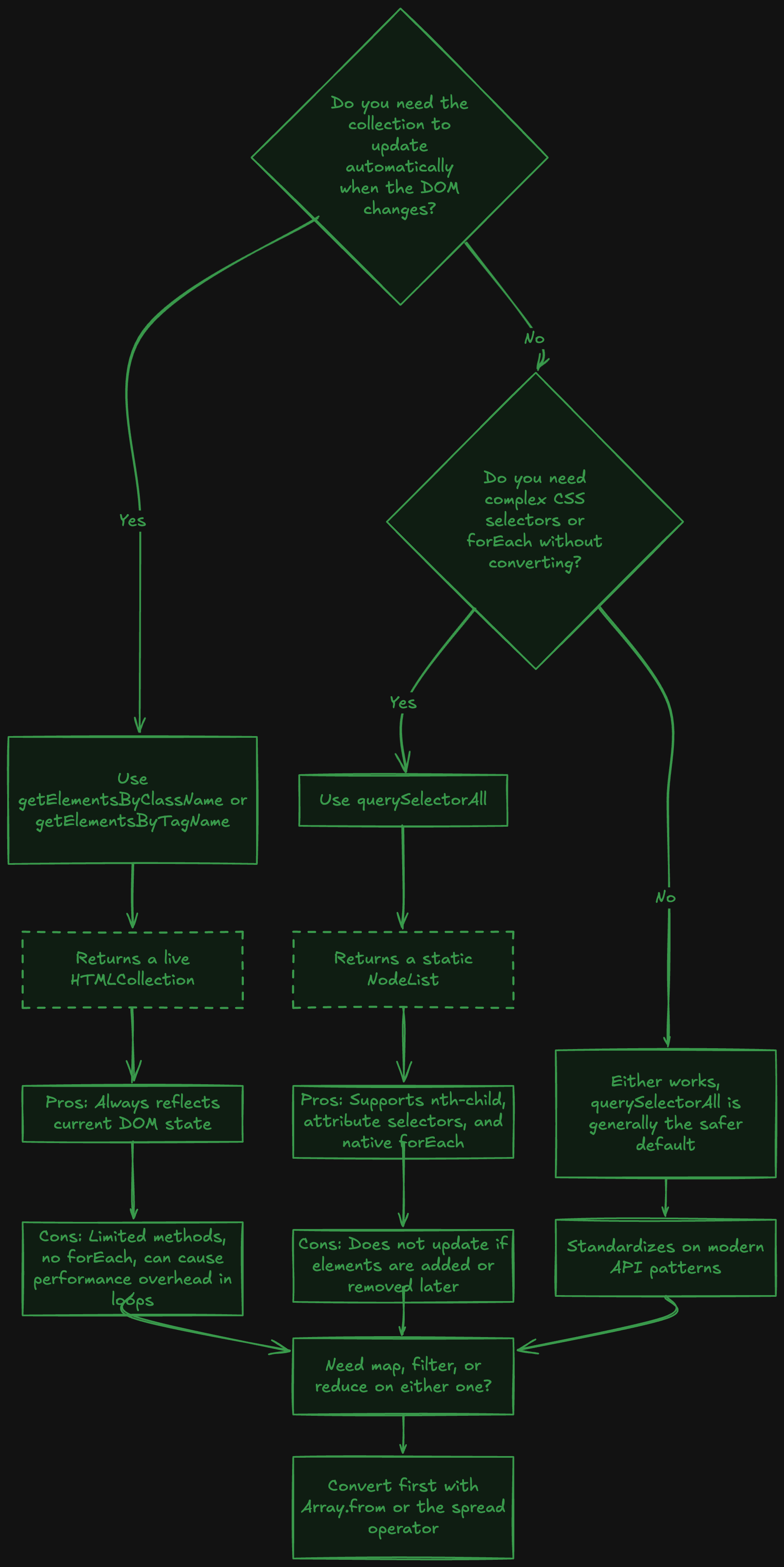
Neither HTMLCollection nor NodeList is a real array so map, filter, and reduce are not available on either directly. When I need those methods I convert first.
const items = document.querySelectorAll(".item")

// Array.from
const itemsArray = Array.from(items)

// spread operator
const itemsArray = [...items]
Both work for NodeList. Both work for HTMLCollection too.
const items = document.getElementsByClassName("item")
const itemsArray = Array.from(items)

itemsArray.forEach(function(item) {
  console.log(item)
})
Once it is a real array every array method is available. I convert almost immediately whenever I grab elements and need to do more than loop through them.
Converting a live HTMLCollection gives you a static snapshot at that moment. The array will not keep updating even though the original HTMLCollection would have.
When to Use Which
querySelectorAll almost every time. It accepts any CSS selector so it is more flexible than getElementsByClassName or getElementsByTagName which only take one specific thing.
// only querySelectorAll can do this
document.querySelectorAll("ul li.active:first-child")
It gives you a static snapshot which is usually what you want. If you grab a list of elements and the DOM changes underneath you mid-operation, a live collection can behave in ways you did not expect. Static is predictable.
It has forEach built in so you can loop immediately without converting.
Where HTMLCollection makes sense is when you genuinely need the collection to stay up to date on its own. All images on a page, all form elements, all links. Situations where the count or contents changing automatically is useful rather than surprising.
// use this when you want live updates
const allImages = document.images // HTMLCollection, always current

// use this when you want a snapshot to work with
const activeItems = document.querySelectorAll(".item.active") // NodeList, frozen
Like the expense sheet, if I had wanted a running live total that updated every time someone added a new entry, I needed the live version. If I just needed to calculate splits at one specific moment, the snapshot was fine. The mistake was not knowing which one I had.
Try It Yourself
Open a browser console on any page and run this.
const byClass = document.getElementsByClassName("a")
const byQuery = document.querySelectorAll(".a")

console.log(byClass.length)
console.log(byQuery.length)

const newEl = document.createElement("div")
newEl.className = "a"
document.body.appendChild(newEl)

console.log(byClass.length)  // one more than before
console.log(byQuery.length)  // same as before
Replace "a" with any class that exists on the page you are testing on. Watch one number go up and the other stay the same. That single experiment makes the live vs static difference real in a way no explanation can.
Then try calling forEach directly on byClass and watch the error. Then convert it with Array.from and try again.
Wrapping Up
I calculated the Kashmir trip expenses from a list that was missing Falesh's extra shopping. The numbers looked right. The logic was right. But the data was incomplete and I did not know it.
HTMLCollection is the live version. It stays connected and updates on its own. NodeList from querySelectorAll is the snapshot. It freezes at the moment you call it.
querySelectorAll is the right call almost every time. More flexible, more predictable, has forEach built in. When you need a collection that keeps itself up to date automatically, that is when HTMLCollection is the right one.
And whenever you need the full power of array methods on either one, Array.from() or the spread operator gets you there in one line.
I hope you enjoyed reading this.
About the author
I like making things with code. This is where I share my projects and the bugs I ran into.
Comments
Join the discussionNo comments yet. Be the first to comment.