Destructuring in JavaScript

I like making things with code. This is where I share my projects and the bugs I ran into.
One evening in my hostel, the mess food was thik thaak at best, honestly not my favorite, and I was properly hungry that day. So I did the obvious thing, opened Zomato and ordered aloo paratha, curd, butter, and in desert my fav ras malai.
Then the real test began, the wait. My room is on the 5th floor, so I stood out on my balcony basically staring down at the road, waiting for the delivery bhaiya to appear. And thodi baarish ho rahi thi that evening, so he kept getting later and later. Unki galti nahi thi, I know, but yaar I was starving, and I had already been waiting almost 40 minutes. Around the 45 minute mark he finally showed up, I paid him on UPI in a total rush, and ran back upstairs.
And here is the part that matters for us. I did not sit there confused, fishing around inside the bag one item at a time. I tore it open and pulled everything out in one go, aloo paratha here, curd there, butter, ras malai, each landing in its spot. Kholo, unpack karo, khaana ready.
That, right there, is destructuring in JavaScript. Pulling everything you need out of one container, cleanly, in a single go. In plain words, bas ek quick way to grab values out of an array or object and drop them straight into their own variables. Chalo, let me show you, because your code can unpack a bag exactly like I unpacked that Zomato order.
The old way, reaching in again and again
Let me show you the old, messy way of unpacking a container in code first, so you actually feel why destructuring is such a relief. Say you have a user object, the kind you handle constantly when you build any real app.
const user = {
  name: "Ayush",
  email: "ayush@example.com",
  age: 21,
};

const name = user.name;
const email = user.email;
const age = user.age;
Look at that, yaar. user. this, user. that, user. again. Three whole lines just to pull three things out of one object. It works, but it is repetitive, and the more properties you need, the more this pile keeps growing. This is the reaching-into-the-bag-one-item-at-a-time approach, and it gets tiring fast.
Object destructuring, unpacking by label
Here is the exact same thing with destructuring.
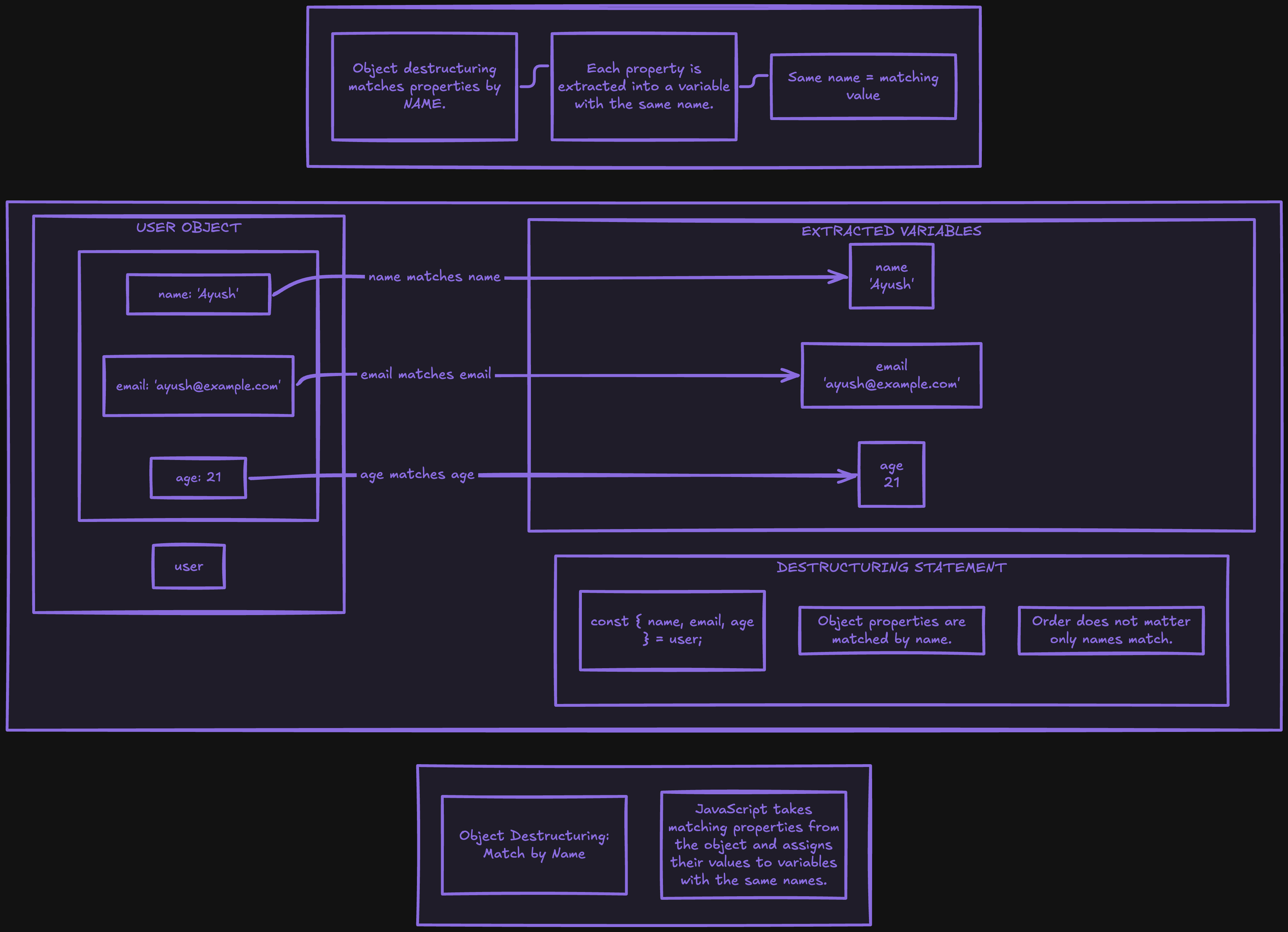
const { name, email, age } = user;
Ek line. Bas. This pulls name, email, and age out of the user object and makes three variables with those same names. Think of the user object as a bag where every item has a label on it, and this one line just empties the labeled items into matching variables. Because it goes by label, the names inside the curly braces have to match the keys in the object.
Same result as those three lines above, but clean, readable, and it scales beautifully. Need five properties? Just add them inside the braces.
Array destructuring, unpacking by position
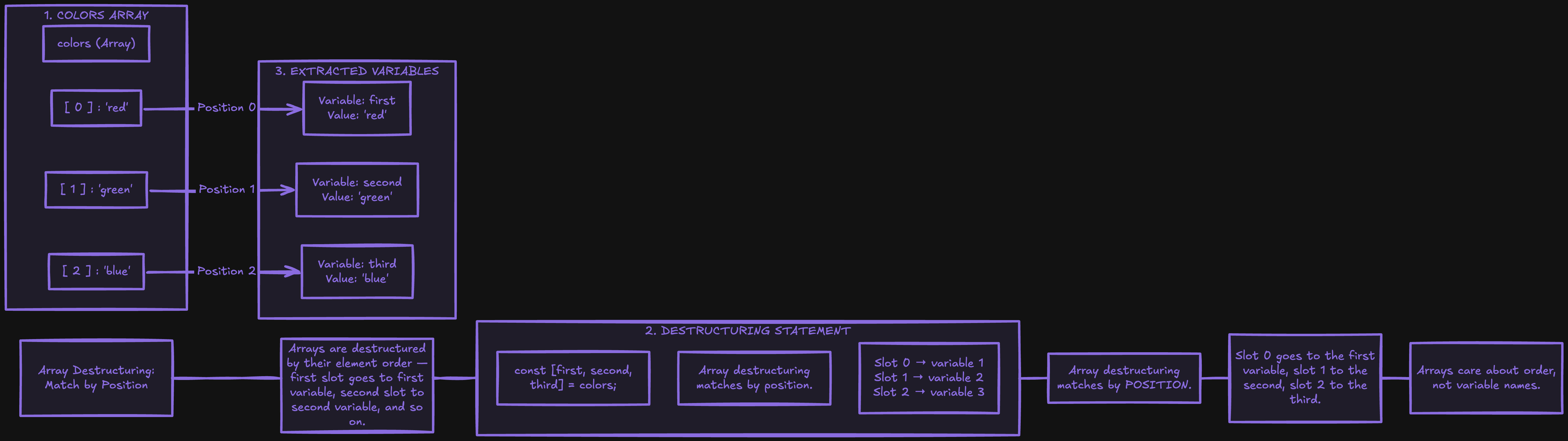
Objects use labels, but arrays have no labels, they only have order. So array destructuring works by position instead.
const colors = ["red", "green", "blue"];

const [first, second, third] = colors;
// first is "red", second is "green", third is "blue"
Dekho, two things are different here. We use square brackets, not curly braces, and the names are totally up to you, because here what matters is position, not name. The first variable grabs the first item, the second grabs the second, aur aise hi aage. It is like unpacking a numbered list in order.
You can even skip items you do not care about, just leave a gap with a comma.
const [, , third] = colors;
// third is "blue", the first two are skipped
Default values, for when something is missing
Sometimes the property you want might just not be there in the object. So you can give it a fallback value right inside the destructuring.
const { name, role = "user" } = user;
// if user has no role, role becomes "user"
If the object actually has a role, that real value is used. If it does not, the default quietly kicks in. Matlab, it is like your Zomato order arriving with the ras malai missing, so you just grab a default sweet from your room in its place, so nothing later on gets ruined.
Renaming, when you want a different name
Ab ek chhoti si problem. What if the key is name, but you already have a variable called name, or you just want a clearer name like fullName? You can rename it right while unpacking.
const { name: fullName } = user;
// this creates fullName, not name
Read it simply as "take name, but call it fullName." That is all the colon is doing here. Bahut handy when a key name clashes with something you already have.
The one you will use the most: function parameters
Now this is where destructuring genuinely shines, and where you will end up using it every single day. Unpacking straight inside a function's parameters.
function greet({ name, age }) {
  console.log(`Hi ${name}, you are ${age} years old`);
}

greet(user);
// Hi Ayush, you are 21 years old
Ab is code se ghabrao mat, let me slow it down for you. Normally you would pass the whole user object into greet, and then inside the function you would write user.name and user.age. But here, right inside the parentheses where the function takes its input, we unpack directly. So greet still receives the whole object, it just immediately pulls out only the name and age it cares about. Same idea as before, bas ab it is happening right at the door instead of inside the room. If you have touched React props or written any Node route, you have already seen this everywhere.
Nested destructuring, and it is okay if this feels like a lot
One more, and I will be honest with you, this one looks confusing the first time, and that is completely normal. Objects can have objects inside them, and you can unpack those too, you just mirror the shape.
const person = { name: "Ayush", address: { city: "Jodhpur" } };

const { address: { city } } = person;
// city is "Jodhpur"
You are basically saying "go into address, and from inside it, pull out city." If your brain is going thoda too much right now, relax, skip this one for now. You genuinely will not need nested destructuring on day one, and you can come back to it later once the basic stuff feels natural.
Try it yourself
Do not just read it, khud unpack karke dekho. Paste this into a file and run it with node.
const student = {
  name: "your name",
  marks: [90, 85, 78],
  city: "your city",
};

const { name, marks, city } = student;
const [first, ...others] = marks;

console.log(`${name} from ${city} scored ${first} in the first subject`);
console.log(`The other marks are ${others}`);
Play with it. Rename a variable, add a default for a key that does not exist, try unpacking inside a function. And that ...others you just used quietly grabs "everything else" into a new array, a nice little taste of where this whole thing goes next.
Wrapping up
So that is destructuring. Objects unpack by label with curly braces, arrays unpack by position with square brackets, and on top of that you get defaults, renaming, and clean function parameters.
Come back to that Zomato order one last time. You do not fish around inside the bag a hundred times, you tear it open once and everything lands where it belongs. Destructuring lets your code do exactly that, pull out what you need in one clean line, instead of writing object.this and object.that over and over. Use it once in your own code and trust me, you will not go back. Aur haan, that ras malai after all that waiting? Intezaar ka phal sach mein meetha hota hai.
I hope you enjoyed reading this.


