Map & Set in JavaScript

I like making things with code. This is where I share my projects and the bugs I ran into.
Let me tell you about AML Sir, and if you have a professor even a little like him, you already feel my pain. AML Sir takes one of our labs, and he is, without any exaggeration, insanely strict. Formal white shirt and black jeans, mandatory. Show up in anything else and he will not even mark your attendance, bas simple. And you had better be sitting inside that lab before he walks in, because if you are even a minute late, bhai, chhod do, bacche ki jaan lene ka irada hai kya wala scene hota hai har baar.
So every lab day, the same tension. We file in early, dressed exactly right, and sir opens his attendance register and starts marking. And here is the thing about that register, whether you are dressed right or late or whatever, one truth never changes, your roll number sits on it exactly once. You cannot be marked present twice. Every roll number, unique. Not a single duplicate.
Now sir keeps another register too, the one that actually decides our fate, the lab marks. Each roll number paired with the marks that student earned. Roll number in, marks out.
Believe it or not, you just met two of the most useful data structures in JavaScript. Sir's attendance register, where everything is unique, is a Set. His marks register, where every key points to a value, is a Map. Chalo, before sir marks me absent for being late to my own blog, let me show you both properly.
Set: the attendance register, where everything is unique
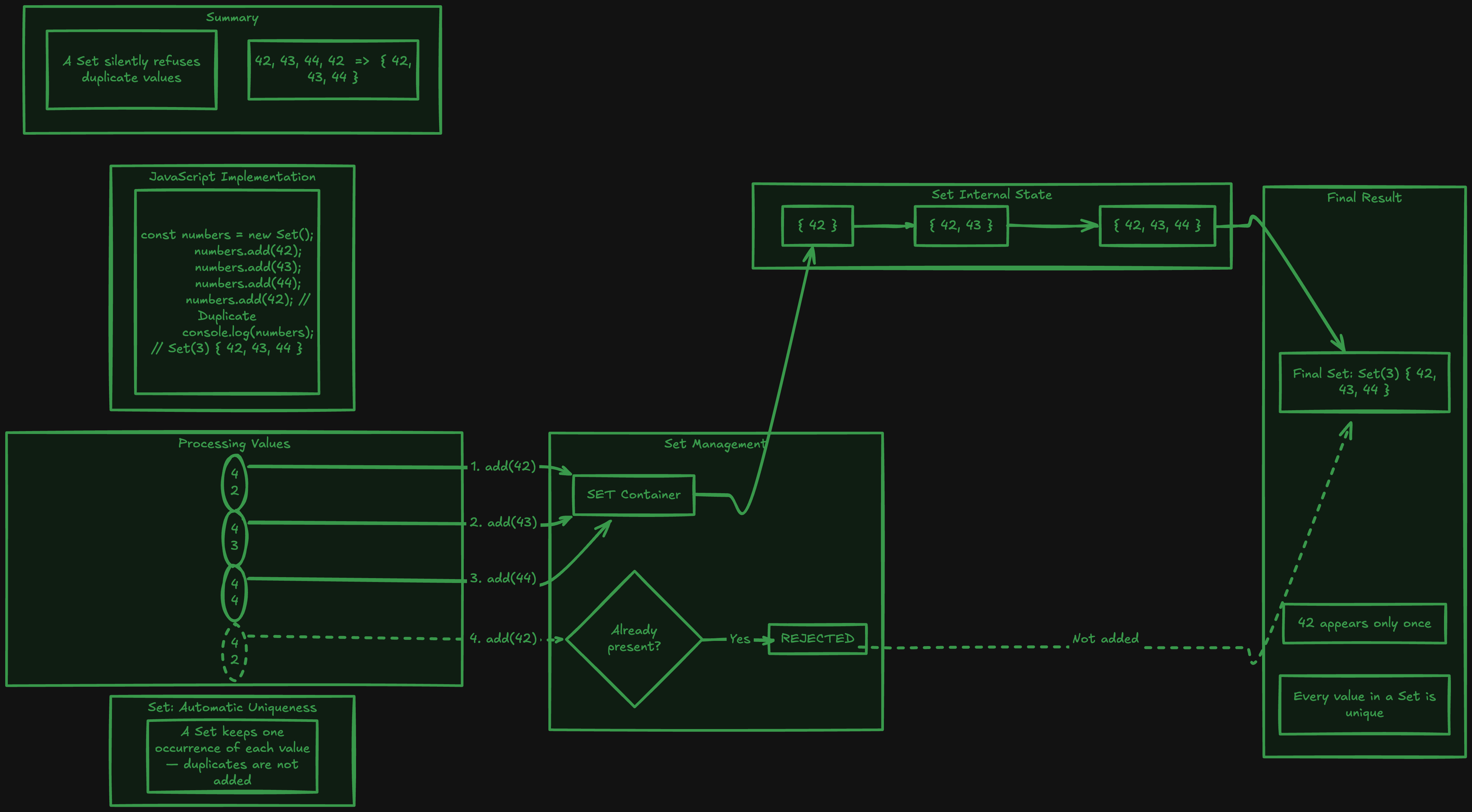
A Set is a collection of values where every value can appear only once. Just like AML Sir's attendance sheet, duplicates simply are not allowed. Try to add something that is already there, and JavaScript quietly ignores it, ekdum sir ki tarah, no second chance.
Here is how you make one.
const presentToday = new Set();

presentToday.add(42);
presentToday.add(43);
presentToday.add(44);
presentToday.add(42); // arre, 42 is already marked

console.log(presentToday); // Set(3) { 42, 43, 44 }
See, we added 42 twice, but the Set only kept it once. It did not throw an error, it did not complain, it just refused to store a duplicate. That single behaviour is the entire personality of a Set.
The everyday methods
A Set gives you a few simple, clean methods.
const rolls = new Set([42, 43, 44]);

rolls.add(45);          // add a value
rolls.has(43);          // true,  is 43 present?
rolls.delete(44);       // remove 44
rolls.size;             // 3,     how many values (not .length, .size)

console.log(rolls);     // Set(3) { 42, 43, 45 }
Notice one thing that trips people up. For a Set you check the count with .size, not .length. Arrays use length, Sets use size, bas yaad rakhna.
And has() is secretly a big deal. Checking whether a value exists in a Set is extremely fast, much faster than checking an array with includes() when the list gets long. So if you keep asking "is this thing already in my list," a Set is often the smarter choice.
The one use case you will reach for constantly
Here is where Set genuinely shines in daily code, removing duplicates from an array. This used to be an annoying little chore.
const marks = [88, 76, 88, 90, 76, 64];

// the old, clunky way
const uniqueOld = [];
for (const m of marks) {
  if (!uniqueOld.includes(m)) {
    uniqueOld.push(m);
  }
}
Look at all that just to throw out duplicates. Now watch the Set version.
const marks = [88, 76, 88, 90, 76, 64];

const unique = [...new Set(marks)];
// [88, 76, 90, 64]
Bas ek line. You pour the array into a new Set, which automatically drops every duplicate, and then spread it back out into a fresh array. This little trick, [...new Set(arr)], is worth memorising, because you will use it way more than you expect.
Looping over a Set
A Set is iterable, so looping is easy, and it remembers the order you added things in.
const rolls = new Set([42, 43, 44]);

for (const roll of rolls) {
  console.log(roll); // 42, then 43, then 44
}

rolls.forEach((roll) => console.log(roll)); // works too
Set vs a plain array, quickly
Both a Set and an array hold a list of values, so when do you pick which? An array keeps everything, duplicates included, it is ordered by index so you can grab item number 3 directly with arr[2], and it comes loaded with all the rich methods like map, filter, and reduce. A Set, on the other hand, silently throws away duplicates, has no index at all (there is no set[0]), and its real strength is that checking "is this value here" with has() stays lightning fast even on a huge list, while an array's includes() has to walk through the whole thing item by item.
So the short version, reach for an array when you need order, index access, duplicates, or those array methods. Reach for a Set when you need uniqueness or fast existence checks. Bas itni si baat hai.
Map: the marks register, key to value
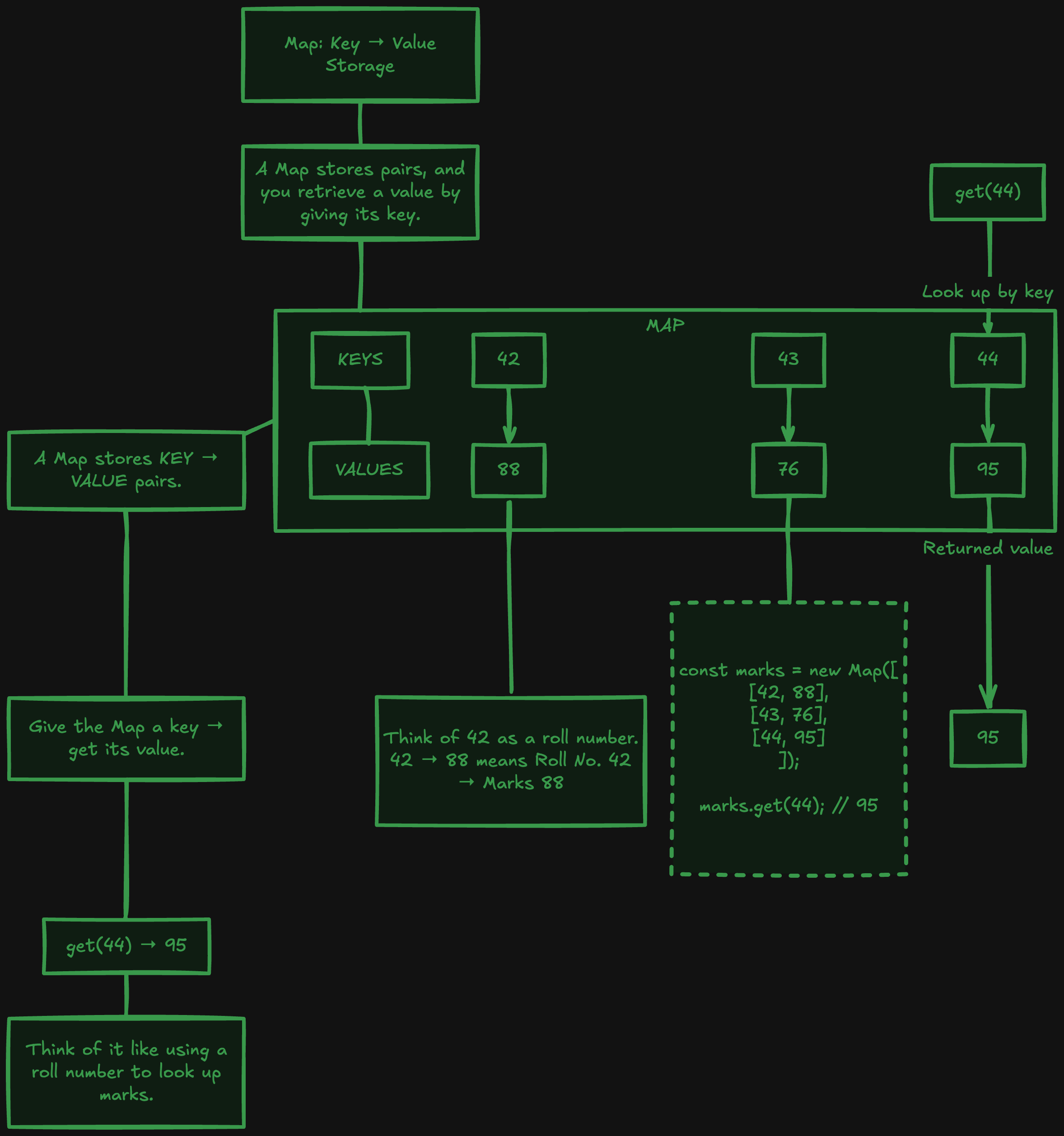
Now AML Sir's marks register. A Map stores things as key and value pairs, exactly like roll number paired with marks. It sounds like a plain object, and it is similar, but a Map has some real superpowers we will get to.
Here is the basic idea.
const marksRegister = new Map();

marksRegister.set(42, 88);
marksRegister.set(43, 76);
marksRegister.set(44, 95);

console.log(marksRegister.get(42)); // 88
console.log(marksRegister.get(44)); // 95
You set a key with its value, and you get the value back using the key. Roll number in, marks out. Simple as that.
And you know whose entry in that register is always spotless? Rudra Pratap. While the rest of us sit there completely lost, because sir's voice is so unbelievably low that nobody can follow a word, Rudra actually keeps his lab work up to date and does everything exactly sir's way. Look up his roll number in the marks register and you will find top marks, guaranteed. Be like Rudra, yaar.
The everyday methods
Map has a clean, predictable set of methods, and they feel very similar to Set.
const register = new Map([
  [42, 88],
  [43, 76],
]);

register.set(44, 95);   // add or update a pair
register.get(43);       // 76,   fetch by key
register.has(42);       // true,  does this key exist?
register.delete(43);    // remove that pair
register.size;          // 2,     how many pairs (again, .size)
Same .size, same .has, same .delete feel as a Set, so once you learn one, the other comes free.
The real superpower: keys can be anything
Here is the thing that makes Map special, and beginners always find it surprising. In a normal object, keys are basically always strings. But in a Map, a key can be almost anything, a number, a string, even a whole object or a function.
const record = new Map();

record.set(42, "present");        // number key
record.set("topper", "Rudra");    // string key

const student = { name: "Ayush" };
record.set(student, "roll 42");   // an entire object as a key!

console.log(record.get(student)); // "roll 42"
That last one is impossible with a plain object, and it opens up patterns you simply cannot do otherwise. Kaafi powerful once you need it.
Looping over a Map
A Map is iterable too, and it also keeps insertion order. When you loop it, you get each pair as [key, value], which pairs beautifully with destructuring.
const register = new Map([
  [42, 88],
  [43, 76],
  [44, 95],
]);

for (const [roll, marks] of register) {
  console.log(`Roll ${roll} scored ${marks}`);
}
// Roll 42 scored 88
// Roll 43 scored 76
// Roll 44 scored 95
You also get register.keys(), register.values(), and register.entries() if you want just one side of the pairs.
Map vs a plain object, the question everyone asks
If a Map is just keys and values, why not use a normal object? Achha sawaal. For simple stuff, an object is totally fine. But a Map genuinely beats an object in a few real ways.
Keys can be any type in a Map, while object keys are stuck as strings. That alone is huge for certain problems.
A Map tells you its size instantly with .size, while with an object you have to do Object.keys(obj).length every time. Thoda irritating.
A Map is directly iterable, you loop it with a clean for...of, no extra steps. And a Map keeps your keys in the exact order you inserted them, reliably.
A Map also has no surprise inherited keys. A plain object secretly carries stuff from its prototype, which can occasionally bite you. A Map starts genuinely empty.
So the rule of thumb, reach for a plain object for simple, fixed, string-keyed data like a config. Reach for a Map when your keys are dynamic, might not be strings, or when you are adding and removing pairs a lot.
Try it yourself
Do not just read it, khud chalao. Paste this into a file and run it with node.
// Set: unique attendance
const attendance = new Set();
attendance.add(42);
attendance.add(43);
attendance.add(42); // duplicate, ignored
console.log("Present today:", [...attendance]); // [42, 43]

// dedup a messy array in one line
const messy = [1, 2, 2, 3, 3, 3, 4];
console.log("Unique:", [...new Set(messy)]); // [1, 2, 3, 4]

// Map: roll number to marks
const marks = new Map();
marks.set(42, 88);
marks.set(44, 95);
console.log("Roll 44 scored:", marks.get(44)); // 95
console.log("Total students:", marks.size);     // 2
Play with it. Add duplicates to the Set and watch them vanish. Put an object as a Map key. Loop both and see the order hold.
Wrapping up
So that is Map and Set, and you understood them before we even opened an editor, all thanks to one terrifying professor.
Set is AML Sir's attendance register, a collection where every value is unique and duplicates get quietly dropped, brilliant for removing repeats and fast existence checks. Map is his marks register, key and value pairs where the key can be anything, better than a plain object whenever your keys get dynamic or you are constantly adding and removing.
Next lab, when AML Sir opens his registers, dressed in your compulsory white shirt and black jeans, sitting there before he even arrives, just remember, the attendance one is a Set and the marks one is a Map. And honestly, in both life and code, try to be like Rudra Pratap, keep your entry spotless.
I hope you enjoyed reading this.


