Blocking vs Non-Blocking Code in Node.js
I like making things with code. This is where I share my projects and the bugs I ran into.
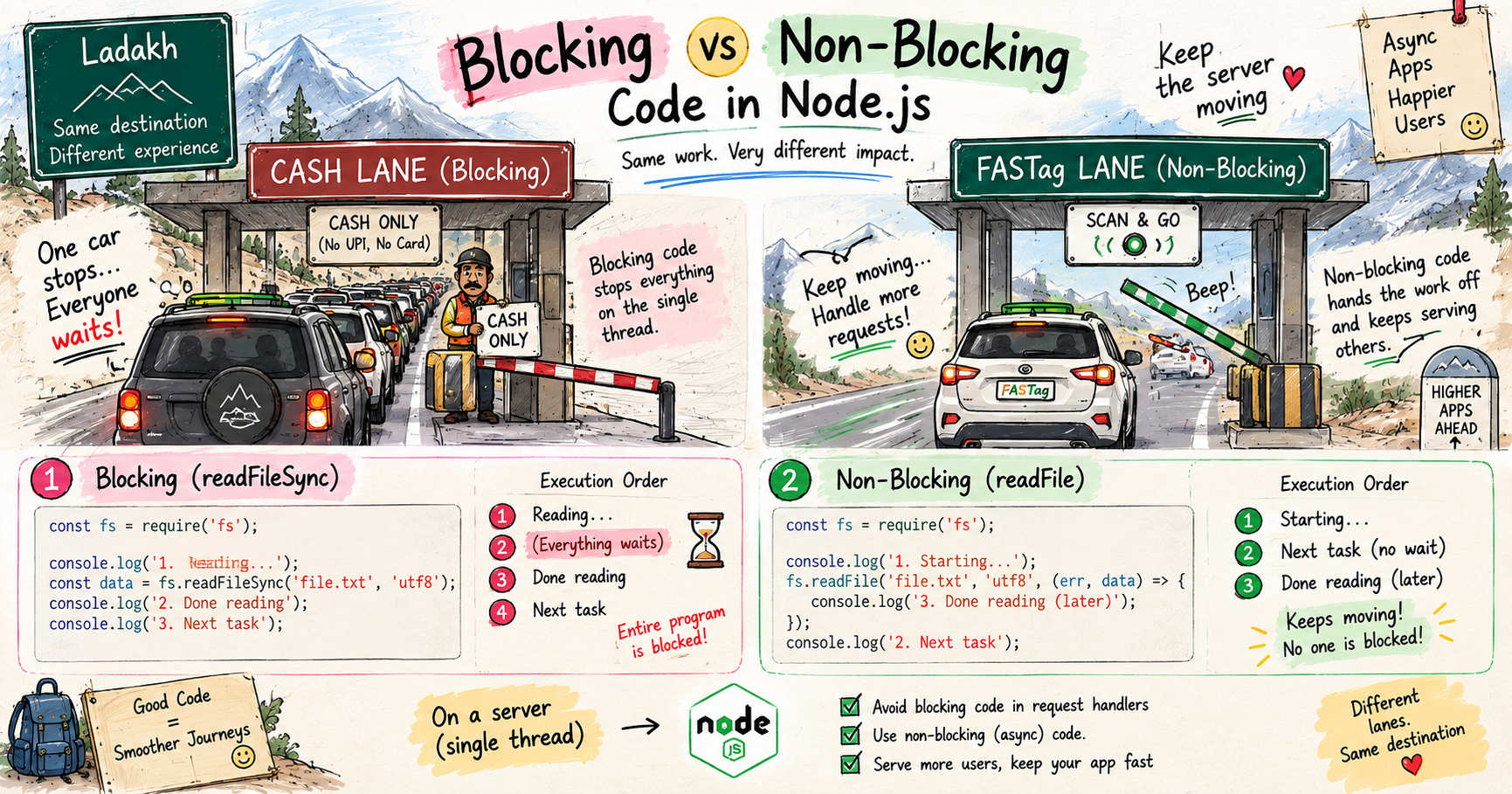
This winter, right after our end sem exams, me and my friends drove up to Ladakh, and I was behind the wheel for most of it. For the entire drive, the toll plazas were a breeze. Almost every one had FASTag, so I would just roll up, the scanner would beep, and we would keep moving without ever fully stopping.
Except one. Somewhere around 11:30 at night, with everyone in the car half asleep, we hit a toll with no FASTag, and these guys would only take cash. No UPI, no card, nothing. I was like, yaar, kya dikkat hai inko, it is already so late and now this. And the painful part, we did have cash, a full 50,000 rupees, but it was buried in a bag deep in the diggi. At that hour, mere andar itni himmat nahi thi to get out, pop the boot, and dig through all the luggage. So there we sat, frozen, arguing for a solid twenty minutes, until finally one of the toll guys agreed to take it as UPI on his own number. Bach gaye.
Now put those two experiences side by side. The FASTag lanes, where we never stopped and just flowed through. And that one cash-only toll, where a single payment froze the entire car, all of us, for twenty whole minutes. That, right there, is the difference between non-blocking and blocking code in Node.js. And on a server, getting frozen like that is a very real danger. I have already covered how Node's single thread and event loop work under the hood, so here let me stay practical, the actual code and what it does to your users. Chalo.
What blocking code means
Blocking code is the cash lane. It is code that stops everything else until it finishes.
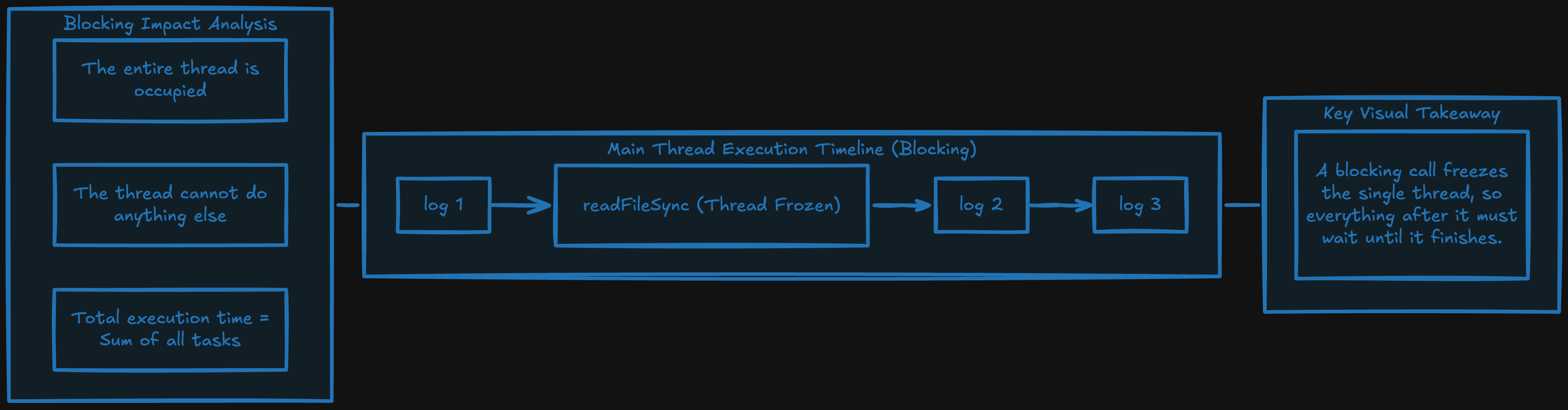
Remember, Node runs on a single thread, one worker doing everything, one thing at a time. I broke that down properly in my event loop post, but the key point here is simple, while a blocking operation is running, that one thread is completely stuck on it. Nothing else can run. Everything waits.
The classic example is reading a file the synchronous way.
const fs = require("fs");

console.log("1. Reading the file...");
const data = fs.readFileSync("bigfile.txt", "utf8"); // everything freezes here
console.log("2. Done reading");
console.log("3. Next task");
That readFileSync line is the fumbling driver. While the file is being read, the entire program is frozen solid. Line 2 and line 3 cannot run, nothing can, until the whole file is done. See that Sync at the end of the name? That is your warning label. In Node, Sync almost always means "this is the cash lane, it will block."
What non-blocking code means
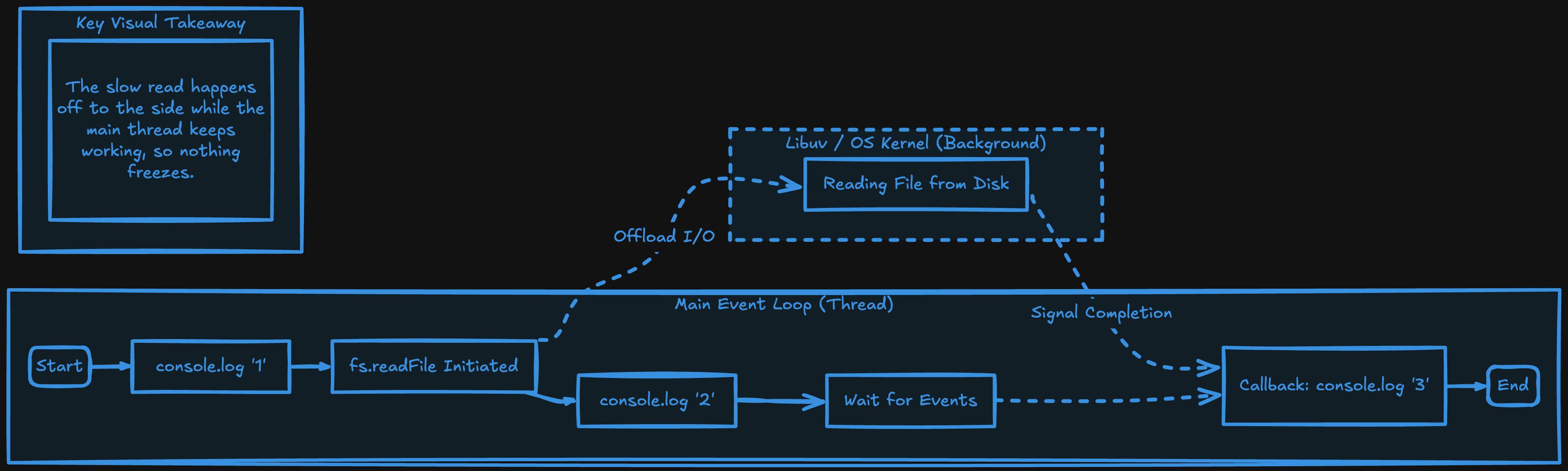
Non-blocking code is the FASTag lane. You start the slow thing, hand it off, and keep moving. When the work is done, its result comes back to you later.
Here is the exact same file read, done the non-blocking way.
const fs = require("fs");

console.log("1. Starting to read the file...");
fs.readFile("bigfile.txt", "utf8", (err, data) => {
  console.log("3. Done reading, this runs later");
});
console.log("2. Next task, without waiting");
Run this and the output is 1, 2, and then 3 a moment later. Not 1, 2, 3 in a frozen row. The file read is handed off to the background, and the thread rolls straight on to the next line, exactly like a FASTag car not stopping the lane. When the file is finally ready, the callback runs. The thread never froze.
Why this absolutely matters on a server
Now here is the part that turns this from a small detail into a big deal. Your Node server is one single thread handling many users at the same time.
Think about what that means with a blocking call. Say one user hits a route that runs readFileSync on a large file. For that whole time, your entire server is frozen. Not just for that one user, for everyone. Every other request, hundreds of people, just sit and wait, because the single thread is stuck reading one file, exactly like a full toll plaza jammed behind one driver counting coins. Requests pile up, response times explode, and your site feels dead.
Now the non-blocking version. That same slow file read is handed off to the background, and the thread stays free to keep serving every other user. Nobody is stuck behind anybody. This is the entire reason Node can handle thousands of users on one thread, as long as you keep it in the FASTag lane. One badly placed Sync call in a busy route can bring a whole server to its knees. Bas ek galat line.
Async operations in Node
The good news, Node gives you non-blocking versions of almost all its slow operations, precisely so you do not have to block. Anything that talks to the outside world, the disk, the network, a database, is slow, and each has an async form.
The simple rule for server code, stay out of the Sync lane in anything that runs per request. Use the async versions with callbacks, promises, or async/await. Keep the thread free.
Real-world examples
File reads. You just saw it, readFile (non-blocking) over readFileSync (blocking). The sync version is genuinely fine in a one-off script that runs and exits, like a build tool. It is dangerous inside a live server.
Database calls. This is the big one in real apps. A query takes time to travel to the database and come back. If you did it in a blocking way, your whole server would freeze for every user while one query ran. So database libraries are non-blocking, you await the result, and while the database is working, the thread is free to serve other requests.
// non-blocking: the thread stays free while the DB works
const users = await db.query("SELECT * FROM users");
console.log(users);
Even though this line "waits" for the users, it does not freeze the whole server. The event loop happily handles other people's requests while this query is out. That is the FASTag lane at work.
Try it yourself
Do not just read it, khud dekho the difference. Paste this into a file and run it with node.
const fs = require("fs");

console.log("start");

fs.readFile(__filename, "utf8", () => {
  console.log("non-blocking read finished (later)");
});

console.log("end");

// Output:
// start
// end
// non-blocking read finished (later)
See how "end" prints before the read finishes? Now swap readFile for readFileSync (and remove the callback), and watch the order go strictly top to bottom, because now nothing can move until the read is done. That flip is the whole lesson in your own terminal.
Wrapping up
So that is blocking versus non-blocking. Blocking code is the cash lane, one slow operation fully finishes while everything, and everyone, waits behind it. Non-blocking code is the FASTag lane, you hand the slow work off and the thread keeps serving everyone else, with the result coming back later.
On a server that is not a style choice, it is survival. One Sync call in a busy route freezes every user at once, while the async version lets a single thread quietly serve thousands. So whenever you write server code, ask yourself one thing, am I in the cash lane or the FASTag lane? Because being stuck at one cash-only toll at 11:30 at night is annoying enough with a car full of sleepy friends. Do not do that to a thousand users at once.
If you want the deeper picture of how that single thread juggles all this without dropping anyone, my event loop post and my "Why Node.js is Fast" post are exactly where to go next.
I hope you enjoyed reading this.