Modern Database Access: Prisma, Drizzle, and ORMs Explained
I like making things with code. This is where I share my projects and the bugs I ran into.
Marvel universe, the MCU, ye toh sab jaante hain. And ek baat notice karo, it is not a single movie, it is a whole universe, dozens of films and characters all connected into one giant world. That "one giant connected world" is not a random detail today, it is basically what a database is. Ab us duniya ke andar S.H.I.E.L.D. ko dekho. They keep a file on literally everyone, every hero, every villain, every threat, every Infinity Stone, all neatly organised and stored forever. That giant, permanent, organised record system, that is a database.
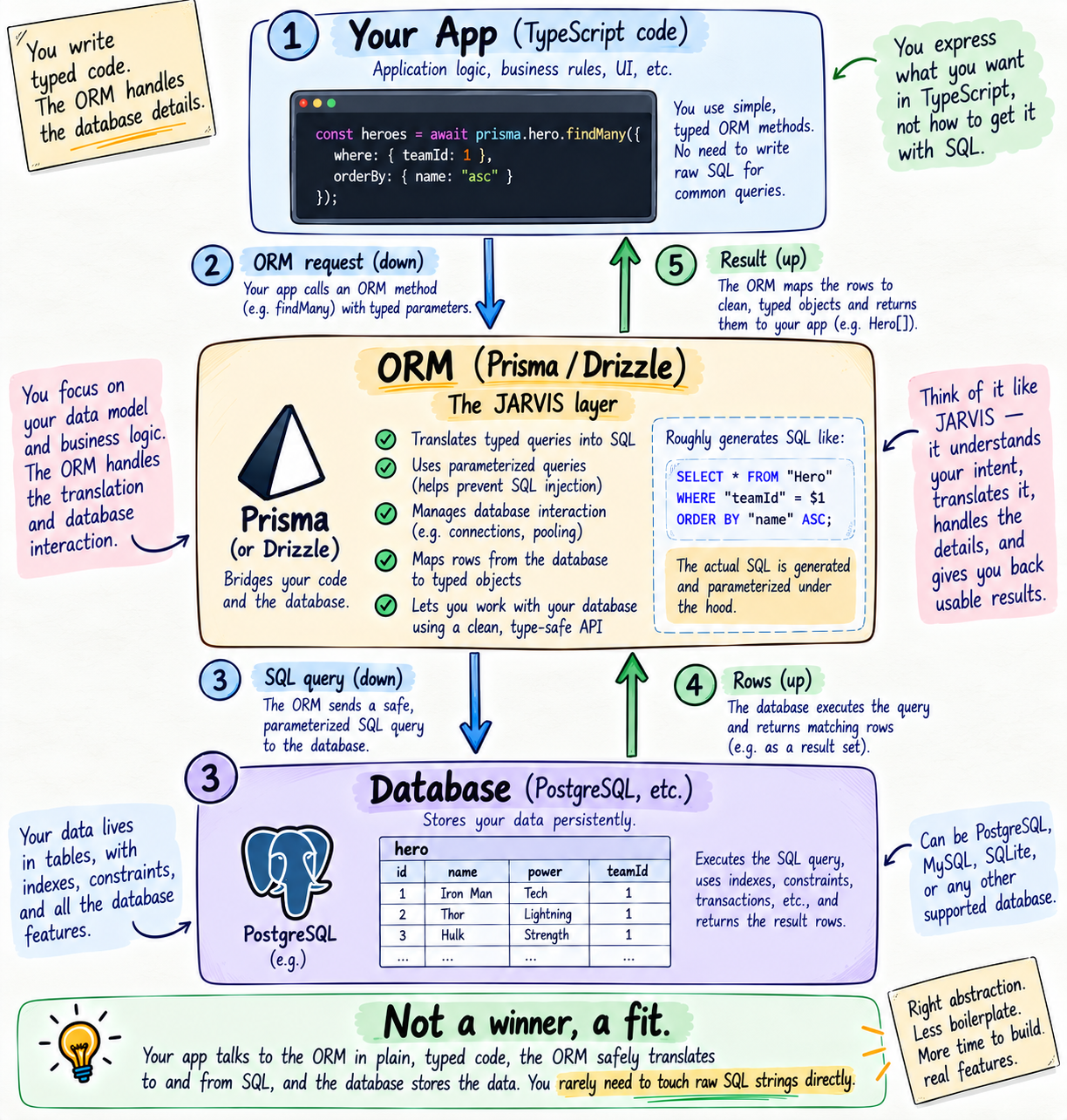
And Tony Stark? He never sits and digs through those files by hand. He just says, "JARVIS, pull up every enhanced individual who can fly," and JARVIS goes into the systems, does all the messy fetching, and hands him a clean answer. Tony talks in plain English, JARVIS does the raw work underneath. That, mere dost, is exactly an ORM. Keep this whole picture in your head, because it is going to explain everything today.
This is the most important post in my backend series, kyunki the database is the most important part of almost any real app. So I am going all in, we are covering everything, properly, from the ground up, and I am going to be honest wherever the real answer is "it depends." All through this series our data has been sitting in tiny in-memory arrays that vanish the second the server restarts. Socho, S.H.I.E.L.D. losing every single file every time the power flickers, ekdum useless. Real apps need a permanent record room, a database, plus a JARVIS to talk to it without losing your mind writing raw queries. Chalo shuru karte hain, and I promise, by the end you will genuinely understand the whole database world.
Why apps even need a database
Every app you built in this series stored its data in a plain array, like let heroes = []. And every one had the same fatal flaw, the moment the server restarts, poof, sab gayab. That array lives in memory (RAM), which is temporary by nature, RAM wipes clean on restart.
A database fixes exactly this. It stores your data on disk, permanently, so it survives restarts, crashes, deploys, everything. App band karo, saal baad kholo, your data is still sitting right there. That is the one job, answer the question "where does my data live after the app closes," with "safely, forever, in the database." S.H.I.E.L.D. does not keep hero files on sticky notes that blow away in the wind, they keep them in a vault. Your app needs that vault.
One quick grounding, taaki ye abstract na lage, where does this database actually live? Usually it runs as its own separate service that your app connects to over a connection URL. In production that is something like PostgreSQL running on a server, or a hosted database you just plug into. The one exception is SQLite, which is simply a file sitting on disk, and that is exactly why it is perfect for learning, no server to run. Either way, your code talks to it the same way.
The building blocks, tables, rows, columns, and keys
Before anything fancy, you must know the actual pieces a relational database is built from, kyunki har baada concept inhi pe khada hai. Let me build them in S.H.I.E.L.D. terms.
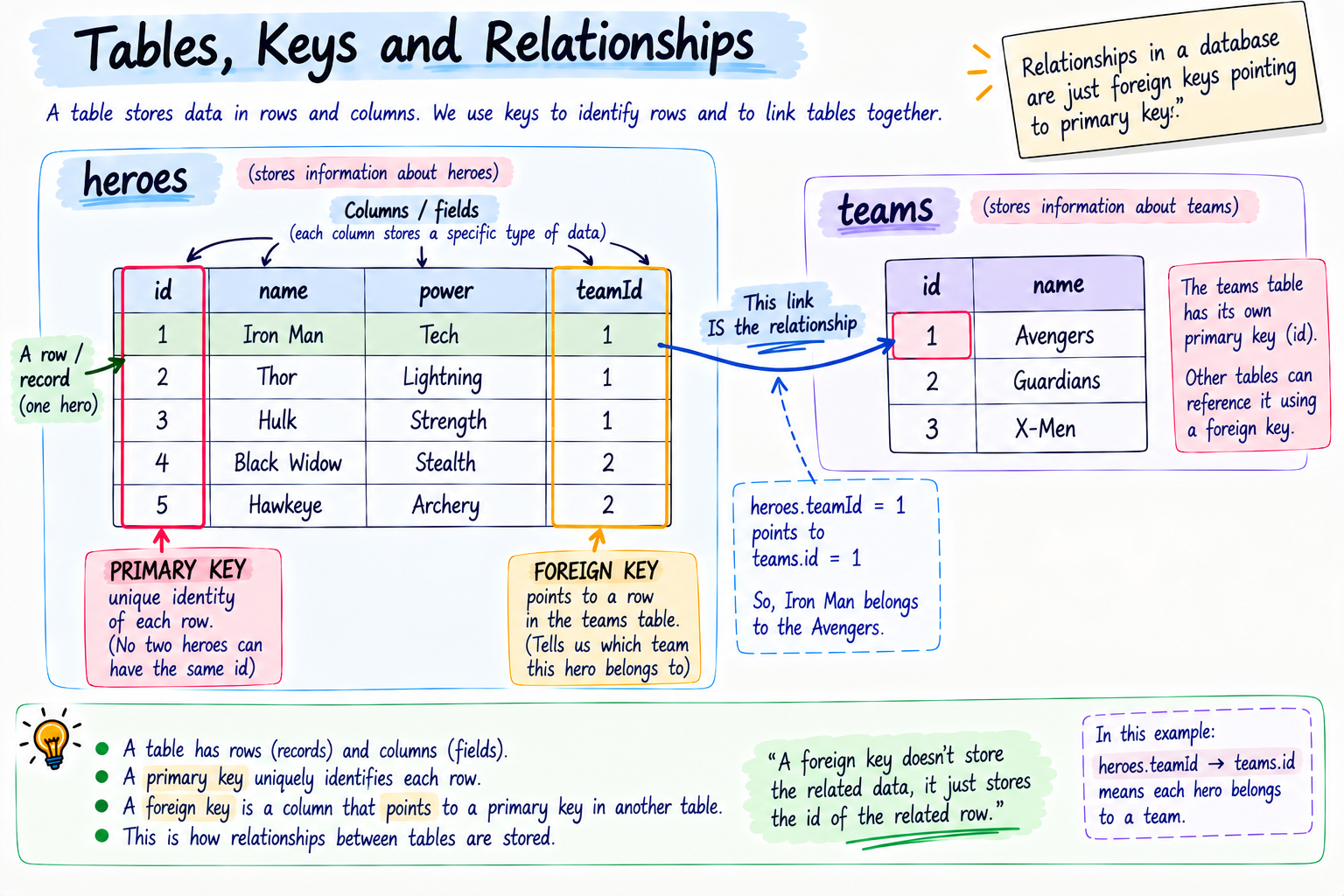
A table is one category of thing, one type of record. The heroes table. Ek bada spreadsheet holding all heroes.
A row (also called a record) is one single entry in that table, one hero. Iron Man is one row.
A column (also called a field) is one property that every row has. name, power, id. Har hero row has a value for each column.
Ab aate hain the two that people skip and then never really get databases, keys.
A primary key is the one column whose value uniquely identifies each row, no two rows share it. Every hero gets a unique id, like 1, 2, 3. Even if two heroes are both named "Peter Parker," their ids differ, so the database can always tell them apart. Usually it is an auto-incrementing number, or a random UUID (a long unique string). The primary key is a row's true, unmistakable identity, uska pakka pehchaan.
A foreign key is the real magic, and it is how relationships actually work under the hood. A foreign key is a column in one table that holds the primary key of a row in another table, creating a link. If each hero belongs to a team, the heroes table has a teamId column that stores the id of a row in the teams table. That teamId is a foreign key. Ek record se doosre record tak ka pointer. And every single relationship in a SQL database is built out of these pointers. Ye baat gaanth baandh lo, relationships are just foreign keys.
And the schema is the full blueprint, the list of all your tables, their columns, their types, their keys, and their relationships. It is the master plan of your whole database, S.H.I.E.L.D.'s official filing standard that says exactly what shape every record takes.
Column data types, what each column can actually hold
Ab socho, S.H.I.E.L.D. would never let an agent scribble a hero's power level into the name box. Har column has a type, a fixed kind of thing it is allowed to hold, and picking the right one matters way more than beginners think. Choose lazily and your data quietly rots. Choose right and the database itself keeps you honest. Ye lo the common ones you will actually use, plus the gotchas nobody warns you about.
Numbers. Integer (INT) for whole numbers like an id or a count. And here is the one that has burned real production apps, for money never, ever use a floating-point type like Float, use Decimal (also called Numeric). Kyun? Dekho, floats store approximations, so 0.1 + 0.2 famously comes out as 0.30000000000000004. Ab imagine that tiny error sitting on a payments table across a million transactions. Poora accounting hil jaayega. Paise ke liye hamesha Decimal. Ye baat gaanth baandh lo.
Text. String, stored as VARCHAR (a capped length, like a name) or TEXT (long, unlimited, like a blog body). For most fields, String is fine.
Boolean for true or false, like isActive.
Dates and times. DateTime or Timestamp for moments in time. And a convention you will see in almost every table, two special columns, createdAt and updatedAt, that automatically record when a row was made and last changed. Prisma even sets these for you with @default(now()) and @updatedAt. Bahut useful for sorting and debugging.
JSON. Modern SQL databases like PostgreSQL let a column hold a whole JSON object, handy for flexible, occasional data without breaking out a full NoSQL database. Isse SQL bhi thoda flexible ho jaata hai.
Enum, a column locked to a fixed set of allowed values, like an order status that can only be pending, shipped, or delivered. Koi random value chipkaane ki koshish karo, database sidha mana kar dega. Ye wahi union type idea hai from my TypeScript post, but this time enforced by the database itself, not just your code.
UUID, an alternative primary key that is a long random unique string instead of boring 1, 2, 3. Socho kyun koi isse chahega, do reasons. Ek, when ids should not be guessable, kyunki /orders/4 screams "just try /orders/5 and peek at someone else's order," while a random UUID gives an attacker nothing. Do, when many machines create records at the same time and cannot sit and coordinate an auto-increment counter. Trade-off, it is longer and not human-readable. Situation decides, hype nahi.
| Type | Use it for | Watch out |
|---|---|---|
| Integer | Ids, counts | |
| Decimal | Money, exact numbers | Never use Float for money |
| String (VARCHAR / TEXT) | Names, text | Pick a sensible length |
| Boolean | true / false flags | |
| DateTime | Timestamps, createdAt / updatedAt | Store in UTC |
| JSON | Flexible occasional data | Do not overuse, it dodges structure |
| Enum | Fixed set of values (status) | |
| UUID | Non-guessable or distributed ids | Longer, less readable |
Constraints and NULL, how the database protects your data
Types decide what a column can hold. Constraints decide what is actually allowed, and yaha se database asli intelligent banta hai. Ye wo bouncer hai jo galat data ko darwaaze pe hi rok deta hai, so garbage never even enters. Your app code can have bugs, a teammate can write a sloppy insert, doesn't matter, the database stands there and says no.
First, NULL, and log yaha confuse hote hain. NULL means "no value here," empty, unknown, not set. It is NOT 0 and NOT an empty string "", those are actual values. NULL is the total absence of any value. A hero not assigned to a team yet has teamId = NULL, matlab "team abhi decide nahi hui," not "team number zero."
Ab the constraints, the rules you clamp onto columns:
NOT NULL means this column is required, it cannot be empty. A hero must have a name, so name is NOT NULL. Try to save one without a name and the database flatly rejects it.
UNIQUE means no two rows can share this value. A user's email is UNIQUE, so do accounts kabhi bhi same email pe register nahi ho sakte, even if two people hit signup at the exact same millisecond. The database itself enforces it, not your hopeful if check that a race condition can slip past.
DEFAULT gives a column an automatic value when you do not provide one, like isActive defaulting to true, or createdAt defaulting to the current time.
CHECK is a custom rule the database enforces, like age >= 18, or price > 0. Data that breaks the rule is refused at the door.
And remember, your primary key and foreign key are constraints too. The primary key guarantees uniqueness and identity, and the foreign key enforces referential integrity, meaning you cannot point a hero at a team id that does not exist, the database will not let you. Isse tumhaara data kabhi apne aap se contradict nahi karta. This is the quiet superpower of SQL, the database itself refuses to hold invalid data.
SQL vs NoSQL, the two families and the honest truth
Databases come in two big families. And yaha main thoda careful rahunga, because the internet is full of "SQL vs NoSQL, which is better" nonsense. The real answer is it depends, and I will explain each case properly.
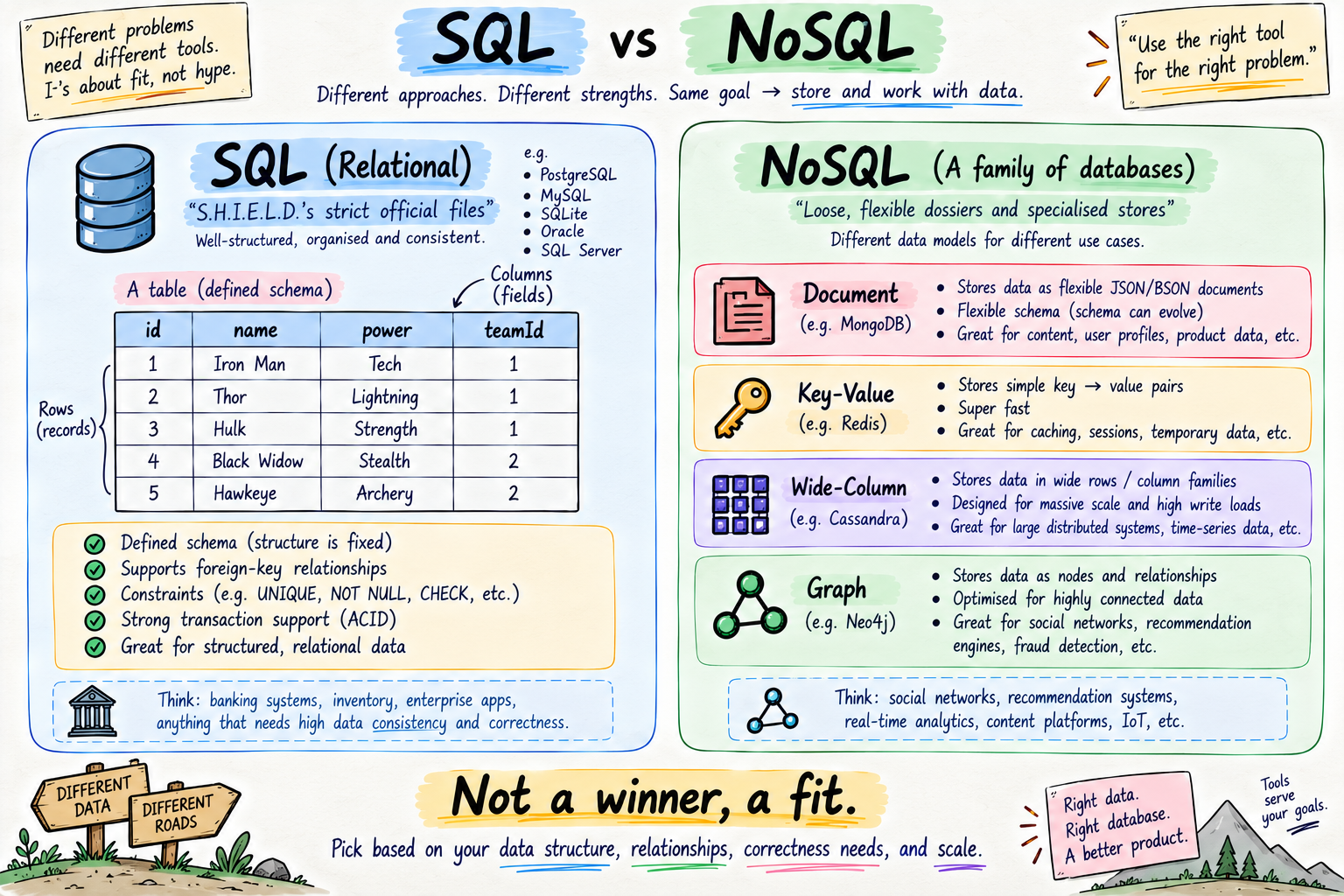
SQL databases, also called relational, store data in tables of rows and columns with a fixed schema, and link tables together using the foreign keys you just met. SQL stands for Structured Query Language, the language you use to talk to them. The big ones are PostgreSQL, MySQL, and SQLite. Their superpowers, strong structure, real relationships, constraints, and rock-solid correctness guarantees called transactions, which we will cover. This is S.H.I.E.L.D.'s strict official filing, every record in a defined format, everything cross-referenced.
NoSQL databases are a broader family, "NoSQL" means "not only SQL," and they come in several distinct types. Ye important hai and usually skipped:
Document databases, like MongoDB, store data as flexible JSON-like documents, and each document can have a different shape. The loose, free-form dossier.
Key-value stores, like Redis, store simple key to value pairs and are blazing fast, often kept in memory, which is why they are used for caching and for the shared session store I mentioned in the sessions post.
Wide-column stores, like Cassandra, are built for gigantic scale across many machines.
Graph databases, like Neo4j, store data as nodes and connections, perfect jab relationships themselves are the main product, like a social network of who knows whom.
Ab the honest part, the "it depends." The old rule "SQL for structured data, NoSQL for flexible data" is a decent starting instinct, but it is too simple, kyunki the lines have blurred. PostgreSQL, a SQL database, can store flexible JSON columns and query inside them. MongoDB, a document database, now supports multi-document transactions. So slogan pe mat jao, choose by your actual situation:
If your data is clearly structured and heavily related, users, orders, products, payments, and correctness matters a lot (money, bookings), lean SQL, kyunki relationships and transactions are its home turf. Ye covers the large majority of normal apps.
If your data is genuinely schema-less or changes shape constantly, or you need to scale writes horizontally across many machines from day one, a document or wide-column NoSQL can fit better.
If you mostly need lightning-fast lookups of simple values, sessions, caches, counters, a key-value store like Redis is the tool, often alongside a main SQL database, not instead of it.
For this whole post we focus on the SQL world, kyunki that is where Prisma and Drizzle live, and where relationships and correctness really matter. But ab tumhe pata hai NoSQL is not one thing, and that the choice is a fit, not a winner.
A quick tour of SQL, the language itself
Even though an ORM will write SQL for you, you must know what it is writing, warna you are trusting JARVIS blindly. SQL, the language, really comes down to four core operations, the same create, read, update, delete (CRUD) from my REST API post.
-- CREATE: add a new row
INSERT INTO heroes (name, power) VALUES ('Thor', 'Lightning');

-- READ: fetch rows, optionally filtered and sorted
SELECT * FROM heroes WHERE power = 'Lightning' ORDER BY name;

-- UPDATE: change existing rows
UPDATE heroes SET power = 'Stormbreaker' WHERE name = 'Thor';

-- DELETE: remove rows
DELETE FROM heroes WHERE name = 'Thor';
Ek baar padho and it is almost English. SELECT reads, INSERT creates, UPDATE changes, DELETE removes. WHERE filters to matching rows, ORDER BY sorts. And one more you will use constantly, JOIN, which combines rows from related tables using their keys.
-- JOIN: get each hero along with their team's name, using the foreign key
SELECT heroes.name, teams.name
FROM heroes
JOIN teams ON heroes.teamId = teams.id;
That JOIN is you following the foreign key to pull related data together. Ye hai the raw machinery. An ORM generates all of this for you, but ab jab JARVIS hands you results, you know exactly what he did under the hood.
Beyond CRUD, asking real questions of your data
Reading rows one by one is baby stuff. Real apps ask sawaal, actual questions, "how many heroes per team," "what is the average power rating," "just give me page two, not all ten lakh rows." Ye wo moment hai jab Nick Fury doesn't want to read every file, he wants the summary on one screen. Iske liye SQL has aggregations, grouping, and pagination, and every ORM exposes them too.
Aggregations crunch many rows into one number. COUNT (how many), SUM (total), AVG (average), MIN and MAX. Poori table ko nichod ke ek answer.
GROUP BY runs that per group instead of over the whole table, like counting heroes team by team in one shot.
-- how many heroes are in each team
SELECT teamId, COUNT(*) AS heroCount
FROM heroes
GROUP BY teamId;
Pagination stops you from stupidly loading ten million rows into memory just to show twenty. LIMIT caps how many rows come back, OFFSET skips ahead, so page two is literally "skip 20, take 20." Socho, ye seedha connects to my URL params and query strings post, wo ?page=2 in the URL becomes a LIMIT and OFFSET down here. Ab wo puzzle ka piece fit ho gaya.
-- page 2, twenty per page
SELECT * FROM heroes ORDER BY name LIMIT 20 OFFSET 20;
In an ORM like Prisma, the same ideas are clean options, take and skip for pagination, and a small groupBy and count API for aggregations. Same power, tumhaari language mein.
The pain of writing raw queries by hand
Toh phir raw SQL seedha code mein kyun na likhein? Log likhte hain, as plain strings, and for a tiny script it is fine. But at real scale it hurts, in specific ways.
// raw SQL as a string, the manual way
const result = await db.query(
  "SELECT * FROM heroes WHERE power = 'Lightning'"
);
Pehla, it is just strings, so your editor cannot help you, no autocomplete, and a typo like SLECT or a wrong column name only blows up at runtime. Doosra, no type safety, your code has no idea what shape comes back, so result.naem fails silently. Teesra, and most dangerous, if you paste user input straight into these strings, you open the door to SQL injection, a classic attack where a user types SQL into a form field and your query runs it, letting them read or delete your entire database. Chautha, doing joins and relations by hand across many tables gets verbose and error-prone fast.
Writing all this by hand, for every operation, is Tony digging through S.H.I.E.L.D.'s files himself, no JARVIS. Powerful, but slow, repetitive, aur genuinely risky.
What an ORM actually is, honestly
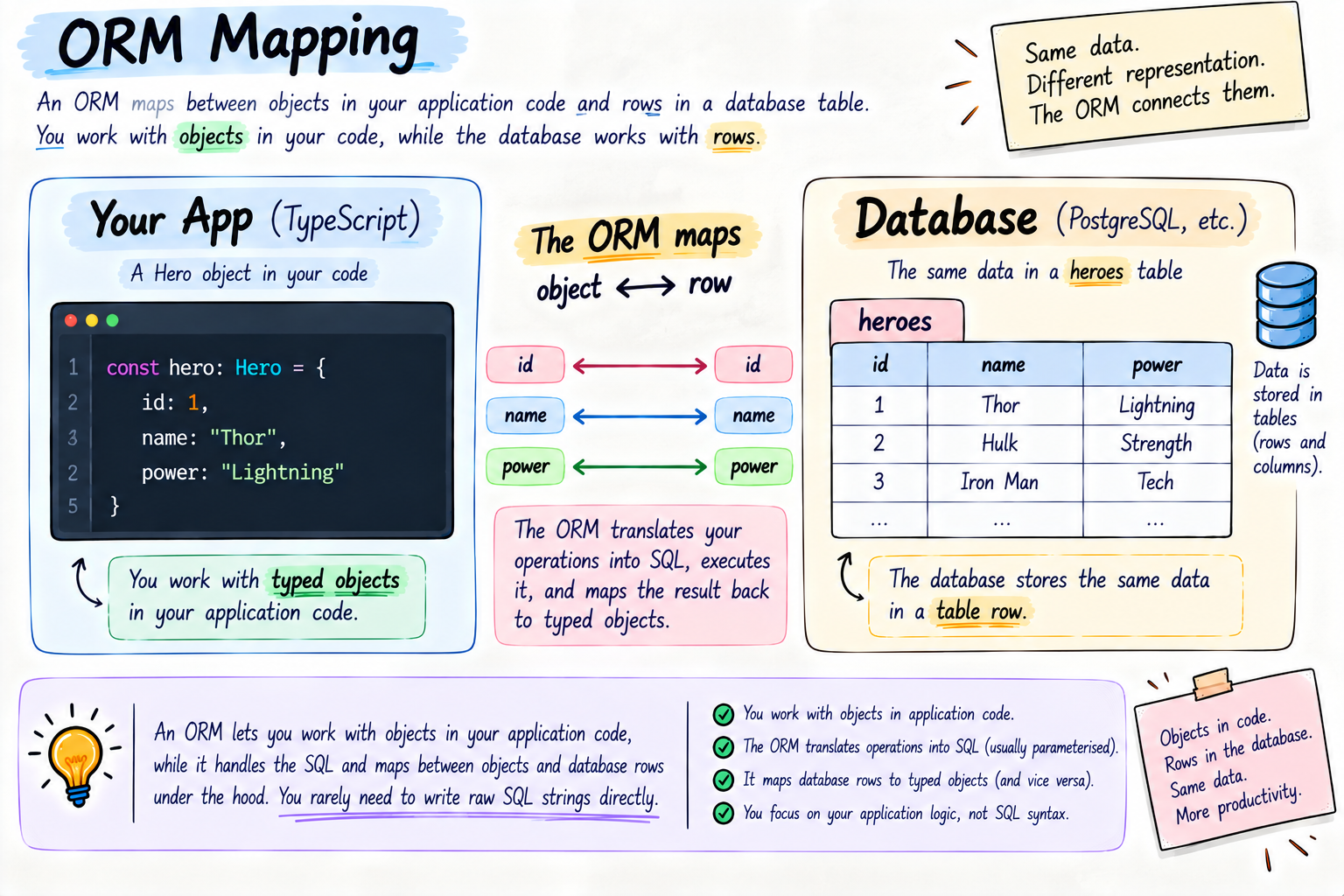
An ORM is the fix, and it is our JARVIS. ORM stands for Object Relational Mapper, and the name is the whole job, it maps between the objects in your code and the relational rows in your database. You work with normal objects and methods, and it generates the real SQL underneath, runs it, and hands you back clean, typed objects.
// with an ORM, you speak your language, it writes the SQL
const heroes = await prisma.hero.findMany({
  where: { power: "Lightning" },
});
No SQL string, no typos waiting to explode, and in TypeScript you get full autocomplete and type checking, your editor knows exactly what a hero is. That is you saying "JARVIS, get me the lightning heroes," and JARVIS doing the messy database work. And a real safety win, ORMs send your values as separate, parameterised inputs rather than pasting them into a string, jisse SQL injection band ho jaata hai by default. That alone is a huge reason to use one.
But yaha main 100 percent honest rahunga, kyunki an ORM is a productivity tool, not magic, and it has real trade-offs you must know:
It is a layer of abstraction, so it can hide what is actually happening. Sometimes it generates a query less efficient than one you would hand-write, and for very complex reports you will still drop to raw SQL now and then. Good ORMs, Prisma and Drizzle included, give you a raw escape hatch for exactly that.
And there is one classic trap every ORM user must know by name, the N plus one problem. Say you fetch 100 heroes, then loop over them and, for each one, separately ask for its team. That is 1 query for the heroes plus 100 more for the teams, 101 queries, painfully slow. The fix is to tell the ORM to fetch the related data together in one go, called eager loading, with something like include. Ye ek trap jaan lo and you dodge the most common ORM performance disaster there is.
Toh, JARVIS handles ninety-five percent of the work brilliantly and safely, but you stay the engineer who knows what he is generating and when to step in.
Understanding Prisma
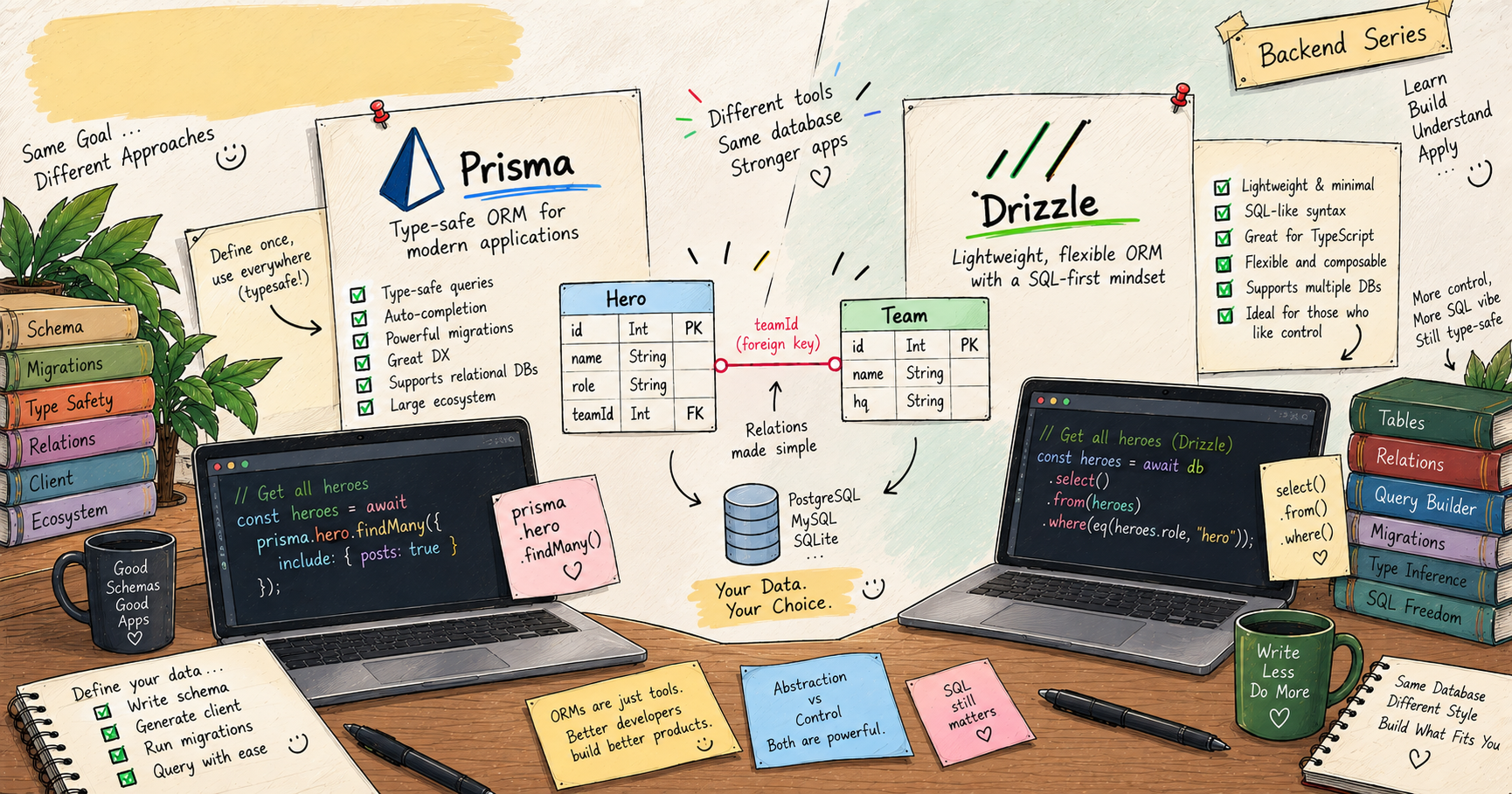
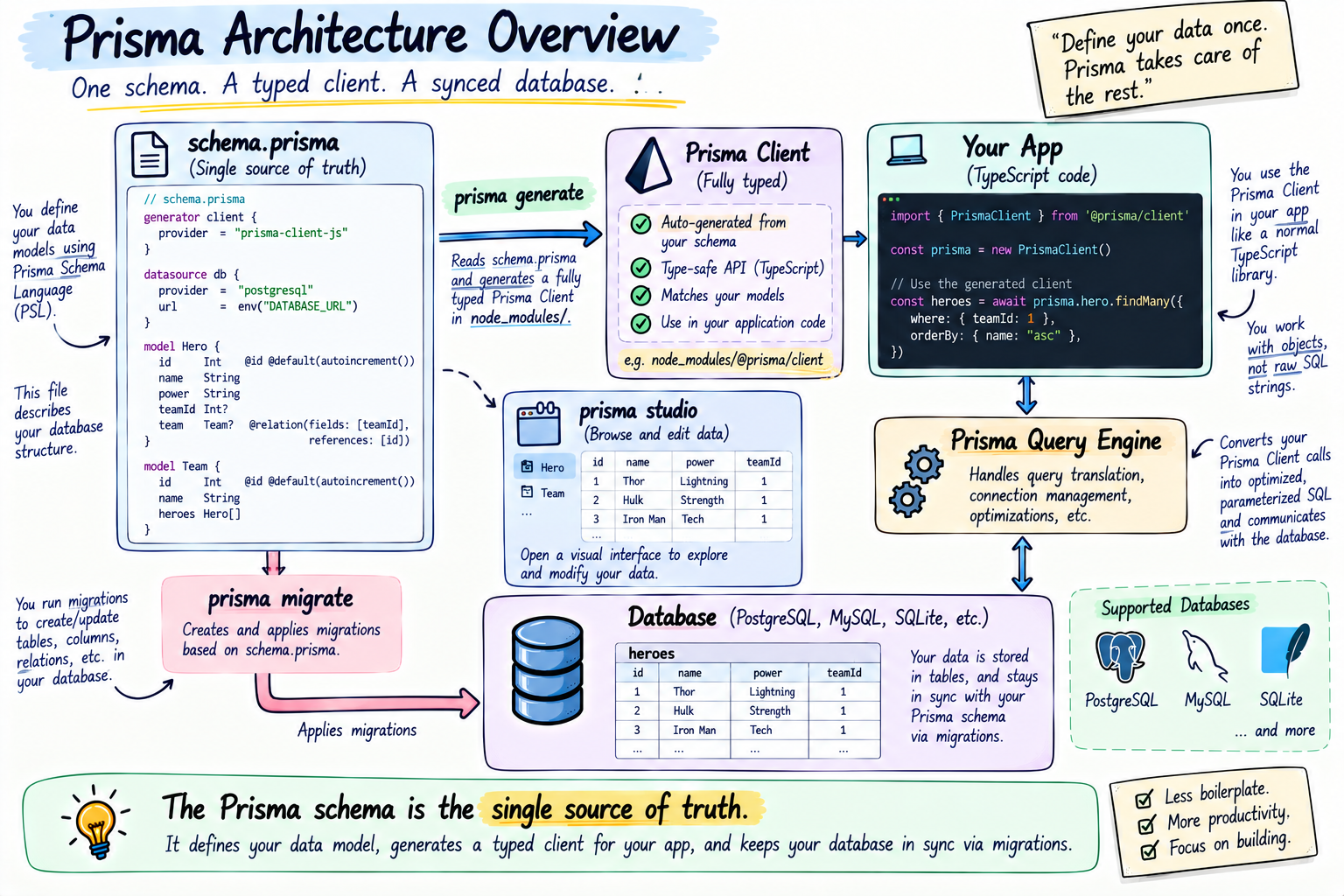
Prisma is one of the two most popular TypeScript ORMs, and its style is schema-first. You describe all your data in one clean file, schema.prisma, and Prisma builds everything around it.
model Hero {
  id     Int    @id @default(autoincrement())
  name   String
  power  String
}
That @id marks the primary key, @default(autoincrement()) makes the database assign the next number automatically. You write this readable schema, run prisma generate, and Prisma produces a fully typed client with autocomplete for every model and field, so prisma.hero just knows what a hero looks like. You also get prisma migrate to evolve your database and prisma studio, a visual tool to browse your data in a table. Prisma's whole identity is developer experience, DX for short, it is polished, readable, and genuinely beginner-friendly.
Ek accurate technical note, taaki tumhe pata ho how the tool works, Prisma has traditionally run a query engine under the hood, a separate binary it downloads during setup, which does the actual talking to the database. Ye powerful and consistent across databases hai, but it is the "extra machinery" people mention, and it is why Prisma setups pull a bigger download. Prisma has been actively moving toward a lighter, engine-free client in newer versions, so this is evolving, not fixed forever. This is the shiny, high-level JARVIS.
Understanding Drizzle
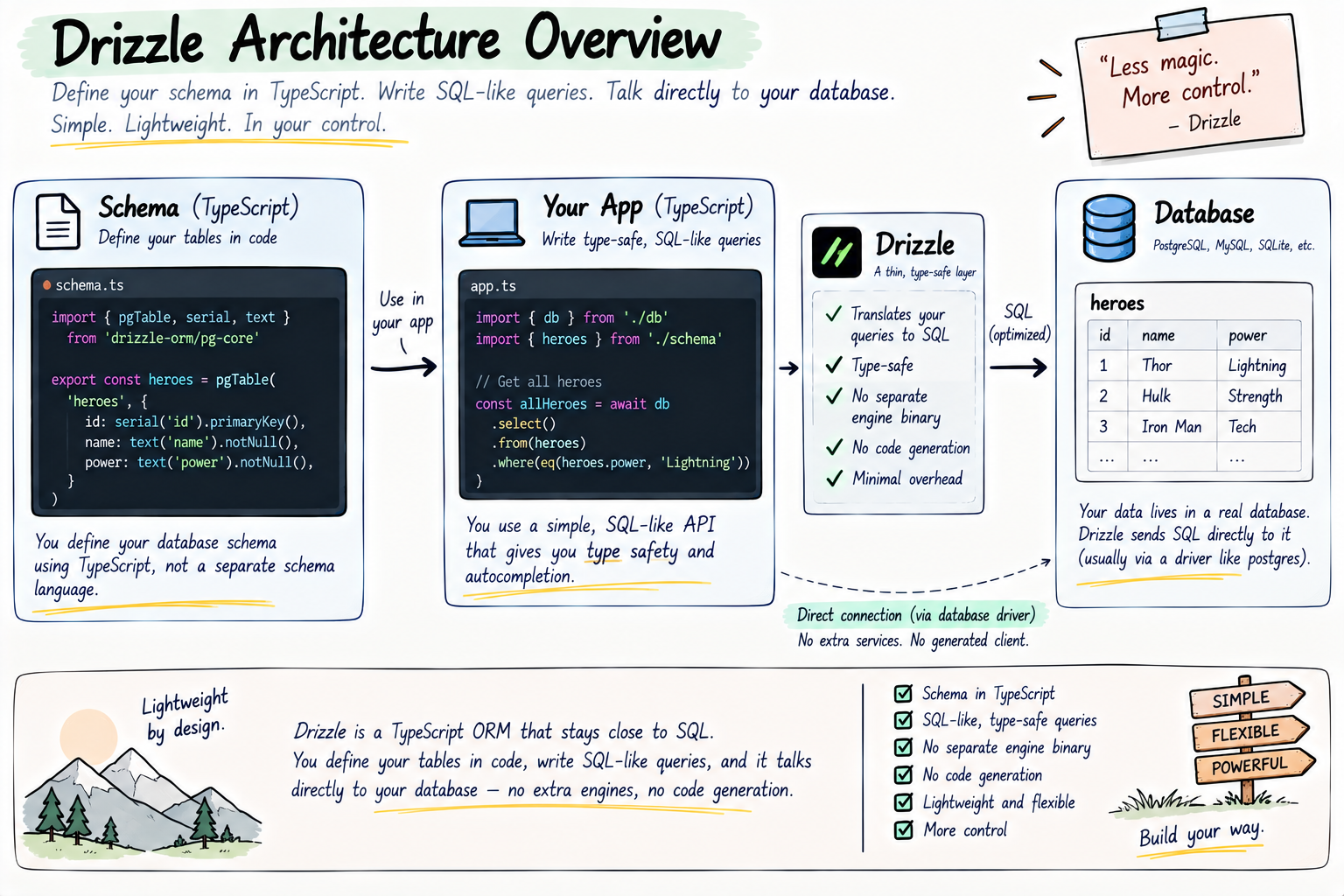
Drizzle is the other modern favourite, and it takes the opposite philosophy, SQL-first and lightweight. No separate schema language and no code-generation step, you define your tables directly in TypeScript, and your queries read very close to actual SQL.
import { sqliteTable, integer, text } from "drizzle-orm/sqlite-core";

export const heroes = sqliteTable("heroes", {
  id: integer("id").primaryKey({ autoIncrement: true }),
  name: text("name").notNull(),
  power: text("power").notNull(),
});
And a query stays close to SQL, just fully typed and safe.
import { eq } from "drizzle-orm";
// reads almost like SELECT * FROM heroes WHERE power = 'Lightning'
const lightningHeroes = await db
  .select()
  .from(heroes)
  .where(eq(heroes.power, "Lightning"));
Drizzle is a thin layer with almost no magic between you and the database, no engine binary, jisse you get more direct control, very predictable SQL, and a tiny footprint, lovely for serverless and edge environments where every kilobyte and cold-start millisecond counts. If Prisma is the polished JARVIS that abstracts everything, Drizzle is the lean FRIDAY that keeps you close to the metal.
Prisma vs Drizzle, the honest and situational comparison
Neither is "the best," and anyone who tells you one universally wins is selling something. They trade off different things, and both are excellent and evolving fast. Here is the honest, case-by-case picture.
Learning curve. Prisma is gentler to start, the schema reads like plain English and the docs are superb, great if you or your team are newer to databases. Drizzle expects you to be comfortable with SQL, since it deliberately mirrors it.
Abstraction vs control. Prisma abstracts more, smoother but hides more of the generated SQL. Drizzle keeps you close to SQL with very predictable queries and more direct control, jo SQL-comfortable teams love.
Footprint. Drizzle is lighter, no engine binary and no generation step, which genuinely helps in serverless and edge setups. Prisma has historically carried more machinery, though, as noted, it is slimming down. So this is true today but a moving target.
Performance. Yaha main jhooth nahi bolunga with a blanket claim, both are fast enough for the vast majority of apps, and which is faster depends on the specific query, database, and workload. Drizzle's thin layer can mean less overhead per query, but Prisma is heavily optimised too. Imaginary micro-benchmarks pe mat jao, pick on fit, and actually measure if performance ever becomes your real bottleneck.
Migrations and tooling. Prisma's migration workflow and Studio are famously smooth and mature. Drizzle has a solid migration kit too, just younger.
Maturity and ecosystem. Prisma is older, hugely popular, and battle-tested with a big community. Drizzle is newer but growing very fast and already production-ready.
The honest takeaway, reach for Prisma when you want speed of development, great tooling, and a gentle on-ramp, which suits most apps and teams. Reach for Drizzle when you want a light footprint, SQL-closeness, and tight control, especially on serverless or edge, and your team knows SQL. No winner, only a fit.
Designing your data, and relationships
Ab the heart of relational databases, connecting things, and remember our foundation, every relationship is just a foreign key. You store separate entities, Hero, Team, Mission, Weapon, and you link them. There are exactly three shapes of relationship. Chalo slowly chalein, Avengers style.
An entity is a type of thing you store, one table each. Hero, Team, Mission.
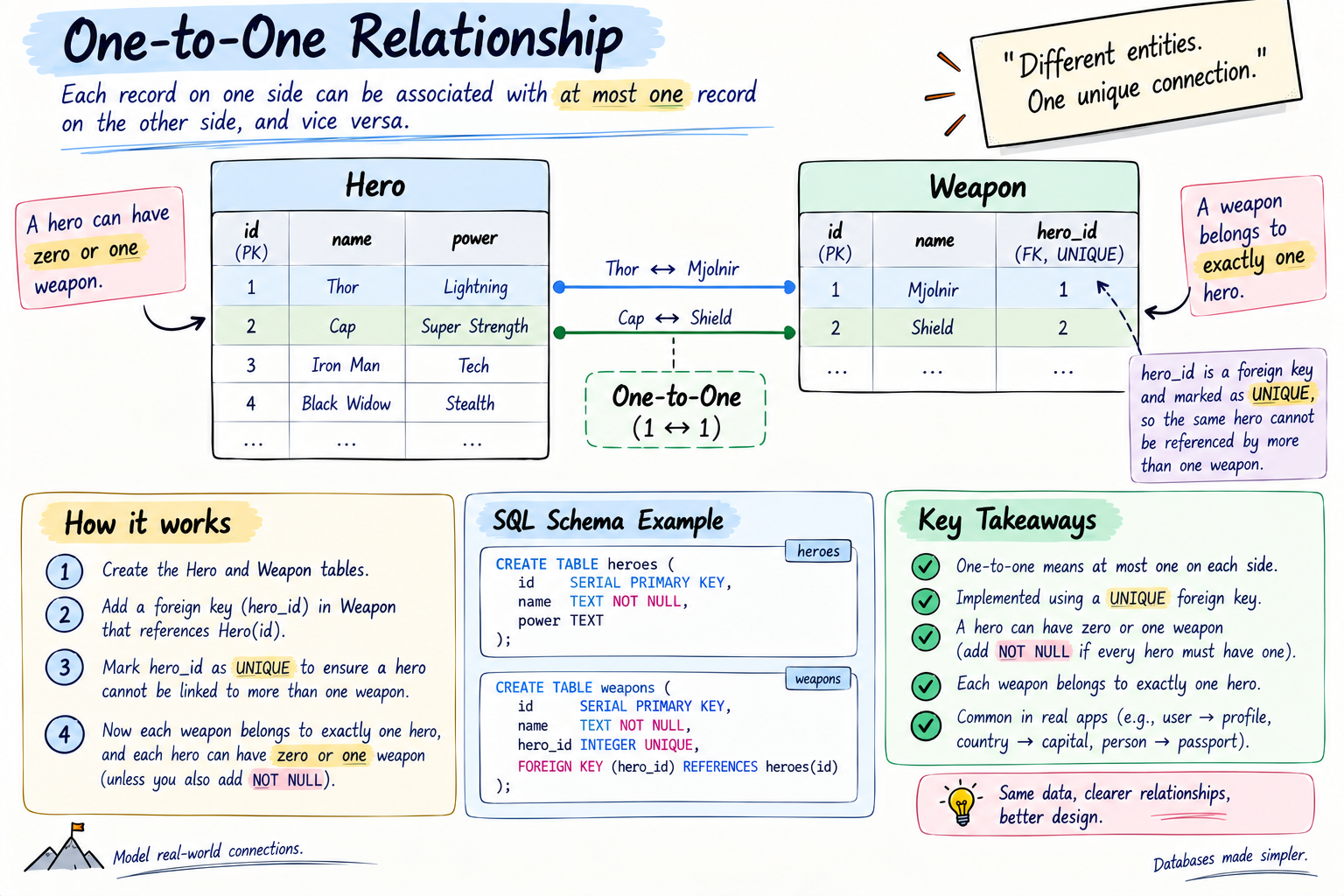
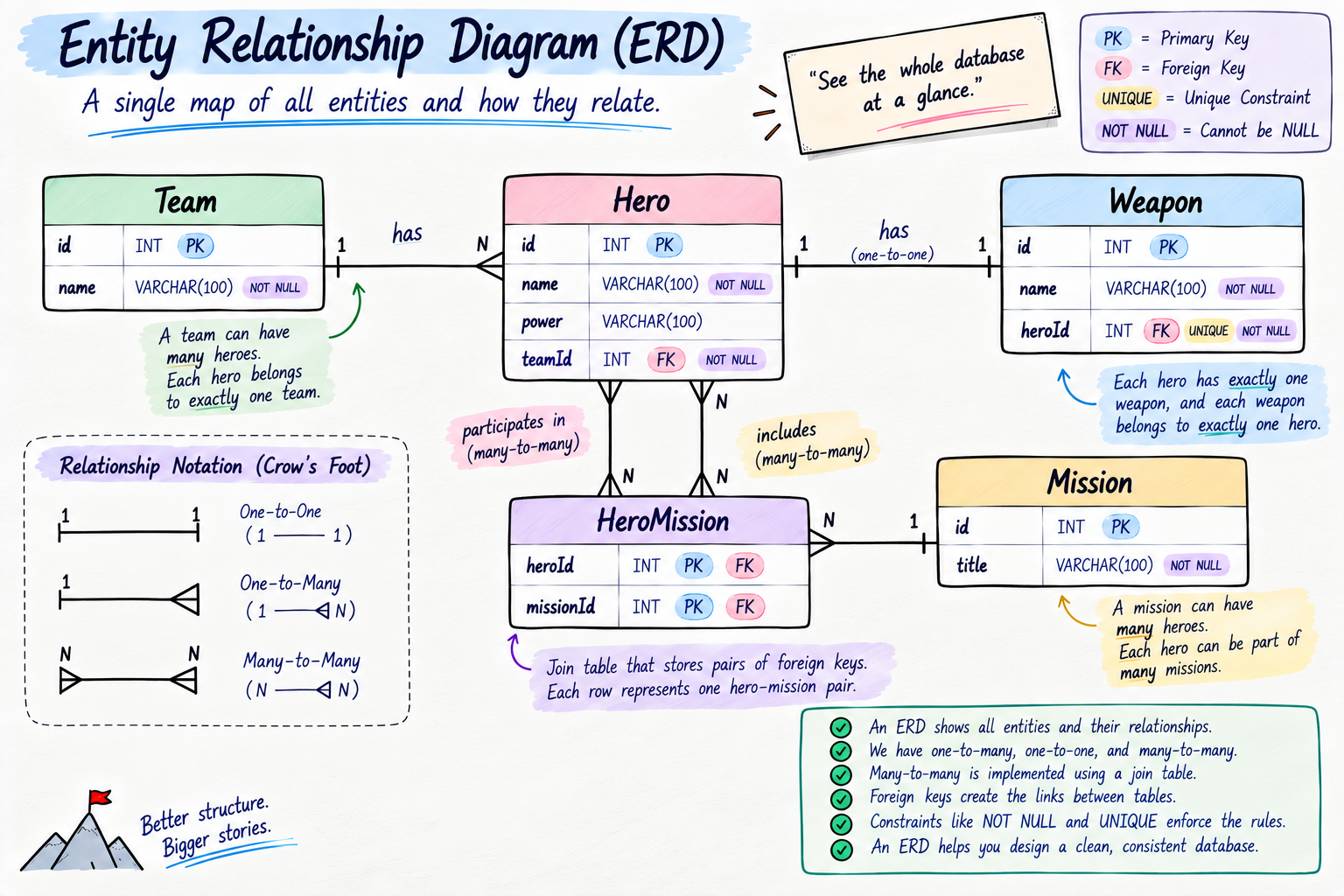
One-to-one. One row on each side maps to exactly one on the other. Each hero has exactly one signature weapon, and each weapon belongs to exactly one hero. Thor and Mjolnir, aur koi nahi. In storage, this is a foreign key on one side with a uniqueness rule, so no two heroes can claim the same weapon.
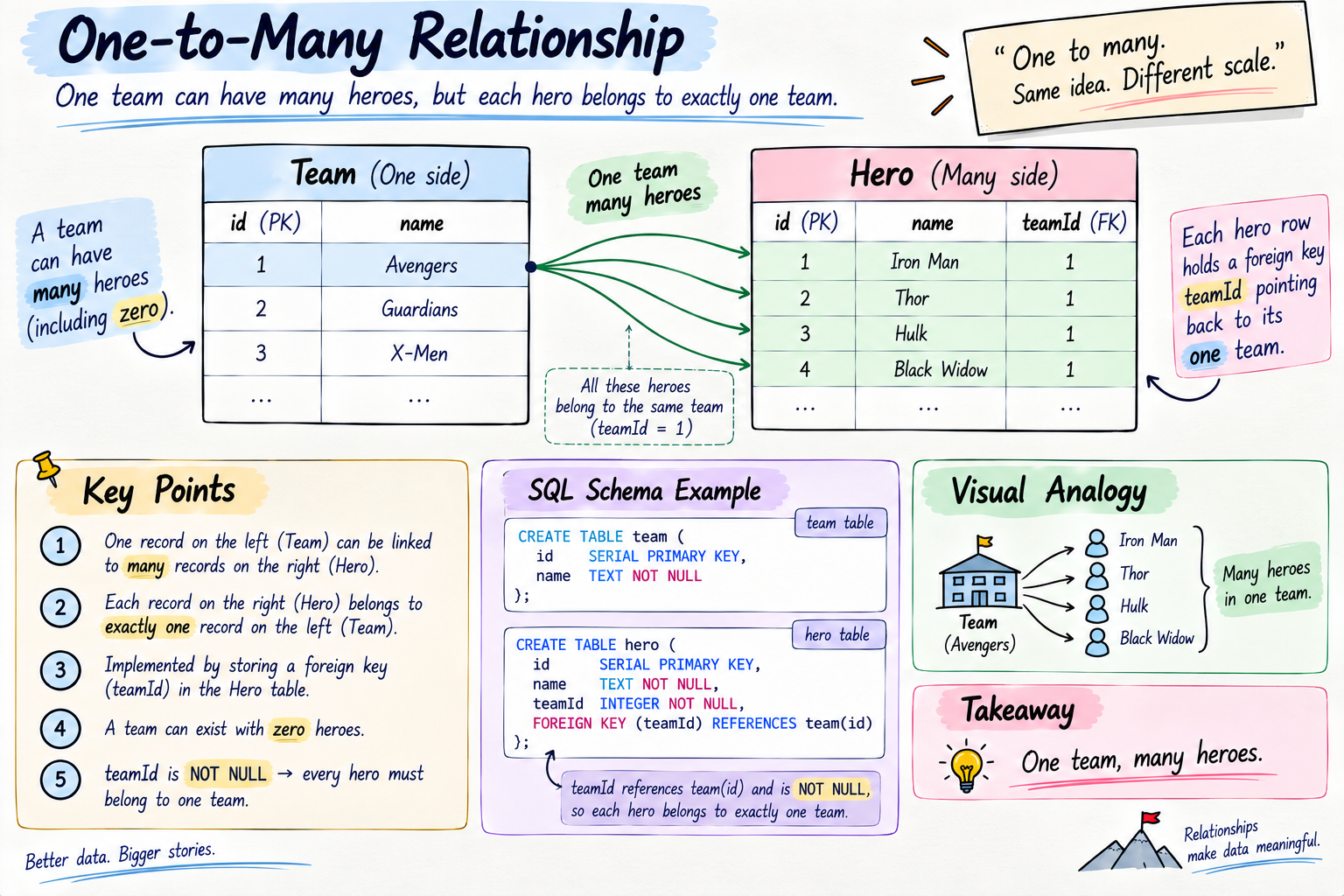
One-to-many. One row on one side links to many on the other. One Team has many Heroes, but each Hero belongs to one Team. The Avengers roster, one team, many members. In storage, the "many" side holds the foreign key, each hero row carries a teamId pointing to its team. Ye sabse common relationship hai jo tum banaoge.
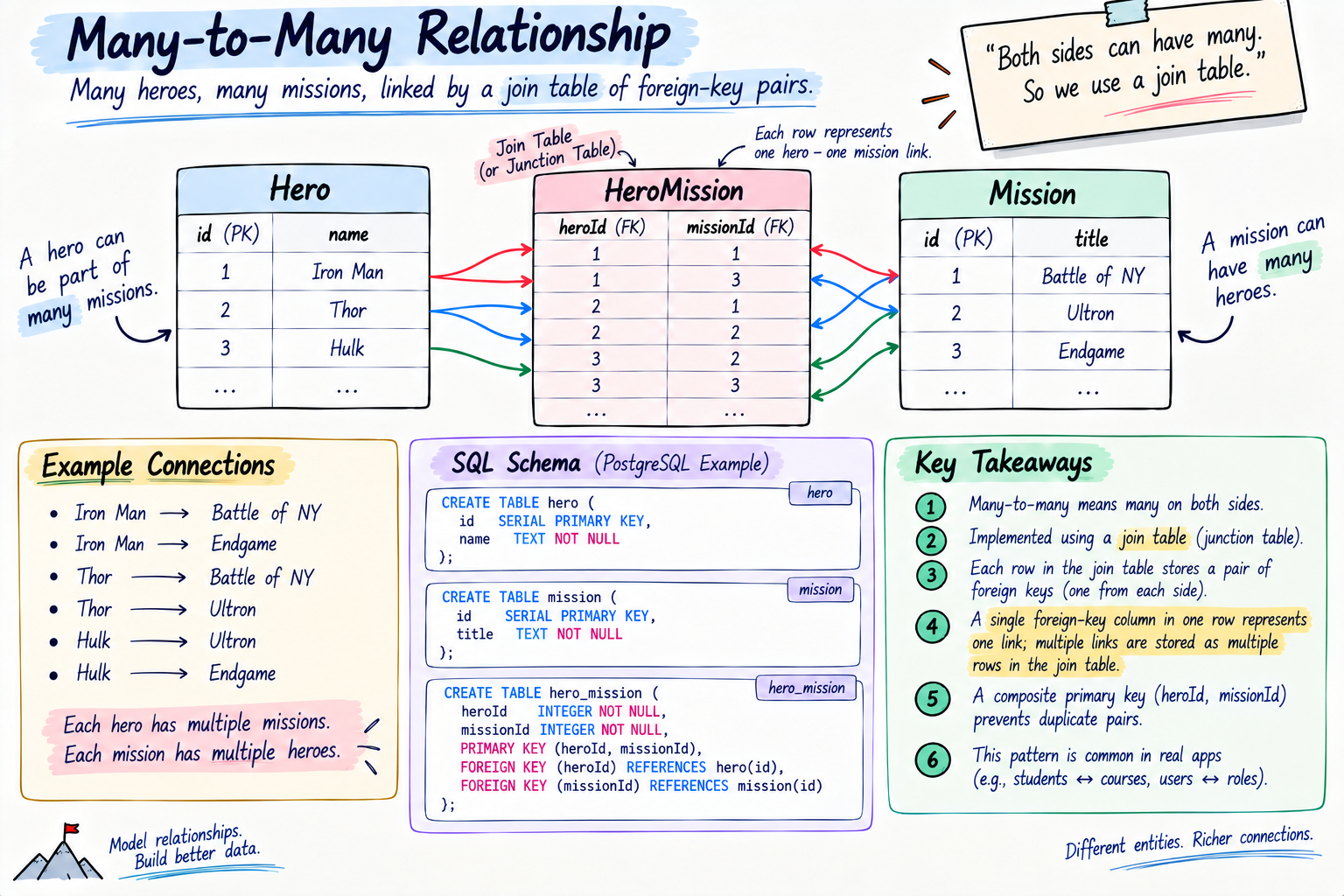
Many-to-many. Many on each side link to many on the other. Heroes and Missions, a hero is in many missions, and a mission has many heroes. A single foreign key column cannot express this, so databases use a small in-between table, called a join table or junction table, that holds pairs of foreign keys, one hero id and one mission id per row, recording each pairing.
Put all your entities and their relationships together on one map, and that map is called an ERD, an Entity Relationship Diagram. It is the blueprint of your whole database, S.H.I.E.L.D.'s board with strings connecting every hero, team, and mission.
Normalization, why we split data into tables
Ek fair sawaal, why bother with all these separate tables and foreign keys, seedha team ka naam har hero row mein kyun na daal dein? The answer is a core database principle called normalization, organising data so each fact is stored in exactly one place.
Maan lo you stored the full team name "The Avengers" inside all fifty hero rows. Now the team rebrands to "Earth's Mightiest." Ab you have to update fifty rows, and if you miss even one, your data contradicts itself, kuch heroes say "The Avengers," kuch say "Earth's Mightiest." That is called an update anomaly, and it is a nightmare. Normalization avoids it, you store the team name once in the teams table, and every hero just holds a teamId pointing to it. Naam ek jagah badlo, sabko dikh jaata hai. One fact, one home.
Honest nuance, the opposite, deliberately duplicating some data for speed, is called denormalization, and it is sometimes done on purpose in read-heavy systems to avoid expensive joins. So normalization is the sensible default that keeps your data consistent, and denormalization is a considered trade-off you reach for only when you have a real performance reason. Situation decides, hamesha ki tarah.
Indexes, how databases stay fast
Ye concept separates people who use databases from people who understand them, indexes.
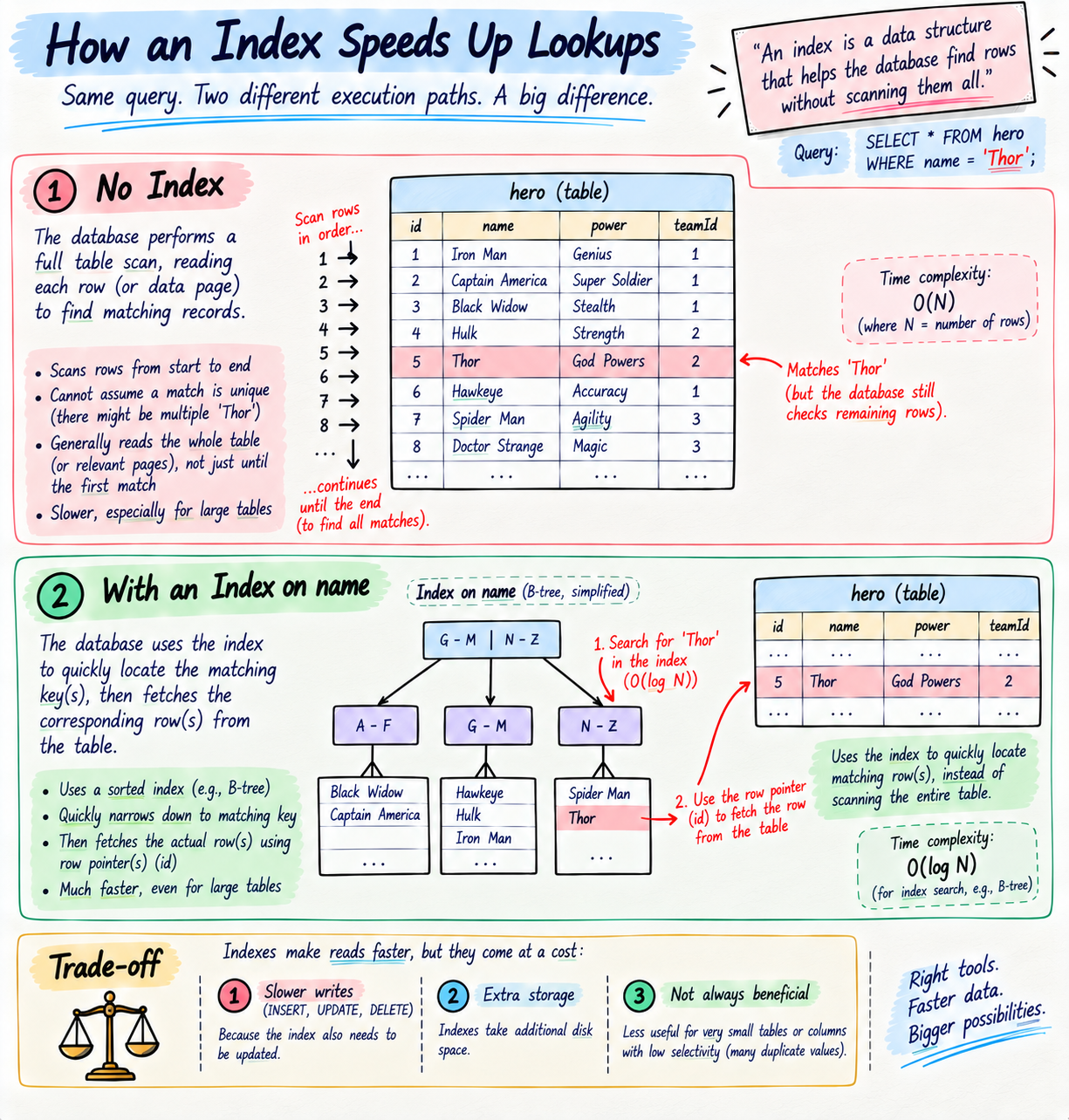
Socho the heroes table has ten million rows, and you run WHERE name = 'Thor'. Without help, the database has to check every single row one by one to find matches, that is a full table scan, and it is slow. An index fixes this. An index is a separate, sorted lookup structure the database keeps for a column, so it can jump almost straight to the matching rows instead of scanning everything. It is exactly the index at the back of a textbook, poori 900 pages padhne ke bajaye, you flip to the index and it tells you the page.
You add an index to columns you frequently search, filter, or join on, like email on a users table, kyunki those lookups happen constantly. Primary keys are automatically indexed for you.
The honest trade-off, and there is always one, indexes make reads much faster but make writes slightly slower, kyunki every insert or update must also update the index, and they take extra storage. So har column pe blindly index mat lagao, index the ones you actually query on. Reads fast, writes thoda slow, that is the deal.
Transactions and ACID, the correctness backbone
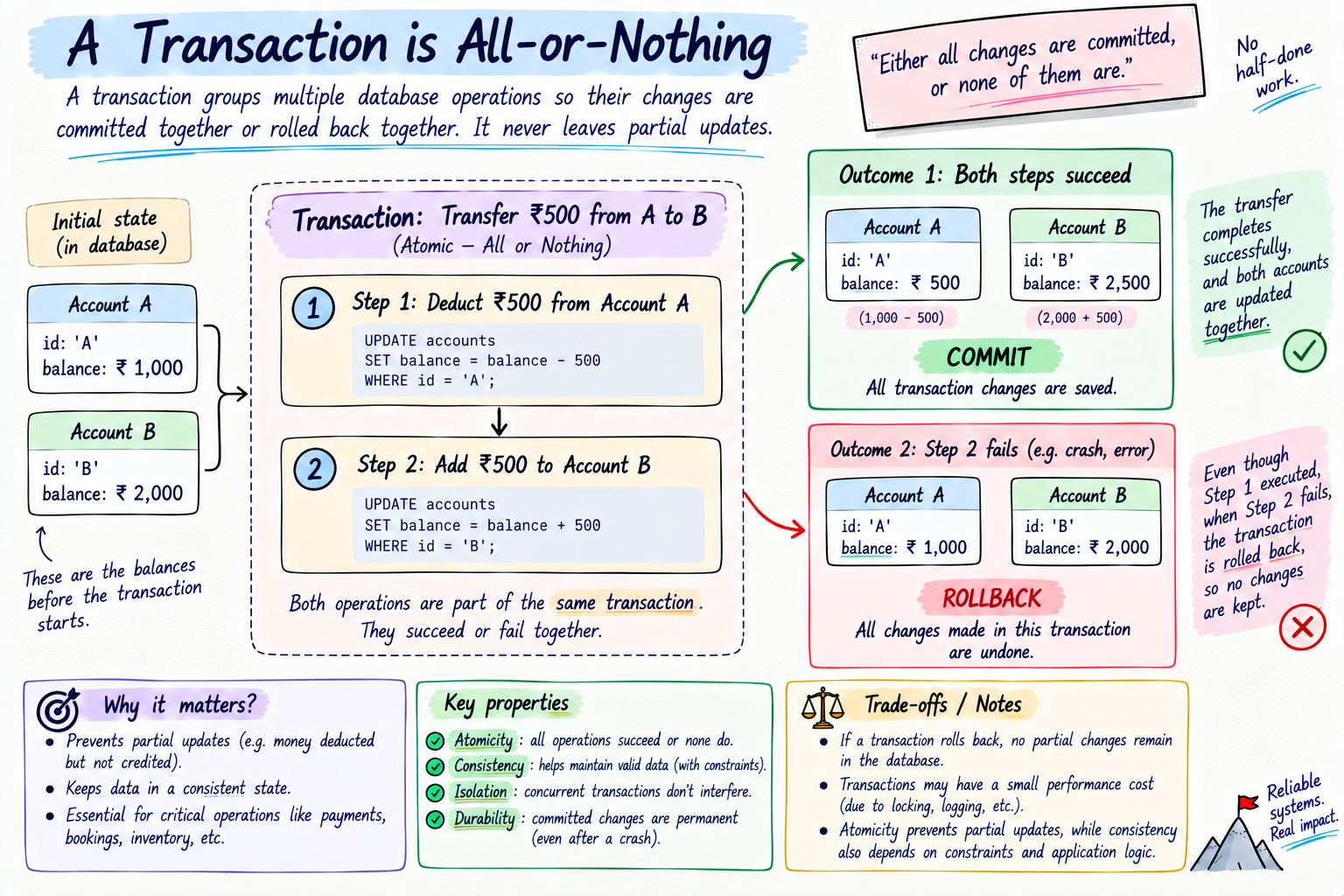
Ye arguably the most important database concept for real apps, and it is where SQL databases truly shine. A transaction is a group of operations treated as one all-or-nothing unit, either every step succeeds, or none of them do.
The classic example, transferring money. You must deduct 500 from account A and add 500 to account B. Ab socho the server crashes right after the deduction but before the addition. Without a transaction, 500 rupees hawa mein gayab, A lost it, B never got it. Disaster. A transaction wraps both steps together, so if anything fails midway, the database rolls the whole thing back as if nothing happened. Both steps commit, or neither does. Ek saath, ya bilkul nahi.
Databases guarantee this through four properties, remembered by the acronym ACID:
Atomicity. All steps in the transaction happen together or not at all, the money example.
Consistency. The database only moves from one valid state to another, all your rules and constraints stay satisfied, you can never end up with a hero pointing to a team that does not exist.
Isolation. Concurrent transactions do not trip over each other, if two run at once, the result is as if they ran one after another, so do people booking the last seat cannot both succeed.
Durability. Once a transaction is committed, it is permanently saved, even if the power dies the next second, it survives, kyunki it is written to disk.
Honest nuance, this is where SQL databases are strong by default, full ACID. Many NoSQL databases historically relaxed some of these for the sake of massive scale and availability (an approach loosely called BASE), though modern ones like MongoDB have added transaction support too. So if your app touches money, inventory, or anything where partial updates are unacceptable, strong ACID is a major reason to reach for SQL. Situation, phir se, decides.
In Prisma, a transaction is one clean call.
// both updates succeed together, or neither does
await prisma.$transaction([
  prisma.account.update({ where: { id: "A" }, data: { balance: { decrement: 500 } } }),
  prisma.account.update({ where: { id: "B" }, data: { balance: { increment: 500 } } }),
]);
Connection pooling, talking to the database efficiently
Ek real-world piece almost every tutorial skips. Your app does not have a magic permanent line to the database, it opens a connection, and opening one is surprisingly expensive, there is a handshake and authentication each time. If every single incoming request opened its own fresh connection, you would waste huge time, and worse, databases cap how many connections they allow at once, so under load you would just run out and everything would fail.
The fix is a connection pool. Instead of opening and closing a connection per request, your app keeps a small set of connections open and ready, and reuses them, handing one to each request and taking it back when done. Ek limited set of open lines, shared smartly. Most ORMs and database drivers, Prisma included, manage this pool for you, and you can tune its size in the connection settings.
One honest gotcha for the modern world, serverless. In serverless setups, hundreds of tiny short-lived function instances can each try to hold connections and quickly exhaust the database's limit. Iska solution is a dedicated pooler in front (like PgBouncer, or hosted poolers) or serverless-friendly drivers. Beginner ke liye itna kaafi hai, just know that a pool exists, it is why your app stays fast under load, and serverless needs a little extra care here.
Scaling a database, when one machine is not enough
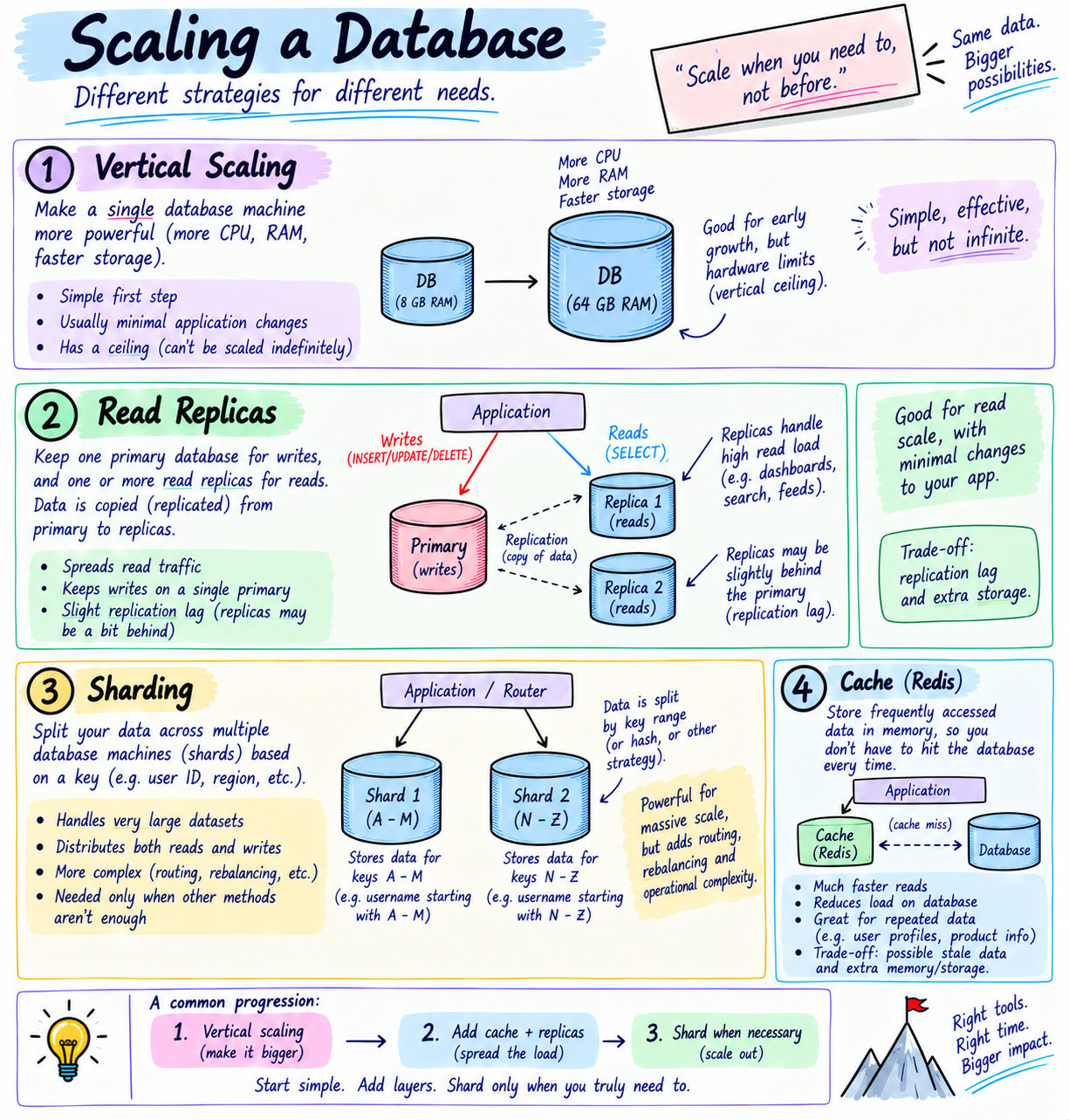
Jab your app gets big, one database machine may not keep up. Ye ecosystem ka important part hai, so a quick, honest map, without drowning you.
Vertical scaling means give the one machine more power, more CPU, more RAM, a bigger box. Simple, and you should do this first, but it has a ceiling, koi machine infinite nahi hoti.
Horizontal scaling means use more machines, which scales far further but is harder to coordinate. It comes in a few flavours:
Read replicas. Keep the main database (the primary) for writes, and make read-only copies (replicas) that handle the flood of reads, spreading the load. Honest caveat, a replica can lag a tiny bit behind the primary, so it is eventually consistent, fine for most reads, not for "read your own write instantly" cases. Situation decides.
Sharding. Split your data across multiple machines by some key, like users A to M on one shard and N to Z on another. Very powerful for huge scale, but genuinely complex, so you reach for it only when you truly must.
Caching. Put a fast in-memory store like Redis in front of the database, so repeated reads are served from the cache instead of hitting the database every time. This is often the biggest, easiest win, and I am dedicating a whole future post to caching, so here just plant the idea.
The honest rule, do not scale prematurely. Start with one solid PostgreSQL, add an index, add a cache, and only reach for replicas and sharding when real traffic actually demands it. Premature scaling is a classic beginner mistake, wahi galti mat karna.
Migrations, evolving your database safely
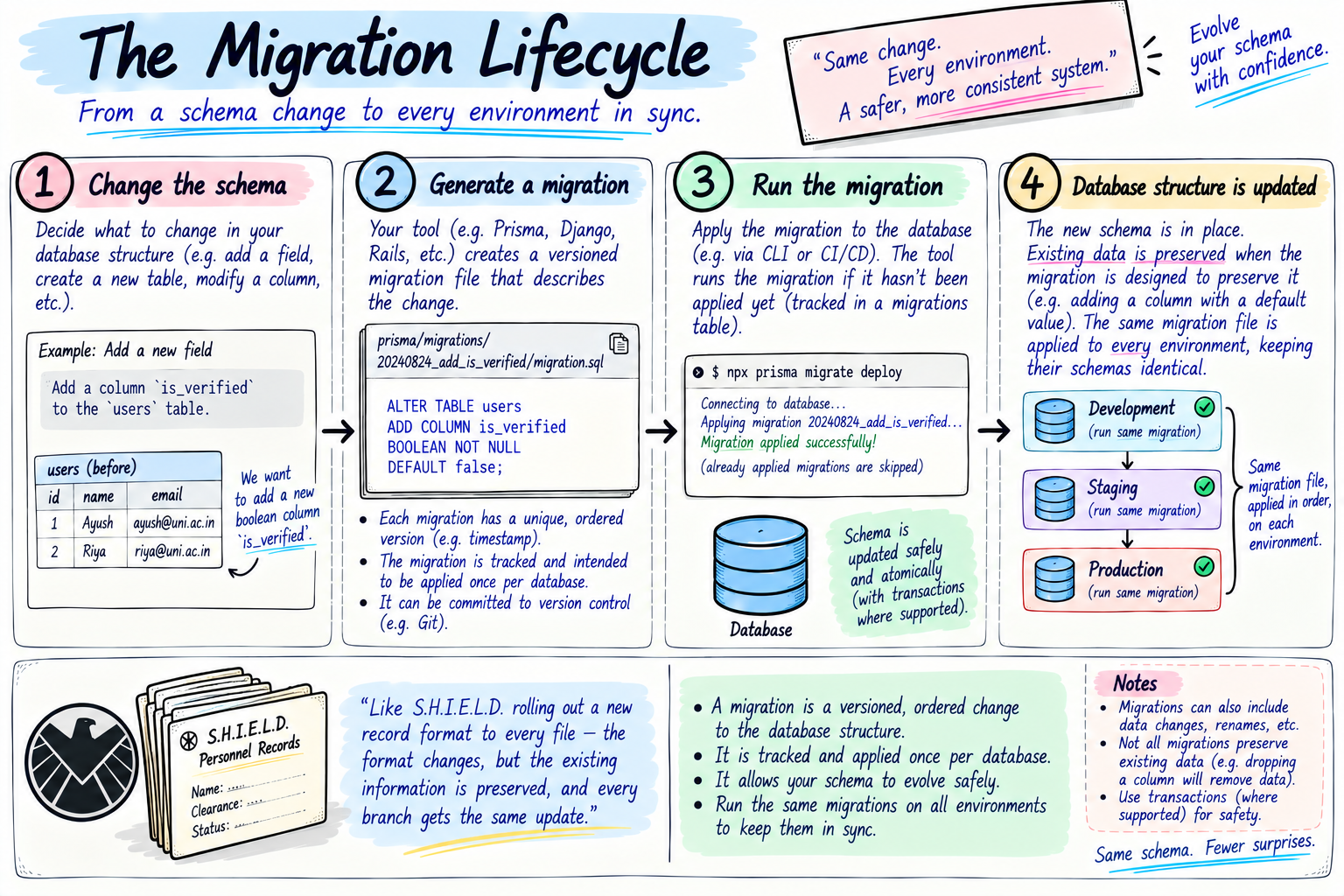
Your app will grow, and your data will need to change shape. Maybe every hero now needs a multiverseVariant field, or you add a whole new Mission table. You cannot just edit code and hope, you must change the actual structure of a live database that already holds real data, without losing any of it.
That is a migration, a versioned, tracked, repeatable change to your database schema. You change your schema, generate a migration file describing the change, and run it, and the database updates its structure in a controlled way. Kyunki each migration is a saved, ordered file, your whole team and every environment, your laptop, staging, production, applies the exact same changes in the exact same order, so they never drift apart.
One practical detail worth knowing, in development you typically run a command like prisma migrate dev which creates and applies migrations as you experiment, and in production you run prisma migrate deploy which safely applies the already-reviewed migrations, no surprises. Both Prisma and Drizzle give you this workflow.
Socho it as S.H.I.E.L.D. officially updating their record format when a new phase of the universe begins, adding a "multiverse" field to every hero's file in one coordinated, documented rollout, not everyone scribbling changes randomly.
Building it with Prisma in TypeScript
Chalo tie it together with real Prisma code. You define models with a relationship, then work with them in clean, typed code. Ye lo a schema with a Team and its Heroes, a one-to-many, note the foreign key.
model Team {
  id     Int    @id @default(autoincrement())
  name   String
  heroes Hero[]
}

model Hero {
  id     Int    @id @default(autoincrement())
  name   String
  power  String
  team   Team?  @relation(fields: [teamId], references: [id])
  teamId Int?   // this is the foreign key
}
After running Prisma's generate and migrate commands, you get a typed client and the full CRUD, all typed, no SQL strings.
import { PrismaClient } from "@prisma/client";
const prisma = new PrismaClient();

// CREATE a team with heroes inside it, in one call
await prisma.team.create({
  data: {
    name: "Avengers",
    heroes: {
      create: [
        { name: "Iron Man", power: "Tech genius" },
        { name: "Thor", power: "Lightning" },
      ],
    },
  },
});

// READ, with filtering, sorting, pagination, and pulling in the related team
// include avoids the N+1 problem by fetching teams in the same query
const heroes = await prisma.hero.findMany({
  where: { power: "Lightning" },   // filter, like SQL WHERE
  orderBy: { name: "asc" },        // sort, like ORDER BY
  take: 20,                        // pagination, like LIMIT
  skip: 0,                         // pagination, like OFFSET
  include: { team: true },          // eager-load the related team
});

// UPDATE one hero
await prisma.hero.update({
  where: { id: 1 },
  data: { power: "Stormbreaker" },
});

// DELETE one hero
await prisma.hero.delete({ where: { id: 2 } });
Dekho how much is happening here, cleanly. Full create, read, update, delete, the same CRUD from my REST post, now backed by a real database instead of a vanishing array. The where and orderBy are your filtering and sorting from the query-strings post, take and skip are your pagination, and include: { team: true } fetches the related team in the same query, jo exactly how you dodge that N plus one trap. All of this, and Prisma writes and runs every line of real SQL underneath. That is the entire promise of an ORM, sitting right there. Drizzle expresses the same operations, bas written closer to SQL.
Choosing the right tools, the full decision
Chalo pull the whole decision together, honestly, kyunki ab you have all the pieces.
For the database itself, SQL vs NoSQL, default to a SQL database like PostgreSQL for most apps, kyunki most app data is structured, related, and needs correctness, and SQL gives you relationships, constraints, and ACID transactions out of the box. Reach for a document NoSQL like MongoDB when your data is genuinely flexible or schema-less, for a key-value store like Redis when you need blazing-fast simple lookups or caching (often alongside SQL, not instead), and for a graph database when relationships themselves are the core of your product.
For the ORM, reach for Prisma when you want fast development, great tooling, and an easy on-ramp, the safe default for most teams and apps. Reach for Drizzle when you want a light footprint, SQL-closeness, and tight control, especially on serverless or edge, with a SQL-comfortable team.
And the meta-rule for all of it, hype ke peeche mat bhaago, fit ke peeche bhaago. There is no universally best database or ORM, only the one that matches your data, your correctness needs, your scale, and your team. When in doubt for a normal web app, PostgreSQL plus Prisma is a boringly excellent starting point you will rarely regret.
Try it yourself
Sirf padho mat, khud karke dekho, this is where databases stop being abstract. The fastest way is Prisma with SQLite, which needs no database server at all, it is just a file. In a folder, run npm install prisma @prisma/client and npx prisma init --datasource-provider sqlite. Put the Team and Hero models above into prisma/schema.prisma, then run npx prisma migrate dev --name init, which creates your SQLite database and your typed client. Drop the CRUD code into a .ts file, run it with npx tsx, and watch real heroes get created, filtered, updated, and deleted, all without writing a line of SQL. Phir run npx prisma studio to literally see your rows in a table, and even watch a relationship connect a hero to a team. That moment, apne objects ko real, permanent rows bante hue dekhna, is when databases truly click.
Quick reference, bookmark this bit
The whole post in a scan.
The building blocks: a table holds rows (records), each row has columns (fields) of a type, a primary key uniquely identifies each row, a foreign key is a column pointing to another table's primary key (that is a relationship), and constraints (NOT NULL, UNIQUE, DEFAULT, CHECK) keep the data valid.
The families: SQL (relational, structured, constraints, strong ACID transactions, e.g. PostgreSQL) and NoSQL (a family, document like MongoDB, key-value like Redis, wide-column like Cassandra, graph like Neo4j). Choose by fit, not hype.
An ORM maps your code objects to database rows, so you write typed code instead of raw SQL, and it blocks SQL injection by default. It is a tool not magic, watch the N plus one problem and use eager loading (include).
// Prisma CRUD, fully typed, no SQL strings
await prisma.hero.create({ data: { name: "Thor", power: "Lightning" } });
const heroes = await prisma.hero.findMany({
  where: { power: "Lightning" },
  orderBy: { name: "asc" },
  take: 20, skip: 0,          // pagination
  include: { team: true },    // avoids N+1
});
await prisma.hero.update({ where: { id: 1 }, data: { power: "Stormbreaker" } });
await prisma.hero.delete({ where: { id: 2 } });
| Concept | In one line |
|---|---|
| Table / row / column | A category, one record, one field |
| Data type | What a column holds (Int, Decimal for money, String, DateTime, JSON, Enum, UUID) |
| Primary key | The unique id of each row |
| Foreign key | A column pointing to another table's key (a relationship) |
| Constraint | A rule the DB enforces (NOT NULL, UNIQUE, DEFAULT, CHECK) |
| SQL vs NoSQL | Structured relational vs a family of flexible stores |
| ORM | Translates code objects to and from SQL rows, safely |
| N+1 problem | Many extra queries in a loop, fix with eager loading |
| Aggregation / GROUP BY | Summarise rows (COUNT, SUM, AVG) per group |
| Pagination | LIMIT and OFFSET, or take and skip |
| Index | A sorted shortcut on a column, fast reads, slower writes |
| Transaction / ACID | A group of operations that all commit or all roll back |
| Normalization | Store each fact once, avoid duplication and anomalies |
| Connection pool | Reused open connections, keeps the app fast under load |
| Scaling | Vertical, then replicas and cache, shard only if you must |
| Migration | A versioned, safe change to your DB structure |
| Prisma / Drizzle | Schema-first polished vs SQL-first lightweight |
| 1:1 / 1:many / many:many | Unique FK / FK on the many side / a join table |
The rules worth memorizing. Data lives in a database to survive restarts. Relationships are foreign keys. Use the right type (Decimal for money, never Float) and constraints so bad data never gets in. SQL for structured, related, correctness-critical data (most apps), NoSQL when you genuinely need its flexibility or scale. An ORM writes safe SQL for you but is not magic, mind the N plus one. Indexes speed reads at a small write cost. Transactions and ACID keep critical operations all-or-nothing. Normalize by default. A connection pool keeps you fast, and you scale with vertical first, then replicas and caching, then sharding only if truly needed. Migrations evolve your schema safely. Prisma is the smooth default, Drizzle the lean SQL-close one.
Wrapping up
Toh ye tha modern database access, properly, poora. A database is your permanent, organised record room, S.H.I.E.L.D.'s vault, where data survives long after the app closes. Inside, everything is tables of typed rows and columns, guarded by constraints and tied together by primary and foreign keys, which is how relationships, one-to-one, one-to-many, and many-to-many, actually work. SQL databases give you that structure plus rock-solid ACID transactions, NoSQL gives you a family of flexible alternatives, and you choose by fit. Raw SQL is powerful but tedious and risky, so we use an ORM, our JARVIS, that lets us work in clean typed code while it writes safe SQL underneath, jab tak we respect its limits like the N plus one trap. Prisma is the smooth schema-first one, Drizzle the lean SQL-first one, both give migrations to evolve safely, indexes keep it fast, transactions keep it correct, normalization keeps it consistent, connection pools keep it responsive, and scaling keeps it alive under real traffic.
That connected, well-run world is exactly the MCU. S.H.I.E.L.D. keeps every hero, team, and mission on permanent record, all linked, all consistent, and Tony never digs through it himself, JARVIS does. Build your app's data the same way, a solid database for the vault, an ORM for your JARVIS, keys and relationships for the connections, constraints for safety, indexes for speed, transactions for correctness, and you get a data universe you can actually trust and manage.
Next up, ab ki our users and data live safely in a database, we make the whole thing genuinely secure, how passwords are really stored, who is allowed to do what, and the big login systems. That is my next post, Securing Apps, Password Hashing, RBAC, OAuth, and OpenID Connect.
I hope you enjoyed reading this.