JWT Authentication in Node.js Explained Simply
I like making things with code. This is where I share my projects and the bugs I ran into.
Some time back, an old school friend of mine got me invited to a formal VIP party in Mumbai. It was not exactly his family's party, it was a proper high-end business party, at the Taj hotel no less, but he really wanted me to come so we could finally meet after years, and he somehow managed to arrange an invitation for me. I was like, thik hai, ek party hi toh hai, kitna kya hoga.
He told me one thing clearly, keep your email handy. The invitation had come by email, and inside it were all sorts of details, a reference number, a personal id, a floor number, a key id, and a QR code. Mujhe laga itna sab kyun, it is just a party yaar, but okay, thik hai.
Then I reached the Taj. At the entrance, the guards asked for that email, and specifically the QR code in it. I showed it, they scanned and verified me, and only then they handed me a key, and that key had a unique token id on it. And bhai, that key was everything. With it I could access anything inside, washrooms, rooms, staff service, food, desserts, ice cream, drinks, matlab anything. I did not have to prove who I was again at any point, the key did all the talking. I walked in, found my friend, and he hugged me for a solid thirty seconds, that feeling I honestly cannot put into words.
Now here is the part that makes this the perfect story for today. At one point my friend had to step out for some urgent work, so I was just casually exploring the room, and somewhere I set my key down and walked out, and the door auto-locked behind me. And suddenly I was helpless, I could not access anything, not even a washroom. I asked the guards for a new key, and they flatly refused, that key is unique to you, we cannot just issue another. No amount of arguing worked, and my friend was not picking up. Eventually he came back, told his father, and finally a hotel senior manager used a master key to unlock the room and return mine, with one instruction, keep this with you always. Aur uske baad, trust me, I did.
That entire evening is exactly how JWT authentication works. You prove who you are once, you get a unique tamper-proof token, and after that you just present that token to access anything, no re-proving. And lose it, and you are locked out completely. Chalo, let us build this properly. Oh, and from this post onward, all our code is in TypeScript, which is what real backends actually use.
First, what authentication even means
Authentication is simply the server figuring out who you are. When a request comes in, the server needs to know, is this really Ayush. Proving your identity to the system, that is authentication. One quick clarification so scope is clear, what you are then allowed to do once the server knows you, like admin versus a normal user, is a separate thing called authorization, and that gets its own post later. Today is purely about proving who you are.
Back in the middleware and file posts, we faked this with a hardcoded check, x-api-key: secret123. That was a placeholder, like a party where everyone shares one common password, not exactly VIP. Real apps cannot work like that, every user is different, and the server must know exactly which user each request belongs to. That is the real problem JWT solves.
The real problem: HTTP forgets you
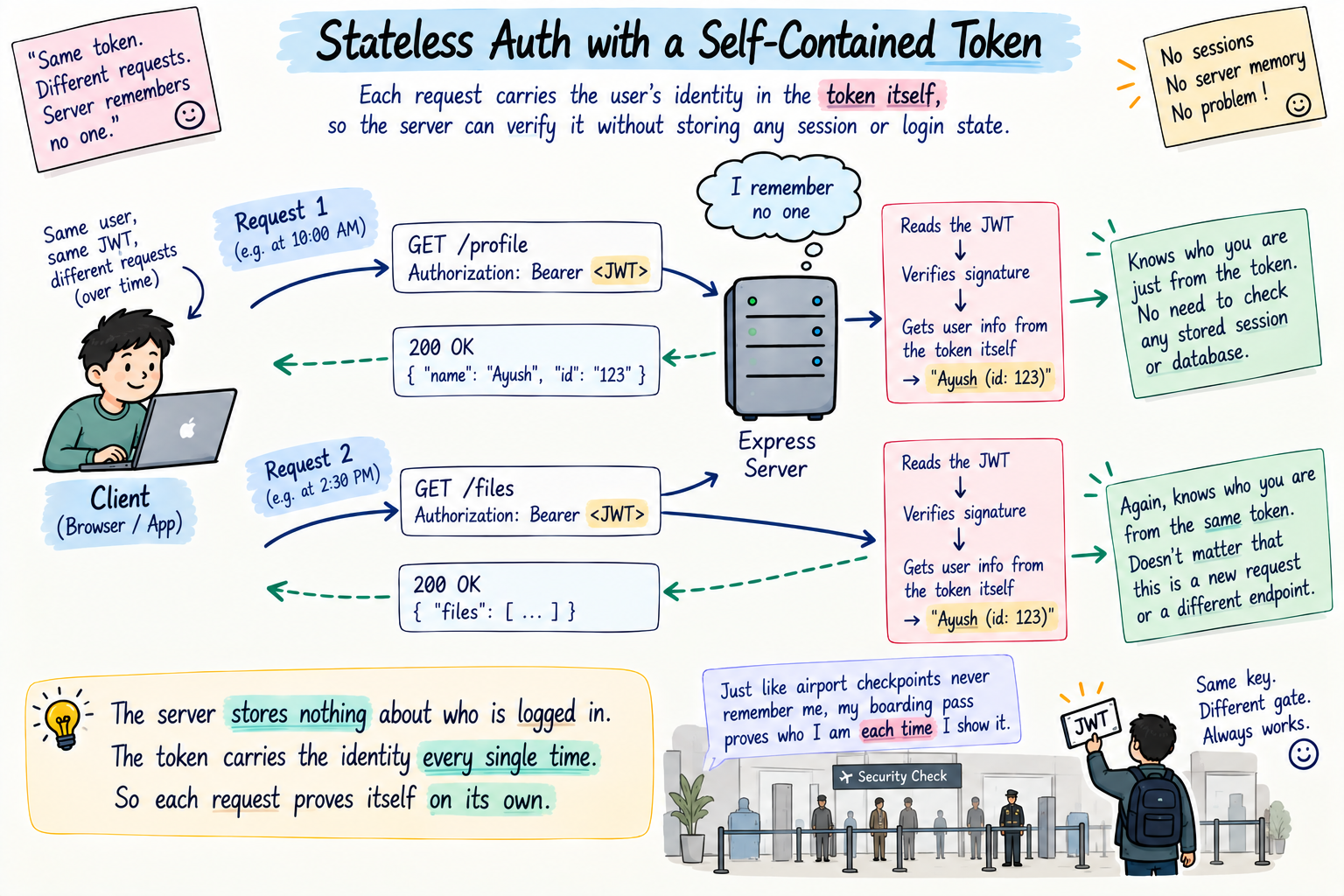
Here is the thing that makes authentication tricky. HTTP is stateless, meaning the server forgets you completely after every single request. Each request arrives like a total stranger, the server has no memory of the fact that you logged in a second ago.
So if you log in on one request, how does the very next request know it is still you? The guards at the Taj did not memorise my face, right. There are two ways to solve this. One, the server keeps a memory of everyone logged in, that is sessions, and I will cover that in the next post. Two, the client carries its own proof of identity on every request, a self-contained pass the server can instantly check, and that is JWT. My Taj key was exactly this, the checkpoints inside did not remember me, my key itself proved everything, every single time.
What a JWT actually is
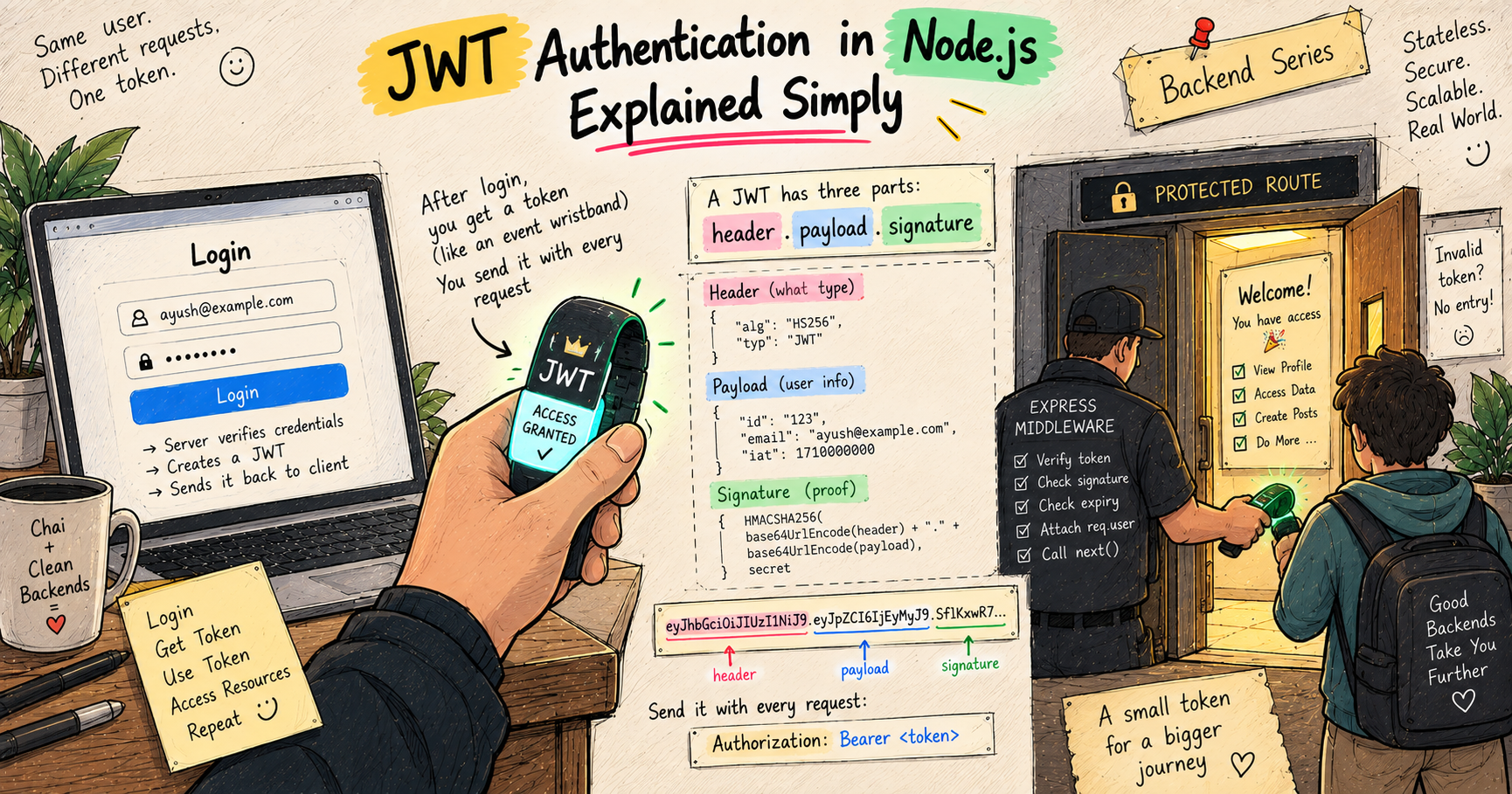
JWT stands for JSON Web Token. It is a signed token that the server gives you after you log in, and which you then send back with every future request to prove who you are.
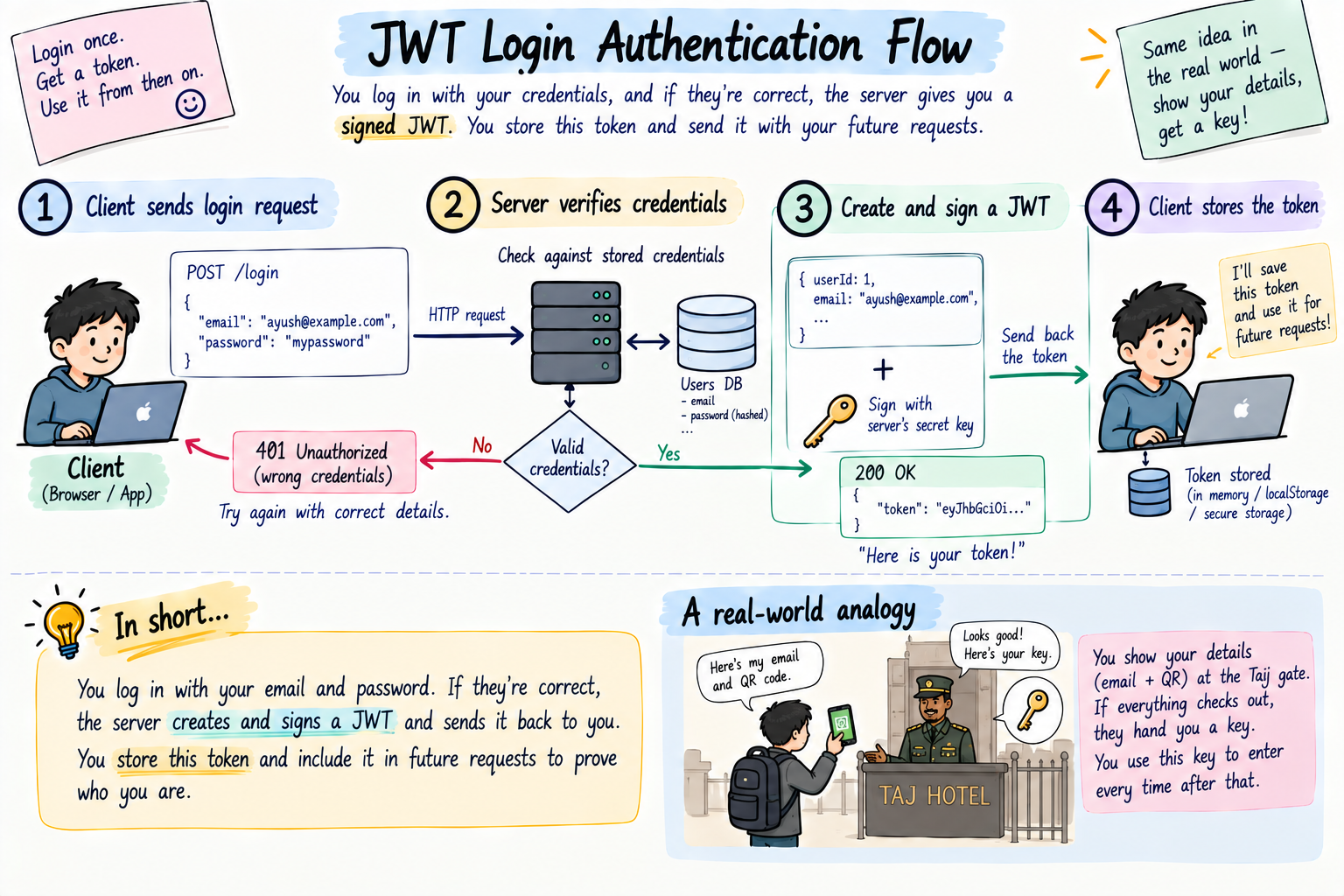
That is my Taj key with its unique token id. After the gate verified me once, the key became my proof for the whole evening. A JWT is that key, in digital form. The server hands it to you at login, and you flash it on every request after.
The two words that matter most are signed and self-contained. Self-contained means the token itself carries who you are inside it, so the server does not need to look you up anywhere. Signed means it is sealed in a way that cannot be faked or edited, exactly why the guards could not just issue a duplicate of my unique key. Let us open it up and see how.
The structure of a JWT: three parts
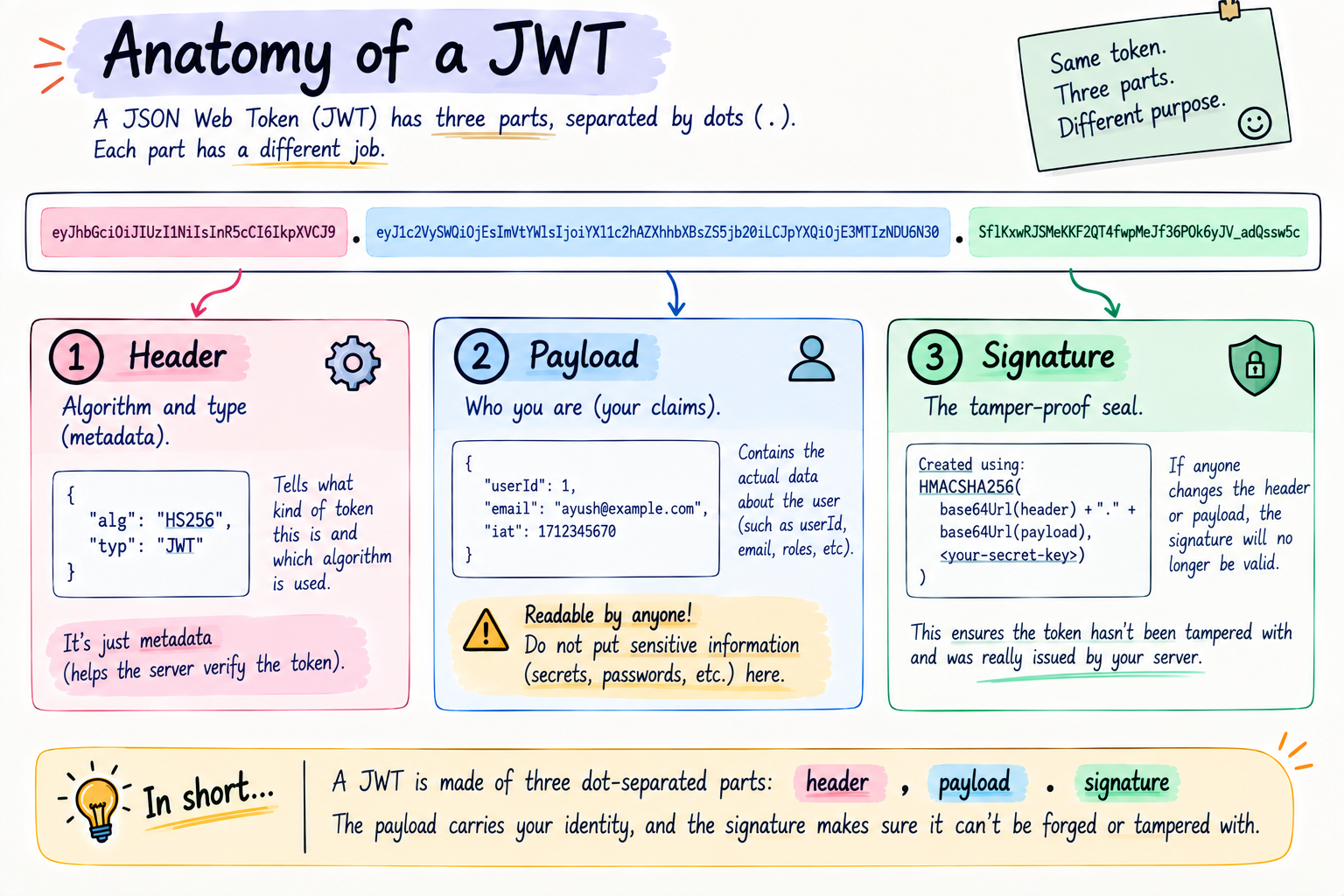
A JWT is one long string that looks a bit scary at first, but it is just three parts joined by dots.
xxxxx.yyyyy.zzzzz
   header . payload . signature
The header is small metadata, mainly which algorithm was used to sign the token. You rarely touch it directly.
The payload is the actual data, the claims, the useful stuff. This is where the server puts who you are, like your user id and email, maybe your role. This is what my key "carried", the fact that I was a verified guest allowed to access everything.
The signature is the tamper-proof seal. The server takes the header and payload, and signs them using a secret key that only the server knows. If anyone changes even one character of the token, the signature no longer matches, and the server instantly rejects it. This is exactly why my Taj key could not be duplicated or faked, only the hotel could make a real one.
One very important thing to burn in right now, and beginners get this wrong all the time. The payload is only encoded, not encrypted. Anyone who has the token can read the payload, it is just base64, easily decoded. The signature stops people from changing it, not from reading it. So never, ever put secret things like passwords inside a JWT payload.
The login flow: getting your token
Here is how a user actually gets a JWT. It is the gate at the Taj, in steps.
The user sends their credentials, email and password, to a login route. The server checks them against what it has stored. If they are wrong, it rejects with a 401, no entry. If they are right, the server creates a JWT, stuffs the user's id and email into the payload, signs it with its secret, and sends that token back to the client. The client saves it. Done, you are "inside," and that token is now your key for every future request.
Sending the token with every request
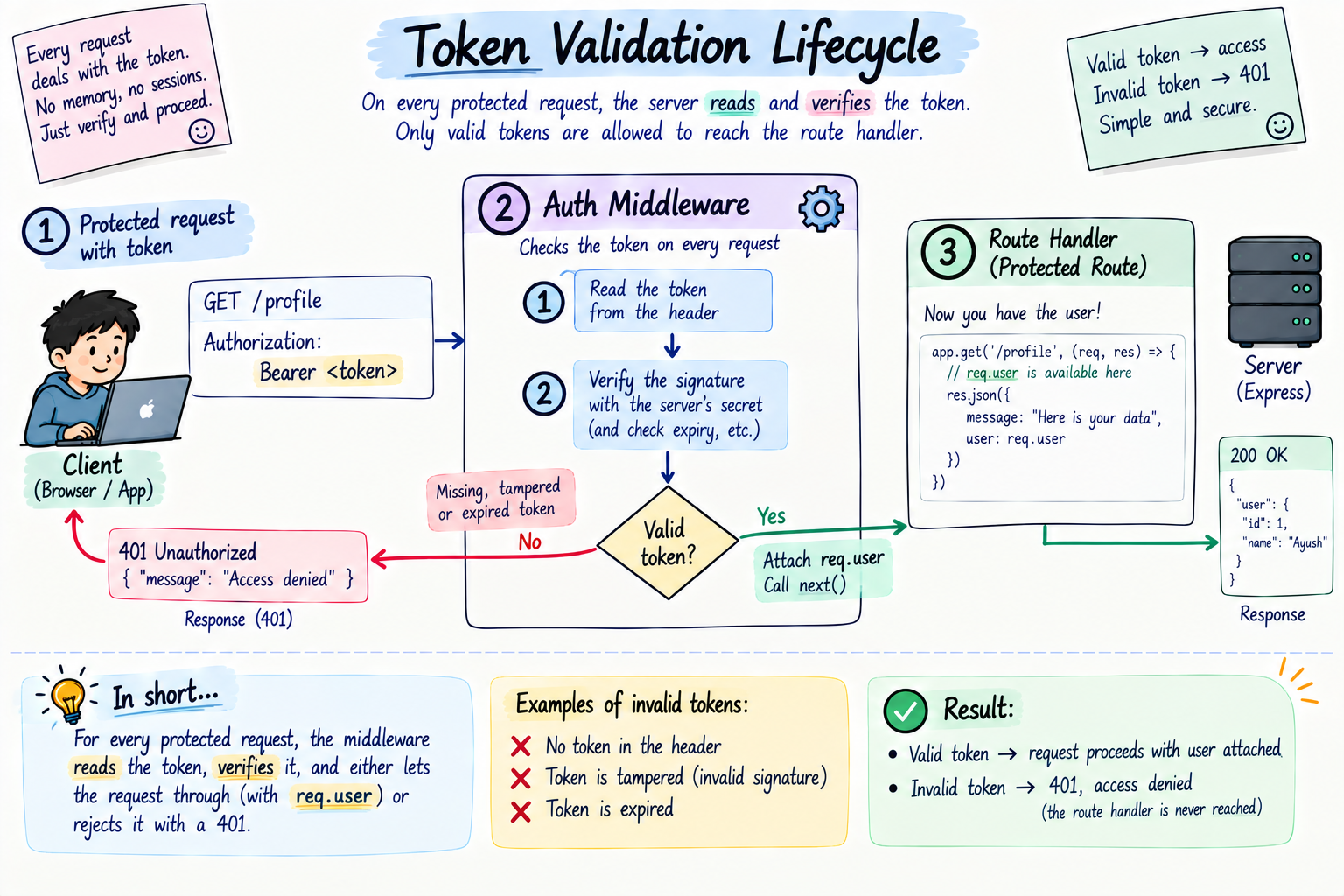
Once the client has the token, it sends it along on every request to a protected route, inside a header called Authorization, in the form Bearer <token>.
Authorization: Bearer eyJhbGciOi...
That is me flashing my key at every door inside the Taj. Every request that wants access carries the token, and the server checks it each time.
Protecting routes with the token
On the server side, protecting a route is a job for middleware, the exact idea from the middleware post. This auth middleware sits before your handler, reads the token from the Authorization header, and verifies its signature using the secret. If the token is valid, it lets the request through and even attaches the user's info onto the request, so your handler knows who is asking. If the token is missing, fake, or expired, it stops the request with a 401.
That is the checkpoint inside the Taj. Valid key, come in. No key, like when I got locked out, sorry, you cannot access anything. The middleware is the guard, the token is the key.
Building it in Express with TypeScript
Now the real thing, in TypeScript. We use a library called jsonwebtoken to create and verify tokens. Install it, along with its types.
npm install express jsonwebtoken
npm install -D typescript tsx @types/express @types/jsonwebtoken @types/node
Here tsx just lets us run a TypeScript file directly, and the @types packages give us type safety for the libraries. Now the code.
import express, { Request, Response, NextFunction } from "express";
import jwt from "jsonwebtoken";

const app = express();
app.use(express.json());

// in a real app, keep this in an environment variable, never in code
const SECRET = "my-super-secret-key";

// our "user", normally this would come from a database
const user = { id: 1, email: "ayush@example.com", password: "1234" };

// the shape of what we store inside the token
interface TokenPayload {
  userId: number;
  email: string;
}

// a request that may carry a logged-in user
interface AuthRequest extends Request {
  user?: TokenPayload;
}

// LOGIN: check credentials, then hand back a signed token
app.post("/login", (req: Request, res: Response) => {
  const { email, password } = req.body;

  if (email !== user.email || password !== user.password) {
    return res.status(401).json({ error: "Wrong email or password" });
  }

  const payload: TokenPayload = { userId: user.id, email: user.email };
  const token = jwt.sign(payload, SECRET, { expiresIn: "1h" });
  res.json({ token });
});

// MIDDLEWARE: the guard that checks the key
function auth(req: AuthRequest, res: Response, next: NextFunction) {
  const header = req.headers.authorization;      // "Bearer <token>"
  const token = header?.split(" ")[1];

  if (!token) {
    return res.status(401).json({ error: "No token, please log in" });
  }

  try {
    const decoded = jwt.verify(token, SECRET) as TokenPayload;
    req.user = decoded;                          // attach who they are
    next();
  } catch {
    return res.status(401).json({ error: "Invalid or expired token" });
  }
}

// PROTECTED route: only reachable with a valid token
app.get("/profile", auth, (req: AuthRequest, res: Response) => {
  res.json({ message: `Welcome, ${req.user?.email}`, userId: req.user?.userId });
});

app.listen(3000, () => console.log("Server on http://localhost:3000"));
Read the whole flow. The /login route is the gate, it checks your email and password, and if they match, jwt.sign creates a signed token carrying your id and email, valid for one hour, and sends it back. The auth middleware is the guard inside, it pulls the token out of the Authorization header, and jwt.verify checks the signature against the secret, if it is valid, it decodes who you are, attaches it to req.user, and waves you on, otherwise it is a 401. And /profile is a protected room you can only enter with a valid key. Notice how TypeScript makes req.user a proper typed thing, so your handler knows exactly what is inside the token, no guessing. That is the TypeScript payoff we talked about way back.
Try it yourself
Do not just read it, khud karke dekho. Make a folder, run the two install commands above, put the code in index.ts, and run it with npx tsx index.ts.
# 1. log in to get a token (copy the token from the response)
curl -X POST http://localhost:3000/login -H "Content-Type: application/json" -d '{"email":"ayush@example.com","password":"1234"}'

# 2. hit the protected route WITHOUT a token, you get blocked
curl http://localhost:3000/profile

# 3. hit it WITH the token (paste the one you got in step 1)
curl http://localhost:3000/profile -H "Authorization: Bearer PASTE_TOKEN_HERE"
Watch it. Login gives you a token. Calling /profile with no token gets a 401, that is me locked out at the Taj. Calling it with the real token lets you in and greets you by name. And for fun, change one character in the token and try again, the signature breaks and you are rejected, proof that it cannot be faked.
Security, the part you must respect
JWT is powerful, but a few rules keep it safe, and each one has a Taj parallel.
Keep the secret truly secret. The whole system rests on that signing secret. If it leaks, anyone can forge valid tokens, like someone stealing the hotel's key machine. Keep it in an environment variable, never commit it to code.
Never put sensitive data in the payload. Remember, the payload is readable by anyone. Put an id and an email, fine. Never a password or anything private. Assume the whole world can read your payload, because they can.
Always set an expiry. We used expiresIn: "1h". Tokens should expire so a stolen one does not work forever, just like my Taj key was only good for that one evening, not for life.
Use HTTPS. Send tokens only over HTTPS (HyperText Transfer Protocol Secure, the encrypted version of HTTP), so nobody can sniff the token off the wire in transit.
Store it carefully on the client. Where the browser keeps the token matters for safety, and there are trade-offs, which is a topic on its own, but the short version is, treat the token like a real key, guard it.
Two questions everyone asks
Two things always come up the moment JWT clicks, so let me answer them straight.
What happens when the token expires? Bas, simple, the user logs in again and gets a fresh one, exactly like my Taj key would have been useless the next morning. But making a user log in every single hour is annoying, so real apps hand out a second, longer-lived token called a refresh token, whose only job is to quietly fetch a new access token in the background without you typing your password again. That is its own proper topic, par ab tumhe word pata hai.
And how do you even log out? Here is the twist of being stateless, the server never stored your token, so it cannot just cancel it. Logging out simply means the client throws its token away. Gaya token, gaya access, you can no longer prove who you are, done. For tighter control, apps keep short expiry times and sometimes a server-side blocklist of killed tokens, but the basic idea stays, delete the token and you are logged out.
The mistakes that will trip you up
The classic JWT traps.
Hardcoding or committing the secret. Putting the secret in your code and pushing it to GitHub. Now anyone can forge tokens. Use an env variable.
Putting secrets in the payload. Thinking the payload is hidden. It is not, it is just encoded. Never store anything private there.
Forgetting to verify. Just decoding a token instead of verifying its signature. Decoding reads it, verifying proves it is real. Always jwt.verify, never trust a token you have not verified.
No expiry. Issuing tokens that never expire, so a leaked one is dangerous forever. Always set expiresIn.
Mishandling the header format. Forgetting the token comes as Bearer <token>, and trying to verify the whole "Bearer eyJ..." string. Split on the space and take the second part.
Quick reference, bookmark this bit
The whole post in a thirty-second scan.
JWT stands for JSON Web Token. After login the server gives the client a signed token, the client sends it on every request, the server verifies it. It has three dot-separated parts: header, payload (readable, so no secrets), and signature (tamper-proof).
// issue a token at login
const token = jwt.sign({ userId: 1, email }, SECRET, { expiresIn: "1h" });

// verify it in an auth middleware
const decoded = jwt.verify(token, SECRET) as TokenPayload;

// client sends it as a header
// Authorization: Bearer <token>
| Step | What happens |
|---|---|
| Login | Check credentials, jwt.sign a token, send it back |
| Each request | Client sends Authorization: Bearer <token> |
| Protected route | Middleware runs jwt.verify, valid = next(), invalid = 401 |
The rules worth memorizing. Log in once, get a signed token, send it on every request, the server verifies it, stateless. Three parts: header, payload, signature. The payload is readable, so never put secrets in it. Keep the signing secret in an env variable. Always set an expiry. And verify the token, never just decode it.
Wrapping up
So that is JWT authentication. Because HTTP forgets you after every request, you need a way to prove who you are each time without logging in again and again. A JWT is that proof, a signed, self-contained token the server hands you at login, that you flash on every request after. It has three parts, a header, a readable payload with your identity, and a tamper-proof signature, and a middleware verifies it on every protected route, letting valid tokens in and blocking the rest with a 401.
That was my whole Taj evening. I proved myself once at the gate, got a unique key that could not be faked, and used it to access everything inside without proving myself again. And the moment I lost it, I was locked out of everything, and nobody could just hand me a fake replacement, because it was truly mine. Treat your users' tokens exactly like that key, and you have got real authentication.
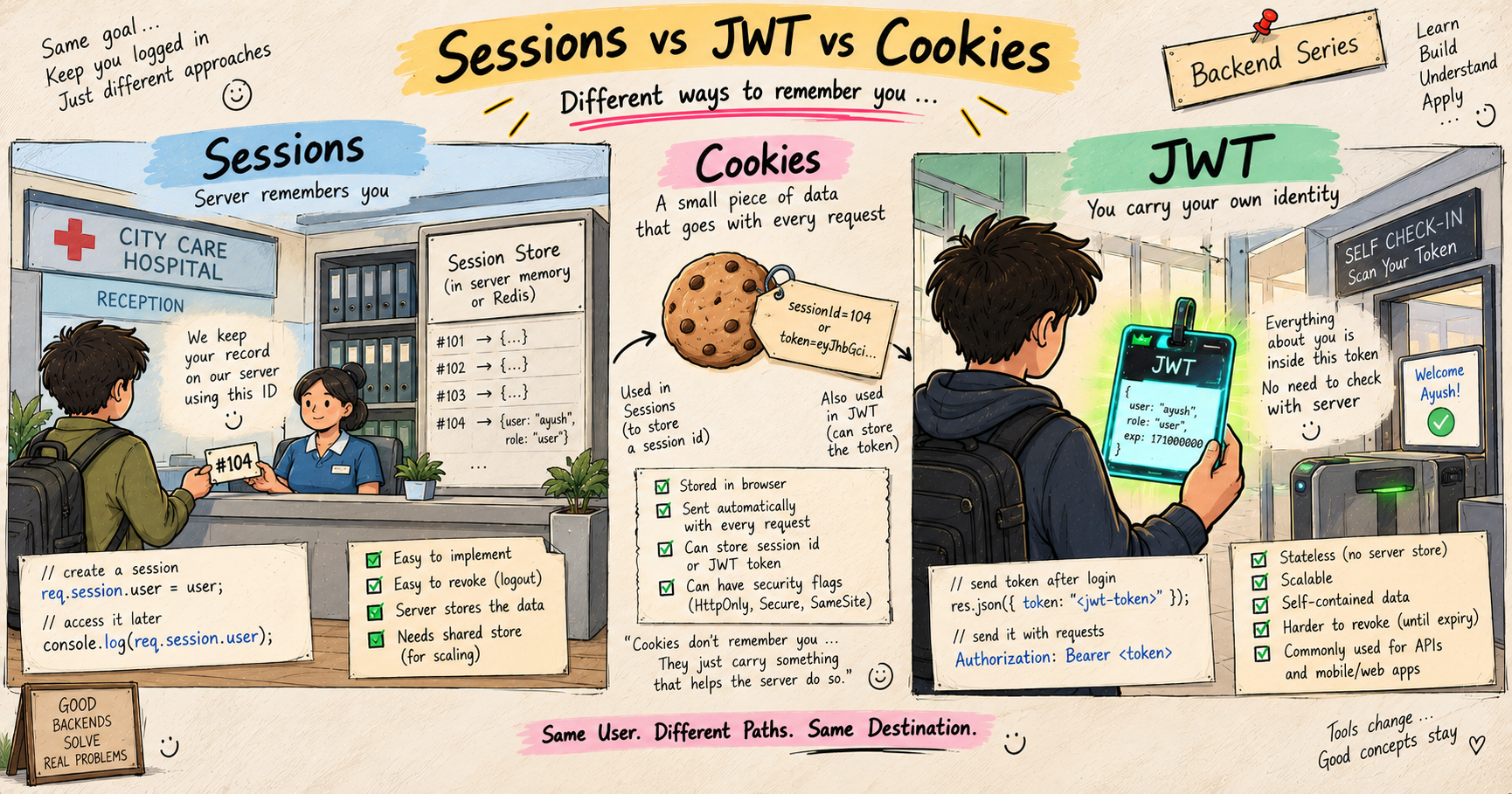
Next up, JWT is one way to stay logged in, but it is not the only one. We compare it with the older, server-side approach and the little pieces that carry it, in my next post, Sessions vs JWT vs Cookies, Understanding Authentication Approaches.
I hope you enjoyed reading this.