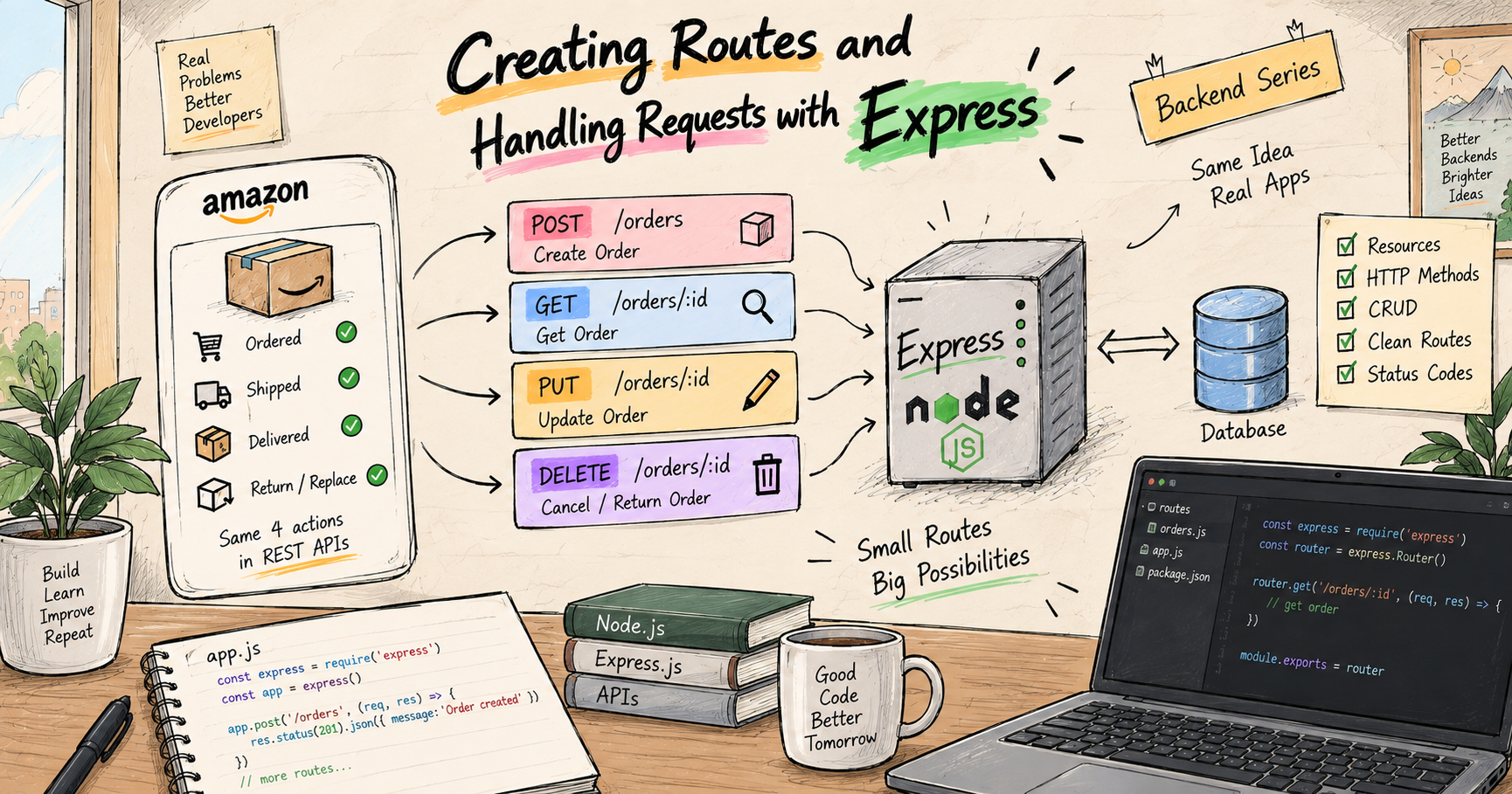
Creating Routes and Handling Requests with Express
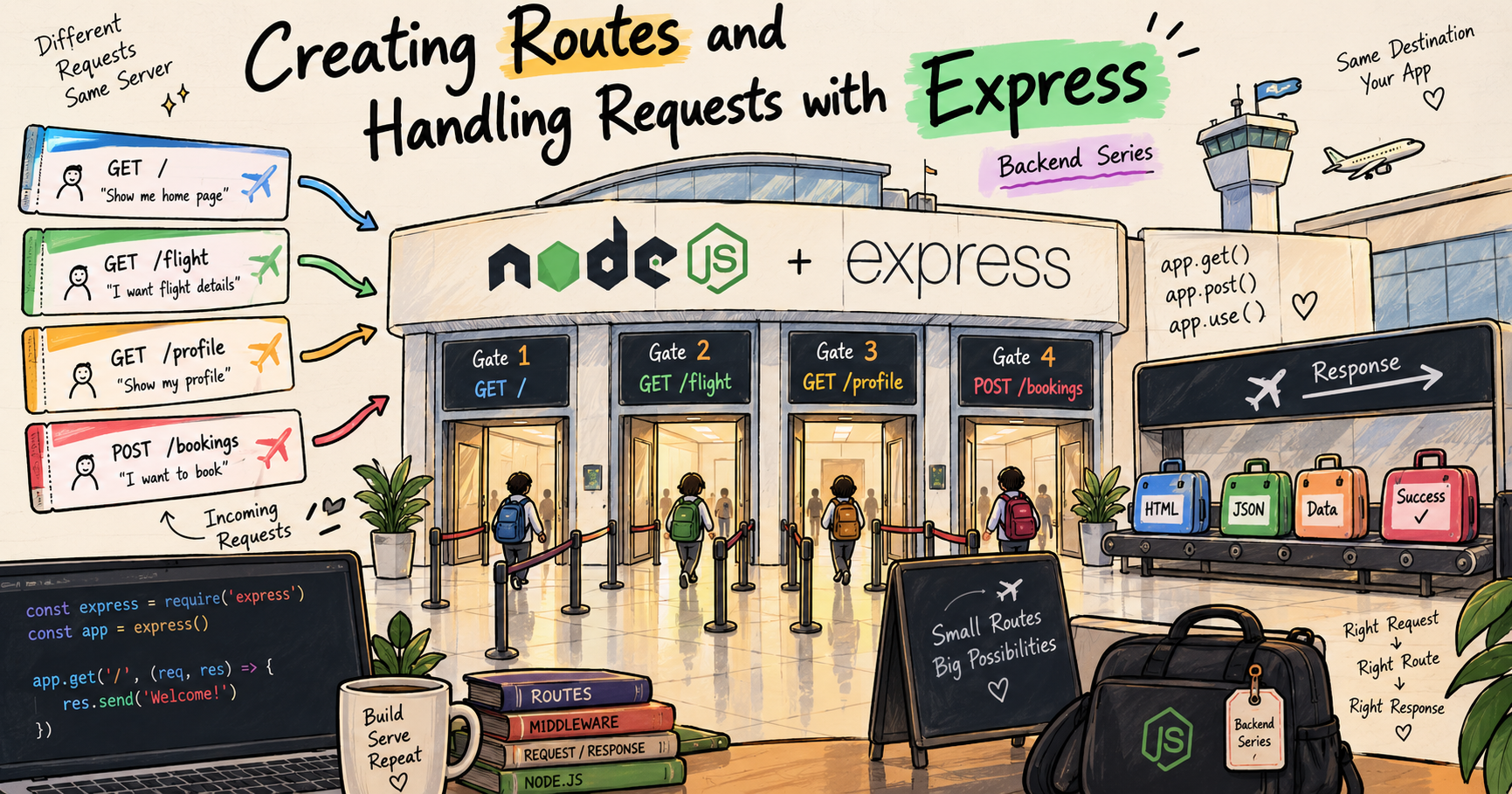
I like making things with code. This is where I share my projects and the bugs I ran into.
A few months back I took my first ever flight, Jaipur to Bangalore, to attend an event I was genuinely excited about. Chalo, finally ab jaana hai, maza aayega, that was the whole mood.
Here is what stayed with me about the airport. I have a Samsung phone, and my boarding pass was sitting in Samsung Wallet, which just handed me everything I needed without me hunting for it, my gate number, my timing, all of it, right there. And the airport itself was one long chain of signs. I followed the symbols and the little navigation maps pasted on the walls, and they walked me straight to my exact gate, on time, well before departure. I did not have to ask a single person "bhaiya ye gate kidhar hai." The address on my pass, plus the signs, did all the routing for me.
Then came the one bump I did not expect. At the gate I pulled out my documents to get checked, and like always I opened DigiLocker to show the digital versions. But they flatly refused, they wanted real paper documents, not digital. I was properly annoyed, arre yaar ye kya hai. We went back and forth for a good fifteen minutes, until a senior walked over and said, "sir, you can go, everything is okay from your side, sorry for the inconvenience." Bas, cleared, and I was on my flight.
I keep coming back to that day because it is almost exactly how a web server works. Something arrives with an address, it gets routed to the one desk that handles it, and it gets a response back, sometimes a yes, sometimes a no. Express is the tool that gives your server all of that, the signs, the desks, the routing, cleanly.
This is the first post of my backend series, so I am going to build the whole foundation from the ground up. If you are in your first year and have never written a line of backend code, you are exactly who I am writing this for. By the end, you will understand what a server really is, and you will be able to write your own, add routes, handle requests, and send responses back, without that quiet fear that you skipped something important. Chalo shuru karte hain.
What even is a backend
Let us start from zero, because half the confusion in backend comes from nobody explaining this plainly.
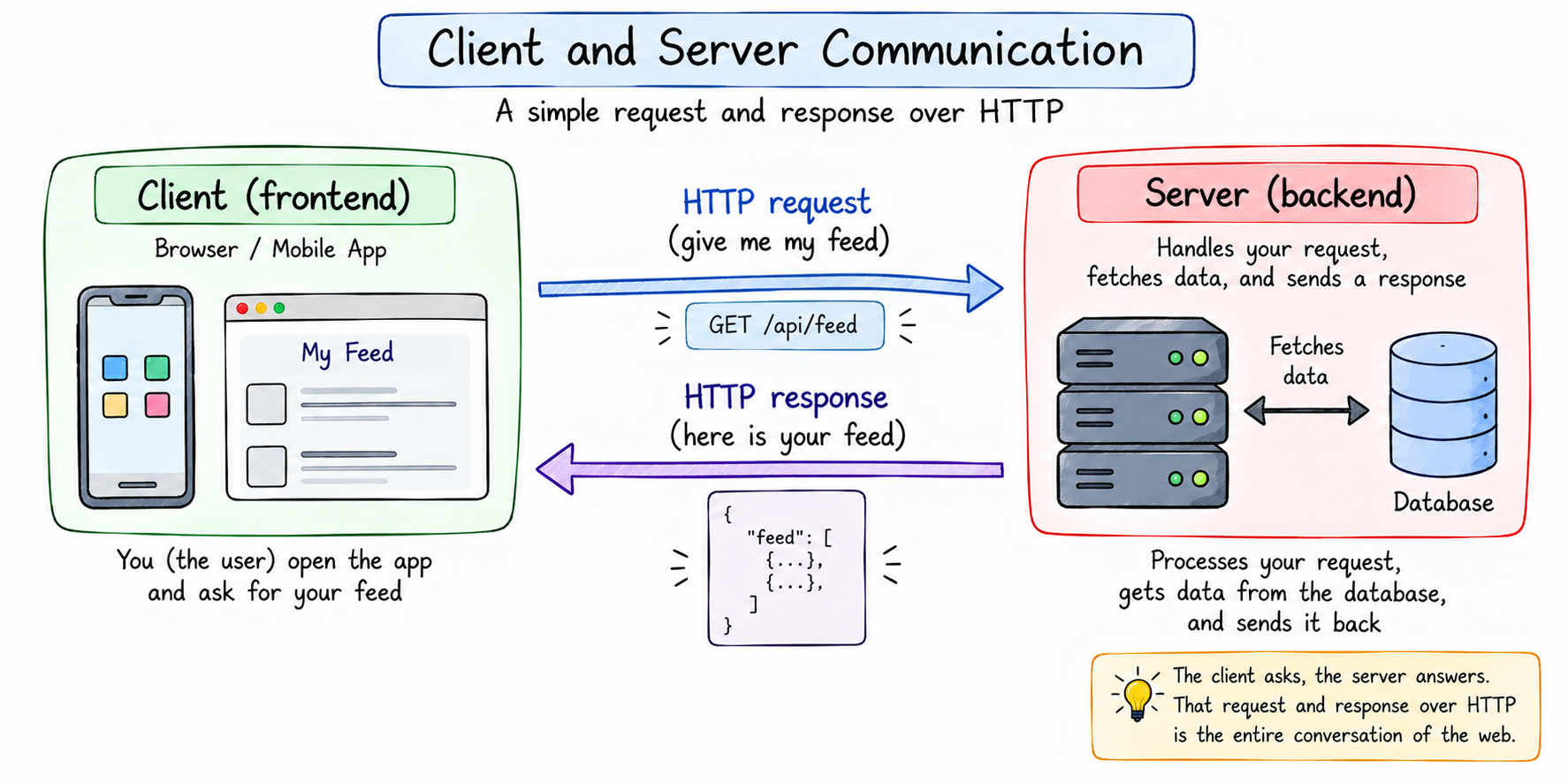
Whenever you use any app, two computers are talking to each other. The one in your hand, running the app or the website, is called the client. The other one, sitting somewhere in a data center, holding all the data and doing the real work, is called the server. The client asks, the server answers.
Open Instagram and your phone (the client) says to Instagram's server, "give me my feed." The server looks up your feed and sends it back. Tap like, and the client tells the server, "save this like." The server saves it and replies "done." That back and forth, all day, for millions of people, is the whole game. The frontend is everything the client shows you. The backend is that server, the part that listens to requests, does the work, talks to the database, and sends answers back. That is the world we are stepping into.
And the language they talk in is called HTTP. You do not need to study it deeply right now, just know that every time a client wants something from a server, it sends an HTTP request, and the server replies with an HTTP response. Two things. Request, response. Hold that tight, because everything else is built on it.
The one loop that runs everything
Strip away all the jargon and a web server does exactly one thing, forever, on a loop. It waits for a request, and it sends back a response.
That is the entire job. A request is someone asking for something, open this page, give me this data, here is a new booking to save. A response is what the server sends back, the page, the data, a confirmation. Request in, response out, again and again, for every user, all day long.
The airport gate is the same loop. A passenger walks up (a request), the desk deals with exactly what they came for (handling it), and sends them onward with an answer (a response). A server is a gate desk that never sleeps. Keep this picture in your head for the rest of the post, because every single thing we write is just one piece of this loop.
What a request and a response are actually made of
Before we touch code, let us open up a request and a response and see their parts, because once you can see them, nothing later feels mysterious.
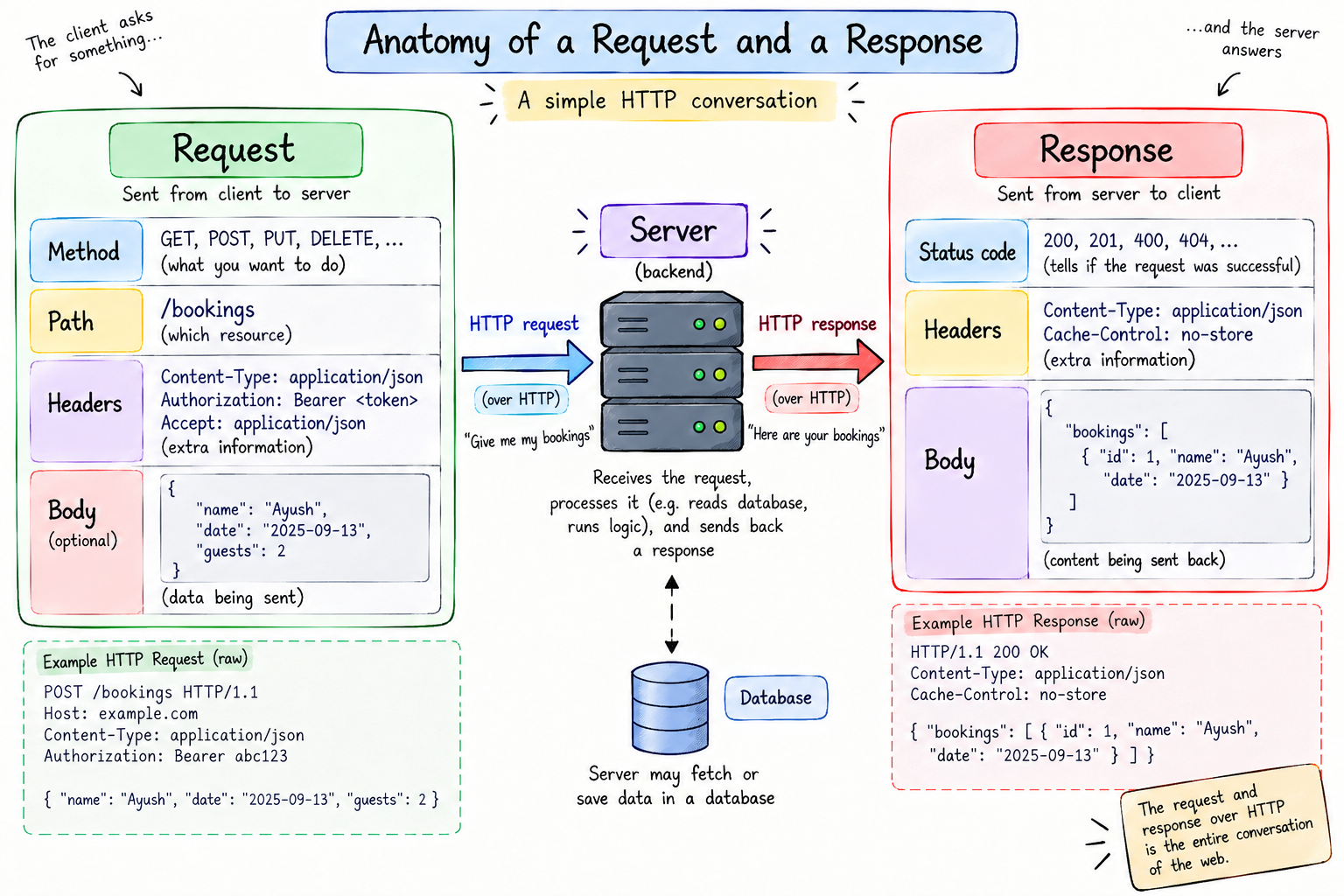
A request has a few pieces:
The method, which is what kind of action you want. GET means "give me something." POST means "here, take this and save it." There are a few more like PUT and DELETE, and we will meet them properly in the next post, but GET and POST are the two you will use constantly.
The path, which is the address, like /flight or /bookings. This is the gate number, it says which specific thing you are asking about.
The headers, which are little bits of extra info about the request, like what format the data is in. You mostly do not worry about these early on.
And sometimes a body, which is the actual data being sent. A GET usually has no body, it is just asking. A POST carries a body, the new information you want to save.
A response has parts too. A status code, a small number that says how it went (200 means okay, 404 means not found, and we will cover these fully soon). Some headers. And a body, the actual content sent back, the page or the data.
So a full exchange is just, the client sends a method plus a path plus maybe a body, and the server sends back a status code plus a body. That is it. That is a conversation on the web. Now let us learn to run the server side of it.
Node can do this, but painfully
Node.js lets you write a server in plain JavaScript, no extra tools needed. You actually saw this shape back in my single thread post.
const http = require("http");

const server = http.createServer((req, res) => {
  // every single request, of every kind, lands right here
});
See the trap hiding in that comment? Every request, no matter its path or method, falls into that one function. There are no signs and no gates, so you are forced to sort out every passenger by hand. Watch how fast that turns ugly with even a couple of pages.
const http = require("http");

const server = http.createServer((req, res) => {
  if (req.url === "/" && req.method === "GET") {
    res.writeHead(200, { "Content-Type": "text/plain" });
    res.end("Home page");
  } else if (req.url === "/about" && req.method === "GET") {
    res.writeHead(200, { "Content-Type": "text/plain" });
    res.end("About page");
  } else {
    res.writeHead(404, { "Content-Type": "text/plain" });
    res.end("Not found");
  }
});

server.listen(3000, () => console.log("Server on http://localhost:3000"));
Look at everything you are doing by hand. Checking req.url yourself to know the page. Checking req.method yourself to know GET or POST. Setting headers yourself with writeHead. And a giant if-else ladder that grows one more branch for every page you add. This is an airport with one overwhelmed guard and no signage, personally asking every passenger "where are you going, and what do you want." It survives a toy app. It collapses the moment your app is real. There has to be a cleaner way, and there is.
What Express is, and why it exists
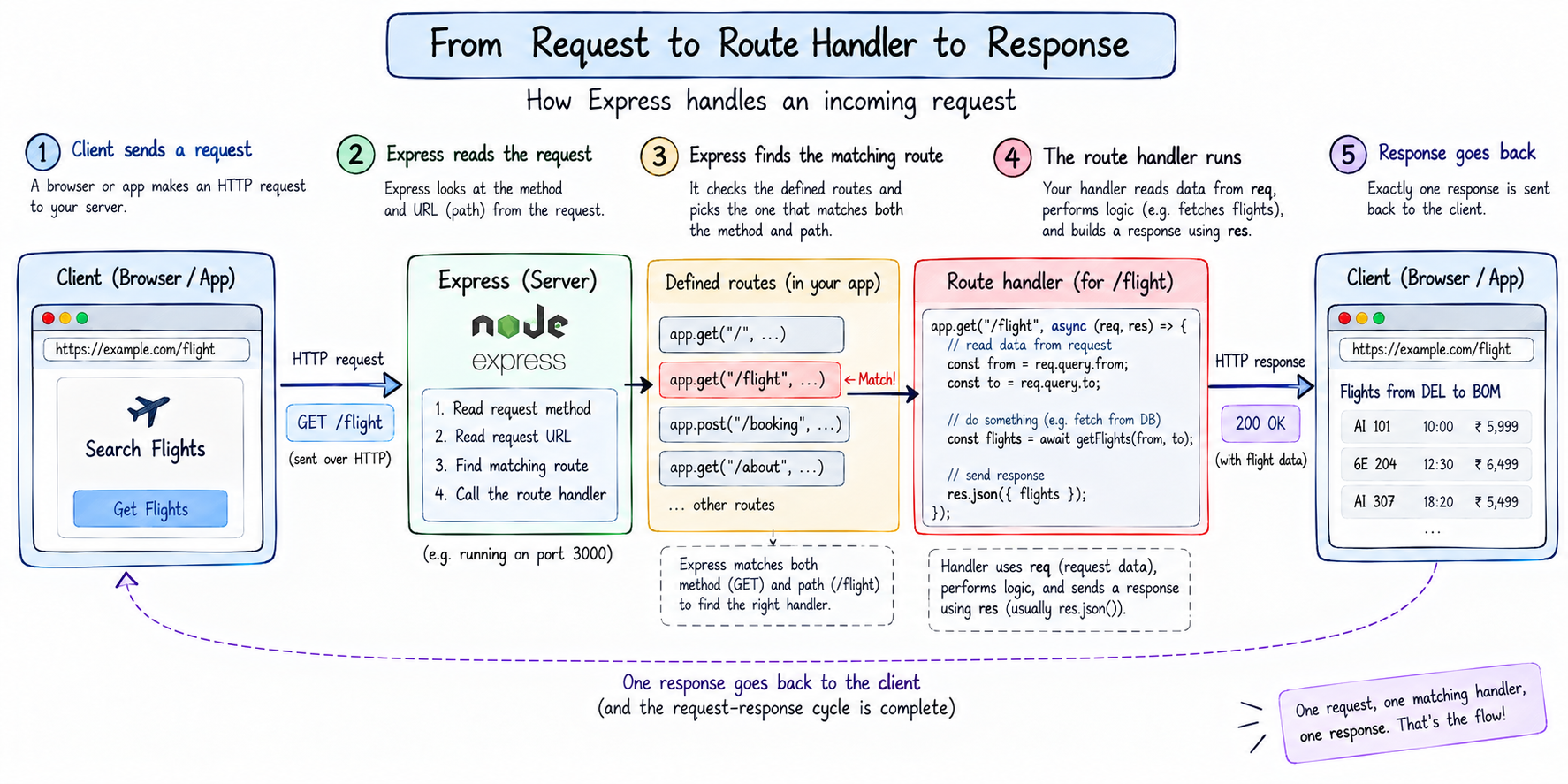
Express is a small framework that sits on top of Node and does all that tedious sorting for you. It is the signage, the navigation maps, and the front desk that raw Node was missing.
The whole idea is this. Instead of one giant function where you manually inspect every request, Express lets you declare, in plain words, "when a GET request comes to this address, run this specific function." Express reads the method and the URL for you and routes each request to the exact handler you wrote for it, exactly like the airport signs walking me to my gate without me asking anyone. You write far less code, and what you do write reads like what it means.
Here are those same pages, now in Express.
const express = require("express");
const app = express();

app.get("/", (req, res) => {
  res.send("Home page");
});

app.get("/about", (req, res) => {
  res.send("About page");
});

app.listen(3000, () => console.log("Server on http://localhost:3000"));
Feel that difference in your gut. No if-else ladder. No manual URL checking. No fiddling with headers, res.send handles them. Each address gets its own clean, named handler. Bahut saaf. That is the entire reason Express exists, it takes Node's raw, do-it-all-yourself handling and gives it structure. Now let us build one from absolute zero, slowly, so nothing feels like magic.
Setting up your project
You need Node installed on your machine first. You can check by running node -v in your terminal, if it prints a version number, you are set. If not, install it from the Node website, it is a two-minute thing. Installing Node also gives you npm, its package manager, which is simply the tool you use to install code libraries like Express into your project.
Now make an empty folder and run two commands inside it.
npm init -y
npm install express
The first command creates a file called package.json. Think of it as your project's ID card, it tracks your project's name and, importantly, the list of tools it depends on. The second command downloads Express into your project and notes it in that package.json. You will now also see a node_modules folder, that is just where the downloaded code lives, you never touch it by hand. Setup ho gaya.
Your first server, line by line
Make a file called index.js and write the smallest server that exists.
const express = require("express");
const app = express();

app.get("/", (req, res) => {
  res.send("Welcome to my first Express server");
});

app.listen(3000, () => {
  console.log("Server on http://localhost:3000");
});
Let us read this slowly, because these lines are the skeleton of every Express app you will ever write.
The first line pulls Express into your file. The second calls it to create an app. That app is your entire server, the whole airport, and every route and setting you add hangs off it.
Now jump to the bottom, app.listen(3000, ...). This is the line that actually switches the server on and opens the airport for business. "Listening" means the server is now awake and sitting there, waiting for requests to arrive, that request-and-response loop is now live. That 3000 is the port. Your computer has many numbered doors, and a server picks one to stand behind and wait. 3000 is just a common pick for development, you could use 5000 or 8080, koi farak nahi padta, as long as nothing else is already using that number. The little function runs once the door is open, giving you a friendly confirmation in the terminal.
In between sits your first route, which is the real work. Run the whole thing with node index.js, open http://localhost:3000 in your browser, and your message shows up. That localhost simply means your own computer, and :3000 is the door you told the server to wait at. A live server, in about eight lines. Ab isko dhang se samajhte hain.
Meet req and res
Every route handler is handed two things, req and res. Nearly everything you do in a server is reading from one and writing to the other, so let us actually get to know them instead of treating them as magic words.
req is the request, everything about what the client is asking for. And here is the quiet gift Express gives you, it has already read and neatly organised that request. The path they hit, the method they used, any data they sent, it is all sitting on req, tidy and ready to use. This is the Samsung Wallet moment. Just like my wallet surfaced my gate number without me digging through PDFs, Express hands you a clean req object instead of making you parse a raw request by hand like plain Node did.
res is the response, your channel to send something back. When you call res.send(...), you are handing the passenger their answer and closing the loop. One rule to burn in early, every request must end with exactly one response. Send one, and only one, and the cycle is complete. Send zero and the client hangs there waiting forever. Send two and you get an error. One request, one response, always.
Handling GET requests
A GET request is a request to fetch, to read, to just look at something. Opening a page, checking an arrivals board, looking up your gate, loading a profile, all GET. It is by far the most common thing a server does, so most of your routes will be GETs.
You handle a GET with app.get, giving it two things, the address and the function to run when someone hits it.
app.get("/flight", (req, res) => {
  res.json({ from: "Jaipur", to: "Bangalore", gate: "A12" });
});
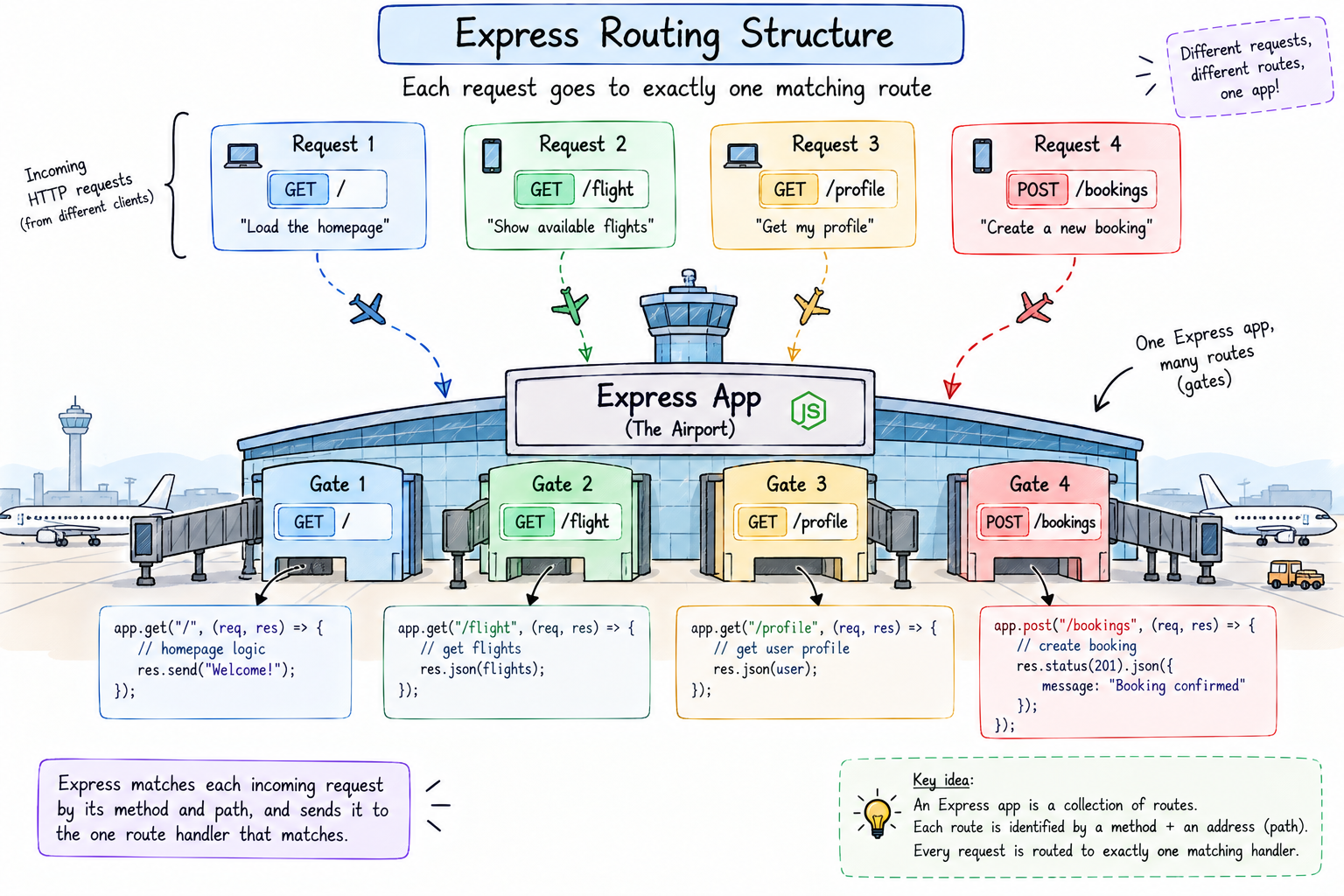
That /flight is the route, the address, the gate number on your pass. When a GET request comes in for /flight, Express routes it straight to this one handler and runs nothing else.
Notice I used res.json here, not res.send. Both send a response, but they are for different things. res.send is for plain text or simple HTML. res.json sends back a proper JSON object, which is what real apps and frontends actually want, structured data they can work with. If JSON is new to you, it is just a simple way of writing data as key and value pairs, almost identical to a JavaScript object, and it is the standard format that data travels in across the web. As a beginner rule of thumb, sending data, use res.json, sending a quick text message, use res.send.
And that is genuinely all a GET route is. An address, and a function that sends something back when that address is asked for. You can add as many as you like, each fully independent.
Many routes, one clean structure
Real apps are not one route, they are many, sitting side by side. Each one is its own gate, and Express is the signage sending every request to the correct one.
app.get("/", (req, res) => res.send("Home"));
app.get("/flight", (req, res) => res.send("Flight details"));
app.get("/profile", (req, res) => res.send("Your profile"));
Three addresses, three handlers, zero if-else. A request for /profile runs only the profile handler and never touches the others. This is what scales so beautifully, adding your tenth or your hundredth route is just one more clean line, not one more branch in a swelling ladder. That is the whole difference between an airport with proper gates and one confused guard doing everything.
Handling POST requests
If GET is fetching, POST is submitting. You are sending data to the server so it can create or store something. Checking in your bag, handing over documents at the counter, submitting a signup form, booking a ticket, all POST.
You handle it with app.post, and this time the client sends data along, which arrives on req.body. There is one setup line you need for this, placed near the top of your file, just once.
app.use(express.json());
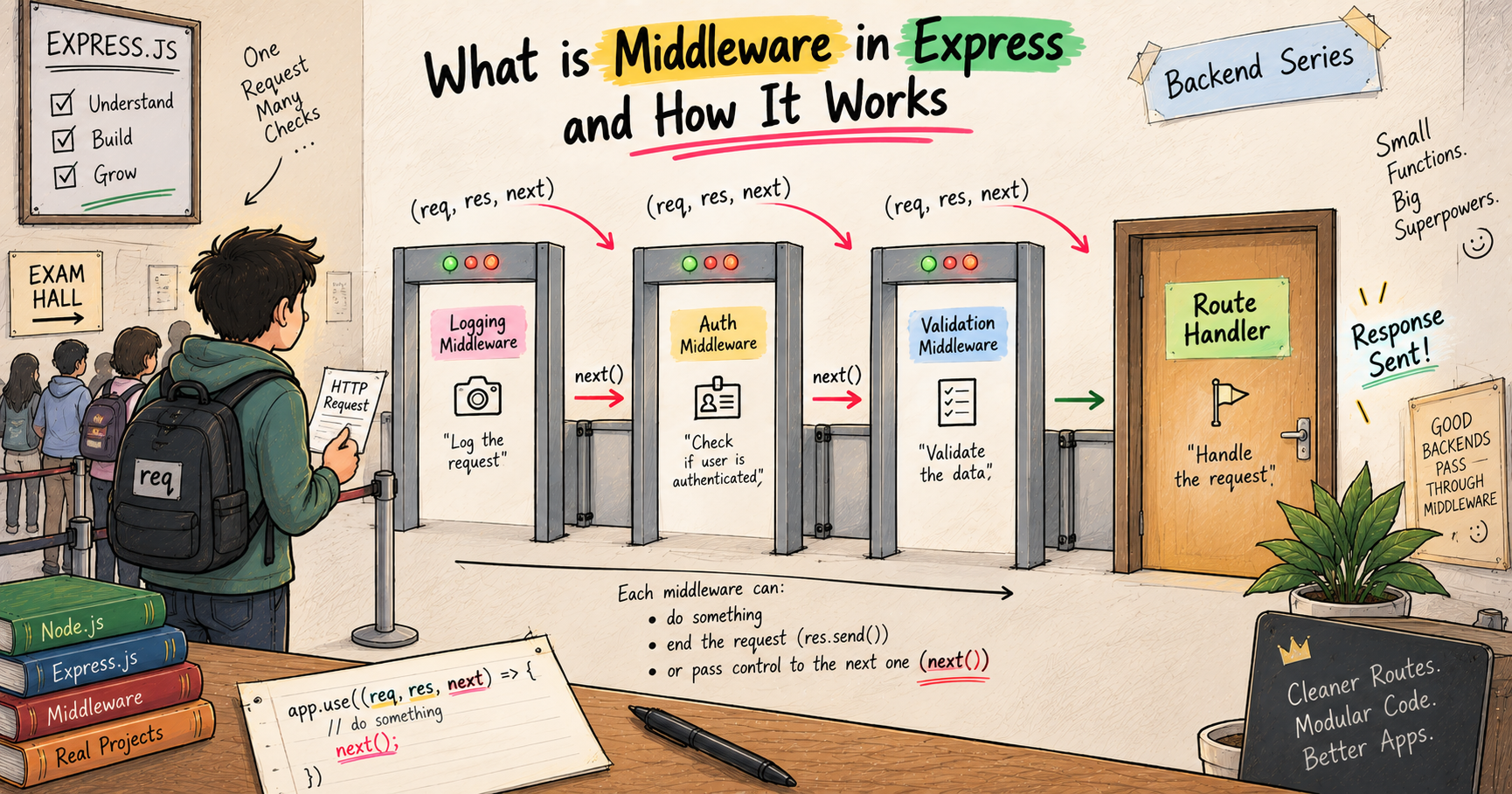
For now, read that as a single sentence, "let my server understand JSON data that clients send it." Without it, req.body comes up empty and you sit there confused wondering where your data went, a classic beginner trap, so put it in and move on. I will fully unpack what that line actually is, and the whole world it opens, in my post on middleware, it deserves its own space.
With that in place, a POST route looks like this.
const express = require("express");
const app = express();

app.use(express.json());

app.post("/bookings", (req, res) => {
  const booking = req.body;
  res.send(`Booking received for ${booking.name}`);
});

app.listen(3000, () => console.log("Server on http://localhost:3000"));
The client sends something like { "name": "Ayush" }, it lands on req.body, and we read req.body.name. Now here is a detail that trips up a lot of beginners, so lock it in. A GET to /bookings and a POST to /bookings are two completely different routes, even though the address is identical. Same as walking up to a counter to ask a question versus walking up to hand over your bag, same counter, totally different interaction. Express keeps them cleanly apart, app.get and app.post are separate gates even at the same path. So the method matters as much as the address does.
Sending responses back
Every request must end with a response, that is the server's whole purpose. Express gives you a few clean ways, and knowing which to use removes a lot of guesswork.
res.send("Just some text");               // plain text or simple HTML
res.json({ from: "Jaipur", to: "BLR" });  // structured JSON data
res.status(201).json({ message: "Created" }); // a response with a status code
res.send is your everyday text reply. res.json is what you will use most in real APIs. And res.status(...) attaches a status code, that little number telling the client how it went before they even read the body. You can chain it, res.status(201).json(...), which sends a "201 Created" along with the data.
This is exactly my document check at the gate. I made a request, handed over my papers, and the first response I got back was a rejection, digital was the wrong format. Then the senior stepped in and the response flipped to a yes, "sir, you can go." Same request, but a server can send back very different responses, a success or a rejection, and the status code is how it says which out loud. Just know for now, 200 is a plain okay, 201 means something was created, 404 means not found. I am giving status codes their full treatment in the very next post on REST API design, so I will keep it light here.
Putting it all together, a tiny real server
Now let us combine everything into one small server that actually feels alive, so you see how the pieces fit. We will build a mini booking server. It keeps a list of bookings, lets you view them with a GET, and lets you add one with a POST.
const express = require("express");
const app = express();

app.use(express.json());

// our "data" for now, just a list held in memory
let bookings = [
  { name: "Ayush", from: "Jaipur", to: "Bangalore" }
];

// GET: send back all bookings
app.get("/bookings", (req, res) => {
  res.json(bookings);
});

// POST: add a new booking
app.post("/bookings", (req, res) => {
  const newBooking = req.body;
  bookings.push(newBooking);
  res.status(201).json({ message: "Booking added", booking: newBooking });
});

app.listen(3000, () => console.log("Server on http://localhost:3000"));
Read what is happening. We keep a simple array called bookings. The GET route hands that whole list back as JSON. The POST route takes whatever the client sent on req.body, pushes it into the list, and replies with a 201 and the new booking. Hit the GET, you see the list. Send a POST, the list grows, and the next GET shows your new one sitting right there. And honestly, that first time you send a booking and watch it appear in the very next GET, chhoti si baat hai, but that is the exact moment backend stops being theory and starts feeling real. You just built something that remembers.
One honest note so you are not misled, this list lives in memory, which means it resets every time the server restarts. Real apps store data in a database so it survives, and that is exactly a later post in this series. For learning routes and requests, an in-memory array is perfect, it keeps the focus on the request handling, which is the skill right now.
How to actually test your server
A beginner question that often goes unanswered, how do I even send these requests to try them? Three easy ways.
For GET routes, your browser is enough. Type the address, http://localhost:3000/bookings, and hit enter. The browser always sends a GET, so you will see the response right there.
For POST routes, a browser address bar cannot help you, it can only send GETs. So you use a tool. The quickest from the terminal is curl.
curl -X POST http://localhost:3000/bookings -H "Content-Type: application/json" -d '{"name":"Rahul","from":"Delhi","to":"Goa"}'
That sends a POST with a JSON body, and you will get your 201 reply. If you prefer clicking over typing, install Postman, a free app made exactly for this, where you pick the method, type the address, paste your JSON, and hit send. Many beginners find Postman far friendlier than curl, so use whatever feels good. The point is just to send requests and watch your server answer.
Living with your server day to day
Two small realities that will save you from silent, hair-pulling confusion.
First, when your server is running with node index.js and you change your code, the running server does not update on its own. It is still running the old version in memory. You have to stop it, Ctrl + C in the terminal, and run node index.js again to see your change. If you are doing that fifty times an hour, install a tool called nodemon, which watches your files and restarts the server automatically. Not needed to learn anything here, just a comfort thing.
Second, if you visit an address you never made a route for, Express automatically sends back a "Cannot GET /whatever" with a 404. That is not a bug in your code, it just means no gate matched, exactly like walking to a gate that does not exist. Totally normal, and good to recognise so it never scares you.
The mistakes that will trip you up (and how to fix them)
Every single beginner hits these. Knowing them in advance is half the confidence.
Your data is undefined on a POST. You read req.body.name and get undefined or a crash. Ninety percent of the time you forgot app.use(express.json()) near the top. Add it, restart, done.
"Cannot set headers after they are sent to the client." This scary error just means you sent two responses in one handler. Remember the rule, one request, one response. Check for something like this.
app.get("/", (req, res) => {
  res.send("Hi");
  res.send("Bye"); // error, you already responded above
});
Fix it by making sure each path through your handler sends exactly one response.
"EADDRINUSE, address already in use." This means something is already running on port 3000, often an old server you forgot to stop. Either stop that old one, or change your port number to something else like 4000.
Nothing happens when you hit a route. Usually the method is wrong, you set up app.post but are hitting it with a browser, which sends a GET. Match the method to how you are testing.
None of these mean you are bad at this. They are rites of passage, and now you already know the fixes.
Try it yourself
Do not just read it, khud banao, this is where it truly clicks. Make a folder, run npm init -y and npm install express, and drop the booking server from above into index.js. Run it with node index.js.
Then play, properly. Open http://localhost:3000/bookings in your browser to see the list. Send a POST with curl or Postman to add your own booking, then refresh the browser and watch it appear. Now push yourself a little, add a / route that sends a welcome message, add a GET /count that returns how many bookings exist with res.json({ total: bookings.length }), and deliberately hit a route you never made to see the 404. Break things on purpose, read the errors, fix them. That loop, write, run, test, fix, is the actual job, and doing it a few times is what turns this from words on a screen into a skill in your hands.
Quick reference, bookmark this bit
Here is the entire post squeezed into something you can scan in thirty seconds. Whether you are revising before an interview or just forgot a detail mid-project, come straight back here.
The skeleton of every Express server.
const express = require("express");
const app = express();
app.use(express.json());              // needed to read JSON bodies

app.get("/path", (req, res) => {      // fetch data
  res.json({ message: "here you go" });
});

app.post("/path", (req, res) => {     // create data
  const data = req.body;              // what the client sent
  res.status(201).json({ created: data });
});

app.listen(3000, () => console.log("Server on http://localhost:3000"));
GET versus POST, the two you will live in.
| GET | POST | |
|---|---|---|
| Purpose | Fetch or read something | Send or create something |
| Carries a body? | No | Yes, on req.body |
| Everyday example | Load your bookings | Add a new booking |
| In Express | app.get(...) |
app.post(...) |
Ways to send a response.
| Code | Use it for |
|---|---|
res.send("text") |
Plain text or simple HTML |
res.json({ ... }) |
Structured data, what real APIs use |
res.status(code) |
Set the status, then chain .send or .json |
The status codes you will actually meet early (full story in the next post).
| Code | Meaning |
|---|---|
| 200 | OK, all good |
| 201 | Created, usually after a POST |
| 400 | Bad request, the client sent something wrong |
| 404 | Not found, no route or item matched |
| 500 | Server error, your code crashed while handling it |
And the rules worth memorizing, the ones that save you the most pain.
A route is just a method plus a path. GET fetches, POST submits. One request, one response, always. req is what came in, res is what goes out. Use res.json for data and res.send for text. And if req.body is ever undefined, you forgot app.use(express.json()).
Wrapping up
So that is the whole foundation. A backend is a server, the client asks and the server answers. That answering happens on one endless loop, a request comes in, the server handles it, a response goes out. Plain Node can run that loop but dumps every request into one function and makes you sort them by hand, a busy airport with no signs. Express adds the signage and the desks, you declare a route for each address and method, and it routes every request to the exact right handler, hands you a clean req to read what they want, and gives you res to send an answer back. GET fetches, POST submits, res.json sends data, status codes say how it went, and a tiny in-memory list is enough to feel a real API working.
That is the same loop I lived at the airport, an address on my pass and the signs routing me to my exact gate, the desk handling my check-in, and a response, eventually, letting me through. My first flight ran on good routing. So does every server you will ever build. And now you can build one, add as many routes as you want, handle GETs and POSTs, send back exactly what you mean, test it, and fix it when it breaks, without that nagging feeling that you missed a step. That was the whole goal.
Next up, now that you can create routes and handle requests, we make them proper. That is REST API design, where addresses, methods, and status codes come together into a clean, predictable API that any other developer instantly understands. And yes, we will finally settle exactly what all those status code numbers mean.
I hope you enjoyed reading this.