URL Parameters vs Query Strings in Express.js
I like making things with code. This is where I share my projects and the bugs I ran into.
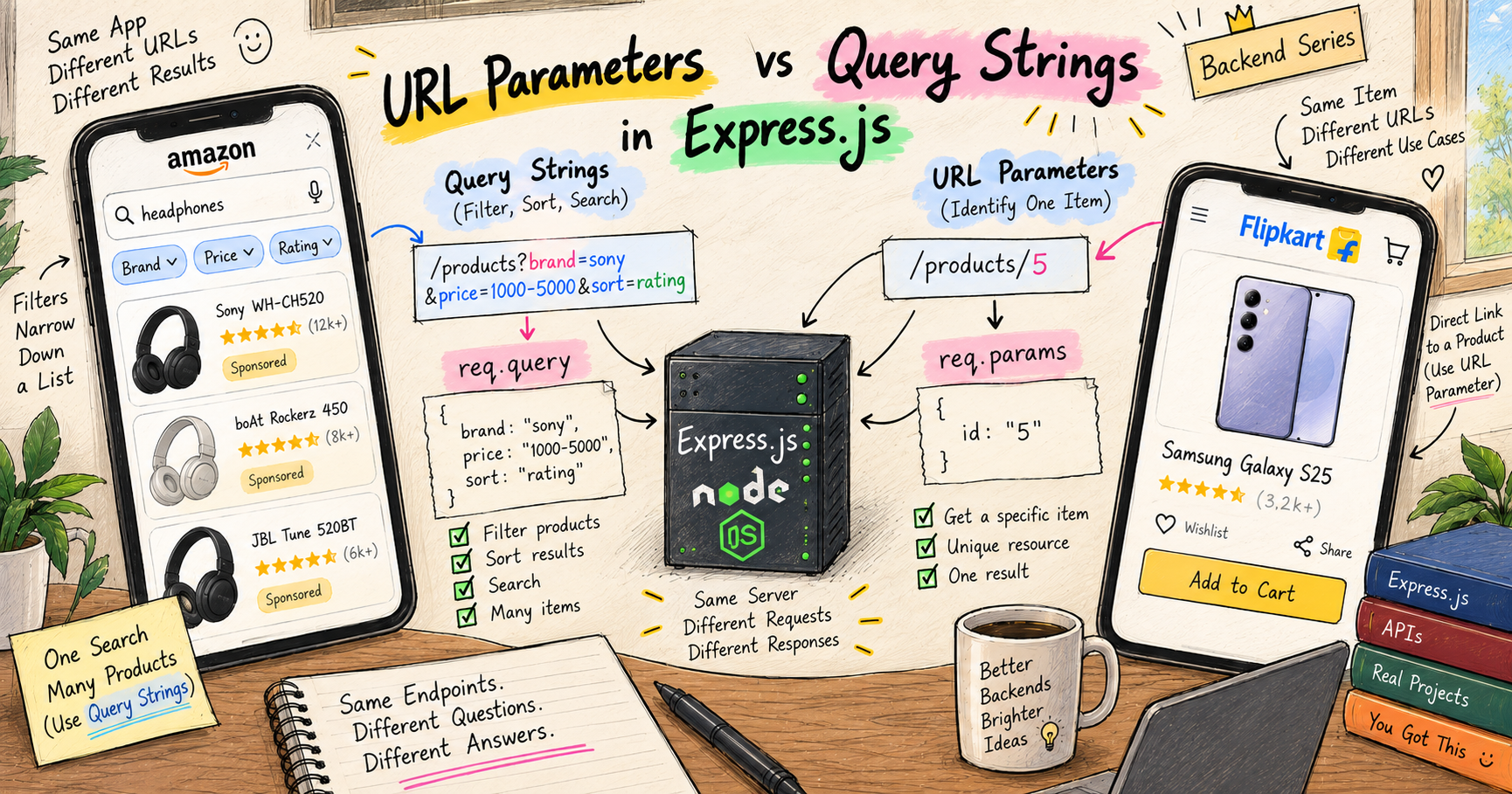
It was sale season, and I finally sat down to buy the stuff I had been eyeing for months. Top of the list, a pair of JBL Live 880NC headphones. So I opened Amazon and searched for them by name.
And ugh, big nah. The results were a wall of sponsored products, this brand, that brand, everything except the exact headphone I had literally just typed. Bhai simple si baat hai, I searched one thing, show me that one thing. But okay, I am a developer, I did not panic. I tapped the filter button, picked the brand JBL, selected the exact model, and boom, in one go, there it was. I went to pay, and a random coupon I had lying in my account knocked another 500 rupees off at checkout. Paisa vasool.
Then over on Flipkart, for the phone I wanted, a Galaxy S25. This time the search behaved, it showed up right on top, waah yaar ye bhi sahi hai. But the price was on the higher side, more than I really wanted to pay, so before ordering I went hunting for offers. I do not have Flipkart Plus, but a friend of mine does, and Plus members get their own deals. So I copied the phone's link and sent it to him on WhatsApp to check. He opened it, landed on the exact same phone, and told me Plus members were getting a 10,000 rupee discount on an HDFC credit card. Haan toh bas, jaldi karde order. One sneaky 500 rupee protect promise fee later, arre bhai kyun, the S25 was finally mine.
Now look closely at two different things I did during that shopping. I filtered a whole list of products down to what I wanted, brand JBL, that exact model. And separately, I pointed at one specific product, so specific that I could copy its link and send it to my friend, and it opened that exact same phone for him. Those two actions, filtering a list and pointing at one exact item, are exactly the two ways a web address carries information, query strings and URL parameters. And in this post, the :id I kept promising you in the last two posts finally gets fully explained. Chalo shuru karte hain.
First, what a URL is actually made of
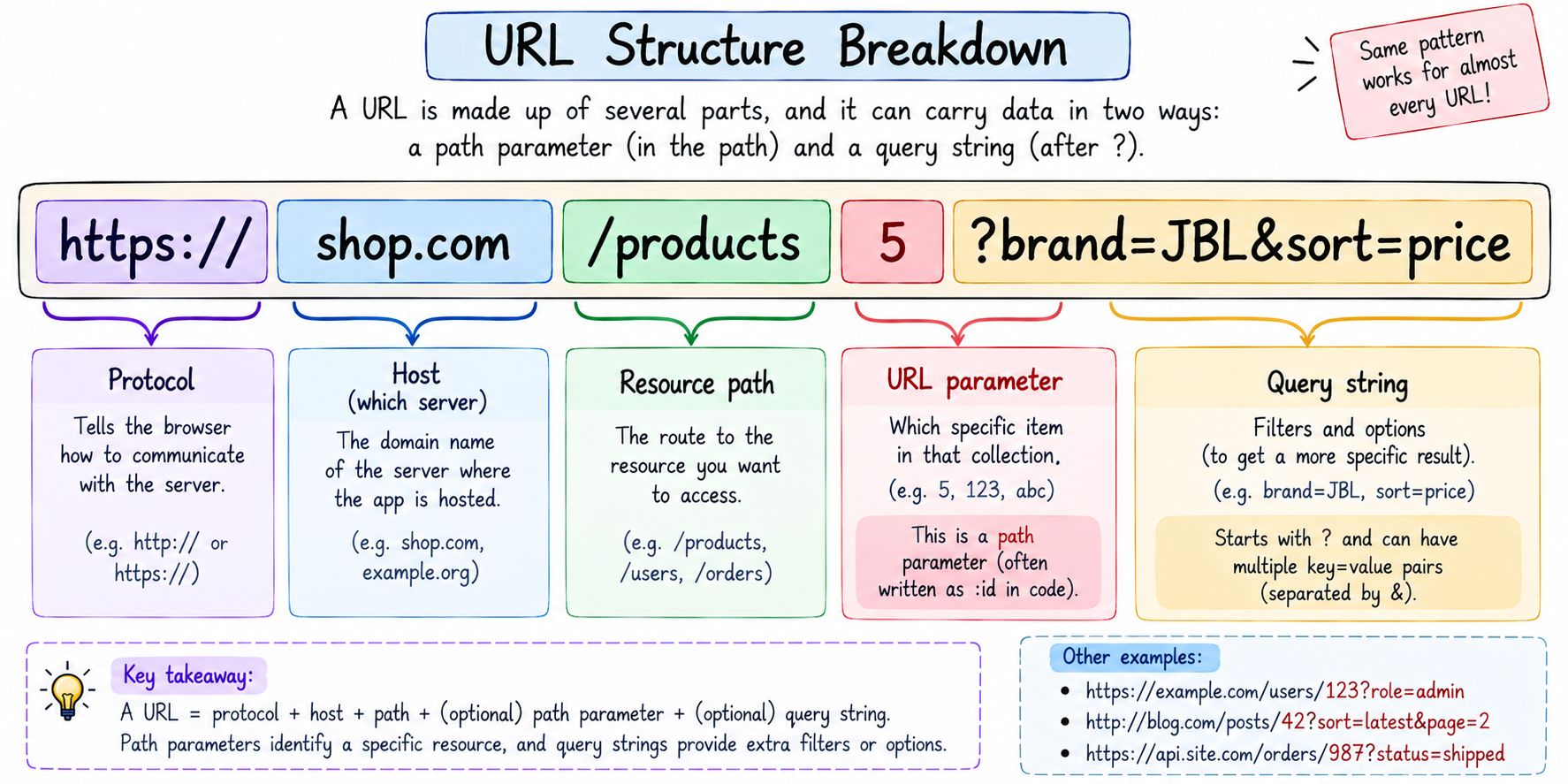
To tell these two apart, you need to see the pieces of a URL. URL stands for Uniform Resource Locator, which is just the full address of something on the web. Let us break a real one down.
https://shop.com/products/5?brand=JBL&sort=price
Piece by piece. https:// is the protocol, how to talk. shop.com is the host, which server to reach. /products/5 is the path, which points at a specific thing on that server, here product number 5. And everything after the ?, that brand=JBL&sort=price, is the query string, a set of extra options tacked on.
Those last two pieces are our whole topic. The 5 sitting inside the path is a URL parameter. The brand=JBL&sort=price after the ? is a query string. Same URL, two very different jobs. Let us take them one at a time.
URL parameters: pointing at one specific thing
A URL parameter is a value that lives inside the path, and its job is to identify one specific resource. When I opened that Galaxy S25 product page, the address became something like /products/5, where 5 is that phone's id. That is a URL parameter, it says exactly which product I want.
Remember /orders/:id from the last two posts? That colon syntax is how you declare a URL parameter in Express. The :id is a placeholder, a blank that gets filled with whatever real value shows up in that spot.
app.get("/products/:id", (req, res) => {
  console.log(req.params.id);
});
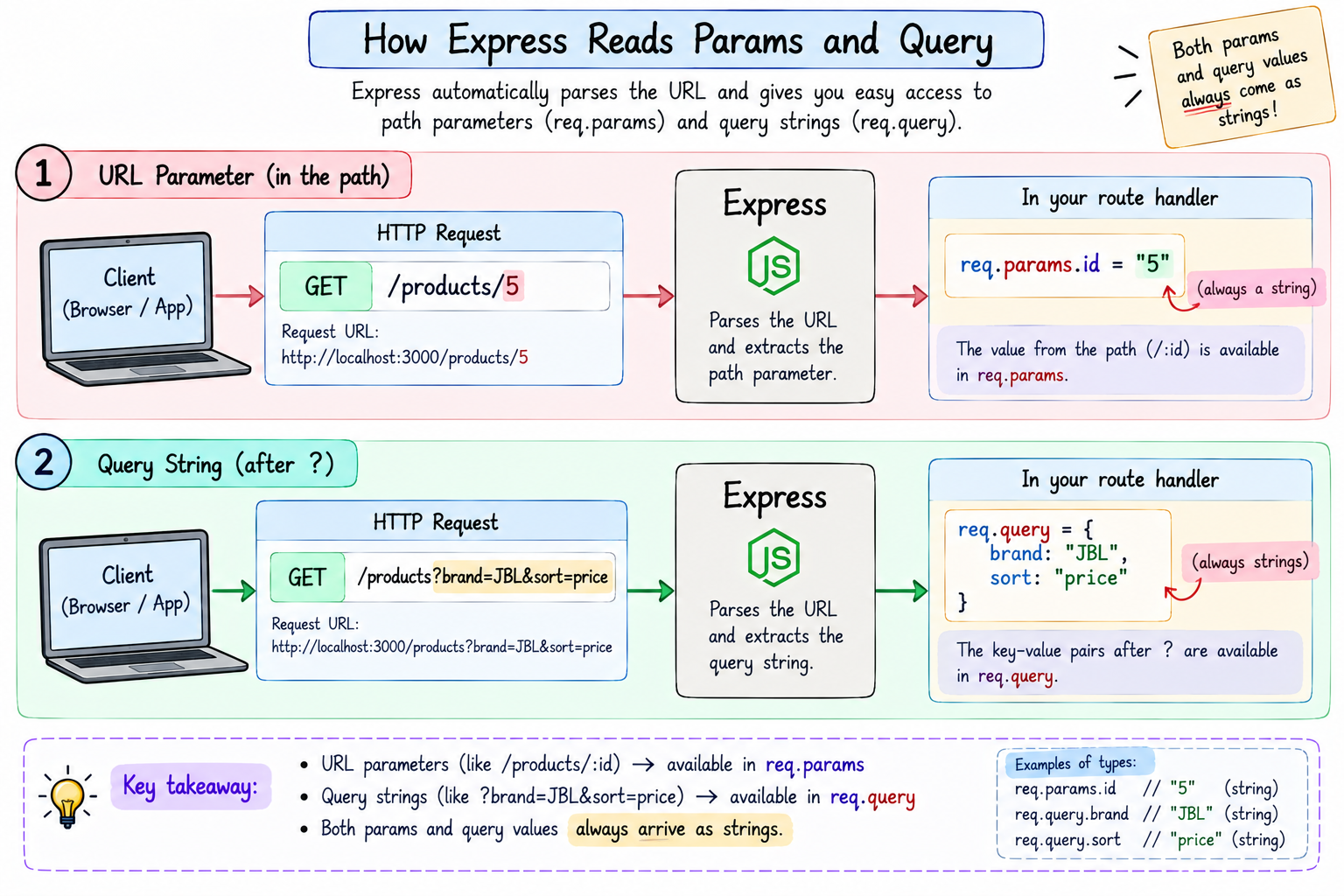
When someone hits /products/5, Express captures the 5 and hands it to you on req.params. So req.params.id is "5". That is the whole mechanism, you put :something in the route, and you read it back from req.params.something. You can even have more than one.
app.get("/users/:userId/orders/:orderId", (req, res) => {
  // hitting /users/12/orders/88
  // req.params.userId  is "12"
  // req.params.orderId is "88"
});
The key feeling to hold, a URL parameter is an identifier. It answers "which one," and it is a normal, expected part of the address. /products/5 is the natural home of product 5.
This is the exact thing that happened when I sent that Galaxy S25 link to my friend. The link I copied had the phone's id sitting right inside it, something like /products/5. When he tapped it, that id carried him straight to the same one phone I was looking at, no searching, no scrolling a list, that single specific product. That is the quiet power of a URL parameter, it pins a link to one exact thing, so you can share it and it lands everyone on the same item every time. A shareable product link is a URL parameter doing its job.
Query strings: filtering and modifying a list
A query string is the part after the ?, made of key=value pairs joined by &. Its job is completely different. It does not identify one thing, it filters, sorts, or modifies a request, usually on a whole list.
This is exactly my Amazon filter moment. When I picked brand JBL and sorted, the app was really asking its server for something like /products?brand=JBL&sort=price. It was not pointing at one product, it was saying "give me the products list, but narrowed to JBL, sorted by price." That is a query string doing its job, taking a big list and shaping it to what I want.
In Express, you read query strings from req.query.
app.get("/products", (req, res) => {
  // hitting /products?brand=JBL&sort=price
  console.log(req.query.brand); // "JBL"
  console.log(req.query.sort);  // "price"
});
Each key=value after the ? becomes a property on req.query. Add more with &, and they all show up. And here is the important part, query strings are optional. If I just open /products with no ? at all, I get the full unfiltered list, which is completely valid. The filters are extras you may or may not add.
That optional nature is exactly why the 500 rupee coupon slid onto my order so easily. Sites often carry a coupon right in the URL as an optional query string, something like ?coupon=SAVE500. Filters, coupons, sort options, a search term, anything that may or may not be there, that is all query string territory. It rides along after the ? when you want it, and nothing breaks when you leave it out.
The real differences, side by side
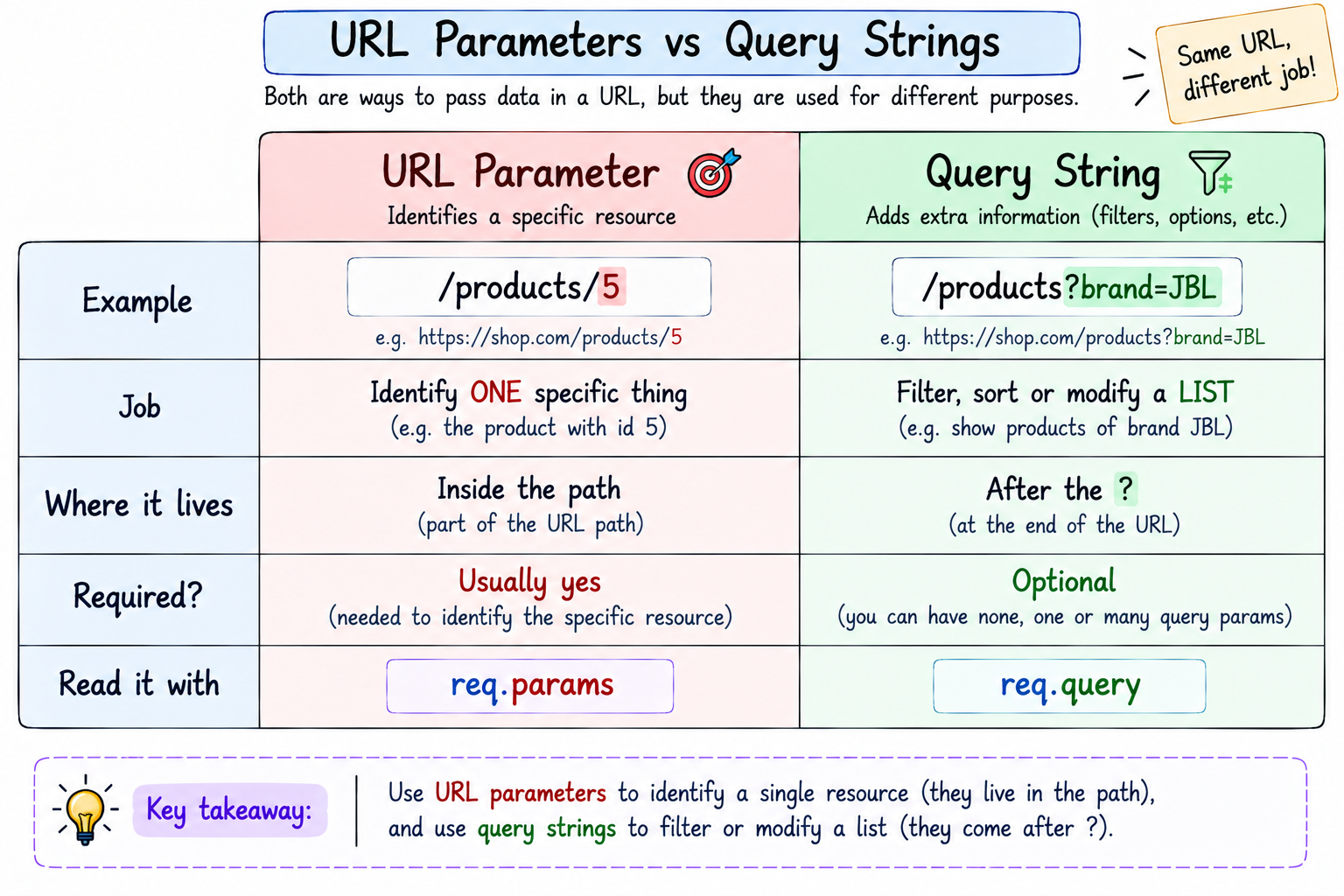
This is where most people get confused, konsa param hai aur konsa query. So chalo, let us just put the two side by side, and dekho, it clears up in one look.
A URL parameter lives inside the path (/products/5), a query string comes after a ? (/products?brand=JBL). A parameter identifies one specific resource, a query string filters or modifies a list. A parameter is usually required, the route is built around it, while query strings are optional add-ons. You read parameters from req.params, and query strings from req.query.
Here is the single rule of thumb that settles almost every case. If removing that piece should make the thing not exist, it is a parameter. Remove the 5 from /products/5 and there is no specific product to show, that is a param. But if removing it just gives you the plain, unfiltered list, it is a query string. Remove ?brand=JBL and you still get all products, just unfiltered, that is a query.
When to use which
The practical guidance, so you never hesitate while designing routes.
Use a URL parameter when you are pointing at one specific resource by its identity. One product, one user, one order. /products/5, /users/42, /orders/88. If you can say "the thing with this id," it is a param.
Use a query string for anything that shapes a list rather than identifying an item. Filtering (?brand=JBL), sorting (?sort=price), searching (?q=headphones), and pagination (?page=2&limit=20). All the optional knobs that tune a result belong in the query string.
And yaar, ek mazedaar baat, you have been seeing these your whole life without knowing the name. Page two of any search? That is ?page=2. Sort by price low to high? ?sort=price. That JBL filter I did, pura query string tha. Next time you filter something online, just look at the address bar, and that random jumble after the ? will suddenly make full sense.
You will very often use both together, and that is perfectly normal. /products/5 to open one product, and /products?brand=JBL&maxPrice=5000 to browse a filtered list. Exactly my shopping trip, one action to filter, another to open a single item.
Building it in Express
Ab asli maza, dono ideas ko real code mein chalte hue dekhna. We will build a small products API with two routes, one that filters a list and one that fetches a single item, in one file. In-memory data as always, so the focus stays on params and query.
const express = require("express");
const app = express();

let products = [
  { id: 1, name: "JBL Live 880NC", brand: "JBL", price: 9000, rating: 4.5 },
  { id: 2, name: "Galaxy S25", brand: "Samsung", price: 75000, rating: 4.7 },
  { id: 3, name: "boAt Rockerz", brand: "boAt", price: 1500, rating: 4.1 },
  { id: 4, name: "JBL Tune", brand: "JBL", price: 3000, rating: 4.0 }
];

// QUERY STRING: filter and sort the whole list
app.get("/products", (req, res) => {
  let result = [...products];
  const { brand, maxPrice, sort } = req.query;

  if (brand) {
    result = result.filter((p) => p.brand.toLowerCase() === brand.toLowerCase());
  }
  if (maxPrice) {
    result = result.filter((p) => p.price <= Number(maxPrice));
  }
  if (sort === "price") {
    result.sort((a, b) => a.price - b.price);
  }

  res.json(result);
});

// URL PARAMETER: fetch one specific product by id
app.get("/products/:id", (req, res) => {
  const product = products.find((p) => p.id === Number(req.params.id));
  if (!product) return res.status(404).json({ error: "Product not found" });
  res.json(product);
});

app.listen(3000, () => console.log("Server on http://localhost:3000"));
See the two handlers doing their separate jobs. The /products route reads optional filters off req.query and shapes the list, my JBL filter in code form. The /products/:id route reads the id off req.params and returns that one product, my tapping a single product page. Two routes, two tools, each for what it is good at.
Notice one small but important thing in both, I wrapped values in Number(). That is because everything in req.params and req.query arrives as a string, always. req.params.id is "5", not 5, and req.query.maxPrice is "5000", not 5000. Forgetting this is the number one bug here, so convert before you compare with numbers.
Try it yourself
Do not just read it, khud banao. Make a folder, run npm init -y and npm install express, drop the code above into index.js, and run node index.js. Every one of these is a GET, so you can test them straight in your browser.
http://localhost:3000/products                      all products
http://localhost:3000/products?brand=JBL            only JBL (query)
http://localhost:3000/products?brand=JBL&maxPrice=5000   JBL under 5000
http://localhost:3000/products?sort=price           cheapest first
http://localhost:3000/products/2                    just the Galaxy S25 (param)
http://localhost:3000/products/99                   a 404, no such product
Play with it. Combine filters, change the id, ask for a product that does not exist and watch the 404. Feel how the ? part shapes the list while the /2 part points at one item. That difference clicking is the whole lesson.
The mistakes that will trip you up
The usual suspects, so you sidestep them.
Forgetting everything is a string. req.params.id and every value in req.query are strings. Comparing "5" === 5 fails, so wrap numeric ones in Number() before math or comparison. This bites everyone once.
Mixing up the two. Using a query string to identify one item (/product?id=5) or a parameter to filter (/products/JBL). Not technically illegal, but it fights every convention and confuses anyone reading your API. Identity goes in the path, filters go in the query.
Route order catching the wrong thing. If you define /products/:id before a literal route like /products/featured, then hitting /products/featured makes Express think featured is an id. Put specific literal routes above the :id route so they win first.
Assuming a query value is always there. Since query strings are optional, req.query.brand can be undefined. Always handle the missing case, like the if (brand) checks in our code, so a plain /products still works.
Quick reference, bookmark this bit
The whole post in a thirty-second scan.
A URL, broken down: https://shop.com/products/5?brand=JBL&sort=price, where 5 is a URL parameter and brand=JBL&sort=price is the query string.
| URL Parameter | Query String | |
|---|---|---|
| Example | /products/5 |
/products?brand=JBL |
| Job | Identify ONE specific thing | Filter or sort a LIST |
| Lives | Inside the path | After the ? |
| Required? | Usually yes | Optional |
| Read with | req.params |
req.query |
Reading them in Express.
app.get("/products/:id", (req, res) => {
  req.params.id;      // "5"  (the identifier)
});

app.get("/products", (req, res) => {
  req.query.brand;    // "JBL" (a filter)
  req.query.sort;     // "price"
});
The rules worth memorizing. Params identify, query filters. Params live in the path, query lives after the ?. Everything from both is a string, so Number() it before doing math. The rule of thumb: if removing it means the thing does not exist, it is a param; if removing it just gives you the full unfiltered list, it is a query.
Wrapping up
So that is URL parameters versus query strings. A URL parameter sits in the path and names one specific resource, /products/5, read with req.params, the shared link that landed my friend on my one exact phone. A query string hangs off the ? and filters or sorts a whole list, /products?brand=JBL&sort=price, read with req.query, the filters that finally cut through all those sponsored results. Params identify, query modifies, and the rule of thumb keeps you right, if removing it breaks the identity, it is a param, if it just unfilters the list, it is a query.
That whole distinction is something you already use every single day. Every time you open one product versus filter a search, you are living the difference between a parameter and a query string. My JBL headphones came from a filter, and my Galaxy S25 came down to a single link I shared with a friend, a link that pointed at one exact phone. Now, minus one annoying protect promise fee, both are happily mine.
Next up, now that our routes can identify items and filter lists, we look at a piece that quietly sits between the request and your handler, running on every request, middleware. That mysterious app.use(express.json()) line finally gets fully explained. That is my next post, What is Middleware in Express and How It Works.
I hope you enjoyed reading this.