How a Browser Works
I like making things with code. This is where I share my projects and the bugs I ran into.
There was a moment when I was learning HTML where I wrote <h1>Hello</h1> in a file, opened it in a browser, and saw "Hello" on the screen. And I thought: okay, so the browser read my tag and printed the text. That seemed obvious. That seemed correct.
It was completely wrong.
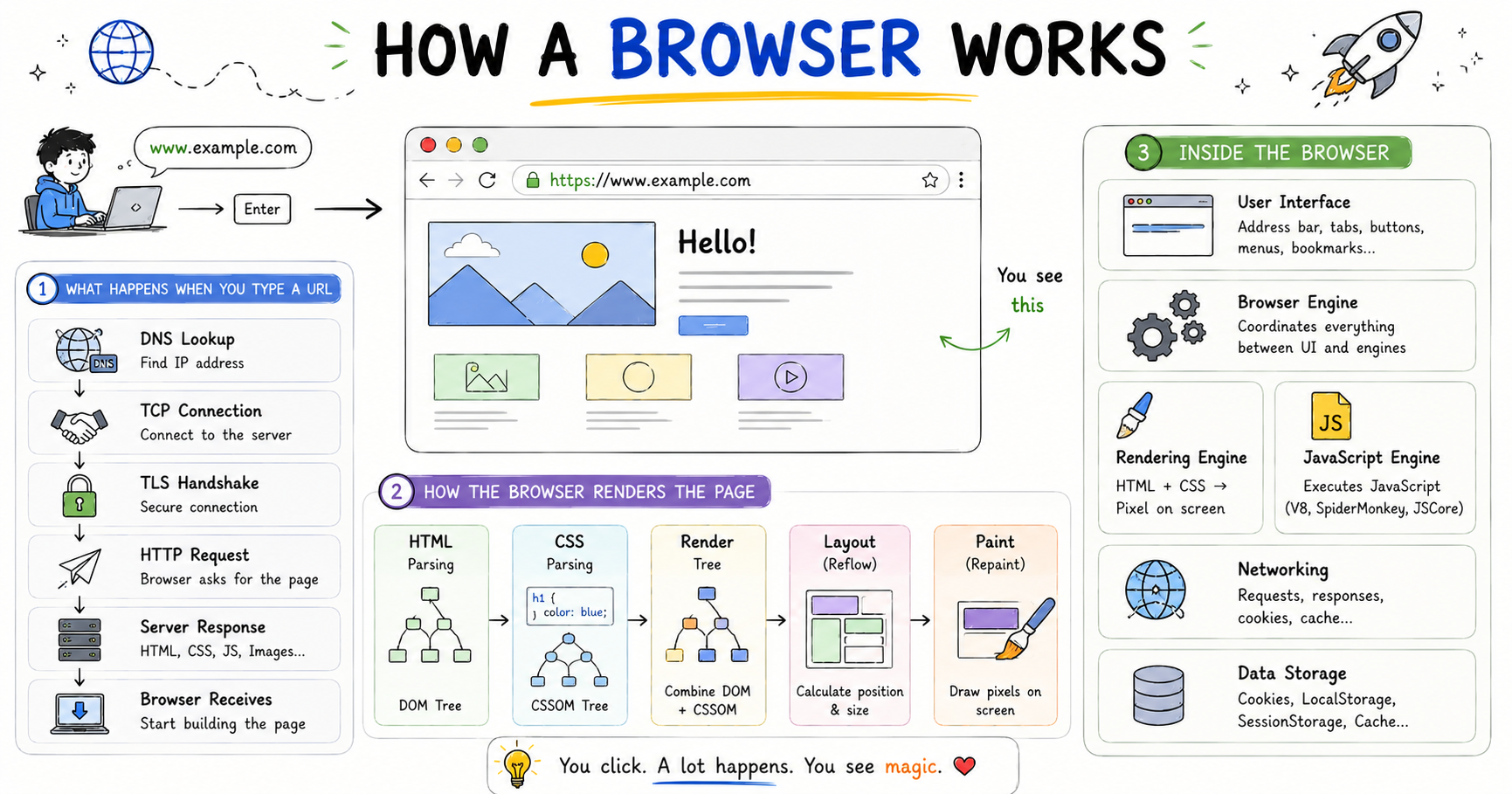
My teacher said something later that reframed the whole thing for me. He said: the browser is not reading your HTML and printing it. The browser is reading your HTML, building an internal model of the entire page, running heavy calculations to figure out where everything goes, and then drawing pixels on your screen using C++ under the hood. What you wrote was input. What you see is the output of a long pipeline that runs in milliseconds. Those two things are almost completely separate.
I wanted to understand that pipeline. What actually happens between the moment you type a URL and the moment something appears on your screen? Turns out the answer is one of the most interesting things I've ever learned about how the web works. And once you understand it, every page you visit looks different to you.
Browsers Are Bigger Than They Look
The first thing that surprised me was realising how large a browser actually is as a piece of software. I thought of it as a window. Something that fetches websites and shows them to you.
My teacher corrected that mental model immediately. A browser, he said, doesn't just show websites. It functions almost like a full operating system. It has its own memory management, its own networking layer, and its own ability to run programs. And here's the specific example he gave that stuck with me: setTimeout in JavaScript. I had been using it to delay things without ever thinking about where it actually came from. It turns out it doesn't come from JavaScript at all. Standard JavaScript has no native timers. setTimeout is a browser API that JavaScript borrows. The browser is lending JavaScript a capability it doesn't have on its own.
That one example changed how I thought about the browser entirely. It's not just a wrapper around websites. It's an environment that HTML, CSS, and JavaScript run inside, and it provides them with tools they couldn't have otherwise.
What's Actually Inside a Browser
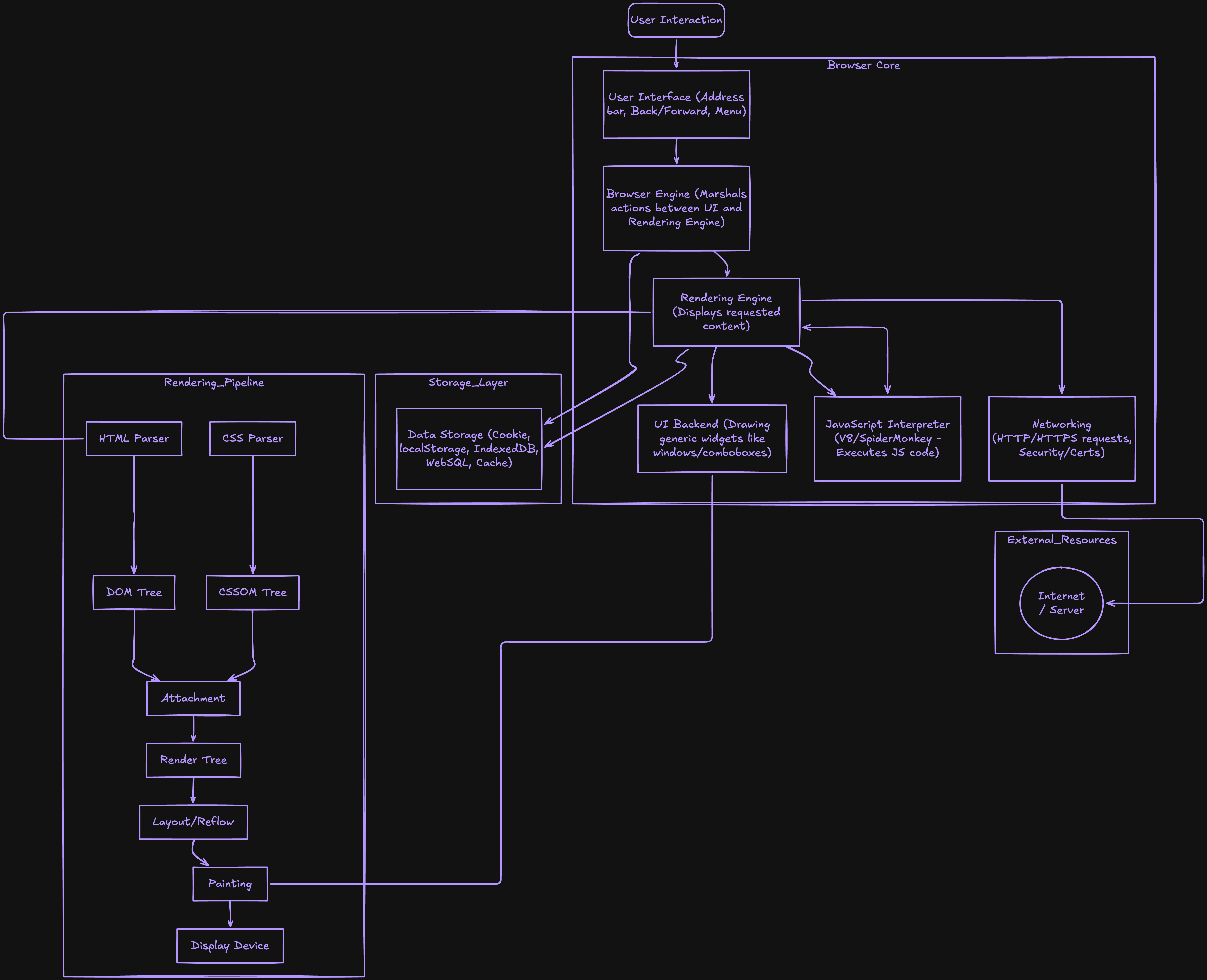
A browser is made up of several distinct parts, each doing a specific job. I had no idea any of these existed as separate things until my teacher broke them down.
The part you see and interact with every day is called the User Interface. The address bar, the tabs, the back and forward buttons, the bookmark icon, the settings menu. None of that is the web page. All of that is the browser's own UI sitting around the web page. It's the shell.
Behind that is the Browser Engine. This is the coordinator between the UI and the actual rendering process. When you type a URL or click refresh, the browser engine receives that signal and coordinates what happens next. It's the manager that receives your input and dispatches it to the right departments.
The two departments it coordinates are the Rendering Engine and the JavaScript Engine. These are separate systems with completely different jobs. The rendering engine handles HTML and CSS, takes them as input, and produces a visual page as output. The JavaScript engine is what actually runs JavaScript code. V8 in Chrome and Edge. SpiderMonkey in Firefox. JavaScriptCore in Safari. These are essentially separate programs that live inside the browser dedicated entirely to executing JavaScript.
Then there's the Networking component, which handles everything that touches the internet. Every time your browser requests a page, downloads a CSS file, fetches an image, sends or receives a cookie, all of that flows through the networking layer.
And finally there's Data Storage. Cookies, local storage, session storage, the cache of files you've already downloaded. The browser remembers a lot across sessions and across visits, and data storage is where all of it lives.
What Happens When You Type a URL
Before getting into how the browser parses HTML and builds a page, I want to lay out the full sequence of what happens the moment you press Enter after typing a URL. My teacher walked through this step by step and it was the first time the whole thing made sense as a connected chain.
The first step is a DNS lookup. Computers communicate using IP addresses like 93.184.216.34, but you typed something like www.example.com. DNS is essentially a phone book that translates the name into the address the browser can actually use to find the server.
Once it has the address, the browser establishes a connection using TCP. If the site uses HTTPS, which almost everything does now, there's also a TLS handshake that sets up encryption before anything is exchanged. My teacher described it as shaking hands with someone before starting a conversation. You agree on how to communicate securely before you say anything.
Then the browser sends an HTTP request. It's asking the server for a specific file:
GET /index.html HTTP/1.1
Host: www.example.com
The server responds with the HTML:
HTTP/1.1 200 OK
Content-Type: text/html

<!DOCTYPE html>
<html>
  <head><title>Example</title></head>
  <body><h1>Hello World!</h1></body>
</html>
As the browser reads that HTML, it discovers it needs more things. CSS files. JavaScript files. Images. Fonts. It fires off additional requests for all of them. And then the real work begins: parsing everything and building a page out of it.
What Parsing Actually Means
I heard the word "parsing" dozens of times before I understood what it actually meant. Once I did, the rest of how browsers work clicked much faster.
Parsing is not just reading text character by character. Parsing is reading text and understanding its structure. Building meaning from it.
My teacher used a maths example that made it click instantly. Take 3 + 5 * 2. You know the answer is 13 and not 16 because you know multiplication happens before addition. But how do you know that? You parsed the expression. You identified the numbers and the operators as separate meaningful units called tokens, you understood the rules of how they relate to each other, and you built a mental model of the correct order of operations.
A browser does exactly the same thing with HTML and CSS. It doesn't just read the characters. It breaks them into meaningful units, understands the relationships between them, and builds a structured model it can work with. That model for HTML is the DOM. That model for CSS is the CSSOM.
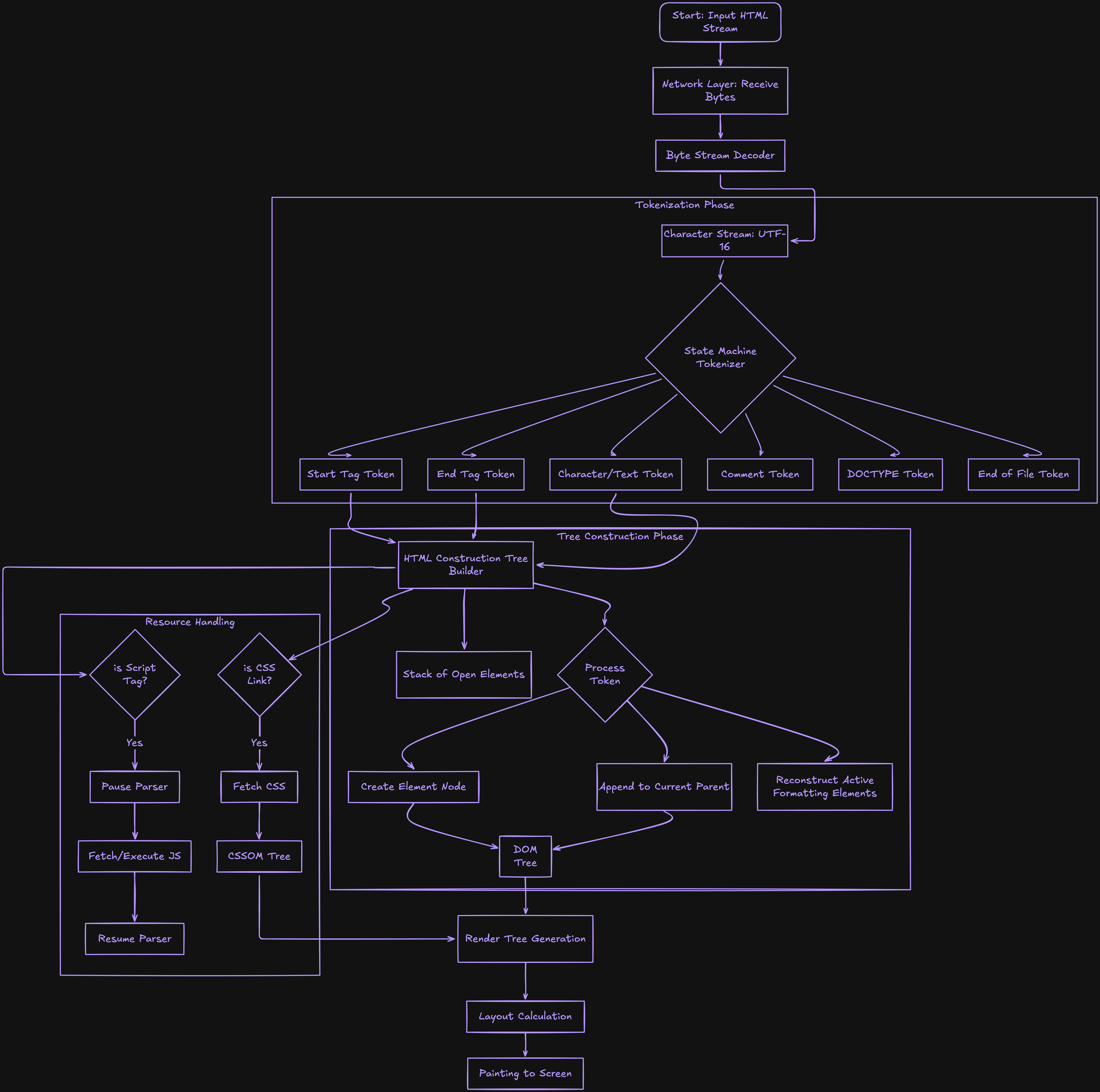
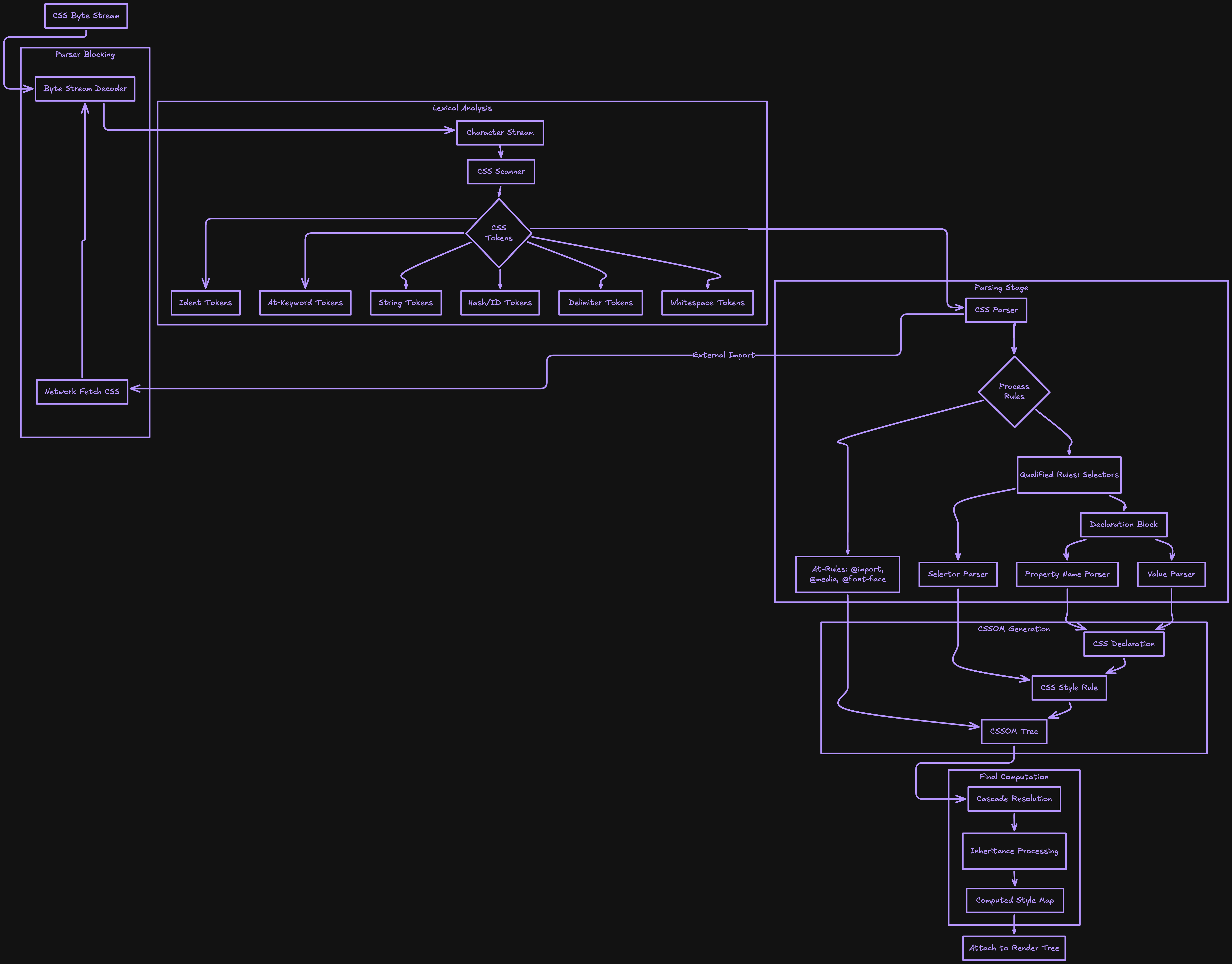
There's also something worth understanding about what the browser actually receives from the network in the first place. It's not text. It's raw bytes. Zeros and ones. Those bytes get converted into characters using an encoding standard like UTF-8. Those characters get broken into tokens. Those tokens become objects. Those objects get linked into a tree. That's the complete journey from network data to a structured model the browser can work with, and it happens before a single pixel is drawn.
HTML Parsing and the DOM
DOM stands for Document Object Model. It's the tree structure the browser builds from your HTML, and I want to be precise about something my teacher pointed out: the DOM and your HTML file are not the same thing. Your HTML is the source text. The DOM is the living, structured model the browser builds by parsing that text. They start from the same place but they're different things.
Here's what the parsing process looks like in concrete terms. The browser receives this HTML:
<!DOCTYPE html>
<html>
  <head>
    <title>My Page</title>
  </head>
  <body>
    <h1>Welcome</h1>
    <p>This is a paragraph.</p>
  </body>
</html>
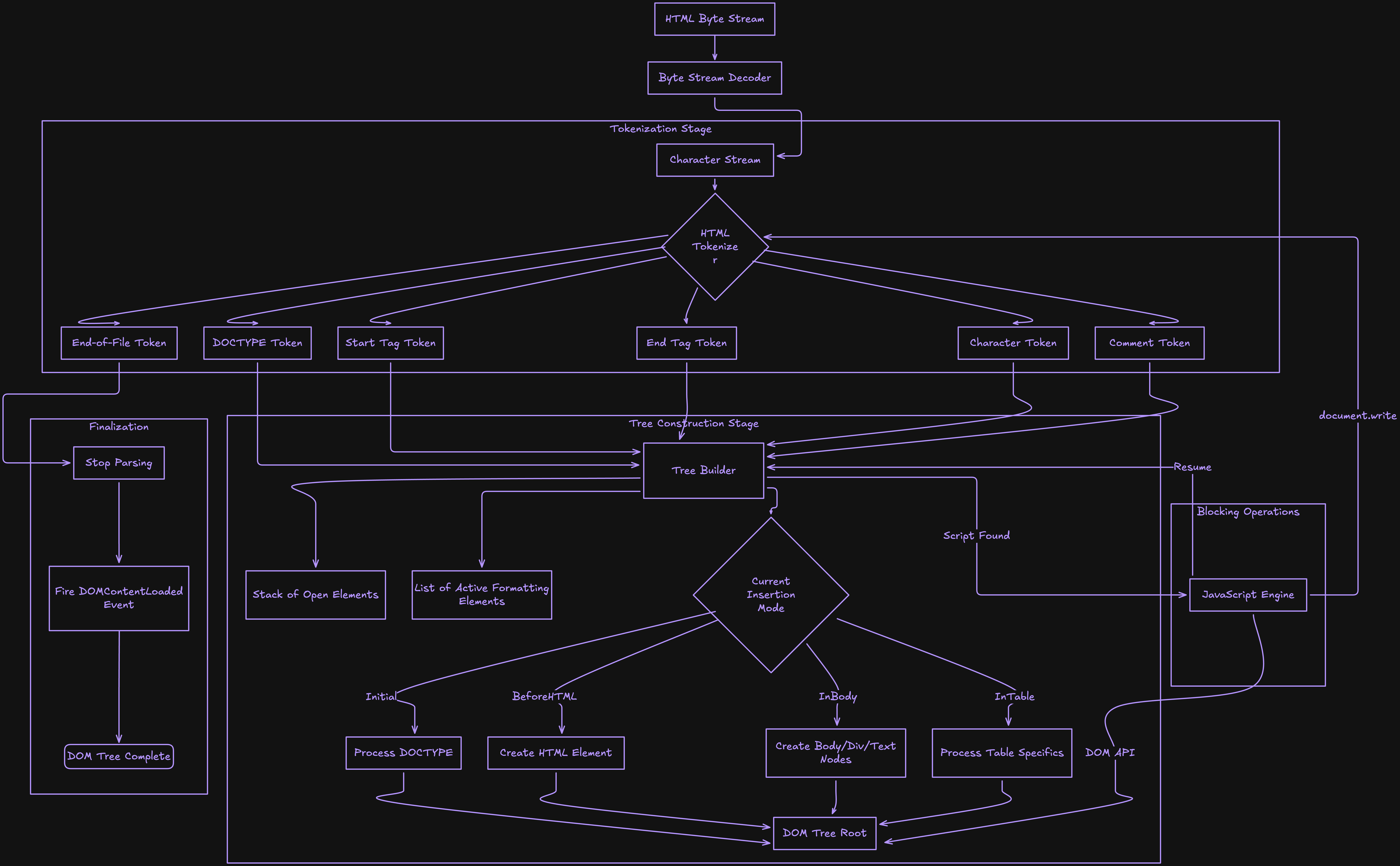
The parser works through it in a specific sequence. First it converts the raw bytes into characters. Then it reads those characters and identifies tokens: opening tags like <h1>, closing tags like </h1>, text content, attributes. Then it converts each token into an object that holds the tag type, its attributes, and its content. And finally it links those objects together using defined relationships, parent, child, and sibling, to produce a tree:
Document
└── html
    ├── head
    │   └── title
    │       └── "My Page"
    └── body
        ├── h1
        │   └── "Welcome"
        └── p
            └── "This is a paragraph."
The html element is the root. Everything branches from it. The body is the parent of h1 and p, which makes those two siblings. The title is a child of head and a descendant of html. Every relationship in the DOM is explicit and navigable, which is exactly what makes it possible for JavaScript to reach into the page and modify any part of it.
HTML parsers are also unusually forgiving. Missing closing tags, incorrectly nested elements, typos in attribute names. The parser tries to recover from all of these and keep building rather than stopping. This is why even poorly written HTML usually still renders something in a browser.
One thing my teacher specifically pointed out that I hadn't considered before: when the browser is in the middle of parsing HTML and it encounters a <script> tag, it stops completely. It does not continue building the DOM until the JavaScript has been fetched and executed. The reason is that JavaScript has the power to modify the DOM while it's still being built, so the browser prioritises reading the JavaScript first to avoid doing layout work it might have to redo. This is exactly why async and defer exist. They tell the browser it's safe to keep parsing HTML and load the JavaScript later, which makes the page feel faster.
CSS Parsing and the CSSOM
I assumed for a long time that the browser read HTML and CSS together as one combined process. My teacher corrected that. They run completely independently, and CSS goes through the exact same pipeline as HTML. Raw bytes become characters, characters become tokens, tokens become objects, and those objects get structured into a tree. This one is called the CSSOM, which stands for CSS Object Model.
Here's a simple example. The browser downloads this CSS:
body {
  font-size: 16px;
  color: black;
}

h1 {
  color: blue;
  font-size: 32px;
}

p {
  color: gray;
}
The browser parses this and builds a CSSOM tree that maps each rule to the elements it applies to. From this tree, it can look at any element in the DOM and immediately know what styles should be applied to it.
When multiple rules apply to the same element, the browser uses specificity to decide which one wins. Inline styles beat everything. IDs beat classes. Classes beat element selectors. This is where the "cascading" in Cascading Style Sheets actually lives: in the CSSOM processing step where the browser figures out which rules win over which others.
The browser processes the HTML DOM and the CSSOM at the same time, but completely independently of each other. They're separate pipelines running in parallel.
Something my teacher pointed out that I hadn't considered before: CSS can actually become a bottleneck for your page's performance. If JavaScript tries to run before the CSSOM is fully built, the browser pauses JavaScript and waits. So a slow CSS file doesn't just delay the visual render. It can delay your scripts too. I had always thought of CSS as a styling concern and JavaScript as a performance concern. Turns out they're more connected than that.
The Render Tree
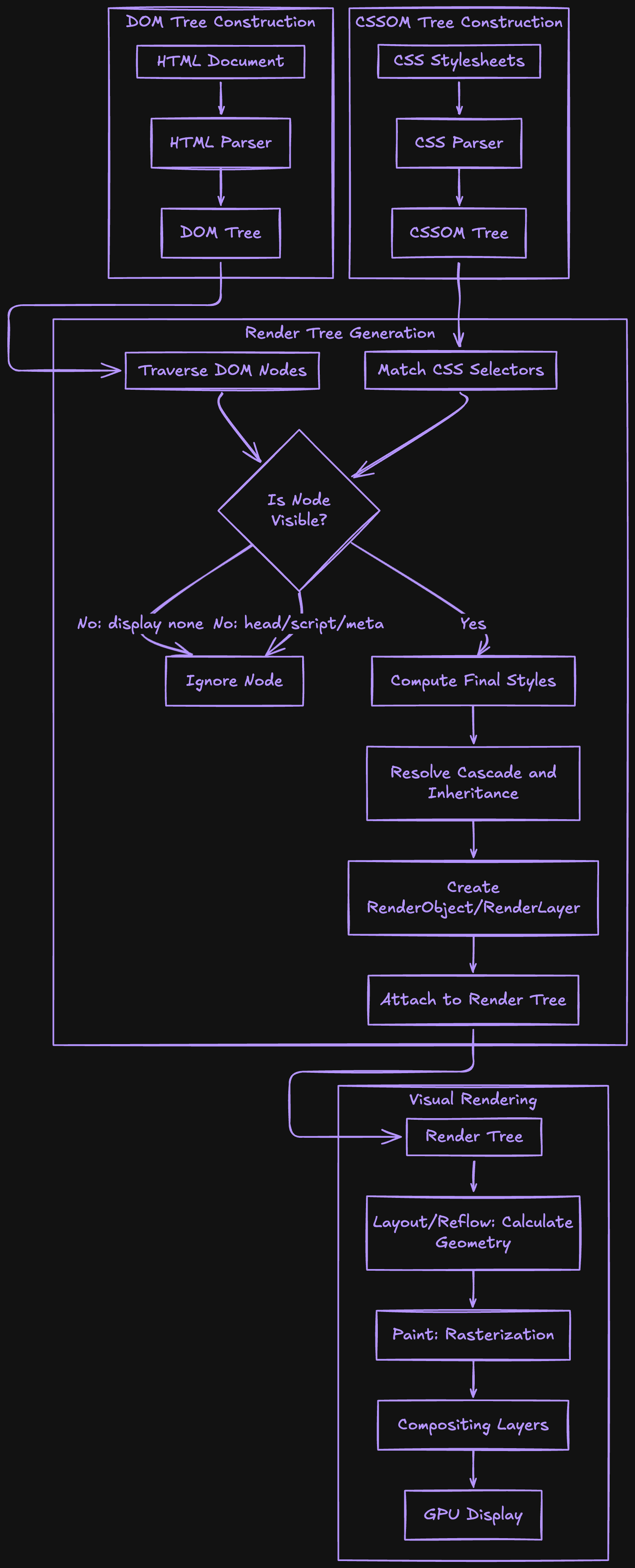
At this point the browser has two separate trees. The DOM and the CSSOM. When I first heard about both of them existing separately, my immediate question was: how do they become one page? That's exactly what the render tree is.
The combined structure is called the Render Tree. The browser walks through the DOM and matches each element to its computed styles from the CSSOM. But the render tree is not just the DOM with styles attached. It only includes elements that will actually appear on screen.
Elements with display: none are excluded entirely. The <head> element is excluded because nothing in it is visible. Elements that are fully transparent or positioned completely off-screen don't make it in either. What's left is exactly what needs to be drawn, with the complete style information for each thing that needs drawing.
Layout
Now the browser knows what to draw and how it should look. What it still doesn't know is where everything goes. This was the part I found most surprising when my teacher explained it. I had assumed "figuring out where things go" was somehow automatic. It's not. It's an entire dedicated step called Layout, sometimes also called Reflow.
Layout is the process of figuring out the exact position and size of every element on the page. How wide is this paragraph? Where does this image sit? How tall does this div need to be once the text wraps? Every element is treated as a rectangular box with content, padding, border, and margin. The browser starts at the root of the render tree and works its way down, calculating dimensions and positions for every element.
My teacher described this step as where the heavy mathematical calculations happen. The browser has to factor in your screen's actual width in pixels, percentage-based widths, how inline elements wrap, how block elements stack, and how parent and child elements affect each other's sizes. It's genuinely complex arithmetic applied to potentially hundreds or thousands of elements at once.
One thing worth knowing: layout is expensive. If something changes that affects position or size, a width, a height, a margin, the browser may have to recalculate positions for a large portion of the page. This is why developers who care about performance try to minimise layout-triggering changes, especially inside animations.
Painting
After layout, every element has a known position and known size. Now the browser draws pixels. My teacher used a specific word for this step: Painting. And it's the right word, because this is literally the browser filling in colour on a canvas, element by element.
Painting happens in a specific order: background colours first, then background images, then borders, then children elements recursively, then outlines. The order matters because elements can overlap, and painting in the wrong sequence produces the wrong result.
Modern browsers also use layers. Elements with CSS properties like transform, opacity, or position: fixed often get their own independent layer. Layers can be painted separately from everything else, which is what makes smooth animations possible. Moving an element that lives on its own layer doesn't require repainting everything around it.
After all the layers are painted, the browser combines them in the correct order. This final step is called Compositing. My teacher described it as stacking transparent sheets of paper with drawings on each one. Each sheet can be repositioned or updated without touching the others.
JavaScript's Role in All of This
JavaScript sits across everything I've described and can affect any part of it.
When JavaScript modifies the DOM, it can trigger a new round of style calculation, layout, and painting. If it adds an element, the browser needs to recalculate positions for everything around it. If it changes a width, layout reruns for that element and potentially its neighbours. If it changes a colour, only painting needs to happen again. Understanding which CSS properties trigger which steps is actually a meaningful part of writing performant JavaScript for the web.
There's also something called the main thread. Almost all of the work I've described, parsing, style calculation, layout, painting, and running JavaScript, happens on a single main thread in the browser. That thread can only do one thing at a time. If JavaScript is running, the browser cannot update the page. If a JavaScript function takes too long to finish, the page freezes completely. Clicks don't register. Animations stutter. This is why writing efficient JavaScript matters: not as an abstract good practice, but because JavaScript is sharing a thread with everything that makes the page feel alive.
Wrapping Up
The thing that stayed with me after learning all of this is how invisible the whole pipeline is. Every time a page loads you're on the receiving end of a DNS lookup, a TCP connection, an HTTP request, HTML parsing, DOM construction, CSS parsing, CSSOM construction, render tree creation, layout calculations, painting, compositing, and JavaScript execution. All of it in milliseconds. And unless something breaks, you never see any of it.
I can't look at a slow page the same way anymore. When something takes a second too long to appear, I find myself thinking about where in the pipeline it might be. Is the DNS lookup slow? Is a CSS file blocking JavaScript? Is a script tag in the wrong place halting DOM construction? Is a JavaScript function running so long it's freezing the main thread?
Understanding this pipeline doesn't just satisfy curiosity. It gives you a completely different set of questions to ask when something goes wrong. And that changes how you build things, not just how you understand them.


