JavaScript Arrays 101
I like making things with code. This is where I share my projects and the bugs I ran into.
The IPL 2025 final was that evening. RCB vs Punjab Kings. I have already written about that night in another blog, the aloo paratha and all three of us watching together. But there is one part of that night I did not write about yet.
The scorecard.
Every time a wicket fell I was tracking it. Who was in, how many runs they had, who was coming in next. The batting order was in my head the whole innings. Salt opens with Virat. Salt falls early, Mayank comes in as impact sub. Mayank goes, Patidar comes. Patidar goes, Livingstone. Livingstone, Jitesh. Jitesh, Shepherd. One after another in a fixed sequence. Each one with a position. Each one waiting for the one above them to finish before they walked in.
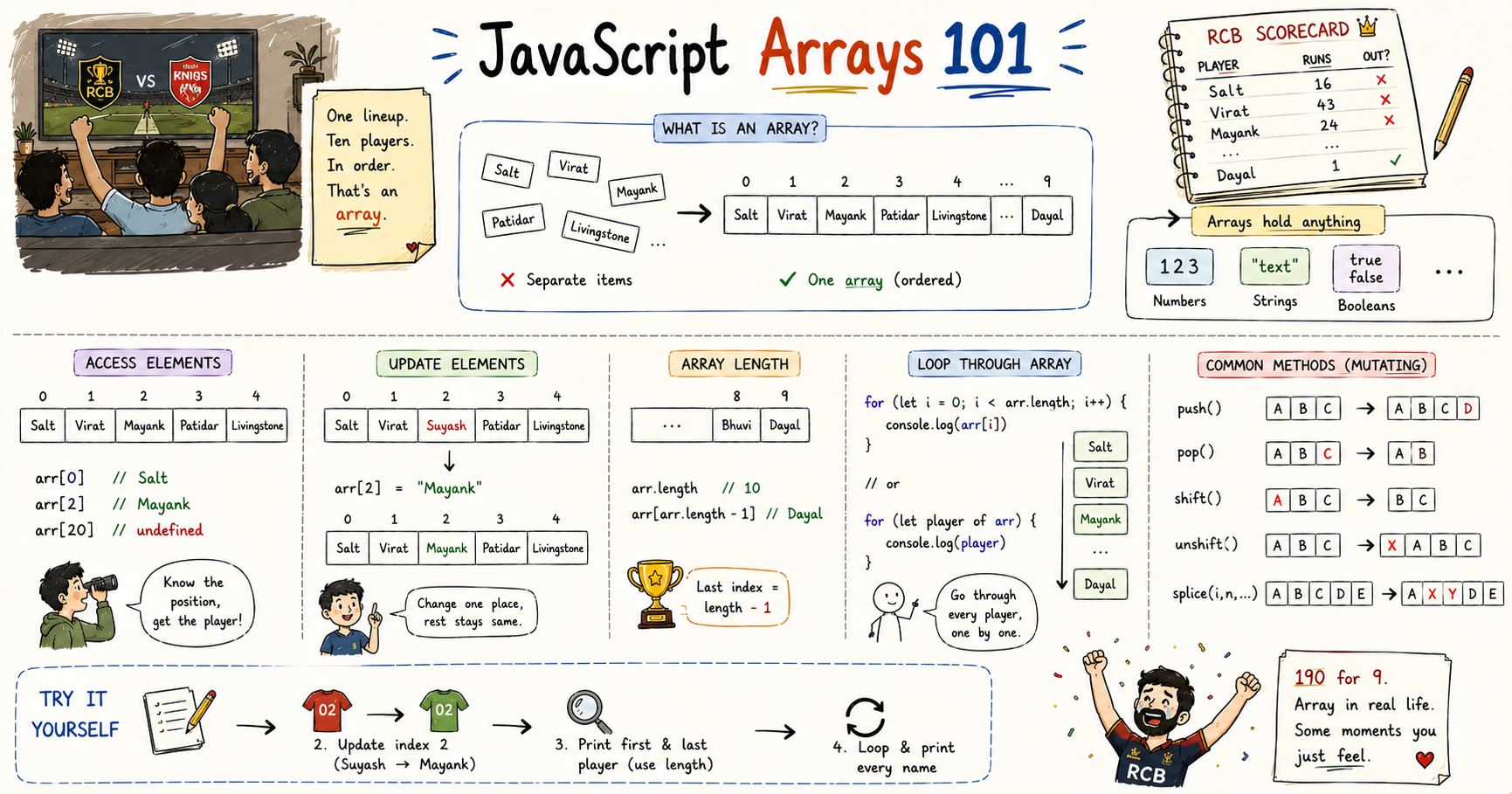
One list. Ten players. Ordered. That is an array.
What an Array Is
During the innings I started writing down each batter separately in my notes. One line for Salt. One line for Virat. One line for Mayank. By the time I got to the fifth player I had five separate things with no real connection between them. If I wanted to look at the whole lineup together I had to scroll through all of them one by one. And that was only five. RCB had eleven players.
let batter1 = "Phil Salt"
let batter2 = "Virat Kohli"
let batter3 = "Mayank Agarwal"
let batter4 = "Rajat Patidar"
let batter5 = "Liam Livingstone"
Five separate variables. No connection between them. An array puts the whole lineup under one name.
const battingOrder = [
  "Phil Salt",
  "Virat Kohli",
  "Mayank Agarwal",
  "Rajat Patidar",
  "Liam Livingstone",
  "Jitesh Sharma",
  "Romario Shepherd",
  "Krunal Pandya",
  "Bhuvneshwar Kumar",
  "Yash Dayal"
]
One variable. Ten players. All in order. That is the whole thing.
The scores that night were numbers, not strings. The batting status was a boolean, in or out. Arrays hold any type.
const scores = [16, 43, 24, 26, 25, 24, 17, 4, 1, 1]
const stillBatting = [false, false, false, false, false, false, false, false, false, true]
Accessing Elements
Salt opened at index 0. Virat opened with him at index 1. When Salt fell in the first over I was already looking at index 2 to see who was walking in next. Mayank.
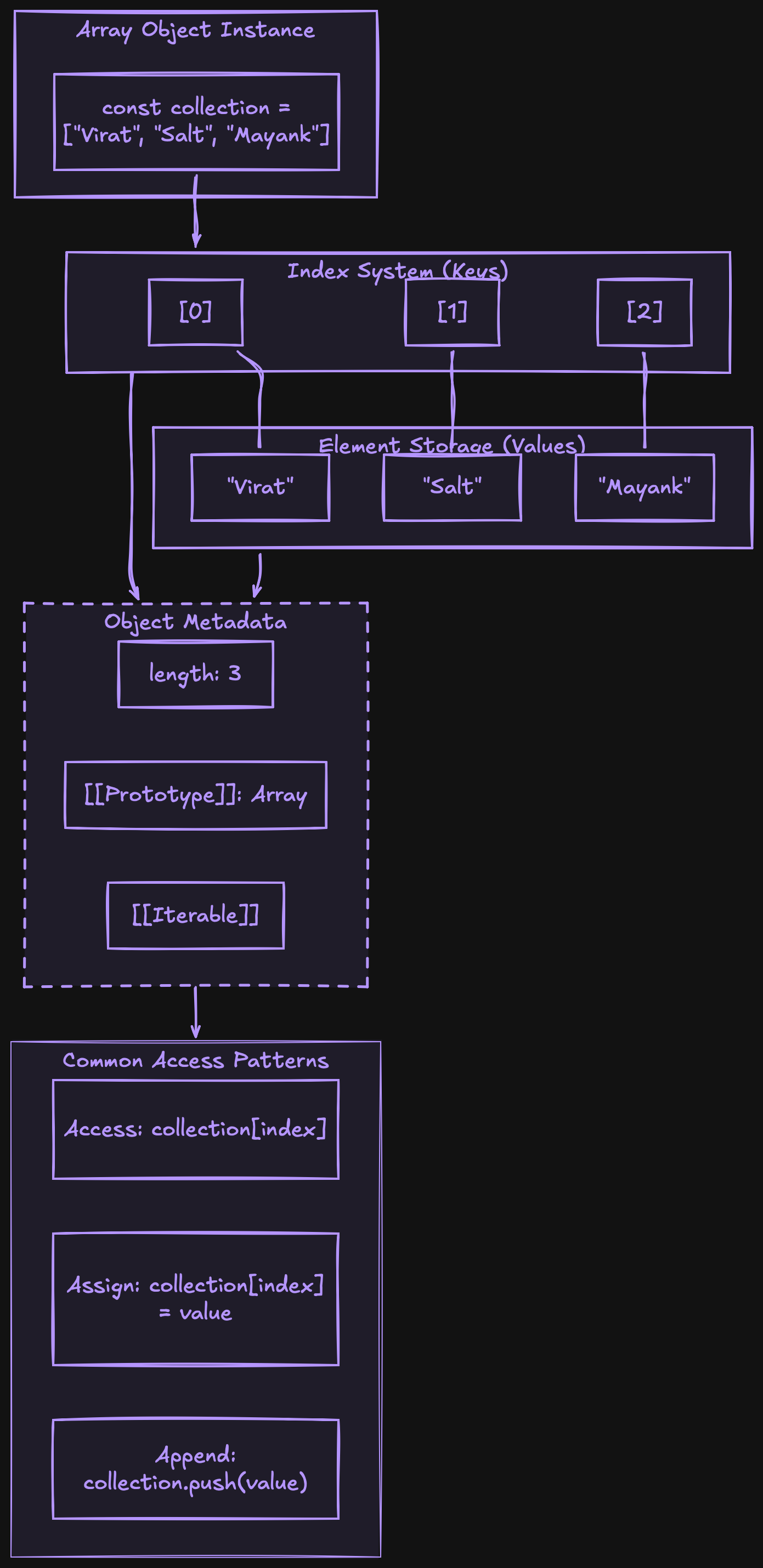
Every element in an array has a position number called an index. It starts at 0, not 1.
const battingOrder = [
  "Phil Salt",       // index 0
  "Virat Kohli",     // index 1
  "Mayank Agarwal",  // index 2
  "Rajat Patidar",   // index 3
  "Liam Livingstone" // index 4
]
Array name, square brackets, index inside. That is how you get any element out.
console.log(battingOrder[0])  // Phil Salt
console.log(battingOrder[1])  // Virat Kohli
console.log(battingOrder[2])  // Mayank Agarwal
If you try to access an index that does not exist, JavaScript does not throw an error. It returns undefined.
console.log(battingOrder[20]) // undefined
No error. Just empty. The position does not exist so there is nothing there.
Updating Elements
Mayank Agarwal was not in the original RCB playing eleven. He came in as an impact substitute for Suyash Sharma mid innings. One position in the lineup changed. Evearything else stayed the same.
const battingOrder = [
  "Phil Salt",
  "Virat Kohli",
  "Suyash Sharma",   // original player
  "Rajat Patidar",
  "Liam Livingstone"
]

// Mayank Agarwal comes in as impact sub
battingOrder[2] = "Mayank Agarwal"

console.log(battingOrder)
// ["Phil Salt", "Virat Kohli", "Mayank Agarwal", "Rajat Patidar", "Liam Livingstone"]
Position 2 changed. Everything else stayed exactly as it was.
I tried reassigning the whole array once and got an error because it was declared with const. But changing an element like this worked fine. const means the variable cannot point to a completely different array. What is inside can still be modified. The reference is locked. The contents are not.
Array Length
RCB had ten players in the order. I knew that because I was watching. But in code you cannot always assume you know how long an array is. length tells you.
const battingOrder = [
  "Phil Salt",
  "Virat Kohli",
  "Mayank Agarwal",
  "Rajat Patidar",
  "Liam Livingstone",
  "Jitesh Sharma",
  "Romario Shepherd",
  "Krunal Pandya",
  "Bhuvneshwar Kumar",
  "Yash Dayal"
]

console.log(battingOrder.length)  // 10
Ten players. But the last index is 9 not 10. Length gives you the count, the last index is always one less.
Yash Dayal was the last batter. To get him without writing index 9 directly:
console.log(battingOrder[battingOrder.length - 1]) // Yash Dayal
battingOrder.length is 10. 10 minus 1 is 9. battingOrder[9] is Yash Dayal. That pattern works for any array of any size. I use it constantly.
Looping Through an Array
RCB finished at 190 for 9. Nine wickets fell. At some point during the innings I wanted to go through every batter one by one, see who batted and what happened. Writing a separate line for each player is ten lines of the same thing repeated. A loop handles the whole thing in one go.
The most direct way is a for loop.
const battingOrder = [
  "Phil Salt",
  "Virat Kohli",
  "Mayank Agarwal",
  "Rajat Patidar",
  "Liam Livingstone",
  "Jitesh Sharma",
  "Romario Shepherd",
  "Krunal Pandya",
  "Bhuvneshwar Kumar",
  "Yash Dayal"
]

for (let i = 0; i < battingOrder.length; i++) {
  console.log(battingOrder[i])
}

// Phil Salt
// Virat Kohli
// Mayank Agarwal
// Rajat Patidar
// Liam Livingstone
// Jitesh Sharma
// Romario Shepherd
// Krunal Pandya
// Bhuvneshwar Kumar
// Yash Dayal
What each part is doing:
let i = 0 start at index 0, the first player in the order.
i < battingOrder.length keep going as long as i is less than 10. When i reaches 10 the condition fails and the loop stops.
i++ after each pass move to the next index.
battingOrder[i] access whichever player is at the current position.
The loop runs ten times. First with i = 0, then 1, all the way to 9. At i = 10 it stops.
When I need the index I use the regular for loop. When I only need the values and do not care about position, for...of is shorter.
for (let batter of battingOrder) {
  console.log(batter)
}
Same output. No index tracking needed. batter takes the value of each element one at a time. I use for...of when I just need to go through every item. I use the regular for loop when I need to know which position each item is at.
Try It Yourself
Build the RCB scorecard array from scratch and put it through everything covered here.
Create the batting order array with all ten players in the correct sequence.
const battingOrder = [
  // Phil Salt first, Yash Dayal last
]
Print the first batter and the last batter using index and length.
console.log(battingOrder[0])                       // Phil Salt
console.log(battingOrder[battingOrder.length - 1]) // Yash Dayal
Update index 2 from "Suyash Sharma" to "Mayank Agarwal" the way the impact sub happened mid innings.
Then loop through the whole array with for...of and print every name.
If all four steps work cleanly the whole picture is there.
Wrapping Up
Salt opened at index 0. Virat at index 1. Mayank came in mid innings as an impact sub and slotted into position 2, replacing the original player at that index. The order was fixed, the positions were fixed, and when something changed exactly one element updated while everything else stayed the same.
190 for 9 at the end. Nine players going through the loop one at a time, each one with a position and a score attached. That whole innings was an array running in real life.
And at the end of it Virat stood on the field crying. Eighteen years. I stopped tracking the scorecard entirely by that point. Some moments you do not need an array for. You just let them happen.
I hope you enjoyed reading this.


