Understanding Variables and Data Types in JavaScript
I like making things with code. This is where I share my projects and the bugs I ran into.
We had just come back from summer holidays and were still in that holiday mood. College had started but September is that one month where nothing much is happening yet, no pressure, no deadlines, just showing up. Me and my best friends were sitting together one day, that usual feeling of yaar mann nahi lag rha kuch toh crazy karna hai, when Harshda suggested going to Thomso.
Thomso is the annual cultural fest at IIT Roorkee and that year Badshah and Sunidhi Chauhan were both performing at the concert. Everyone was in immediately. No debate, no thinking about it. IIT Roorkee is one of the most beautiful campuses in the country and the concert alone was enough reason. The excitement in our WhatsApp group after that one message was something else.
She said mein sabse jyada maze karungi and honestly from the energy she had about this trip I believed her completely.
Then everyone looked at me.
I am that person in our friend circle. Train tickets, stay arrangements, itinerary, all of it lands on me. I wanted to go just as much as everyone else so I was not complaining. So I started that evening. Searching for train ticket prices, checking 2nd AC availability, comparing options, looking at stay inside the campus itself for the full five days.
It was past midnight when I was still at it. That is when Falesh messaged in the WhatsApp group and casually dropped the idea of visiting Haridwar as well. It is around 100 to 150 km from Roorkee, roughly on the way, and he wanted to experience the whole religious side of it. I looked at that message and thought uff yaar really. But before I could say anything everyone in the group started saying yes yes good idea. So that became part of the plan too.
I sorted Haridwar arrangements as well. While doing all of this I was also thinking about what to pack. Power bank obviously, that is non-negotiable. Trimmer. My most comfortable track pants for the journey. Cool clothes for the event itself. Smart watch to stay updated on the go. Shoes. The usual things came together quickly.
But there was one gap. I wanted a white or off-white shirt for the event and I did not have one. So I ordered it online, not fully confident it would arrive on time knowing my qismat. It arrived on time. Condition was good. I was surprised.
The trip was everything. Thomso, the concert, Haridwar, all of it.
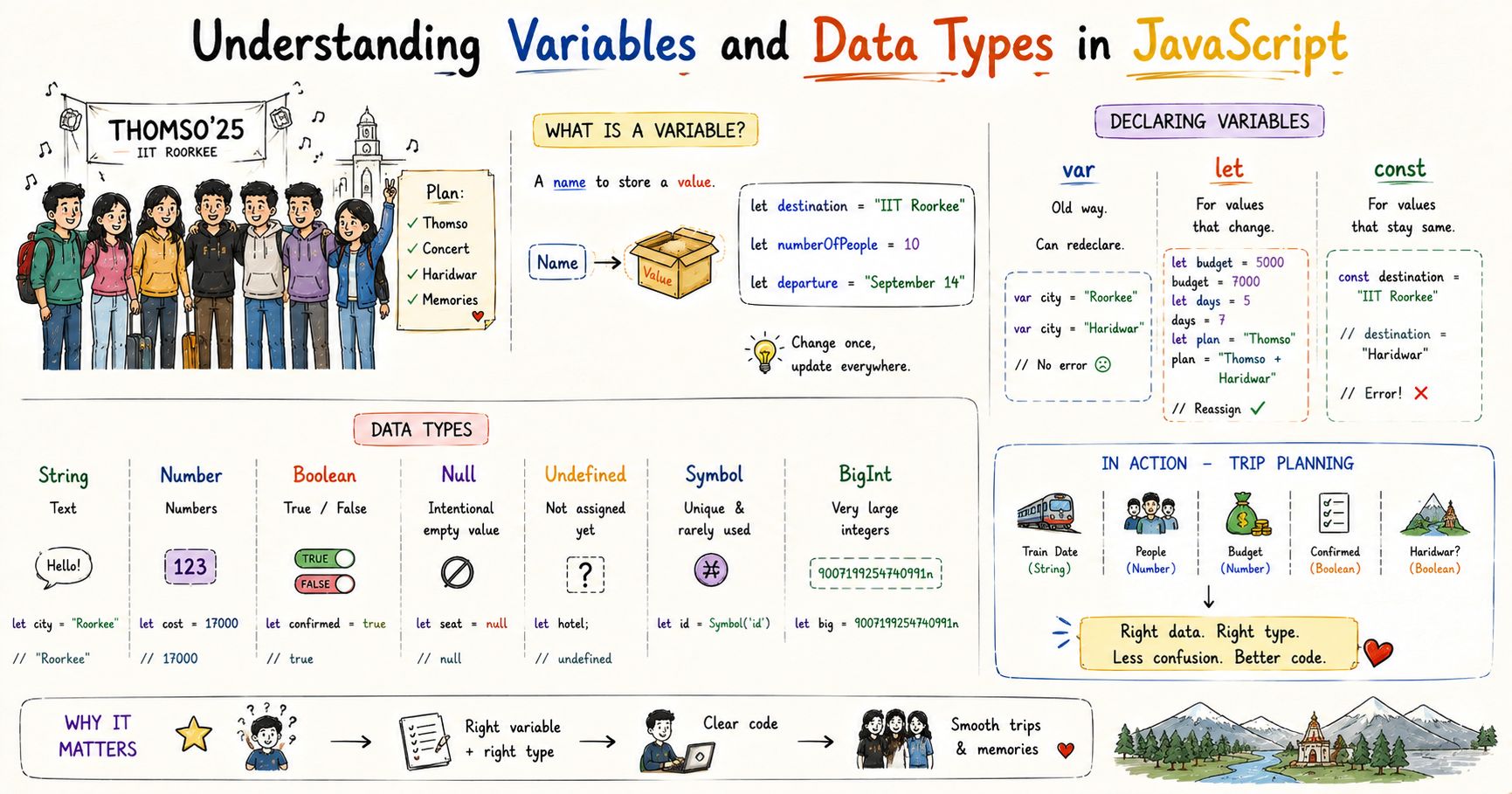
That entire trip, from the first message in the WhatsApp group to all of us coming back home, is exactly how variables, data types, and scope work in JavaScript.
What Is a Variable
When I was sitting at my desk that evening sorting everything out, each piece of information had a name and a value. The train date. The number of people. The total budget. I was not just holding these things in my head randomly. The train date had a name, departure, and a value, the actual date. That is a variable. A name on the outside, a value on the inside.
let destination = "IIT Roorkee"
let numberOfPeople = 10
let departure = "September 14"
Now anywhere in my planning where I needed the destination, I did not retype "IIT Roorkee" every time. I just used destination. If plans changed, I update it in one place and it reflects everywhere. And it makes things readable too. numberOfPeople + 1 means something. 10 + 1 means nothing without context.
var, let, and const
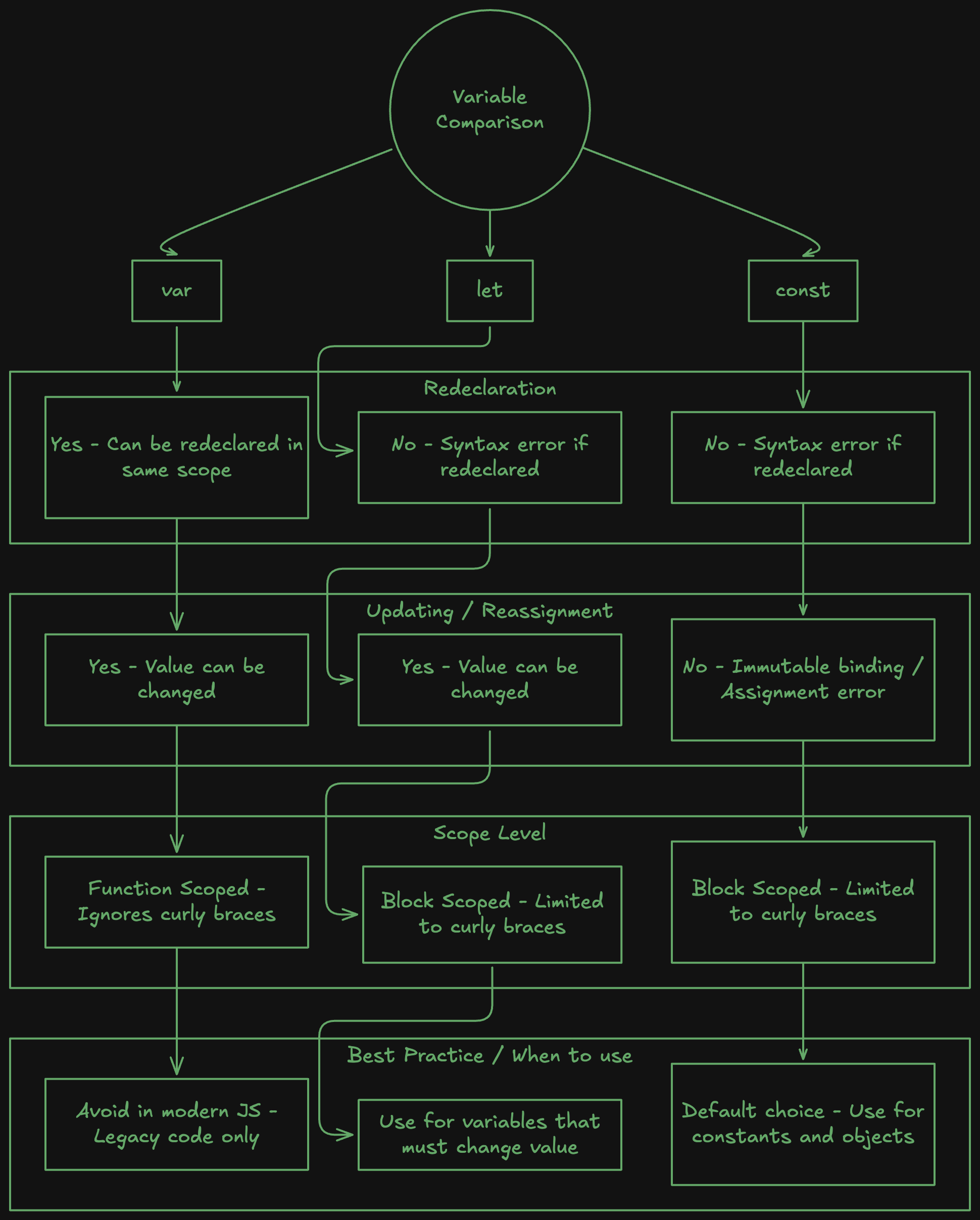
When I started planning the Thomso trip I was just putting everything down without stopping to think about what kind of thing each one was. Budget. Days. Destination. All declared the same way. It was only when things started changing, and some things refused to change, that I understood why JavaScript gives you three different ways to declare a variable.
var is the original way to declare variables in JavaScript. It works but there is one thing it does that causes silent problems. You can declare the same variable name twice and JavaScript will not say anything.
var city = "Roorkee"
console.log(city) // Roorkee

var city = "Haridwar"  // declared again, no error
console.log(city) // Haridwar
In a small file this does not matter. In a large file you might accidentally create a second variable with the same name and overwrite something you needed, and JavaScript will not say a word. I do not use var in new code. You will see it in older codebases and it is worth knowing what it is.
let is for values that change. When Falesh dropped the Haridwar idea at midnight and everyone said yes in the WhatsApp group, the budget changed. The number of days changed. The itinerary changed. These are let variables. Values that start with something and keep getting updated. You can reassign them as many times as you need. The only thing let does not allow is declaring the same name twice by accident, which var does allow and which causes bugs that are very hard to track down.
let budget = 5000
budget = 7000  // Haridwar added, budget updated

let days = 5
days = 7  // extended for Haridwar

let itinerary = "Thomso only"
itinerary = "Thomso + Haridwar"  // Falesh's midnight idea
const is for values that should never change. The destination was always IIT Roorkee. Nobody was changing that. The concert had Badshah and Sunidhi Chauhan locked in from the moment it was confirmed. My name on the train ticket was my name. These never changed and they were never supposed to. Once you set a const, it is sealed. Try to reassign it and JavaScript throws an error immediately.
const destination = "IIT Roorkee"
const concert = "Badshah and Sunidhi Chauhan"
const myName = "Ayush"
destination = "Shimla" // TypeError: Assignment to constant variable
I used to think this was the language being annoying. Then I understood it is actually doing exactly what you told it to do. When something is const, you are making a promise that this value will not change. That error is the language holding you to it.
Once I understood this I started defaulting to const for everything. If I try to reassign it and get that error, I switch it to let. That process alone tells me which values in my code are actually changing and which ones I just assumed might.
Data Types
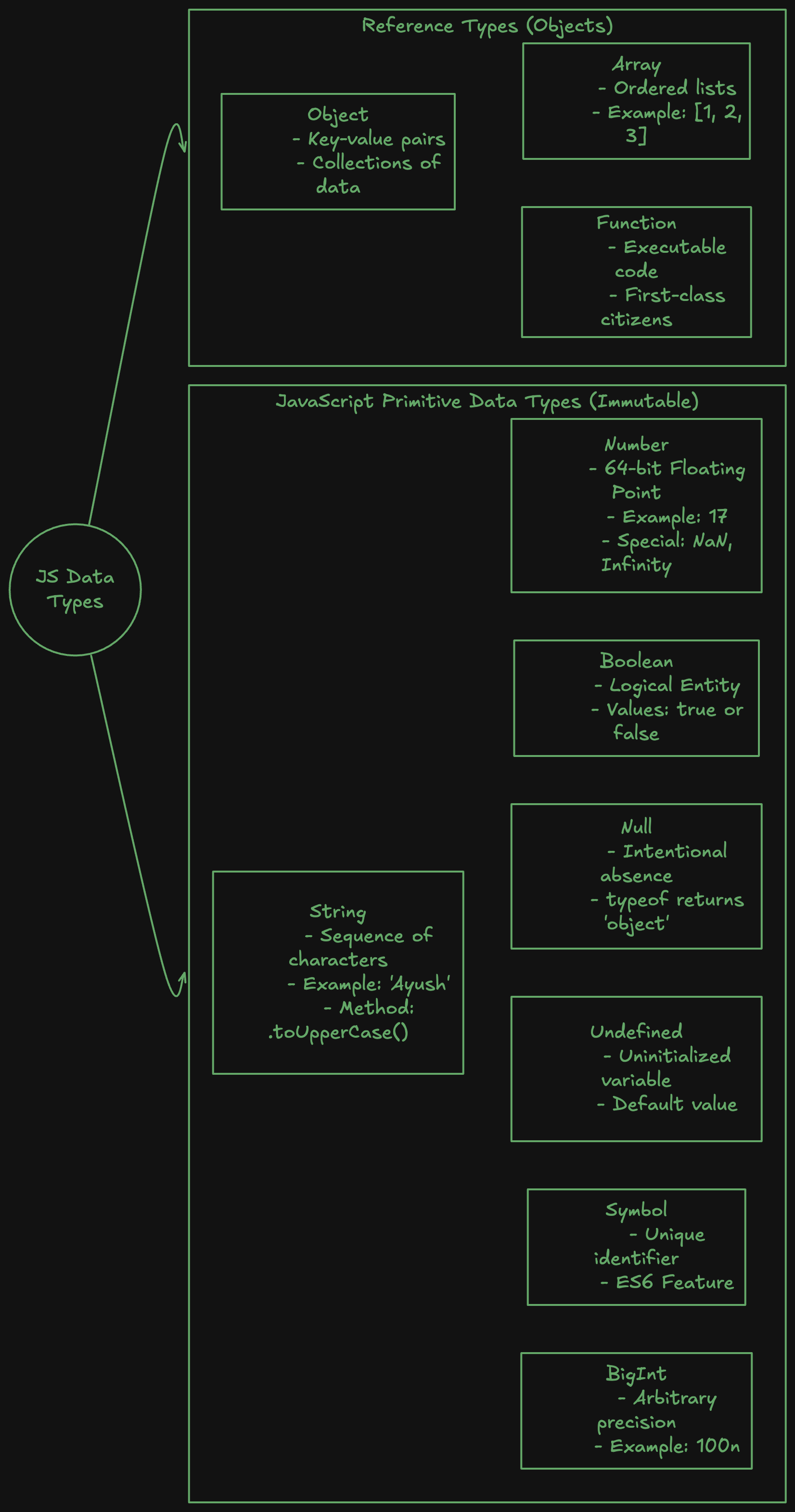
Sitting there that night I had the destination, the budget, whether Haridwar was confirmed, all of it open in front of me. Each one was a completely different kind of thing. The destination was text. The budget was a number I could actually do maths on. Whether Haridwar was confirmed was just a yes or no. I was storing them all the same way but they behaved completely differently. That is what data types are. A variable is the container. The data type is what kind of thing is inside it.
String
The destination, the fest name, Harshda's exact words in the chat, all of that is text. In JavaScript text is called a string and you wrap it in quotes.
let destination = "IIT Roorkee"
let festName = "Thomso"
let harshda = "mein sabse jyada maze karungi"
The train PNR number looks like a number but it is actually a string. You are never going to add two PNR numbers together or divide one by something. It is just text that happens to be made of digits.
const pnr = "4521869307" // string, not a number
Strings also get joined together using +. I used this constantly before I even knew it had a name.
let firstName = "Ayush"
let lastName = "Jain"
let fullName = firstName + " " + lastName
console.log(fullName)  // Ayush Jain
Number
The budget was a number I could actually do maths on. The distance to Haridwar was a number. The number of people coming was a number. In JavaScript these do not need quotes. They are just numbers.
let budget = 5000
let numberOfPeople = 10
let distanceToHaridwar = 130
So when Falesh added Haridwar and the budget needed updating, I could just do this directly.
let budget = 5000
let haridwarExtra = 2000
let totalBudget = budget + haridwarExtra
console.log(totalBudget)  // 7000
Per person cost, total budget, distance, all of it works the same way. JavaScript does not separate whole numbers from decimals either. 5000 and 4999.50 are both just numbers.
Boolean
When Falesh sent the Haridwar idea and I was waiting to see if everyone agreed, the answer in my head was just yes or no. Is Haridwar confirmed or not. That kind of value in JavaScript is called a boolean. It is either true or false, nothing else.
let haridwarConfirmed = false  // before everyone replied
haridwarConfirmed = true       // after everyone said yes yes

let concertTicketsBooked = false
concertTicketsBooked = true

let shirtDelivered = false
shirtDelivered = true  // arrived on time, surprisingly
Every decision in JavaScript runs through booleans. Every if statement, every condition. The shirt arriving on time was a boolean I was not at all confident about.
Undefined
Before I ordered the white shirt, there was a slot in my packing list for it. I knew I needed something for the event. I had mentally reserved that space. Nothing was in it yet. That is undefined. A variable that exists but has not been given a value yet.
let eventShirt
console.log(eventShirt)  // undefined
The variable is there. JavaScript does not throw an error. It just tells you nothing has been put in it yet.
Null
If someone had confirmed they were coming and then backed out, I would have removed their train seat on purpose. Not forgotten to fill it. Removed it deliberately. That is null. undefined means you have not assigned anything yet. null means you have deliberately assigned emptiness. It is intentional.
let seat = "Falesh"   // confirmed
seat = null           // backed out, seat deliberately emptied
I mixed these two up early on and got a bug I could not explain for longer than I would like to admit. undefined is accidental emptiness. null is intentional emptiness. Once that clicked, it never confused me again.
What Scope Means
It was past midnight. Falesh sent that message. Everyone replied. That whole conversation, the idea, the yes yes replies, the energy of it, existed entirely inside our WhatsApp group at that hour. My roommate who was asleep two feet away had no idea any of it was happening. Step outside that context and none of it meant anything to anyone. That is scope.
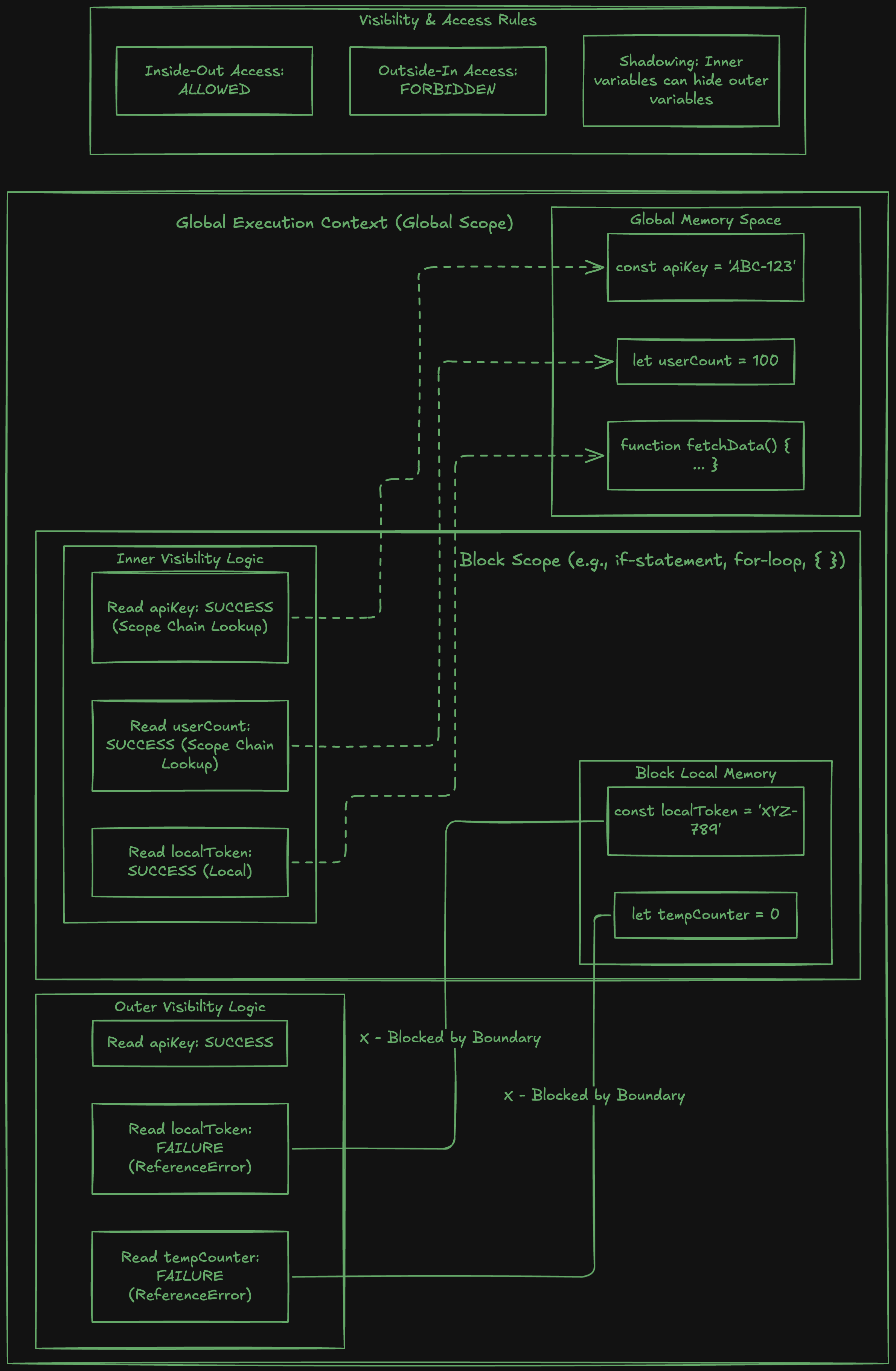
Scope is the area of your code where a variable can be accessed. If a variable is in scope, you can use it. If it is out of scope, it does not exist from where you are standing.
Curly braces {} create a new scope in JavaScript. Variables declared with let or const inside a pair of curly braces only exist inside those curly braces.
{
  let haridwarPlan = "Visit Har Ki Pauri"
  console.log(haridwarPlan)  // Visit Har Ki Pauri
}

console.log(haridwarPlan)  // ReferenceError: haridwarPlan is not defined
The variable was created inside the block. Outside the block it is gone. The same thing happens inside if statements.
let haridwarConfirmed = true

if (haridwarConfirmed) {
  let extraBudget = 2000
  console.log(extraBudget)  // 2000
}

console.log(extraBudget)  // ReferenceError: extraBudget is not defined
extraBudget was declared inside the if block. The moment execution leaves that block, the variable no longer exists.
var does not work like this. It ignores block scope entirely and leaks out. let and const respect it. If something is only needed inside a specific block, declare it there.
Choosing Between var, let, and const
By the time I finished all the arrangements that night, some things had changed three times and some things had never changed once. The budget changed. The itinerary changed. The destination never did. The concert lineup never did. Once I started thinking about code the same way, the decision became automatic. I default to const for everything. If I try to reassign it and get the TypeError, I switch it to let. That process alone shows me which values are actually changing and which ones I just assumed might. I do not use var in new code at all.
Try It Yourself
Reading about variables did not make it click for me. Writing them did. Start with this:
let destination = "IIT Roorkee"
let budget = 5000
const festName = "Thomso"

console.log(destination)
console.log(budget)
console.log(festName)
Then update destination and budget and watch the console change. Then try this:
festName = "Something Else"
That error, TypeError: Assignment to constant variable, is one of the most useful things JavaScript can show you early. It is not a failure. It is the language telling you exactly what const means in practice. You can read about it but the error makes it real in a way that reading does not.
Wrapping Up
Harshda said mein sabse jyada maze karungi and she meant it. The destination was locked from day one. The budget kept changing. Falesh blew up the itinerary at midnight and somehow that became the best part of the trip. The white shirt slot in my packing was empty until it was not. And everything that happened in that WhatsApp group at midnight only made sense to the people who were there.
That is variables, data types, and scope. const for what is fixed from the start and should never change. let for what will keep updating. The type of each value, whether it is text, a number, or true or false, tells JavaScript how to work with it. And scope keeps everything in its place, variables exist where they are declared and nowhere else.
I hope you enjoyed reading this.


