TCP Working: 3 Way Handshake & Reliable Communication
I like making things with code. This is where I share my projects and the bugs I ran into.
What is TCP?
If you've read the previous blog about TCP vs UDP, you already know that TCP is the careful one. It guarantees delivery, maintains order, and makes sure nothing gets lost along the way. But have you ever wondered how it actually does all of that? Like what's actually happening under the hood when TCP sends data from one computer to another?
That's exactly what this blog covers. We're going deep into how TCP actually works, step by step.
Why We Need TCP
The internet was never designed to be reliable. Data doesn't travel in one clean stream from point A to point B. It gets broken into pieces, those pieces take completely different routes through different servers and cables across the world, and they arrive whenever they arrive. Some don't arrive at all.
So without anything managing that chaos, you'd never get a complete file, a full webpage, or a readable email. Something had to be built on top of that chaos to bring order to it. That something is TCP.
Problems TCP Is Designed to Solve
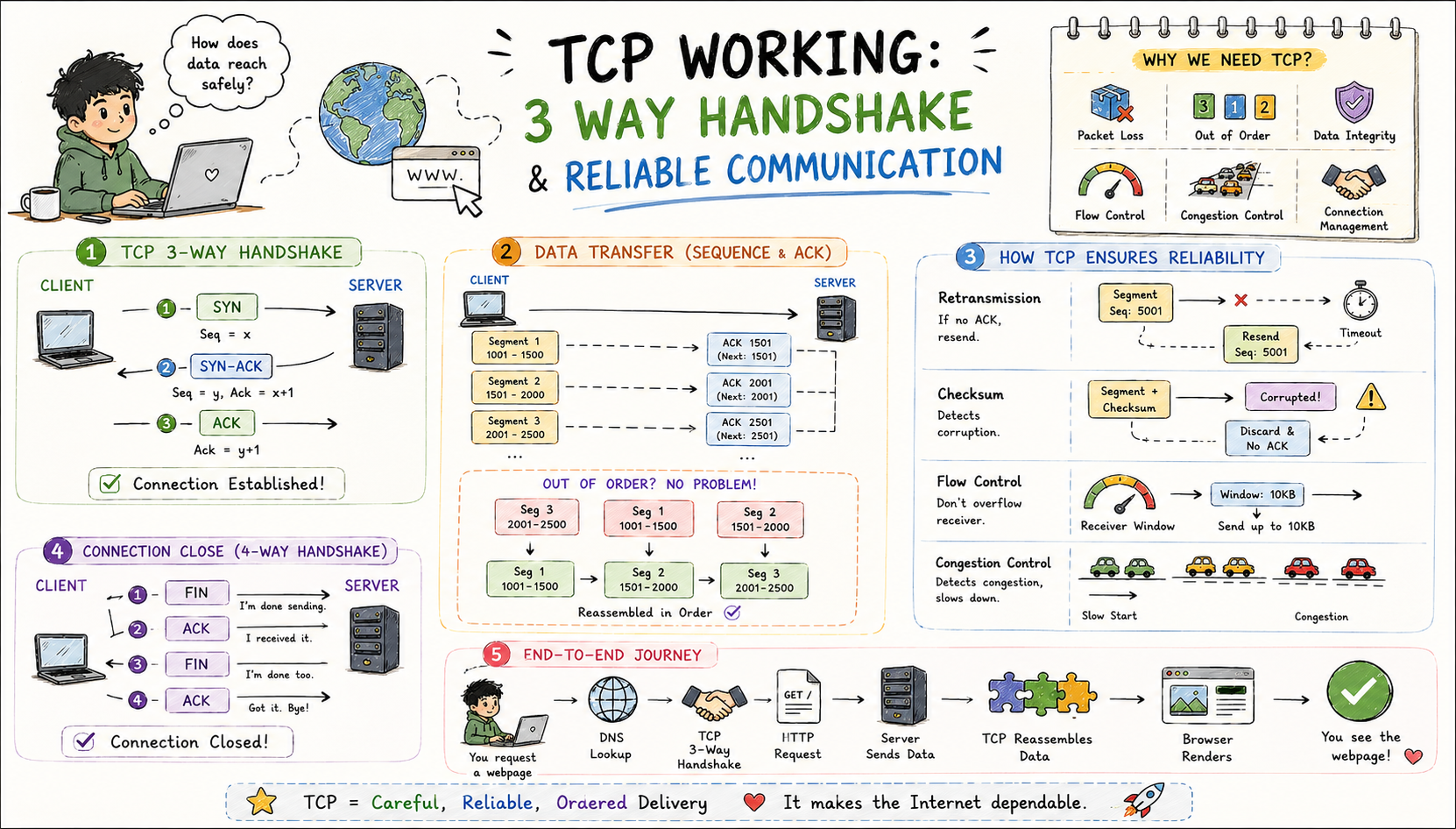
There are six core problems that TCP was specifically built to handle and understanding these makes everything else click into place.
The first is packet loss. Packets can disappear due to network congestion, hardware failures, or routing issues. TCP detects missing packets and retransmits them automatically.
The second is out of order delivery. Packets might take different routes through the internet and arrive out of order. TCP numbers each packet and reassembles them in the correct sequence on the other end.
The third is data corruption. Bits can flip during transmission due to electrical interference or other issues. TCP uses checksums to detect corruption and triggers retransmission when it finds it.
The fourth is flow control. If a sender transmits faster than the receiver can process, data gets lost. TCP adjusts the sending rate based on how much buffer space the receiver has available.
The fifth is congestion control. If too much data floods the network, everyone suffers. TCP detects congestion and slows down transmission to prevent making things worse.
And the sixth is connection management. How do two computers know they're ready to communicate? TCP establishes and terminates connections properly using a defined process, which brings us to the most important part.
What is the TCP 3-Way Handshake
Before any data is transmitted, TCP establishes a connection using a three step process called the 3-way handshake. This ensures both sides are ready to communicate before anything gets sent.
Here's how it works:
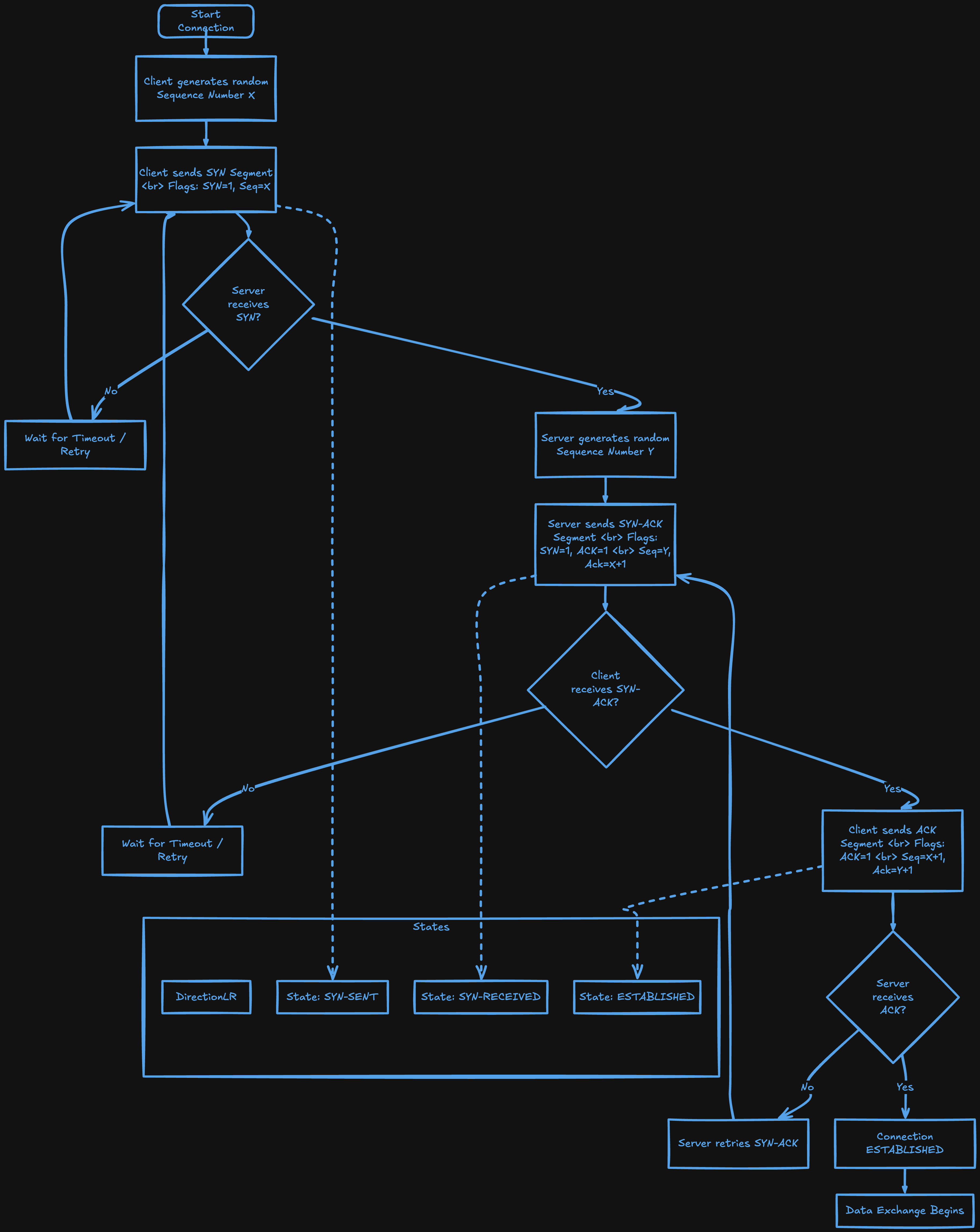
Step 1 is SYN (Synchronize). The client sends a SYN packet to the server saying "I want to connect, my starting sequence number is X."
Step 2 is SYN-ACK (Synchronize-Acknowledge). The server responds saying "I acknowledge your X, I'm ready to connect, my starting sequence number is Y."
Step 3 is ACK (Acknowledge). The client sends back "I acknowledge your Y, let's begin."
And that's it. The connection is established. Both sides now know each other's starting sequence numbers, have agreed they're ready, and can verify the connection works in both directions. The whole thing typically takes one round trip time, which is the time for a packet to go from client to server and back.
Step-by-Step Working of SYN, SYN-ACK, and ACK
Here's a concrete example of what actually happens when your computer connects to www.example.com on port 80.
Step 1 - Client sends SYN:
Client → Server
Flags: SYN
Sequence Number: 1000 (randomly chosen)
"Hello server, I want to establish a connection. My starting sequence number is 1000."
Step 2 - Server sends SYN-ACK:
Server → Client
Flags: SYN, ACK
Sequence Number: 5000 (randomly chosen by server)
Acknowledgment Number: 1001 (client's sequence + 1)
"Hello client, I received your SYN. I'm ready to connect. My starting sequence number is 5000."
Step 3 - Client sends ACK:
Client → Server
Flags: ACK
Sequence Number: 1001
Acknowledgment Number: 5001 (server's sequence + 1)
"Acknowledged. I'm ready. I'm expecting your data at sequence 5001."
Now the connection is established. Both sides know the connection is active, have agreed on sequence numbers, and are ready to transfer data.
How Data Transfer Works in TCP
Once the connection is established, data transfer begins with careful tracking and acknowledgment on both sides.
When data is sent, the application gives TCP data to send. TCP breaks it into packets called segments, assigns each one a sequence number, sends them to the receiver, and waits for acknowledgments back. Here's what that looks like in practice:
Client sends:
Segment 1: Sequence 1001-1500 (500 bytes of data)
Segment 2: Sequence 1501-2000 (500 bytes of data)
Segment 3: Sequence 2001-2500 (500 bytes of data)

Server responds:
ACK 1501 (received bytes 1001-1500, expecting 1501 next)
ACK 2001 (received bytes 1501-2000, expecting 2001 next)
ACK 2501 (received bytes 2001-2500, expecting 2501 next)
Two important things worth knowing here. First, TCP is bidirectional, meaning both sides can send data simultaneously and TCP manages separate sequence numbers for each direction. Second, the receiver tells the sender how much buffer space it has available through something called the window size, which prevents the sender from overwhelming the receiver.
How TCP Ensures Reliability, Order, and Correctness
This is where TCP really earns its reputation. Here's how it handles each guarantee.
For reliability, every segment must be acknowledged. If the sender doesn't receive an ACK within a timeout period, it retransmits that segment:
Client sends Segment 5 (Seq 5001-5500)
Client starts timer
... time passes ...
Timer expires, no ACK received
Client retransmits Segment 5
Server sends ACK 5501
Client knows it arrived
For order, every byte has a sequence number. If segments arrive out of order, the receiver reorders them before passing the data to the application:
Segment 3 (Seq 3001-3500) arrives first
Segment 1 (Seq 1001-1500) arrives second
Segment 2 (Seq 1501-3000) arrives third
TCP reorders them to 1, 2, 3 before giving data to the application
For correctness, each segment includes a checksum. The receiver recalculates it and compares it to what was sent. If they don't match, the segment is corrupted and discarded which triggers retransmission:
Client sends Segment 10 with Checksum: ABC123
Network corruption changes some bits
Server receives Segment 10, calculates Checksum: XYZ789
Checksums don't match → Server discards segment
Server doesn't send ACK
Client timeout → retransmits Segment 10
This time it arrives correctly
For flow control, the receiver tells the sender how much buffer space it has available and the sender never sends more than the receiver can handle:
Server tells Client: "My receive window is 10,000 bytes"
Client sends only 10,000 bytes, then waits
Server processes data, frees up buffer space
Server tells Client: "My receive window is now 15,000 bytes"
Client can send more
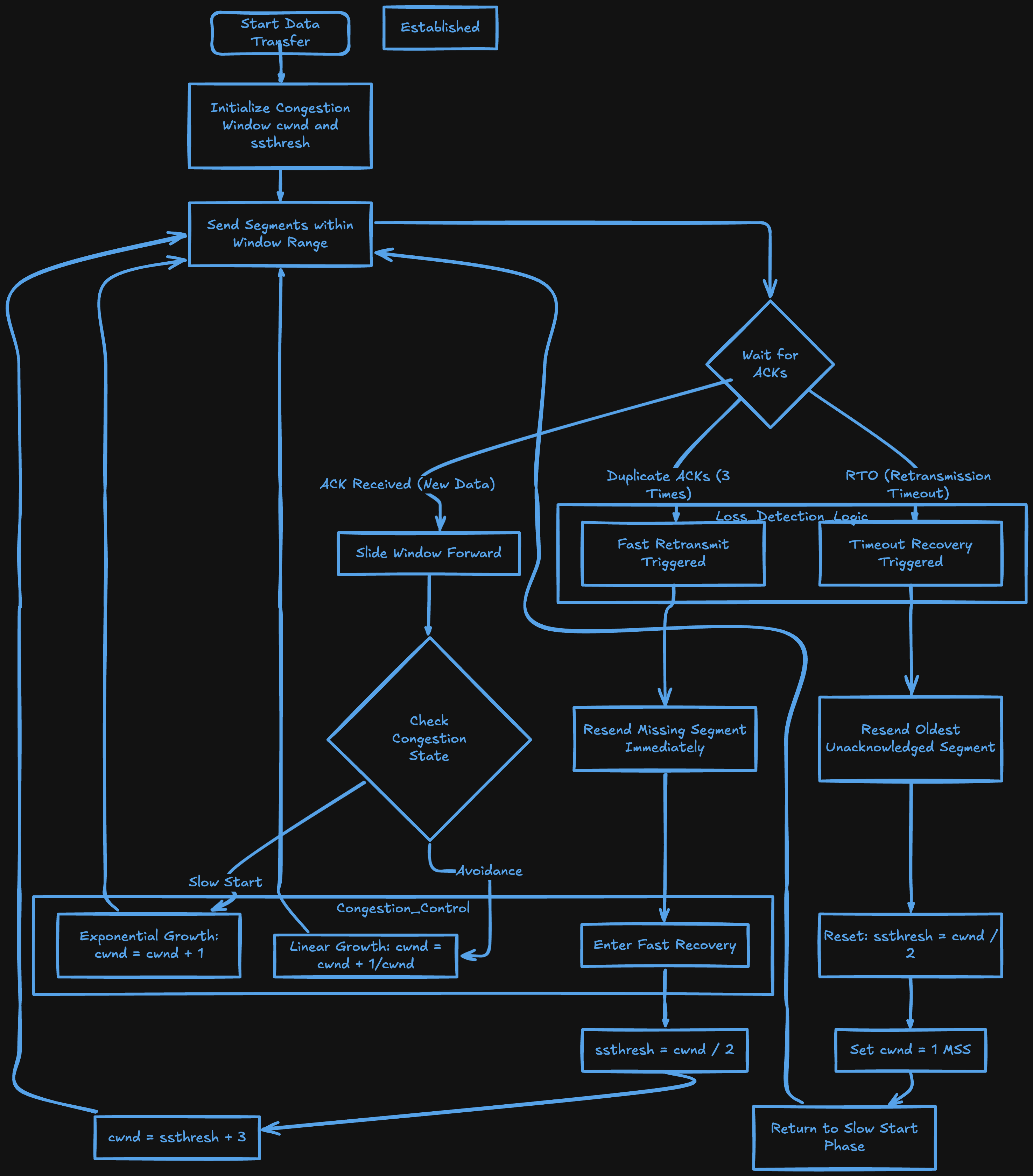
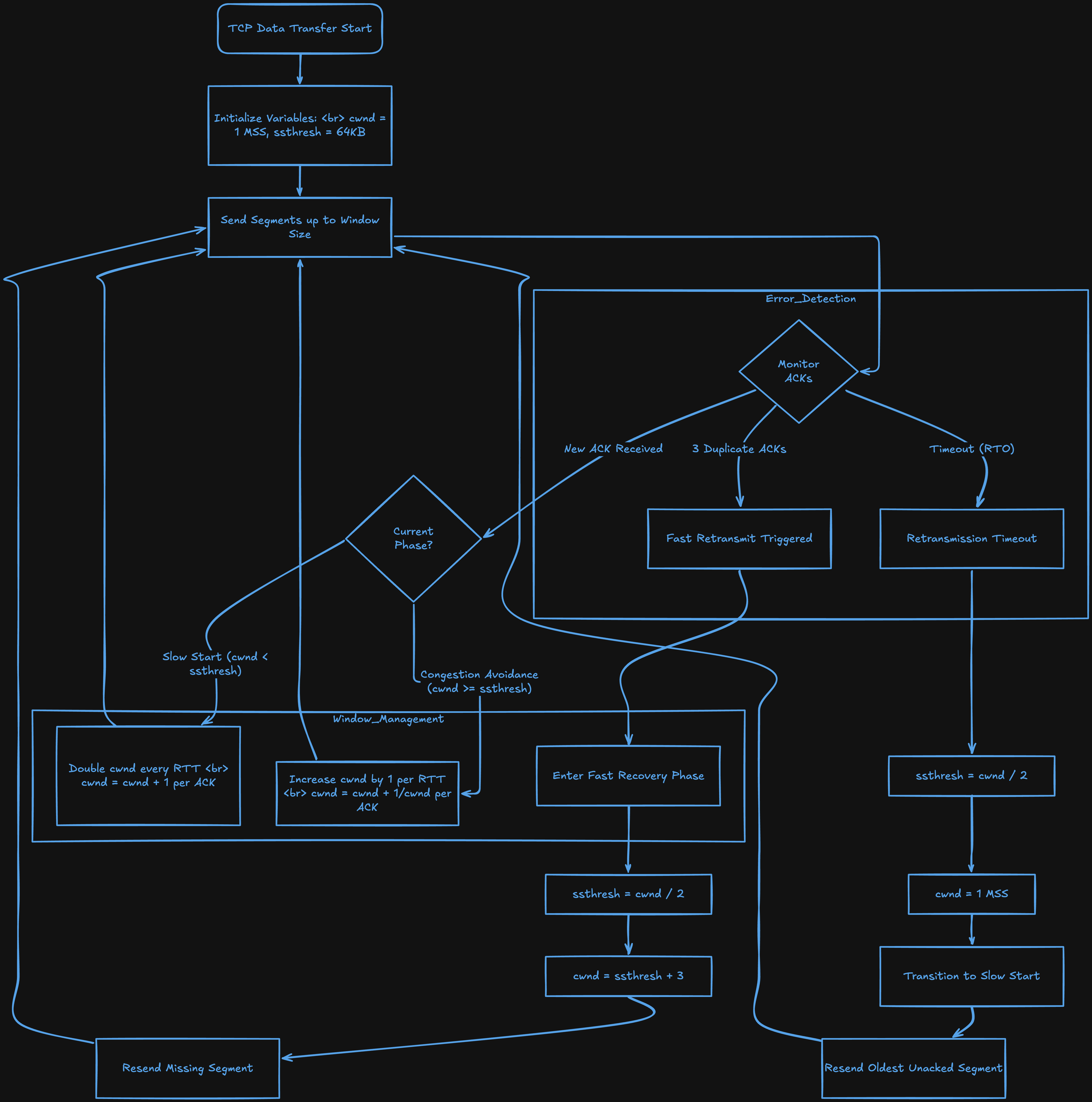
And for congestion control, TCP starts by sending small amounts of data and gradually increases the rate. If packet loss occurs, which indicates congestion, it reduces the rate to avoid making things worse for everyone on the network.
How a TCP Connection is Closed
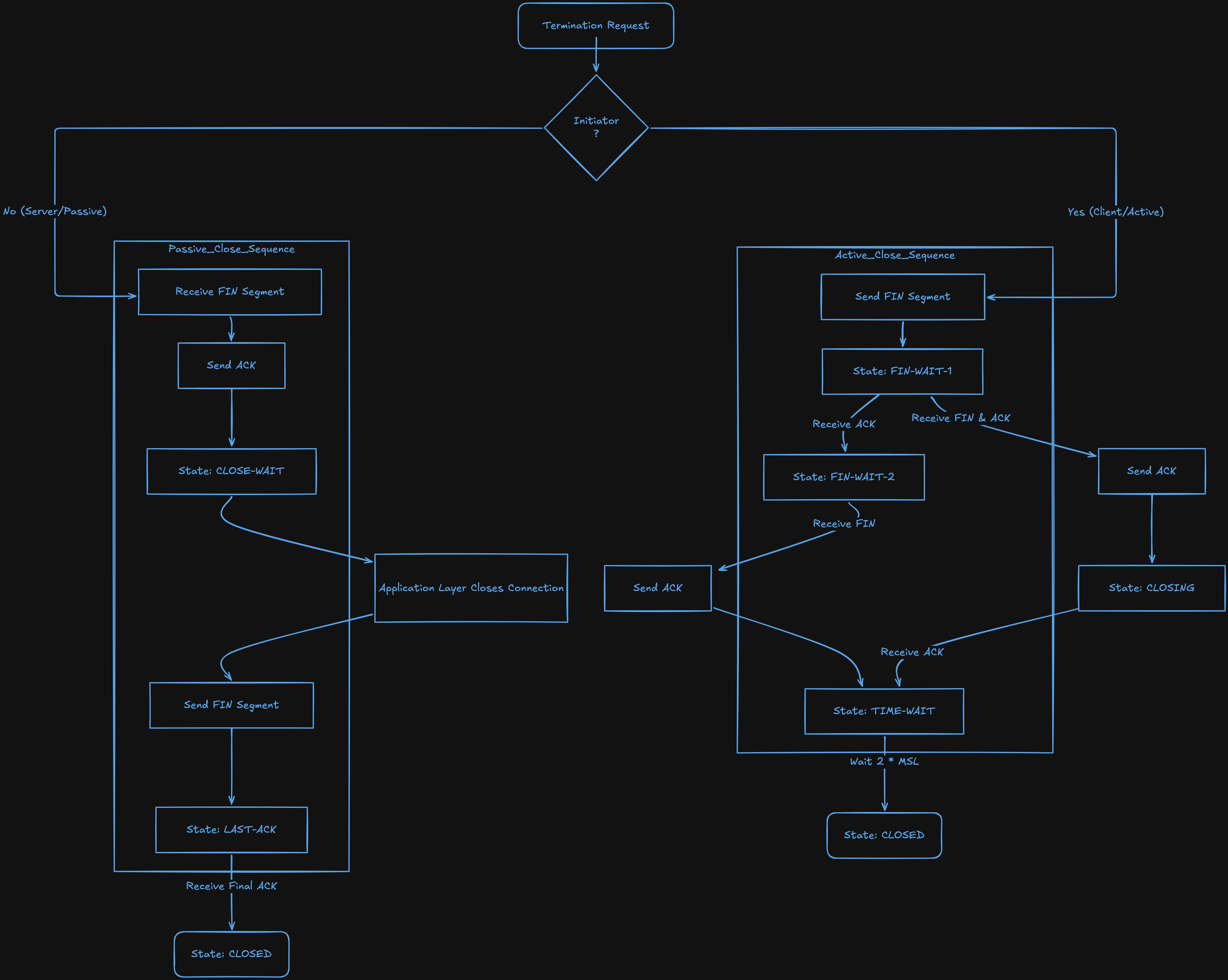
Closing a TCP connection is a graceful process that ensures both sides have finished sending data. It uses a 4 step process sometimes called the 4-way handshake.
Step 1, the client sends FIN saying "I'm done sending data. I have no more to send."
Step 2, the server sends ACK saying "I acknowledge that you're done sending. I received everything." At this point the client won't send more data but the server can still send data to the client. This is called a half-closed connection.
Step 3, the server sends FIN saying "I'm also done sending data now."
Step 4, the client sends ACK saying "I acknowledge that you're done. Connection fully closed."
Step 1 - Client → Server: FIN, ACK
Step 2 - Server → Client: ACK
Step 3 - Server → Client: FIN, ACK
Step 4 - Client → Server: ACK
And that's it. The connection is cleanly closed on both sides with no data left hanging.
Wrapping Up
At this point you understand not just what TCP does but exactly how it does it. The 3-way handshake, sequence numbers, acknowledgments, retransmission, flow control, congestion control, and the graceful 4-way close. That's the complete picture of how TCP works under the hood.
What I find interesting about TCP is how much work it's doing silently every time you load a webpage, send an email, or download a file. Every single one of those actions involves all of these mechanisms firing in the background in milliseconds without you ever thinking about it.
The next time you see a connection timeout or a slow download, you won't just shrug it off. You'll know exactly what's happening at the TCP level and why.


