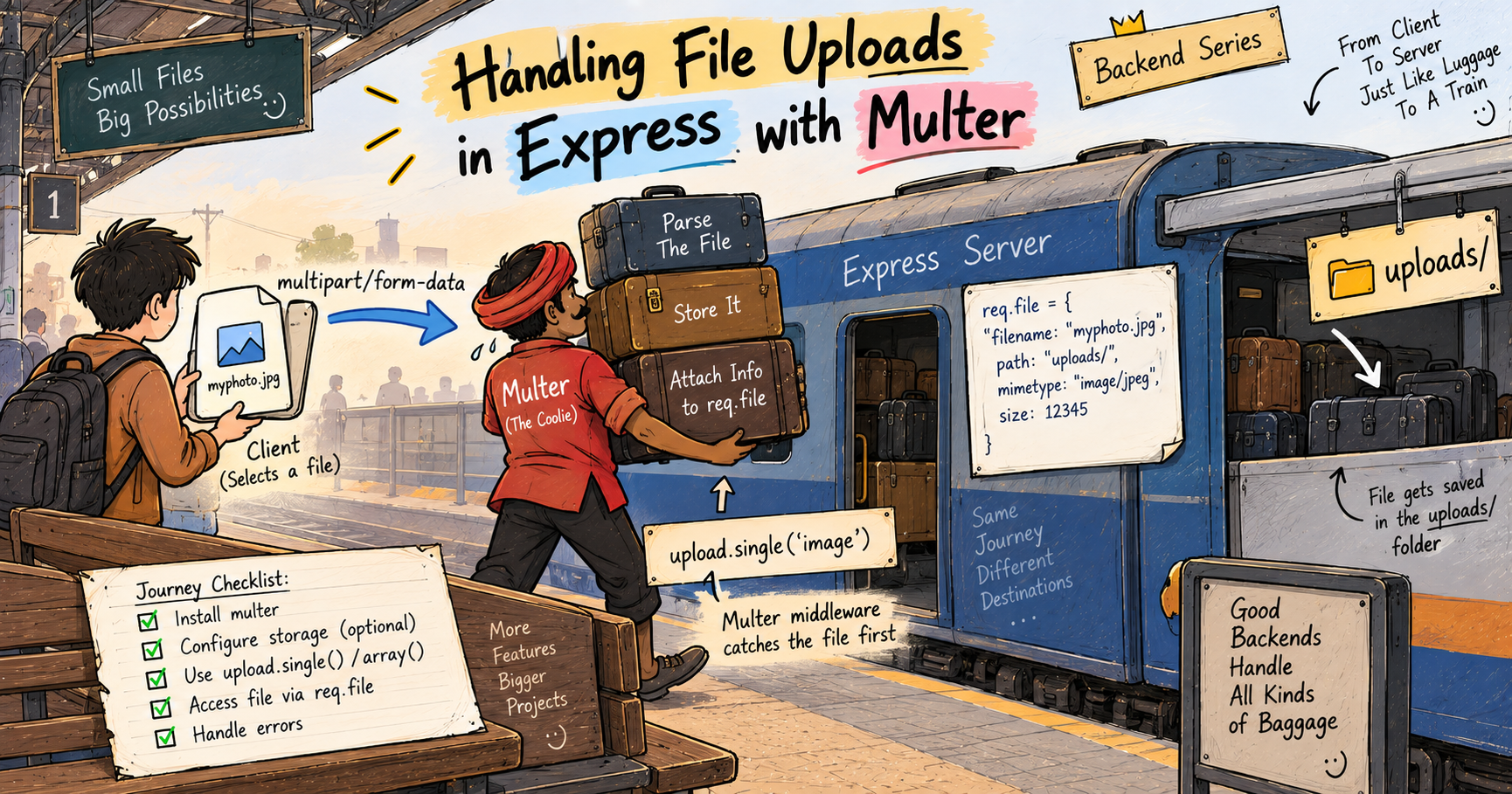
Handling File Uploads in Express with Multer
I like making things with code. This is where I share my projects and the bugs I ran into.
The first time I left for college, first year, first sem, all alone, I took the train. And yaar, the luggage. Mumma had packed basically half the kitchen, besan ke ladoo, makhana roasted in ghee, badam, akhrot, cashews, all the healthy stuff I actually like, and on top of that a small mountain of clothes, some shoes, my books, everything. Six bags in total. There was no way I was lifting all that myself.
So my bade papa dropped me at the railway station in our car, and honestly that ride is one of my favourite memories, we talked the whole way about college, about managing life away from home, all of it, and since the train was already forty minutes late, we got even more time to just talk. When the train finally came, I could not have hauled six bags to coach B3 on my own, obviously. So a coolie stepped in, picked up all that weight, and got it stowed properly under my seat. I had my favourite setup, 2nd AC, side lower seat, curtains drawn, luggage tucked right below me. Bade papa gave me one last hug, the train pulled out, and that was that.
The journey itself was lovely, chai, chips, a bit of my Ikigai book, an episode of Goblin on Netflix. And at the other end, another coolie lifted all six bags out and carried them to my cab, and I paid him around 200 rupees. Done.
Now here is the thing I want you to notice. I did not carry that heavy load myself, and I could not have. A specialist, the coolie, was the one who received all that physical weight and got it stored exactly where it needed to go. That is precisely what happens when a file gets uploaded to your server. Your normal Express setup cannot handle that heavy load, so a specialist middleware steps in to receive the file and store it. That specialist is called Multer. Chalo, let us understand the whole thing.
Why a file upload needs special middleware
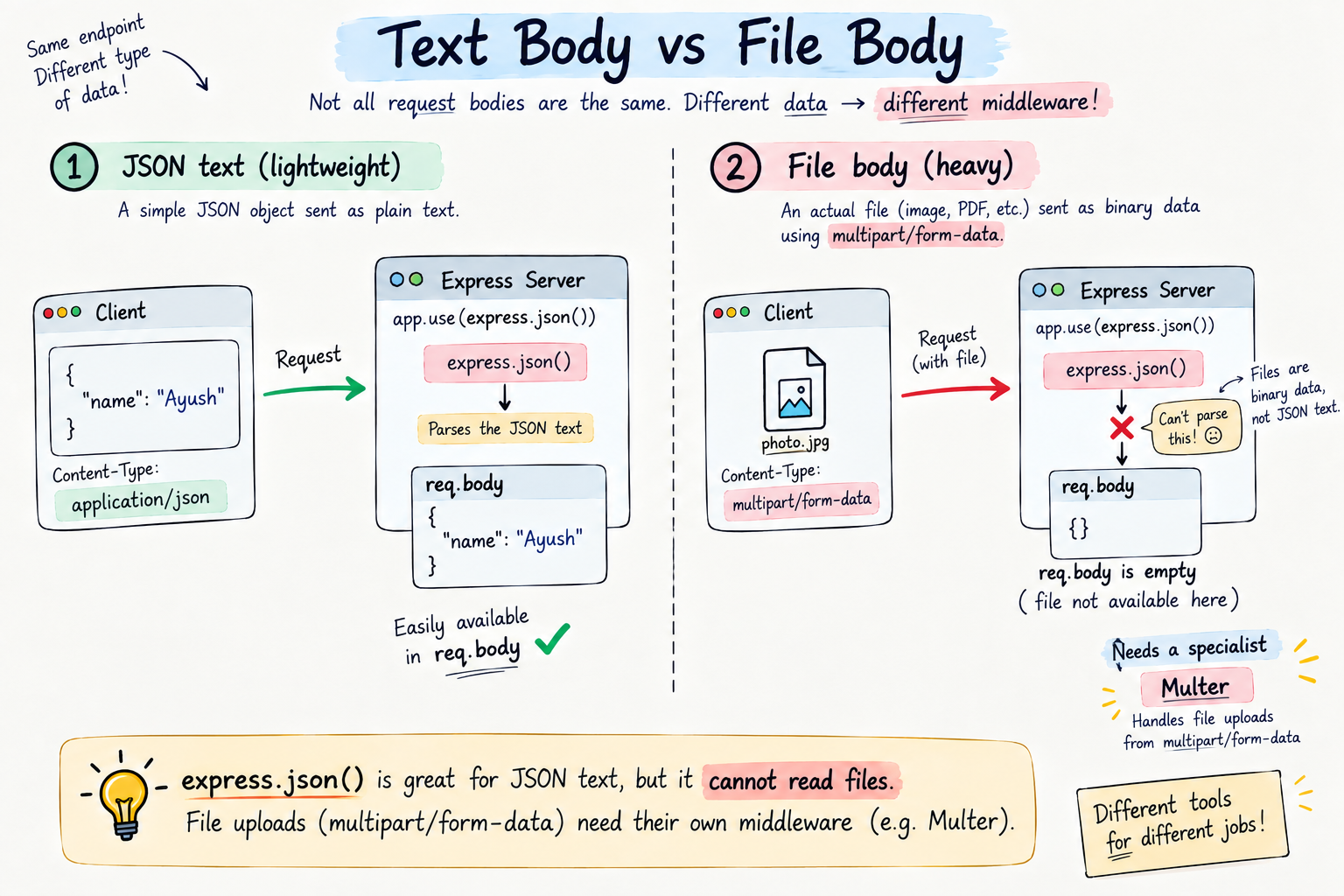
Think back to the earlier posts. When a client sends normal data, like { "name": "Ayush" }, that is just text, and express.json() reads it and puts it on req.body. Light stuff, a simple list, easy to handle.
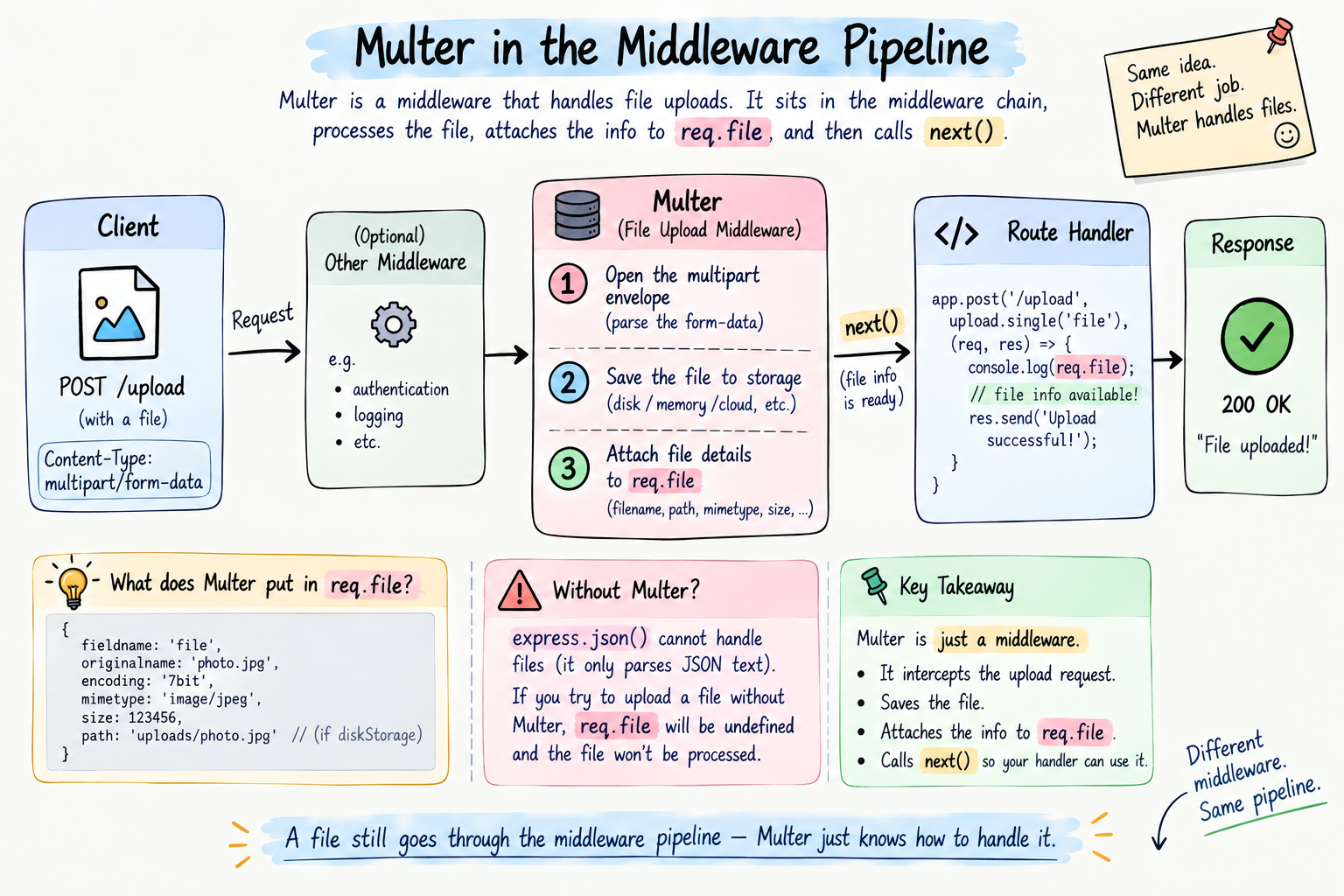
But a file is not text. An image, a PDF, a video, that is heavy, raw binary data, actual bytes, like my six physical bags versus a small paper list. And it does not arrive in the neat JSON format. When you upload a file, the browser sends it in a completely different envelope called multipart/form-data. This format bundles the file's actual bytes together with its name and type, all packed as one.
And here is the catch, express.json() has no idea how to open that envelope. It only speaks JSON text. Hand it a multipart/form-data request and it just shrugs, req.body stays empty and the file is nowhere. Just like I could not lift six heavy bags with my two hands, plain Express cannot handle a file upload on its own. You need a specialist.
What Multer is
Multer is a middleware built for exactly one job: handling file uploads. It is the coolie of your Express app.
When a file comes in as multipart/form-data, Multer steps into the request pipeline, opens that envelope, takes the file, saves it to wherever you tell it, and then hands your route handler a neat summary of what it stored, on req.file. Your handler does not touch the heavy lifting at all, exactly like I never carried my own bags, the coolie received them and placed them, and just told me where they went.
First, install it.
npm install multer
That is the specialist hired. Now let us put it to work.
Handling a single file upload
Here is the simplest possible upload, one file. Say a user is uploading one profile photo.
const express = require("express");
const multer = require("multer");
const app = express();

// tell Multer where to drop uploaded files
const upload = multer({ dest: "uploads/" });

// the "photo" here must match the form field name the client sends
app.post("/upload", upload.single("photo"), (req, res) => {
  res.json({ message: "File uploaded", file: req.file });
});

app.listen(3000, () => console.log("Server on http://localhost:3000"));
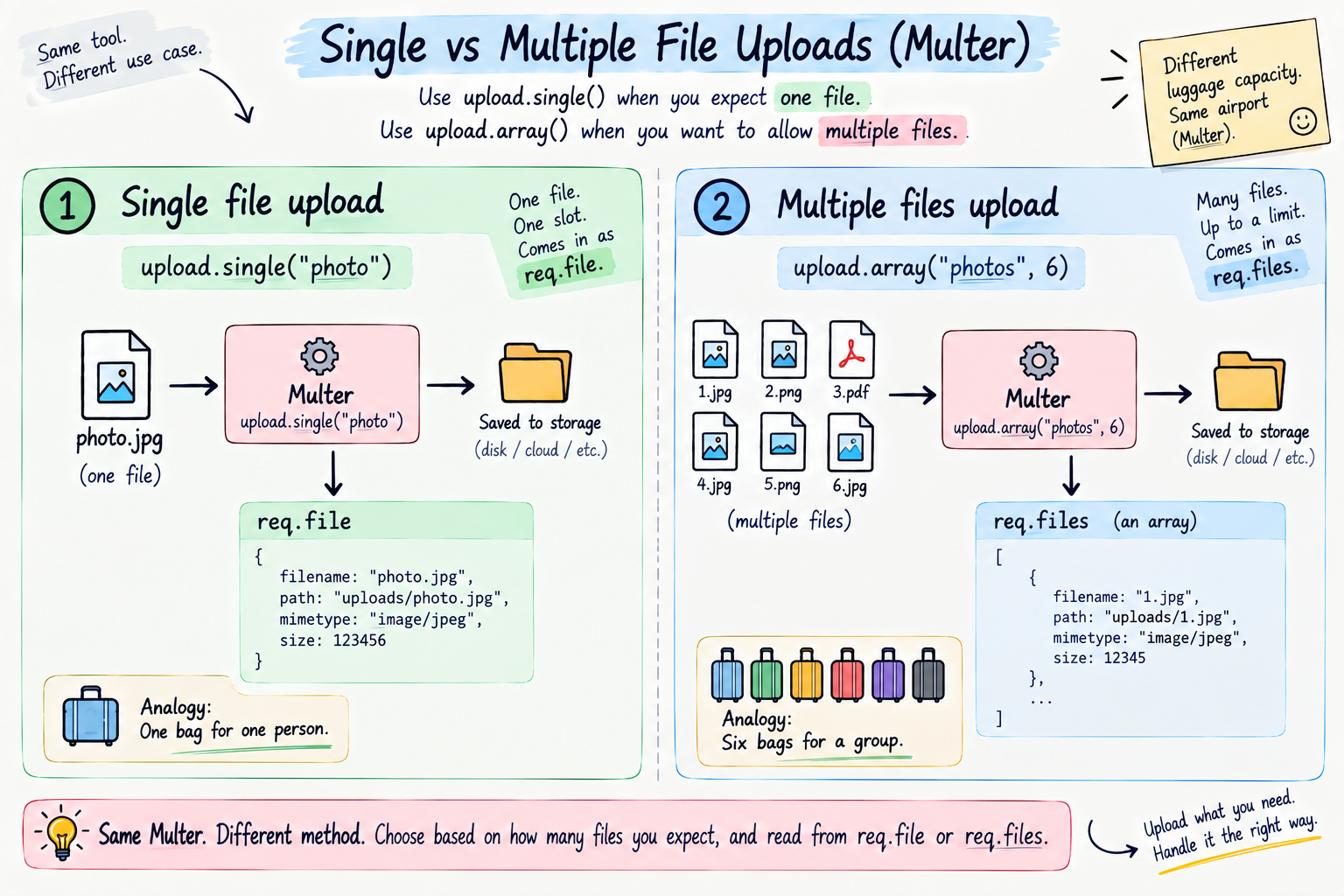
Read the important line. upload.single("photo") is Multer working as middleware, sitting right before your handler, just like checkAuth did in the middleware post. That "photo" is the name of the form field carrying the file, it has to match what the client sends, warna file nahi milegi. Multer grabs that one file, saves it into the uploads/ folder, and by the time your handler runs, all the details are sitting on req.file, the stored filename, its size, its type. The coolie stowed the bag and handed you the tag.
Ek second, let us also see the other side, so the full picture is clear. On a real webpage, the form that actually sends this file looks like this.
<form action="/upload" method="POST" enctype="multipart/form-data">
  <input type="file" name="photo" />
  <button type="submit">Upload</button>
</form>
Two things here are doing all the work. enctype="multipart/form-data" tells the browser to send the file in that special heavy envelope instead of as plain text, without it the file never really goes. And name="photo" on the input has to match the "photo" in upload.single("photo") exactly, that is the field-name match I keep stressing. Miss either one, and the file just does not land.
Handling multiple file uploads
I did not travel with one bag, I had six. Same in real apps, sometimes a user uploads many files at once, a gallery, multiple documents. For that, Multer gives you upload.array.
// accept up to 6 files sent under the field name "photos"
app.post("/upload-many", upload.array("photos", 6), (req, res) => {
  res.json({ message: "Files uploaded", count: req.files.length });
});
Two small changes from before. It is upload.array instead of upload.single, and you give it the field name plus a max count, here 6, just like my six bags. And notice, now the files land on req.files, plural, an array of them, instead of req.file. One coolie, many bags, all stored, all accounted for.
Storage configuration, choosing where and how files are saved
That quick multer({ dest: "uploads/" }) works, but it saves files with random names and no extension, which is often not what you want. For real control, Multer gives you diskStorage, where you decide both the folder and the filename.
const storage = multer.diskStorage({
  // where to store the file
  destination: (req, file, cb) => {
    cb(null, "uploads/");
  },
  // what to name the file
  filename: (req, file, cb) => {
    cb(null, Date.now() + "-" + file.originalname);
  },
});

const upload = multer({ storage });
Read it calmly, it looks fancier than it is. destination decides which folder the file goes into, our uploads/. filename decides what to call it, and here I prefix the current time with Date.now() so two files named photo.jpg do not overwrite each other, a very common real problem. That cb is just a small callback Multer gives you to say "okay, here is my answer," first argument for an error (null means all good), second for the value. This is you telling the coolie exactly which shelf and what label to use, instead of letting him decide.
Serving the uploaded files back
Storing a file is only half the story. At my destination, the whole point was getting the luggage back out. Same here, once a file is saved, you usually want to access it again, show that profile photo on a page, for example.
Since the files are sitting in a folder, you serve them with express.static, the built-in middleware I mentioned in the last post.
app.use("/uploads", express.static("uploads"));
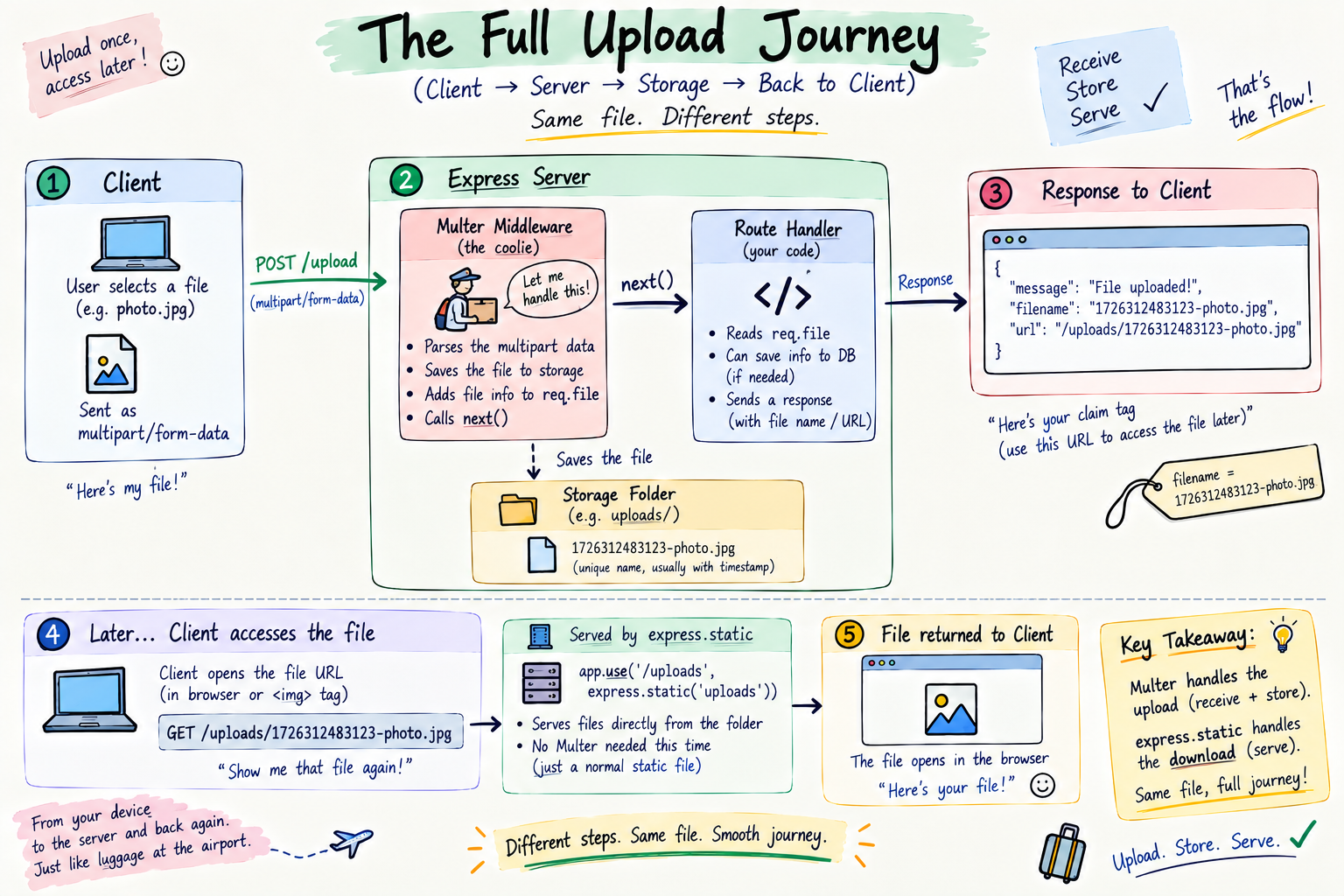
This one line says "anything in the uploads folder, make it reachable under the /uploads URL." So a file saved as uploads/1699-photo.jpg becomes openable at http://localhost:3000/uploads/1699-photo.jpg. That URL is your claim tag, show it, get the file back. The coolie at the destination, handing your bags out.
Building it all in Express
Let us put the whole upload lifecycle, receive, store, serve, into one file.
const express = require("express");
const multer = require("multer");
const app = express();

// storage config: our folder, and safe unique filenames
const storage = multer.diskStorage({
  destination: (req, file, cb) => cb(null, "uploads/"),
  filename: (req, file, cb) => cb(null, Date.now() + "-" + file.originalname),
});
const upload = multer({ storage });

// serve stored files so they can be opened by URL
app.use("/uploads", express.static("uploads"));

// single file
app.post("/upload", upload.single("photo"), (req, res) => {
  res.json({ message: "Uploaded", file: req.file.filename });
});

// multiple files
app.post("/upload-many", upload.array("photos", 6), (req, res) => {
  const names = req.files.map((f) => f.filename);
  res.json({ message: "Uploaded", files: names });
});

app.listen(3000, () => console.log("Server on http://localhost:3000"));
Follow the flow. A file comes in, Multer (the coolie) catches it before your handler, saves it into uploads/ with a safe unique name, and puts the details on req.file or req.files. Your handler just reads those details and replies. And express.static keeps the folder openable by URL, so anything stored can be fetched back later. Receive, store, serve, the full journey.
Try it yourself
Do not just read it, khud karke dekho. Make a folder, run npm init -y, then npm install express multer. One important step, create the uploads folder yourself first, mkdir uploads, because Multer expects it to already exist, warna error aayega. Drop the code above into index.js and run node index.js.
Now upload a real file with curl using the -F flag, which sends multipart/form-data.
# single file (the @ points to a real file on your machine)
curl -F "photo=@myphoto.jpg" http://localhost:3000/upload

# multiple files
curl -F "photos=@one.jpg" -F "photos=@two.jpg" http://localhost:3000/upload-many
Check your uploads folder, your files are sitting there with time-stamped names. Then open the returned filename in your browser at http://localhost:3000/uploads/THE-NAME and watch your file come right back. Upload, stored, served, you just built the whole thing.
The mistakes that will trip you up
The classic Multer traps, so they never waste your evening.
The uploads folder does not exist. With diskStorage, Multer will not create the folder for you, so if uploads/ is missing, the upload errors out. Make the folder first, ya phir create it in code.
Field name mismatch. The name in upload.single("photo") must exactly match the field name the client sends. If the form sends avatar but you wrote photo, req.file comes back undefined, and beginners lose hours here. Match them exactly.
Forgetting it is not JSON. A file cannot go through express.json(), and you do not send it as a JSON body. It must be multipart/form-data, which is what an HTML form with enctype="multipart/form-data" or curl's -F sends. Send a file as JSON and it simply will not arrive.
Files overwriting each other. If you save every file by its original name, two users uploading photo.jpg means the second wipes the first. Add something unique like Date.now() to the filename, as we did.
Trusting the file blindly. In a real app, do not just accept anything. Set limits and check the type, for example only allow images under a certain size, because a stranger uploading a giant or dodgy file to your server is a real risk. Multer supports limits and a fileFilter for exactly this, worth reading up on once you are comfortable.
Quick reference, bookmark this bit
The whole post in a thirty-second scan.
Files are not JSON. They arrive as multipart/form-data, so express.json() cannot read them. Multer is the middleware that can.
const multer = require("multer");

// simple: random names in a folder
const upload = multer({ dest: "uploads/" });

// controlled: choose folder and filename
const storage = multer.diskStorage({
  destination: (req, file, cb) => cb(null, "uploads/"),
  filename: (req, file, cb) => cb(null, Date.now() + "-" + file.originalname),
});
const upload = multer({ storage });
| Need | Use | Read from |
|---|---|---|
| One file | upload.single("field") |
req.file |
| Many files | upload.array("field", max) |
req.files |
| Serve stored files | app.use("/uploads", express.static("uploads")) |
open by URL |
The rules worth memorizing. A file is multipart/form-data, not JSON, so it needs Multer, not express.json(). Multer is middleware, put it before the handler with upload.single or upload.array. The field name must match the client exactly. Make the uploads folder first. Give files unique names so they do not overwrite. And serve them back with express.static.
Wrapping up
So that is file uploads with Multer. A file is heavy, raw binary sent as multipart/form-data, and plain Express cannot lift it, just like I could not carry six bags myself. Multer is the specialist middleware, the coolie, that steps into the pipeline, receives the file, saves it to your storage folder with a name you control, and hands your handler the details on req.file or req.files. Use upload.single for one file, upload.array for many, and express.static to serve them back out by URL.
That was my whole train journey, really. I handed the heavy load to a specialist who received it and stored it exactly where it belonged, I travelled light, and at the destination it all came back out to my cab. Receive, store, serve. Your users will hand your server files the same way, and now you know exactly who does the lifting.
Next up, now that we can receive and store files, we go deeper into where those files actually live and how to serve them properly, local storage, folder structure, and safe access. That is my next post, Storing Uploaded Files and Serving Them in Express.
I hope you enjoyed reading this.