Callbacks in JavaScript: Why They Exist
I like making things with code. This is where I share my projects and the bugs I ran into.
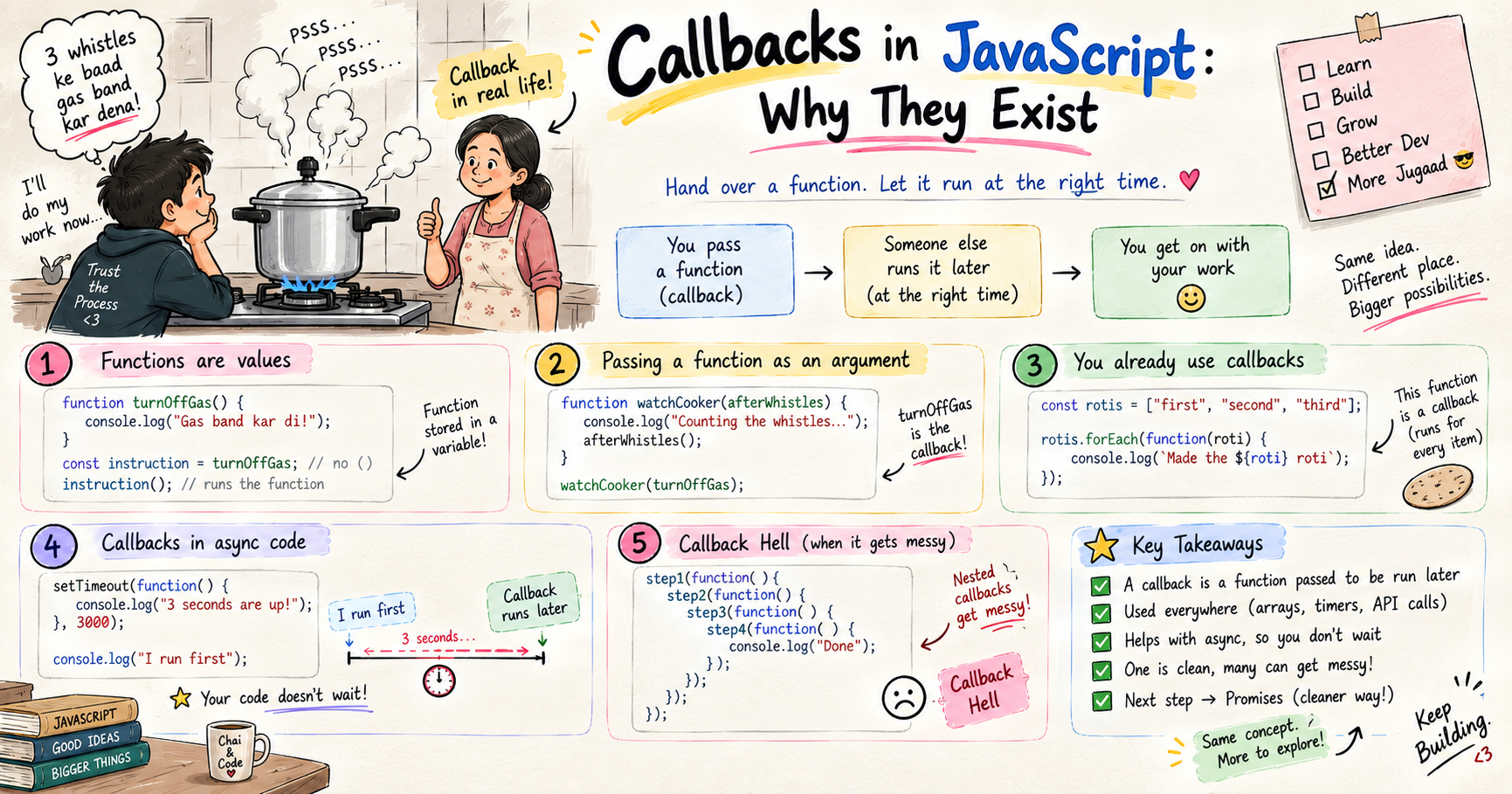
Anyone who has cooked with a pressure cooker knows the rule. The dal is done after about three whistles, and then the gas goes off. But nobody actually stands at the stove the whole time counting whistles, you always have something else to do. So you do the obvious thing, you tell whoever is nearby, usually mom, "teen seeti ke baad gas band kar dena," and you walk off to your own work.
Notice what is really going on there. You did not stay glued to the stove, waiting. You handed over one exact instruction, to be carried out at the right moment, when that third whistle blows. Someone else runs it for you, later, only once the condition is met.
That is exactly what a callback is in JavaScript. You hand an instruction to something else, to be run at the right time, and you get on with everything else meanwhile. This pattern shows up in JavaScript constantly. So let me build it up from the ground, because once this clicks, all the async stuff you keep hearing about suddenly makes sense.
First, the one idea everything rests on: functions are values
Before callbacks make any sense, this has to click. In JavaScript, a function is a value, just like a number or a string. You can store it in a variable, and you can pass it around.
function turnOffGas() {
  console.log("Gas band kar di!");
}

const instruction = turnOffGas; // store the function itself, notice no ()
instruction();                  // "Gas band kar di!"
Look carefully. turnOffGas without the brackets is the function itself, the value, the instruction sitting in your hand. turnOffGas() with brackets actually performs it. That tiny difference is the whole key. Writing the name holds the instruction, adding the brackets runs it. Yaad rakhna, this trips up every single beginner.
Passing a function as an argument
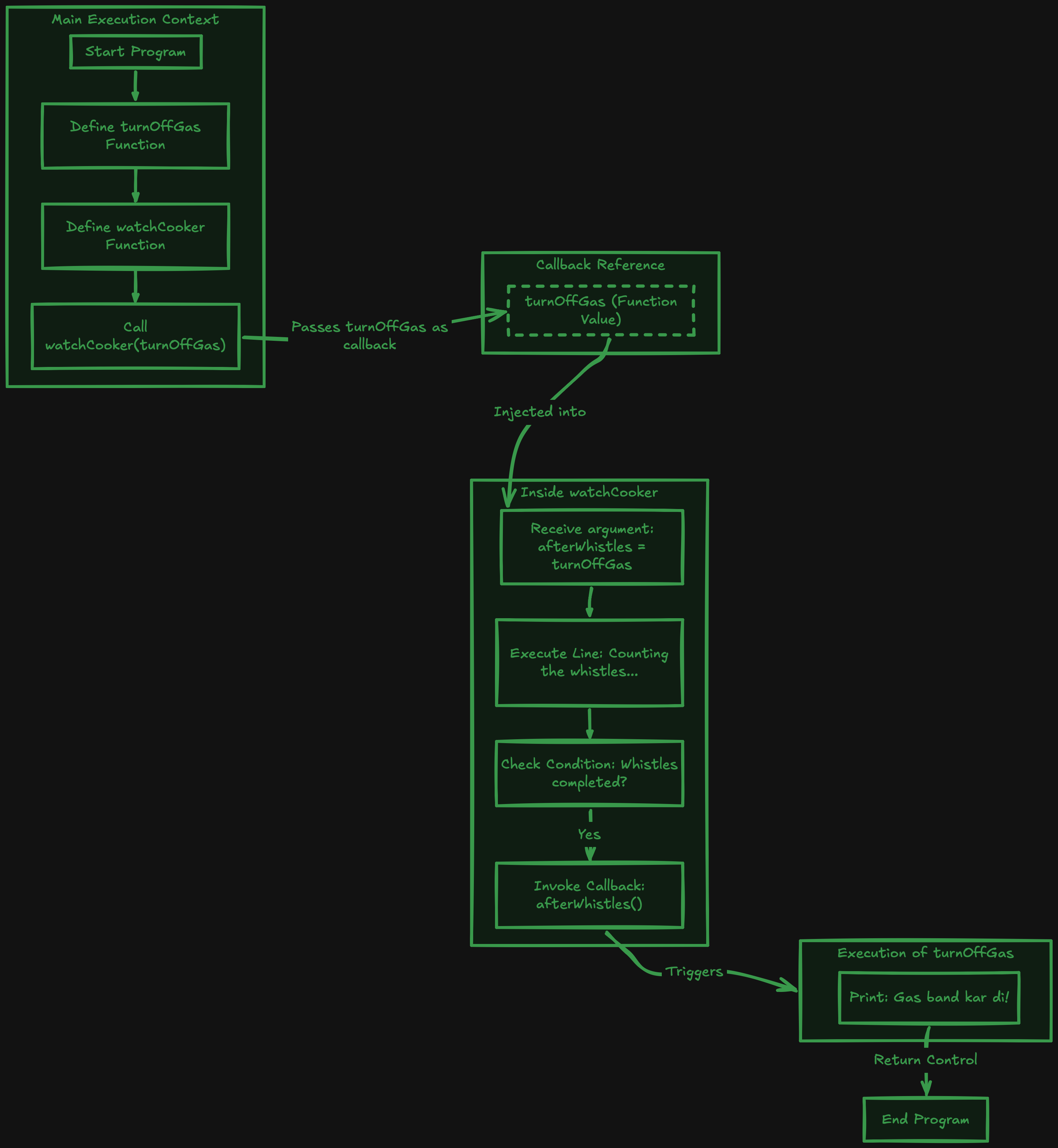
If a function is just a value, then you can hand it to another function, exactly like handing your mom that instruction.
function watchCooker(afterWhistles) {
  console.log("Dal is cooking, counting the whistles...");
  afterWhistles(); // run the instruction we were handed
}

watchCooker(turnOffGas);
// Dal is cooking, counting the whistles...
// Gas band kar di!
Here watchCooker takes a function called afterWhistles and runs it at the right moment. That handed-over function, turnOffGas, is the callback. watchCooker is your mom keeping an ear on the cooker, and you passed her the instruction to run. Bas, that is a callback, a function passed into another function to be called back at the right time.
You already use callbacks every day
Here is the part that surprises beginners. You have almost certainly used callbacks already without ever naming them. The most common one, forEach.
const rotis = ["first", "second", "third"];

rotis.forEach(function (roti) {
  console.log(`Made the ${roti} roti`);
});
That function you handed to forEach? Callback. forEach takes it and runs it once for every item in the array. You did not call it yourself, you handed it over and forEach ran it for you, again and again, just like mom running your instruction. Same story with map, filter, and sort. They all work by you passing them a function to run. These are synchronous callbacks, they run right now, immediately, in order.
So callbacks are not some scary async-only thing. At their core they are just "here is a function, you run it for me." Simple.
So why are callbacks such a big deal in async code
Now the real reason callbacks matter so much in JavaScript. They shine brightest when something takes time.
Think back to the kitchen. You handed mom that instruction precisely because you did not want to stand at the stove counting whistles yourself. Slow things in code are the same. Reading a file, fetching data from a server, a timer, all of these take time, and you do not want your whole program sitting frozen until they finish. So you hand over a callback, "when this slow thing is done, run this."
setTimeout(function () {
  console.log("3 seconds are up, now running the callback");
}, 3000);

console.log("Meanwhile, I go finish my own work");
Run this and the second line prints first, instantly. The function you gave setTimeout is a callback that JavaScript tucks away and runs later, once the timer finishes. Your program never froze, it kept moving, exactly like you walked off to your own work while mom kept an ear on the cooker. This "do not wait, I will run it when ready" behaviour is the entire reason callbacks are everywhere in JavaScript.
The one catch: nesting
One callback is clean and lovely. The trouble starts when one slow task depends on another, which depends on another. To run the second only after the first finishes, you end up putting a callback inside a callback inside a callback, and the code starts marching to the right into an ugly staircase. Developers call this callback hell.
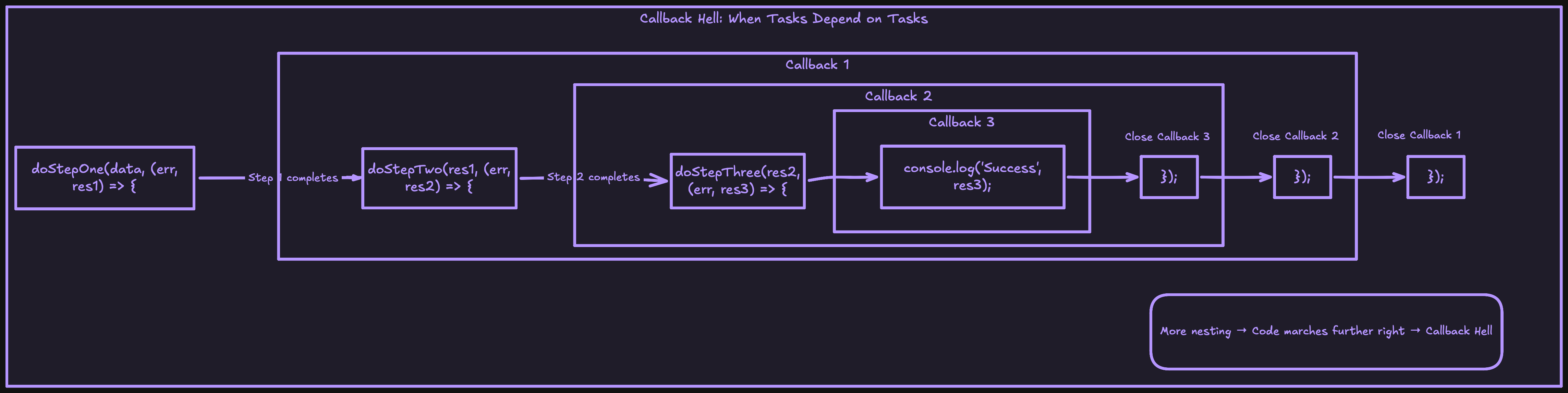
I am not going to re-open that whole mess here, because I already broke it down in detail, along with the much cleaner fix called promises, in my post "Async Code in Node.js: Callbacks and Promises." So once you are comfortable with the basics here, that post is your exact next step.
Try it yourself
Do not just read it, khud chala ke dekho. Paste this in.
function greet(name, callback) {
  console.log(`Hi ${name}`);
  callback(); // run whatever instruction was passed in
}

function sayBye() {
  console.log("Chalo, bye!");
}

greet("Ayush", sayBye);
// Hi Ayush
// Chalo, bye!

// and an async one
setTimeout(() => console.log("I run later"), 2000);
console.log("I run first");
Swap in your own callback, change the timer, hand a function to forEach. Watch exactly when each thing runs.
Wrapping up
So that is why callbacks exist. Because a function in JavaScript is just a value, you can hand it to another function and say "run this at the right time." Sometimes that is right now, like forEach. Sometimes it is later, when a slow thing finishes, like setTimeout. Either way, it is the same idea as telling your mom "teen seeti ke baad gas band kar dena," you hand over the instruction and get on with your life.
Get this foundation solid, and then head to my Callbacks and Promises post to see what happens when callbacks pile up, and the much cleaner way out.
I hope you enjoyed reading this.