Javascript Array Methods
I like making things with code. This is where I share my projects and the bugs I ran into.
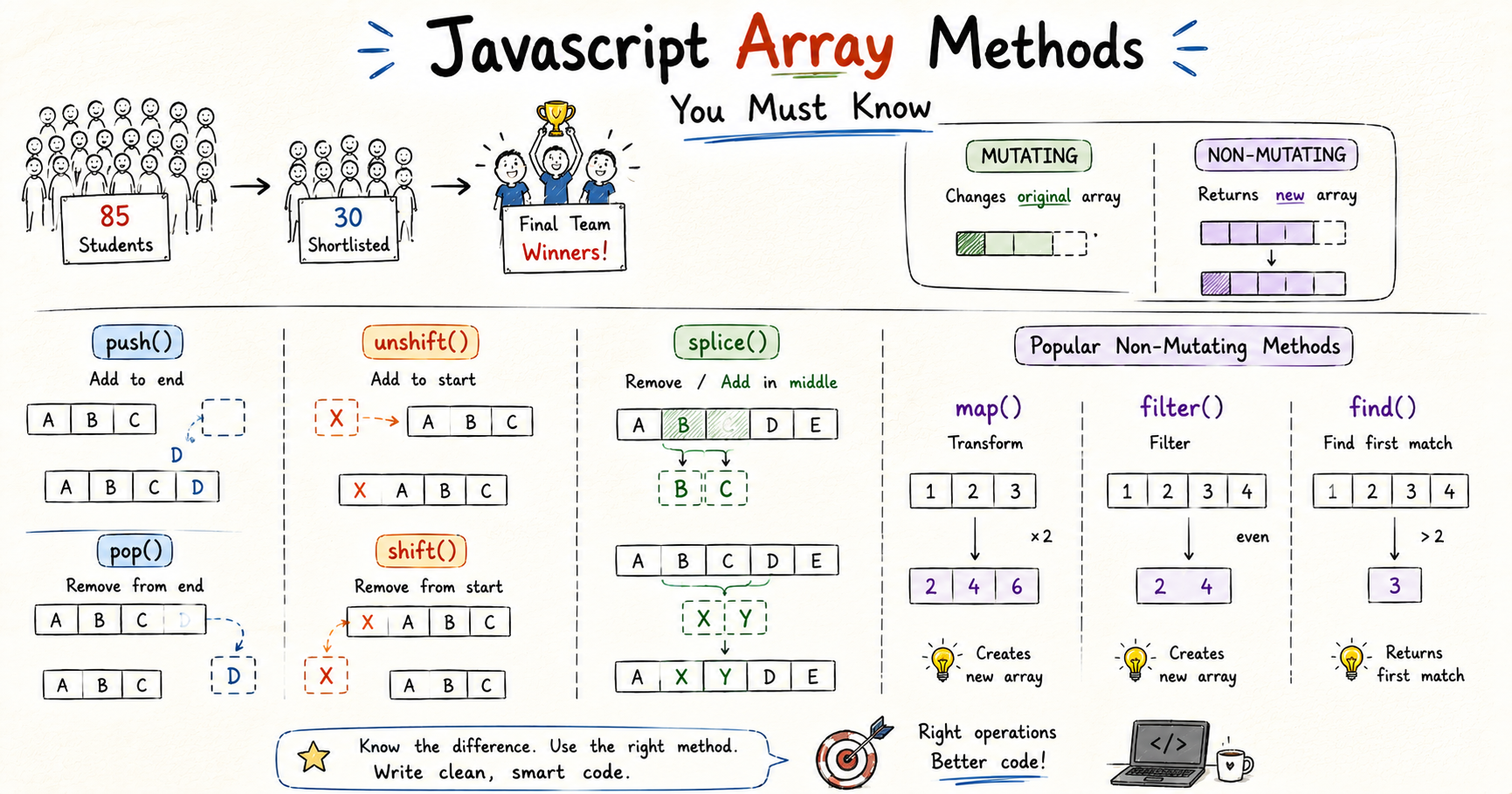
When I was in class 10th our coach asked the captain to select students for the cricket match against St Peter's. Our class had 85 students and every single one of them wanted to play. The captain shortlisted 30 names from that 85. I was watching the list go up and all I was thinking was mera naam hoga ya nahi.
My name was there.
But that was not the final team. From those 30 the coach filtered further based on capability and overall performance. Then a proper trial happened. Batting, bowling, fielding, everything tested individually. I was a batsman so most of it went fine. Then came the fielding round.
Coach started throwing catches. I was getting them cleanly. Then his second last throw came in at an angle I did not expect. I could not catch it cleanly but somehow I got my hands on it and stopped it from going for four. Did not catch it though. One ball in the whole trial and I let it go.
I walked off that ground a little worried. Maybe that one ball would be enough to drop me. Five days until the announcement. I could not focus on studies. Could not focus on anything. Jaise tese those five days passed somehow.
The head coach announced the final team at 2 PM sharp on the practice ground. My name was in it.
Match day came. I batted at number 4. We were chasing and the top order had done well but we still needed runs. I scored 52 off 23 balls. School won.
That entire journey from 85 students to a winning scorecard is one list being transformed over and over. Some operations modified it directly. Some gave back something new without touching it. That is the whole thing with array methods.
Two Types of Methods
Every method in this blog falls into one of two categories and knowing which is which changes how you use them.
Some methods change the original array directly. Push a new element in, the original grows. Splice something out, the original shrinks. The list itself is different after you use these.
Other methods read the array, do something with the values, and hand you back something new. The original stays exactly as it was. You can transform, filter, and search without worrying that the list you started with has changed.
That distinction is the whole thing. Once it is clear, every method makes sense immediately.
push() and pop()
When the captain first started building the shortlist he was adding names one by one to a piece of paper. Each new name went at the end. That is push(). It adds one or more elements to the end of an array and the original array grows.
const shortlist = ["Rahul", "Arjun", "Dev"]

shortlist.push("Ayush")

console.log(shortlist) // ["Rahul", "Arjun", "Dev", "Ayush"]
pop() is the opposite. It removes the last element and returns it.
const removed = shortlist.pop()

console.log(removed)    // Ayush
console.log(shortlist)  // ["Rahul", "Arjun", "Dev"]
Both modify the original array directly. Push adds to the end. Pop takes from the end. I use these constantly, any time something new needs to be added to a list or the most recent item needs to come off.
shift() and unshift()
When the coach rearranged the batting order he sometimes needed to add someone at the top or pull the first person off the list. That is shift() and unshift().
shift() removes the first element and returns it. unshift() adds one or more elements to the beginning.
const battingOrder = ["Rahul", "Arjun", "Dev", "Ayush"]

battingOrder.unshift("Vikram")

console.log(battingOrder) // ["Vikram", "Rahul", "Arjun", "Dev", "Ayush"]

const first = battingOrder.shift()

console.log(first)         // Vikram
console.log(battingOrder)  // ["Rahul", "Arjun", "Dev", "Ayush"]
The way I remember which is which: shift sounds like things sliding forward. The first element slides out and everything else shifts down one position. unshift puts something back at the front.
Both modify the original array directly. They are slower than push and pop on large arrays because every element has to be re-indexed after the change, but for the sizes of arrays you will work with early on it makes no difference.
splice()
When the coach dropped two players from the 30-person shortlist and replaced one of them with someone who had missed the first trial, that is splice. It cuts elements out of the original array and can insert new ones in their place.
const shortlist = ["Rahul", "Arjun", "Dev", "Ayush", "Karan"]

const dropped = shortlist.splice(1, 2)

console.log(dropped)    // ["Arjun", "Dev"]
console.log(shortlist)  // ["Rahul", "Ayush", "Karan"]
First argument is the index to start from. Second is how many elements to remove. splice(1, 2) starts at index 1 and removes 2 elements. Those elements come out of the original and get returned. The original is shorter now.
splice can also insert new elements in place of the removed ones.
const shortlist = ["Rahul", "Arjun", "Dev", "Ayush"]

shortlist.splice(1, 1, "Vikram", "Suresh")

console.log(shortlist) // ["Rahul", "Vikram", "Suresh", "Dev", "Ayush"]
splice(1, 1, "Vikram", "Suresh") removes 1 element at index 1 and inserts two new names in its place.
splice modifies the original array directly. If you just want a copy of a portion without touching the original, that is slice, which is coming up next.
forEach()
After the final team was announced the coach went through every player's name and told each one what their role was for the match day. One player at a time. Same action for each one. forEach() does exactly that.
It goes through every element and runs a function on each one. It does not return anything and it does not modify the original.
const finalTeam = ["Rahul", "Arjun", "Ayush", "Dev", "Karan"]

finalTeam.forEach(function(player) {
  console.log(player + " is in the final team")
})

// Rahul is in the final team
// Arjun is in the final team
// Ayush is in the final team
// Dev is in the final team
// Karan is in the final team
Same output as a for...of loop. The difference is intent. When I see forEach it signals that something is being done with each element, not that a new array is being built. I use it when I need to do something with each value and the code needs to read cleanly.
slice()
When I wanted to share just the top three batsmen from the final lineup with someone, I did not want to hand over the whole team sheet. Just that portion, without touching the original.
const finalTeam = ["Rahul", "Arjun", "Ayush", "Dev", "Karan", "Vikram", "Suresh"]

const topThree = finalTeam.slice(0, 3)

console.log(topThree)   // ["Rahul", "Arjun", "Ayush"]
console.log(finalTeam)  // ["Rahul", "Arjun", "Ayush", "Dev", "Karan", "Vikram", "Suresh"]
First argument is the start index. Second is the end index, which is not included. slice(0, 3) gives elements at index 0, 1, and 2. Original completely untouched.
You can also slice from the end using negative numbers.
console.log(finalTeam.slice(-2)) // ["Vikram", "Suresh"]
-2 means start two positions from the end. I use this when I need the last few elements without knowing the exact length.
The difference between splice and slice in one line: splice cuts from the original. slice copies from the original.
map()
After the match the coach had each player's score from the trial and wanted to add a percentage sign to every one of them for the report. Same operation on every element, new array as the result.
const trialScores = [72, 85, 90, 68, 78]

const percentages = trialScores.map(function(score) {
  return score + "%"
})

console.log(percentages)   // ["72%", "85%", "90%", "68%", "78%"]
console.log(trialScores)   // [72, 85, 90, 68, 78]
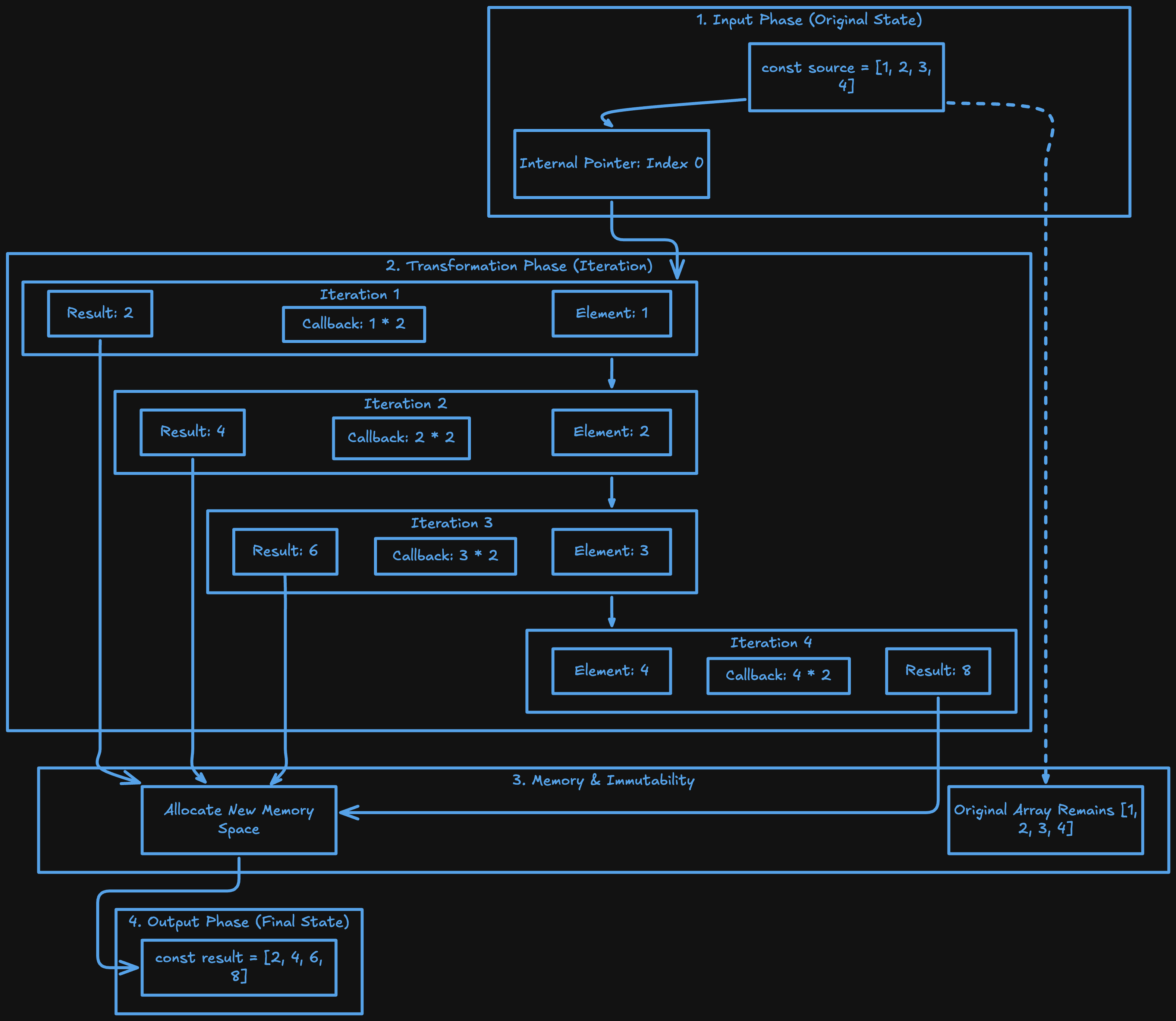
map() creates a new array by running a function on every element. The original is untouched.
The return inside the callback is not optional. Without it map gives you an array full of undefined because it does not know what value to put in for each element. I made that mistake early and spent time confused about why the output looked wrong.
A for loop doing the same thing shows what map is replacing:
// with a for loop
const percentages = []
for (let i = 0; i < trialScores.length; i++) {
  percentages.push(trialScores[i] + "%")
}

// with map
const percentages = trialScores.map(function(score) {
  return score + "%"
})
Same result. map is the cleaner way to say give me a new array where every element has been transformed.
filter()
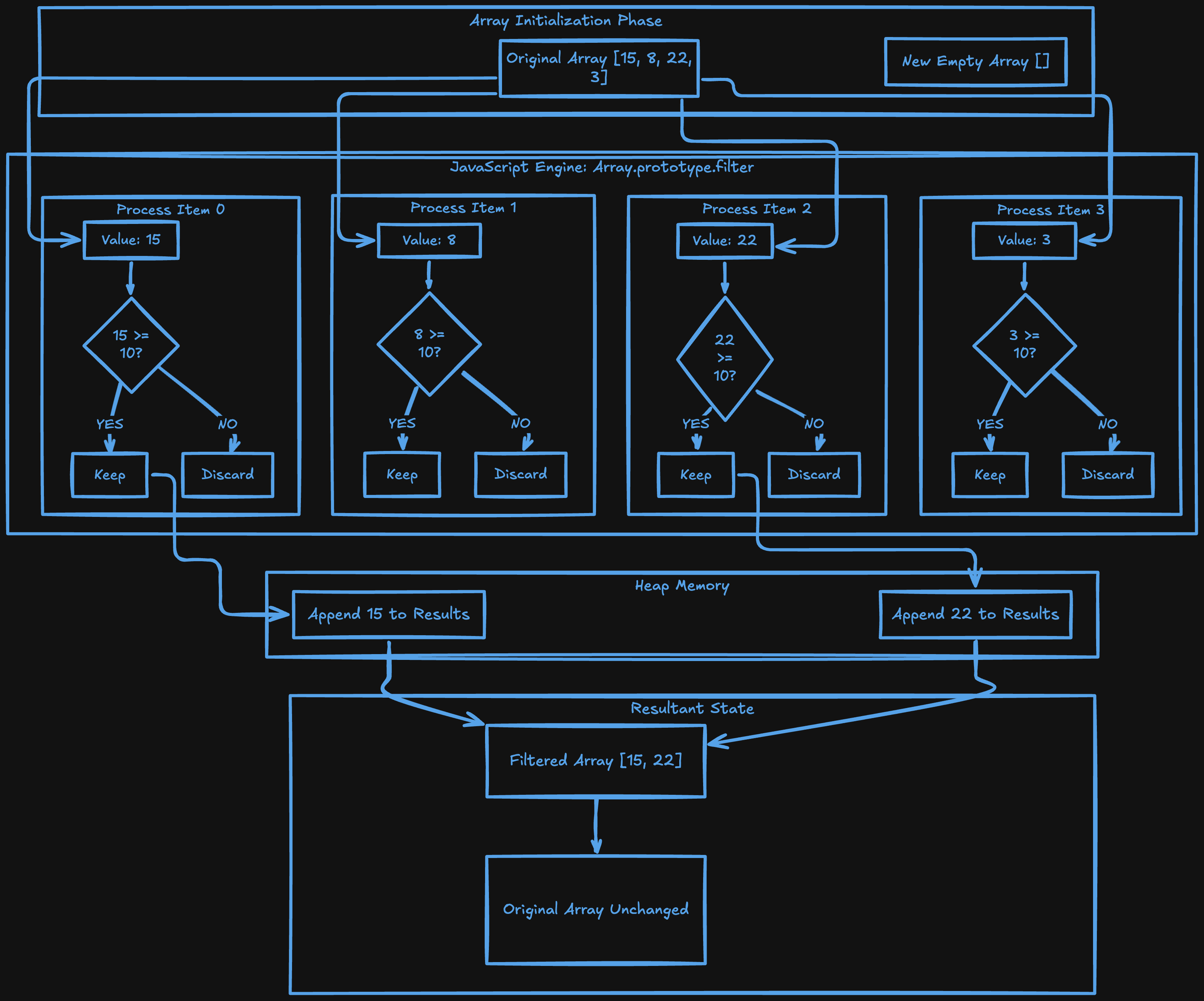
From the 30-person shortlist the coach kept only the players who scored above 75 in the trial. Everyone below that was out. Same list, fewer elements, new array. That is filter().
It goes through every element, runs a function that returns true or false, and builds a new array with only the elements that returned true.
const trialScores = [72, 85, 90, 68, 78, 55, 91]

const qualifiedScores = trialScores.filter(function(score) {
  return score > 75
})

console.log(qualifiedScores) // [85, 90, 78, 91]
console.log(trialScores)     // [72, 85, 90, 68, 78, 55, 91] original unchanged
A for loop doing the same thing shows exactly what filter is replacing:
// with a for loop
const qualifiedScores = []
for (let i = 0; i < trialScores.length; i++) {
  if (trialScores[i] > 75) {
    qualifiedScores.push(trialScores[i])
  }
}

// with filter
const qualifiedScores = trialScores.filter(function(score) {
  return score > 75
})
filter is the cleaner way to say give me a new array with only the elements that match this condition. Original stays exactly as it was.
reduce()
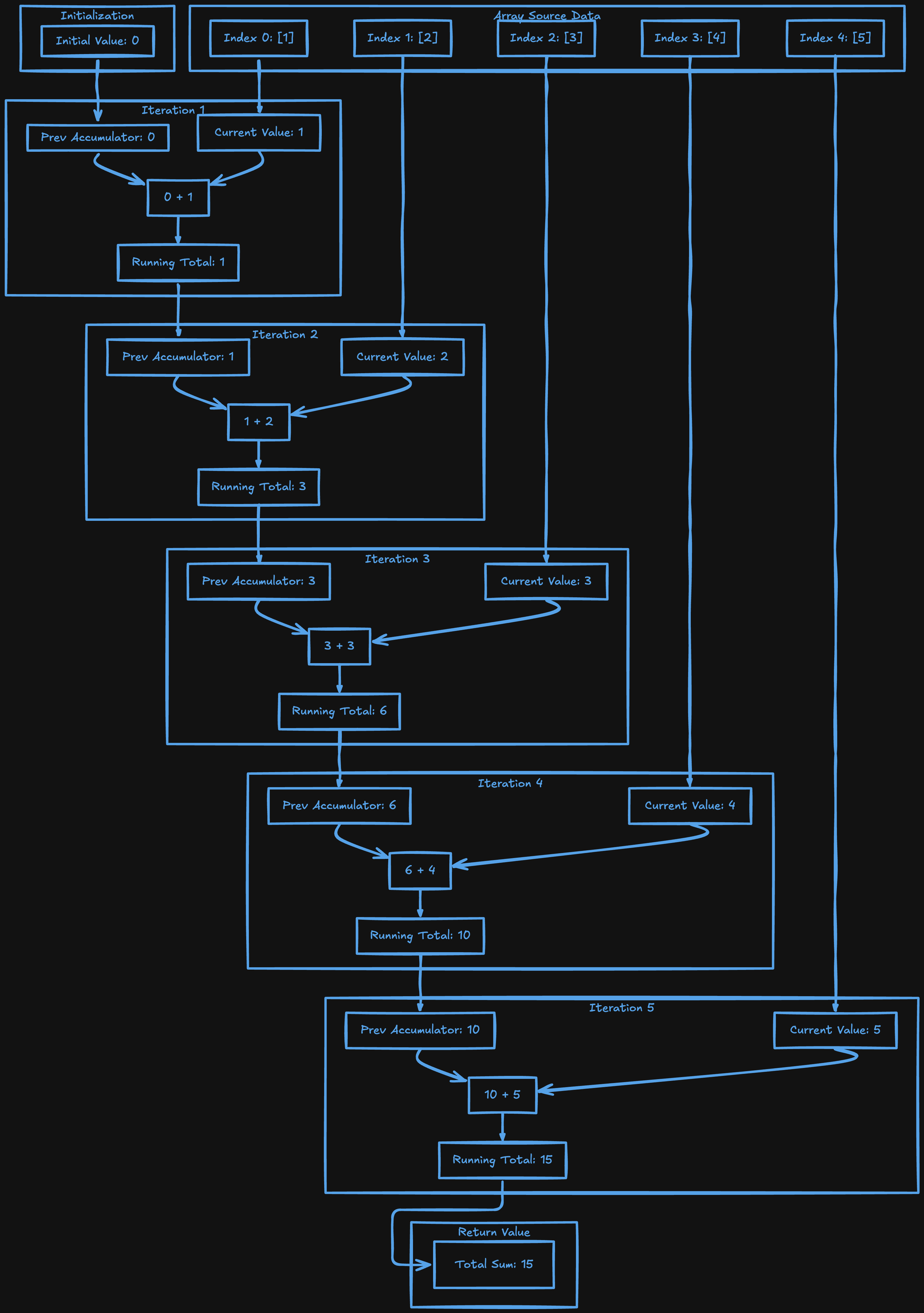
After the match the team had individual scores from all the batsmen. The coach wanted one number, the total runs scored by the whole team. Every score added together into a single value. That is reduce().
const battingScores = [34, 18, 52, 27, 15]

const totalRuns = battingScores.reduce(function(accumulator, current) {
  return accumulator + current
}, 0)

console.log(totalRuns) // 146
The 0 at the end is the starting value. The accumulator begins there and picks up the result of each step.
start:   accumulator = 0
step 1:  0 + 34 = 34
step 2:  34 + 18 = 52
step 3:  52 + 52 = 104
step 4:  104 + 27 = 131
step 5:  131 + 15 = 146
result:  146
My 52 off 23 balls is in there at step 3. The accumulator carried it forward and added everything else on top until the total came out.
reduce took me the longest to understand. The moment it clicked was when I stopped trying to understand the whole thing at once and just focused on what the accumulator was holding after each step.
indexOf() and includes()
The captain needed to check if a specific player was in the final team before announcing the batting order. Searching through the whole list manually every time was unnecessary.
indexOf() returns the index of the first matching element. If nothing matches it returns -1.
const finalTeam = ["Rahul", "Arjun", "Ayush", "Dev", "Karan"]

console.log(finalTeam.indexOf("Ayush"))  // 2
console.log(finalTeam.indexOf("Vikram")) // -1
includes() just tells you whether the value exists, returning true or false. I reach for this more often because most of the time I do not need the position, I just need a yes or no.
console.log(finalTeam.includes("Ayush"))  // true
console.log(finalTeam.includes("Vikram")) // false
Use includes when you only need a yes or no. Use indexOf when you need to know exactly where it is.
find() and findIndex()
When the coach needed the first player in the list who could bowl as well as bat, he did not need everyone who matched. Just the first one. That is find(). It stops as soon as it finds a match and returns that element.
const trialScores = [72, 85, 90, 68, 78, 55, 91]

const firstQualified = trialScores.find(function(score) {
  return score > 75
})

console.log(firstQualified) // 85
If nothing matches it returns undefined.
findIndex() does the same thing but returns the position of the first match instead of the element itself.
const firstQualifiedIndex = trialScores.findIndex(function(score) {
  return score > 75
})

console.log(firstQualifiedIndex) // 1
I use find when I need a specific item from a list. filter gives everyone who matches. find gives the first one and stops.
Try It Yourself
Take the trial scores and put them through everything.
const trialScores = [72, 85, 90, 68, 78, 55, 91, 63, 88, 74]
Map every score to a string with a percentage sign. Filter only the scores above 75. Reduce to get the total of all scores. Find the first score above 80. Find its index.
After each method log the original trialScores. It will not have changed. Then try removing the return from inside the map callback and log the result. That one experiment will make return inside map stick forever.
Wrapping Up
85 students wanted to play. The captain shortlisted 30. The coach filtered that down further. Trials happened. A final 11 was picked. I scored 52 off 23 balls at number 4. School won.
Every step of that was an array being transformed. Push when a name got added. Splice when someone got dropped. Filter when the coach narrowed down by performance. Find when he needed the first available allrounder. Reduce when the total team score needed to be calculated.
Some methods change the original directly, push, pop, shift, unshift, splice. forEach loops without returning anything new. Others give you something new without touching the original, slice, map, filter, reduce. And for searching, includes, indexOf, find, findIndex.
Knowing which type you are using is what keeps you from being surprised by an array changing when you did not expect it to.
I hope you enjoyed reading this.