JavaScript Modules: Import and Export Explained
I like making things with code. This is where I share my projects and the bugs I ran into.
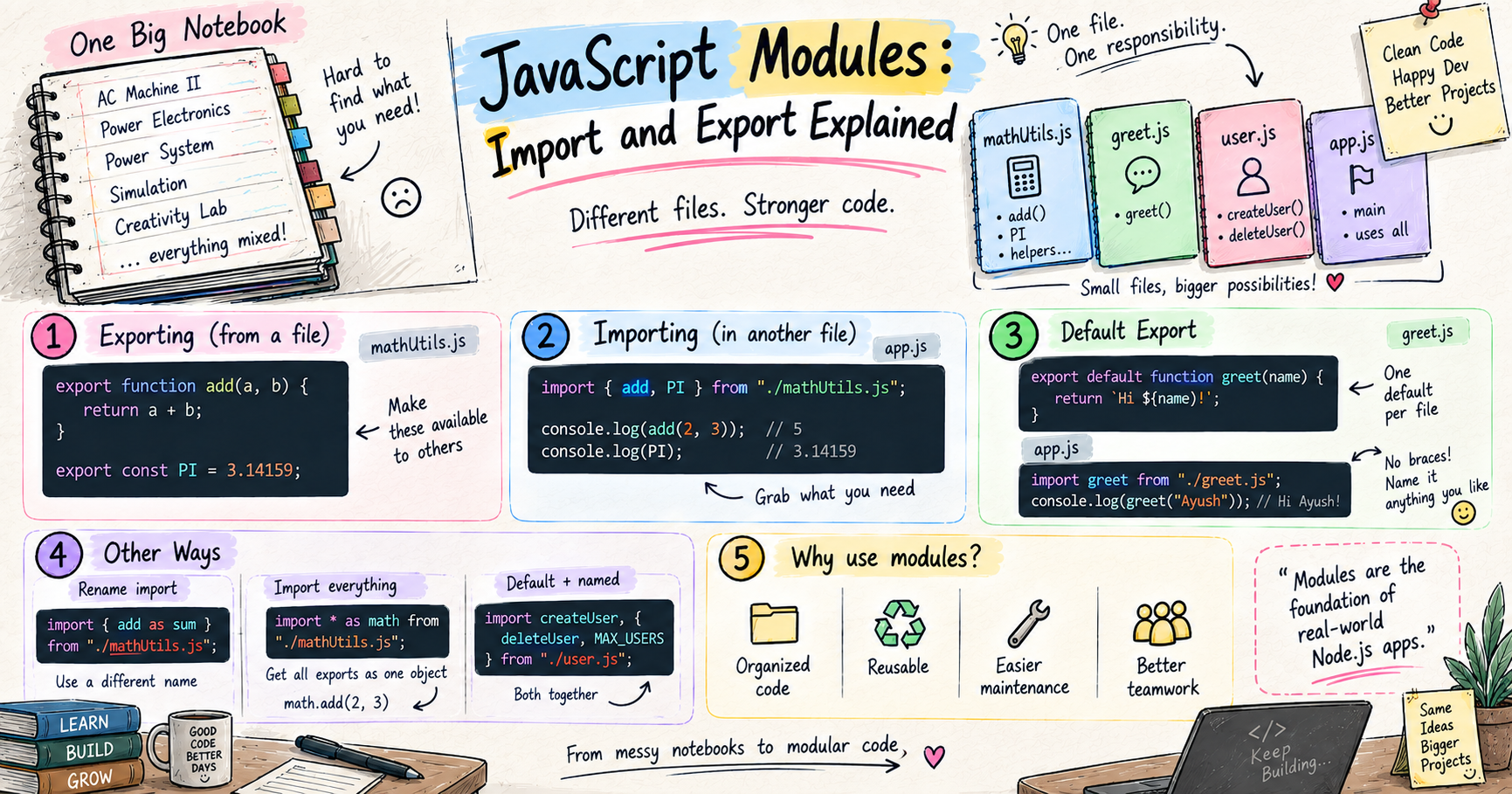
Let me tell you about my one big notebook. I keep a single thick unruled spiral notebook for everything in my branch. Every electrical theory subject goes into it, AC Machine II, Power Electronics, Power System, Simulation, Creativity lab, all of it, page after page, in one place. And day to day, this genuinely works for me. I do not want the school-style headache of carrying a different notebook for every subject depending on the day's timetable. One notebook, done.
Until last mid-terms, when this one-notebook life completely backfired. I sat down to prepare, say, Power System, and to actually study it I needed all ten of its lectures together, compiled. But in my giant notebook those pages were scattered all over, squeezed between AC Machines here, Simulation there, some lab work in between. Finding one lecture was not enough, I needed all ten, and I had zero time to hunt through the whole thing page by page. Normally the class survives on borrowed, ready-made notes, but that time even the two toppers who actually keep things organized had not prepared any. I properly panicked, yaar ab padhu kahan se.
That mess, one giant notebook with everything jammed together and no way to quickly pull out just what you need, is exactly the problem that modules solve in code. Chalo, let me show you.
Why modules are even needed
When you start out, you write everything in one file. And honestly, for a tiny script, that is completely fine. The problem sneaks up on you as your project grows.
That one file slowly becomes 500 lines, then a thousand, then more. Functions scattered everywhere, and finding the one you want means scrolling forever, exactly like my one giant notebook at exam time. Worse, everything is tangled together, so one small change can quietly break something unrelated on the other side of the file. And if you want to reuse a function in another project, your only option is copy-paste, which is a maintenance nightmare waiting to happen.
Modules fix all of this with one simple idea. A module is just a file. You split your code into separate files, each one handling a single concern, and they share only what they need with each other. One notebook per subject.
Exporting: making things available to others
Here is the first rule that surprises beginners. By default, whatever you write inside a file is private to that file. Another file cannot see it at all. That is actually a good thing, it keeps your code from leaking everywhere.
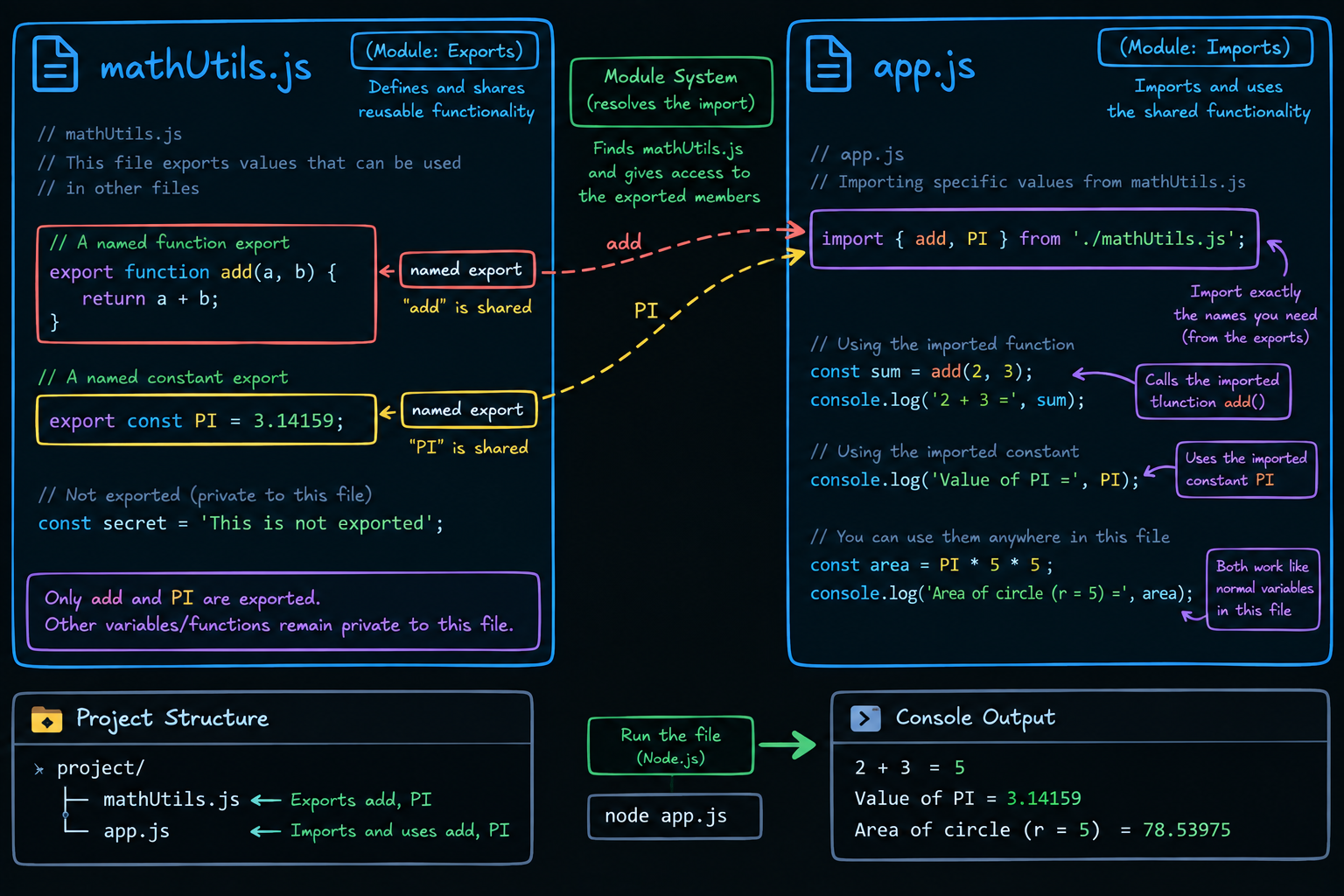
So to let another file use something, you have to explicitly export it. Say we have a file of math helpers.
// mathUtils.js
export function add(a, b) {
  return a + b;
}

export const PI = 3.14159;
By putting export in front of add and PI, you are marking them as "available to borrow," just like labeling the sections in your notebook that a friend is allowed to copy. Everything without export stays private inside mathUtils.js.
Importing: grabbing what you need
Now, in another file, you pull in exactly what you want using import.
// app.js
import { add, PI } from "./mathUtils.js";

console.log(add(2, 3)); // 5
console.log(PI);        // 3.14159
Read that first line like a sentence. "Import add and PI from the mathUtils notebook." The curly braces with the exact names are called named imports, you are naming the specific sections you want to grab. And that ./mathUtils.js is just the path to the file, the ./ means "in the same folder as this one."
That is the whole loop. One file exports, another imports. Notebooks lending notes to each other.
Default vs named exports
This is the part people always mix up, so let me make it stick with the notebook idea.
Named exports are the specific labeled sections of a notebook. A file can have as many as it wants, and you import them by their exact names, inside curly braces. You already saw this with add and PI.
A default export is the one main thing a notebook is really about, its headline. A file can have only one default export, and when you import it, you skip the braces and can call it whatever you like.
// greet.js
export default function greet(name) {
  return `Hi ${name}`;
}
// app.js
import greet from "./greet.js"; // no braces, and the name is your choice
console.log(greet("Ayush"));    // Hi Ayush
Notice, no curly braces for the default, and I could have called it hello instead of greet and it would still work, because a file has only one default, so there is no confusion about which thing you meant.
A single file can even have both, one default headline plus several named sections.
// user.js
export default function createUser(name) { /* ... */ }
export function deleteUser(id) { /* ... */ }
export const MAX_USERS = 100;
// app.js
import createUser, { deleteUser, MAX_USERS } from "./user.js";
The default comes first with no braces, the named ones follow inside braces. Simple once you see the shape.
A couple of handy extras
Two small things you will run into. You can rename a named import if the name clashes with something you already have, using as.
import { add as sum } from "./mathUtils.js";
And you can grab everything a file exports as one bundled object.
import * as mathUtils from "./mathUtils.js";

mathUtils.add(2, 3);
console.log(mathUtils.PI);
That pulls the whole notebook in under one name, and you reach into it with the dot. Handy when a file has lots of exports.
The benefits, why all this is worth it
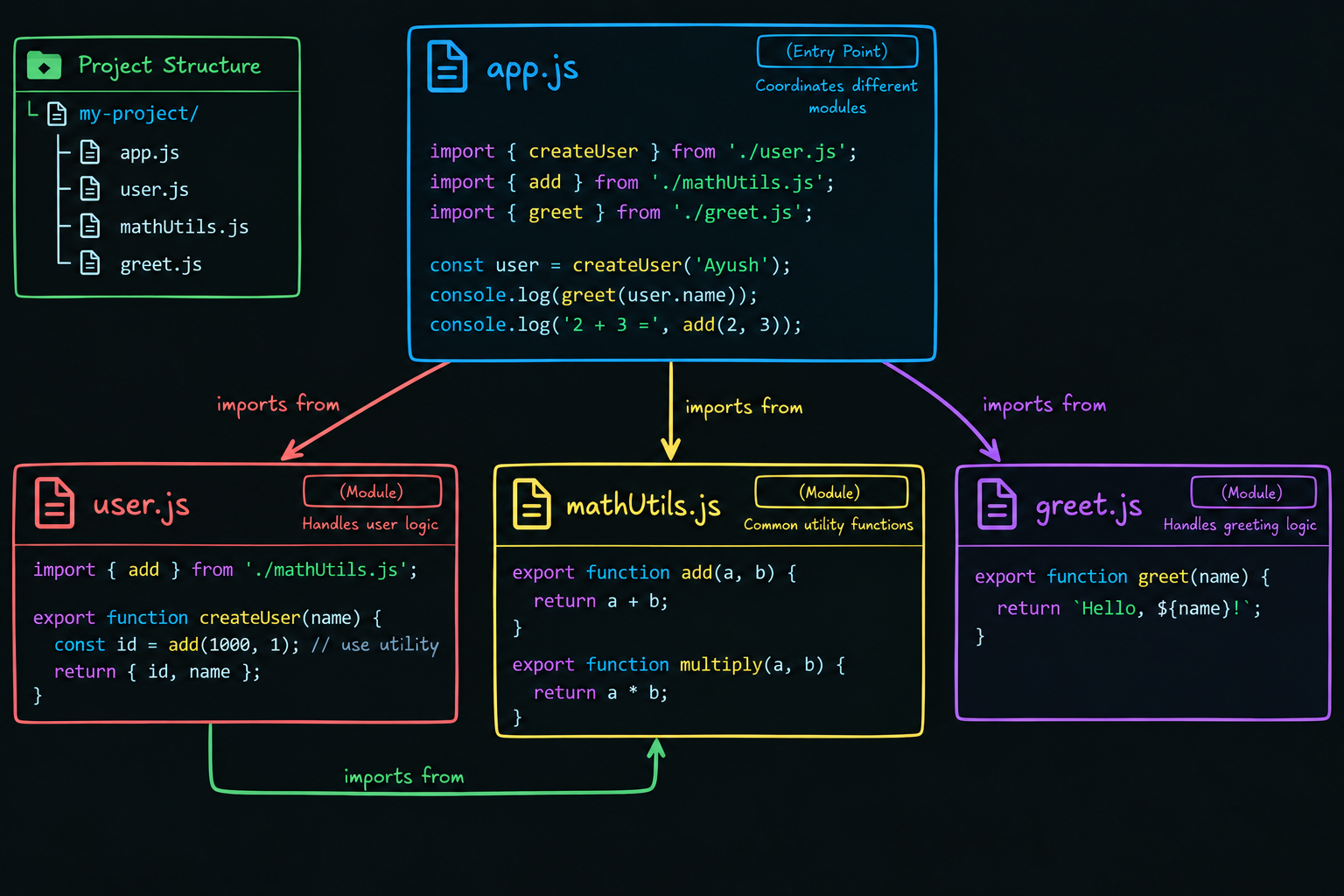
Step back and look at what modules actually buy you.
Your code gets organized. Each file does one job, so you always know where to look. No more scrolling through a thousand-line monster.
Your code becomes reusable. Write add once, import it anywhere, in this project or the next, no copy-paste, no drift.
It becomes maintainable. Fix a bug inside one module, and every file that imports it gets the fix automatically. And because files are separate, a change in one is far less likely to break another.
And it makes teamwork actually possible. Different people work on different files at the same time without constantly stepping on each other, exactly like everyone keeping their own subject notebooks instead of fighting over one shared one.
Try it yourself
Do not just read it, khud banao. Make two files in the same folder.
// mathUtils.mjs
export function add(a, b) {
  return a + b;
}
// app.mjs
import { add } from "./mathUtils.mjs";
console.log(add(5, 7)); // 12
Then run node app.mjs. One quick note, to use this modern import and export syntax in Node, either name your files with a .mjs extension like I did here, or add "type": "module" to your package.json. Otherwise Node assumes the older style. Speaking of which, if you have peeked at Node code before, you may have seen const x = require("./file") and module.exports = .... That is CommonJS, the older module system Node used before this import/export standard existed. Same core idea, files sharing code, just older syntax. The modern import/export is what you want to learn and use.
Wrapping up
So that is modules. Instead of cramming your whole app into one giant, tangled notebook, the exact mess I was stuck in before mid-terms, you split it into clean, separate files. Each one keeps its stuff private, exports what it wants to share, and imports what it needs from others. Named exports are the labeled sections, the default export is the notebook's headline, and together they keep your code organized, reusable, and easy to maintain.
And here is why this is the perfect note to end my JavaScript run on. Modules are the entire backbone of backend development. The moment you start building a real Node server, your code splits into files, routes in one, controllers in another, database models, config, each a module importing and exporting from the others. Everything I am about to write in my backend series sits on top of exactly this idea. So get comfortable with import and export here, because from now on, you will be using them in every single file you write.
I hope you enjoyed reading this.