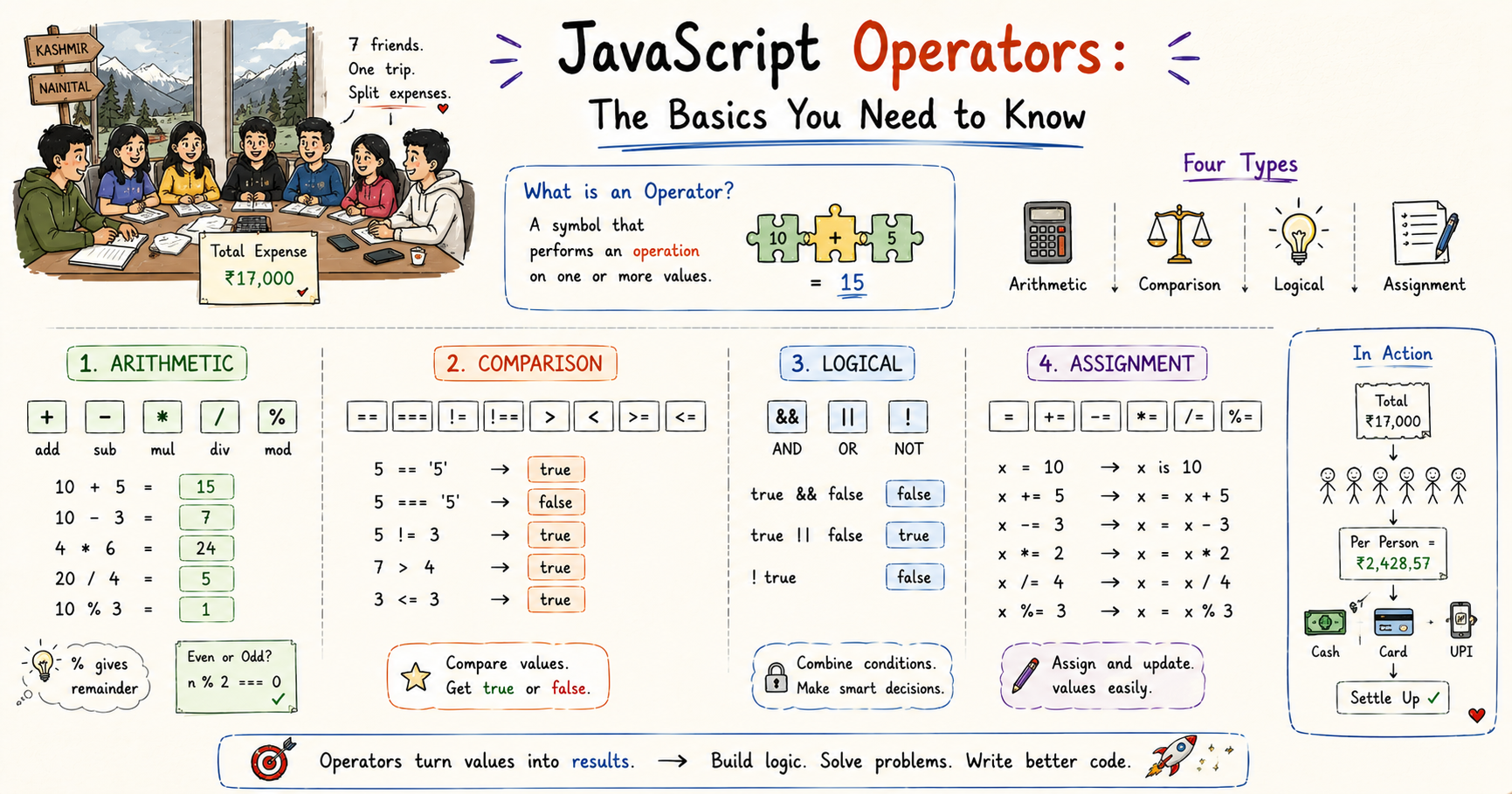
JavaScript Operators: The Basics You Need to Know
I like making things with code. This is where I share my projects and the bugs I ran into.
Our college seniors came to us one day and said something like, upto now there is no official trip organized by us for you juniors so now we are planning one. Kashmir. River rafting, famous locations, hotels already booked, everything sorted. One guy from our batch asked why Kashmir specifically, there are so many places. One of the seniors just said because it is Jannat of the whole earth and we want you to feel it and experience it with your own eyes. We went quiet for a second. What an answer.
The excitement was already at another level. Then they told us Nainital was also part of the itinerary and that was it. Me and my best friends from the group sat together and figured out who was going. Practical exams were a month away so not everyone could commit. Seven of us finally decided. Me, Rishika, Aaditi, Falesh, Bhanu, and Shreyansh. Shreyansh is a super senior, fourth year, IIT Bombay, his nickname is Albatross and he is one of the coolest people I know. His friend Bhavana was also joining us from IIT B, they would meet us in Kashmir.
I had not seen Albatross in almost two years. When we landed and I saw him again I was genuinely glad in a way that is hard to explain. He is someone I admire and respect unlike almost anyone else, close to me like family. We stayed up that night and talked for six to seven hours straight. Everything I had experienced in the last two years of college, everything that had changed, everything that had not. At the end he said something I still think about. Tu jaisa pahle tha wesa hi hai ab tak. Mere liye kuch bohot noticeable changes nahi hai. He meant it as a compliment and it hit different.
I said Radhe Radhe Ji and went to sleep.
The trip the next morning was everything. River rafting, snowball fights, eating fresh apples straight from the trees. Rishika was scared at the rafting point and would not get in. We were all trying to convince her. I finally told her agar tune complete kiya toh mein kuch crazy present dunga tumhe. She looked at me and said bese toh Ayush kuch deta nahi hai isi bahane chalo kuch toh gift dega. She did it. She had the time of her life. I did not give the gift. In my defence I have given many gifts and thrown many parties and this particular promise may have slipped my mind entirely.
After Kashmir we went to Nainital. Just as good. By the end of the whole trip everyone was exhausted and full and happy and we had about seventeen thousand rupees worth of shared expenses to settle.
That is where it got interesting.
I am an online guy. Google Pay, UPI, done. Rishika same. But Bhanu paid a mix of online and cash throughout the trip. And Falesh paid everything by credit card, every single expense, no matter the amount.
When I sat down with my calculator and my notes to figure out who owed what, the numbers kept looking right but not adding up. Everything seemed equal on paper. But equal looking and actually equal are two completely different things. That is exactly what operators in JavaScript taught me.
What Are Operators
Before the trip I would have said I already know what operators are. Plus is addition. Minus is subtraction. Done. But the moment I had to calculate shared expenses with mixed payment types I realized there is a lot more happening between values than just adding and subtracting.
I had used operators without ever really thinking about what the word meant. Once I did, it clicked fast. An operator is a symbol that tells JavaScript to do something with one or more values.
let total = 10 + 5
Here + is the operator. 10 and 5 are the operands. total gets the result. The operator sits between values, does something with them, and produces a result. That is the whole pattern.
There are four categories worth knowing: arithmetic, comparison, logical, and assignment. Each has a different job and once the job clicks, the individual symbols inside each one fall into place.
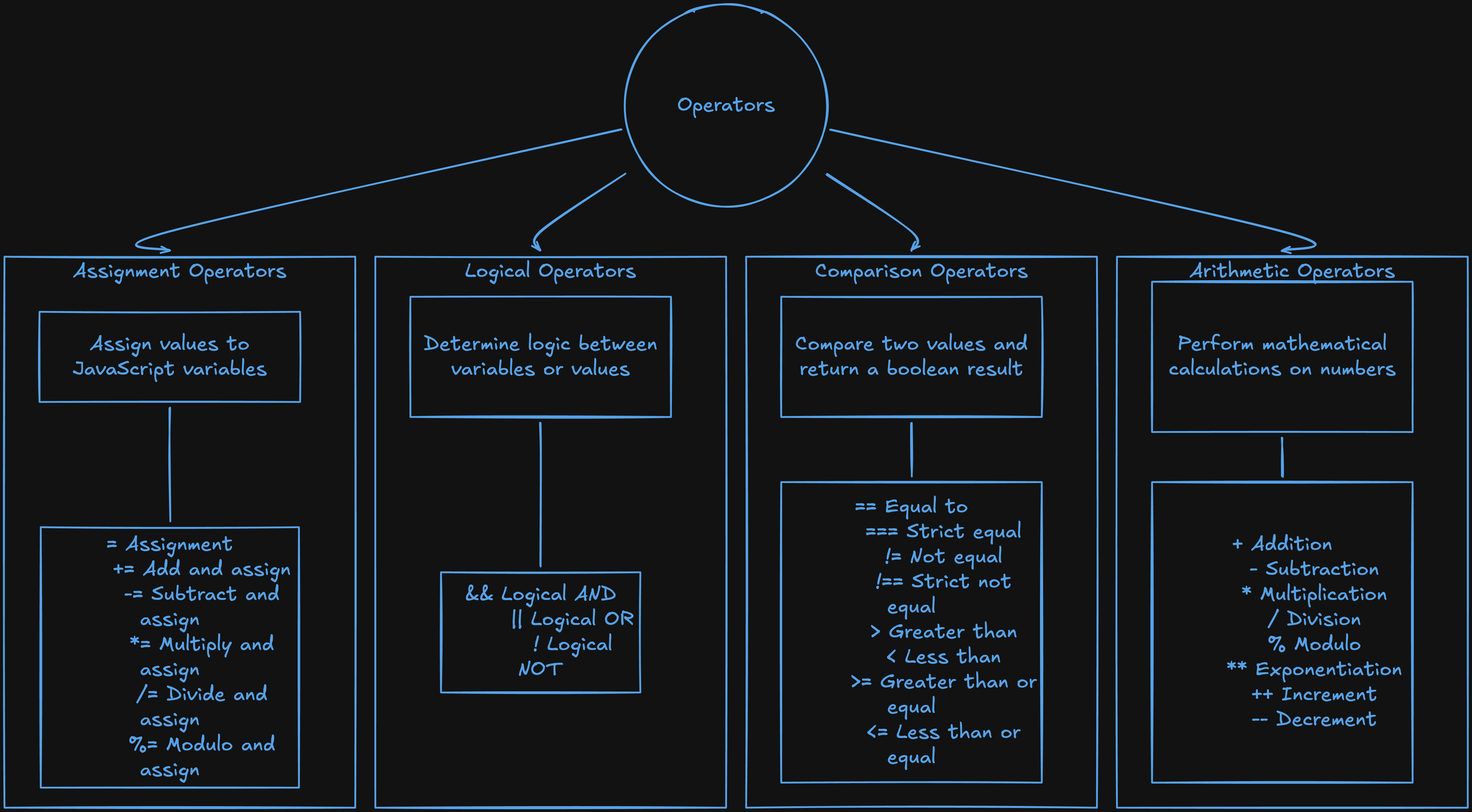
Arithmetic Operators
The first thing I needed to do when settling the bills was just calculate. Total expense divided by seven people. How much Bhanu overpaid. How much Falesh's credit card had covered. Basic numbers. Arithmetic operators handle all of that, they work exactly the way maths does.
let totalExpense = 17000
let numberOfPeople = 7

let perPerson = totalExpense / numberOfPeople
console.log(perPerson) // 2428.57...
Per person share sorted. But Bhanu had paid 7000 in cash when he only owed 5000, so I needed to figure out how much to return to him.
let bhanuPaid = 7000
let bhanuOwes = 5000
let bhanuGetsBack = bhanuPaid - bhanuOwes
console.log(bhanuGetsBack) // 2000
The one that confused me early on was %. I kept assuming it had something to do with percentages. It does not. It is the modulo operator and what it does is give you the remainder after division.
console.log(10 % 3) // 1
console.log(15 % 5) // 0
console.log(7 % 2)  // 1
10 % 3 is 1 because 3 goes into 10 three times making 9, with 1 left over. I ignored % for a long time because I did not understand what it was for. Then I needed to check whether a number was even or odd and realized it was exactly the right tool.
let number = 8
console.log(number % 2) // 0, even numbers always leave no remainder
If number % 2 is 0, the number is even. If it is 1, it is odd. That pattern comes up constantly once you start writing conditionals.
Comparison Operators
Once I had the amounts calculated I needed to check them. Did Bhanu's cash payment match what he owed. Did Falesh's credit card total match his share. I needed something that could look at two values and tell me yes or no. That is what comparison operators do. They compare two values and come back with true or false, nothing else.
let bhanuOwes = 5000
let bhanuPaidCash = 7000

console.log(bhanuPaidCash > bhanuOwes)   // true, he overpaid
console.log(bhanuPaidCash === bhanuOwes) // false, not the right amount
means greater than. < means less than. >= means greater than or equal to. <= means less than or equal to. Same as maths, nothing new here.
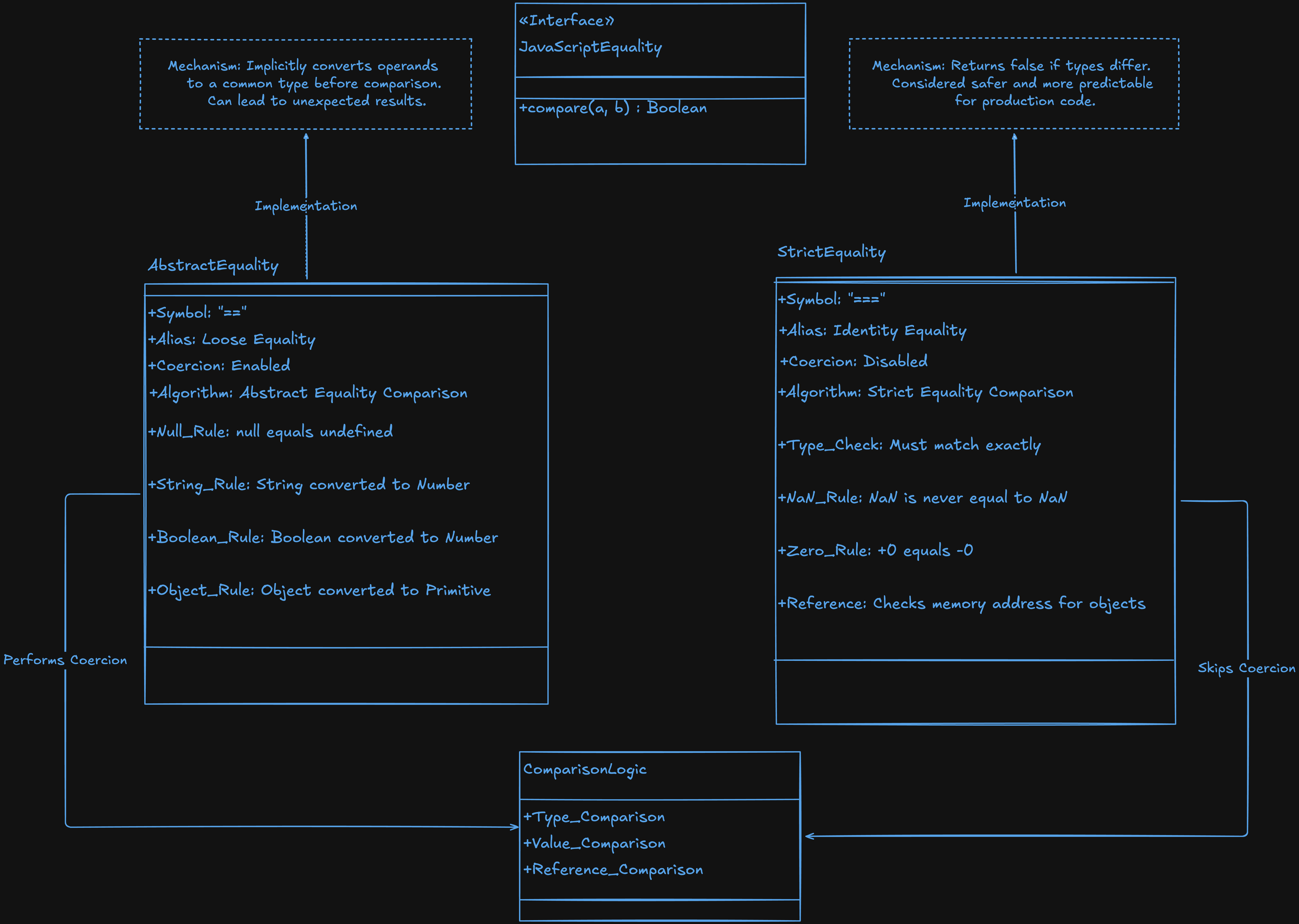
The ones that caused real problems are == and ===
== vs ===
This is the one I got wrong for a long time.
When I was checking the totals in my code the comparison kept returning true even when the amounts were off. I could not figure out why. Then I checked the types of what I was comparing and that is when I saw it.
== checks if two values are equal but it does not care about type. Before it compares it tries to convert both values to the same type, quietly, behind the scenes.
console.log(5000 == "5000")   // true
console.log(0 == false)       // true
console.log("" == false)      // true
5000 and "5000" are not the same thing. One is a number, one is a string. But converts the string to a number before comparing, finds they match, and returns true. The amounts looked correct on screen but the types were different and was hiding that from me.
=== is the strict version. It checks both value and type. No conversion happens.
console.log(5000 === "5000")  // false
console.log(5000 === 5000)    // true
console.log(0 === false)      // false
5000 and "5000" are not strictly equal because they are different types. That is the right answer.
I use === by default now, every time. After that bill settling session I stopped giving JavaScript a chance to decide what to convert.
For not equal the same split exists. != does not care about type. !== does.
console.log(5000 != "5000")  // false, they are equal after coercion
console.log(5000 !== "5000") // true, they are not strictly equal
Logical Operators
When I was settling the trip bills I kept needing to check multiple things at the same time. Not just whether someone paid the right amount but whether they paid the right amount and in the right form. That is where logical operators come in. Three of them: &&, ||, and !.
&& (AND)
&& returns true only if both conditions are true. If either one is false, the whole thing is false.
Bhanu had overpaid in cash. His payment was only fully settled when the cash amount was correct and the online amount was correct.
let cashCorrect = false  // he paid 7000 instead of 5000
let onlineCorrect = true

console.log(cashCorrect && onlineCorrect) // false, cash check fails
Both have to pass. The moment one fails, the whole thing fails. I use && whenever something needs to meet multiple requirements at the same time.
|| (OR)
|| returns true if at least one condition is true. It only returns false if both are false.
For some shared expenses any payment method was acceptable. Cash or online, either one worked.
let paidCash = false
let paidOnline = true

console.log(paidCash || paidOnline) // true, one is enough
console.log(false || false)         // false, both are false
|| is for situations where any one of several conditions is sufficient. Either works, just not neither.
! (NOT)
! flips a boolean. true becomes false. false becomes true.
let isSettled = false

console.log(!isSettled) // true
I use ! constantly in conditions where I want to check that something has not happened yet.
let isSettled = false

if (!isSettled) {
  console.log("Still needs to be paid") // this runs
}
!isSettled reads almost like English: if not settled. That is what makes it useful.
Assignment Operators
For a while I was writing total = total + 2428 every single time I added someone's share to the running total. It worked but once I saw the shorthand I realized I had been doing it the long way the entire time.
The basic assignment operator is =. It is not saying two things are equal. It is saying store this value into this variable. That distinction matters once you start mixing it with comparison operators because =,== ,and === are three completely different things.
Adding each person's share to the running total looked like this:
let total = 0

total += 2428  // Ayush's share added
total += 2428  // Rishika's share added
total += 2428  // Aaditi's share added
total += 2428  // Falesh's share added

console.log(total) // 9712
Same as writing total = total + 2428 each time. Just without all the extra typing.
let total = 0

total += 2428  // same as: total = total + 2428
total -= 500   // same as: total = total - 500
total *= 2     // same as: total = total * 2
total /= 4     // same as: total = total / 4
I use += and -= constantly. Any time I am tracking a running total, a countdown, or something that changes over time, it is almost always += or -= doing the work.
Try It Yourself
The operators that finally made sense to me were not the ones I read about. They were the ones I ran in a console and watched produce results I did not expect.
Start with this and run every line:
let a = 17000
let b = 7

console.log(a + b)   // 17007
console.log(a - b)   // 16993
console.log(a * b)   // 119000
console.log(a / b)   // 2428.57...
console.log(a % b)   // 4
Then run this and look closely at what comes back:
console.log(5000 == "5000")   // true
console.log(5000 === "5000")  // false
One returns true, the other false, same values on screen. That difference is the thing that makes == vs === real. Reading about type coercion is one thing. Watching it happen is another.
Then write this:
let cashCorrect = true
let onlineCorrect = true

if (cashCorrect && onlineCorrect) {
  console.log("Payment settled")
}
Change cashCorrect to false and run it again. Nothing prints. Change onlineCorrect to false too and run it again. Still nothing. That is && in practice. Both have to pass.
Wrapping Up
Seven of us went to Kashmir. Jannat of the whole earth the senior had said. He was right. River rafting, snowballs, fresh apples, Nainital, all of it. Albatross talking to me for six hours straight and saying tu jaisa pahle tha wesa hi hai. Rishika doing the rafting only because I promised her a gift that I definitely did not forget to give. Some of the best days of my life.
Then we came home and I sat with my calculator and my notes trying to settle seventeen thousand rupees across seven people who had paid in three completely different ways. Bhanu's cash overpayment of 7000 instead of 5000 had me like bhai jyada paise aa rahe hai toh 1 2 crore mujhe de de jarurat hai. But I paid him back of course.
Arithmetic for calculating the shares. Comparison for checking whether what was paid matched what was owed. Logical for checking multiple payment conditions at once. Assignment for tracking the running total. Every operator had a job and once I knew which job belonged to which symbol, the code stopped looking like noise.
Bhanu overpaid in cash. The numbers looked equal on screen. They were not equal at all. === would have caught it immediately.
I hope you enjoyed reading this.